
1. Important Safety Information
Read and understand this entire manual before operating the generator. Failure to follow instructions can result in serious injury or death. Keep this manual for future reference.
- Carbon Monoxide Hazard: Generators produce carbon monoxide, a colorless, odorless, poisonous gas. Operate the generator outdoors in a well-ventilated area, far from windows, doors, and vents. Never operate indoors or in partially enclosed spaces.
- Electrical Shock Hazard: Do not operate the generator in wet conditions. Ensure all electrical connections are dry and properly grounded. Use only approved extension cords.
- Fire Hazard: Gasoline is highly flammable. Refuel in a well-ventilated area with the engine off and cool. Do not smoke while refueling. Store fuel in an approved container.
- Hot Surfaces: The generator's engine and muffler become very hot during operation and remain hot for a period after shutdown. Avoid contact with hot surfaces.
- Moving Parts: Keep hands, feet, and clothing away from moving parts.
2. What's in the Box
Upon unpacking, verify that all components are present and undamaged. If any items are missing or damaged, contact customer support.

Image: The Efurden EDOG04 generator is shown alongside its included accessories: a yellow-handled screwdriver, a spark plug socket wrench, a black oil funnel, and the user manual.
- Efurden EDOG04 Inverter Generator
- Screwdriver
- Spark Plug Socket Wrench
- Oil Funnel
- User Manual
Video: This video demonstrates the unboxing process of the Efurden EDOG04 generator, showing how to open the packaging and identify the included accessories.
3. Product Overview
Familiarize yourself with the generator's components and control panel before operation.

Image: A close-up view of the Efurden EDOG04 generator's control panel, highlighting and labeling the ECO Switch, AC Reset button, Low Oil Indicator (yellow), Overload Indicator, Running Indicator (green), Engine Switch, AC1 Socket, AC2 Socket, Ground Terminal, Cigarette Lighter, AC1 Overload button, and DC Overload button.
Control Panel Components:
- ECO Switch: Engages or disengages ECO mode for fuel efficiency.
- AC Reset: Resets the AC circuit breaker.
- Low Oil Indicator (Yellow): Illuminates when engine oil level is low.
- Overload Indicator: Illuminates when the generator is overloaded.
- Running Indicator (Green): Illuminates when the generator is operating normally.
- Engine Switch: Controls engine ON/OFF.
- AC 120V Outlets (2): Standard household outlets.
- 30A RV Port: For connecting RVs or high-power appliances.
- DC 12V Port: For charging 12V batteries.
- Ground Terminal: For grounding the generator.
4. Setup
4.1 Adding Engine Oil
- Place the generator on a level surface.
- Remove the oil fill cap/dipstick.
- Using the provided oil funnel, slowly add the recommended engine oil (refer to specifications for type and capacity) until it reaches the upper mark on the dipstick. Do not overfill.
- Securely replace the oil fill cap/dipstick.
4.2 Adding Fuel
- Ensure the generator is off and cool.
- Open the fuel tank cap.
- Carefully pour fresh, unleaded gasoline into the fuel tank. Do not fill above the red indicator line.
- Securely close the fuel tank cap.
5. Operation
5.1 Starting the Generator
- Ensure the generator is on a level, outdoor surface, away from combustible materials.
- Turn the fuel valve to the 'ON' position.
- Set the engine switch to 'ON'.
- If the engine is cold, move the choke lever to the 'CHOKE' position.
- Pull the recoil starter handle firmly until the engine starts.
- Once the engine starts, slowly move the choke lever to the 'RUN' position.
Video: This video demonstrates the step-by-step process of starting the Efurden EDOG04 portable inverter generator, including fuel valve operation, engine switch, and recoil start.
5.2 Connecting Electrical Devices
Before connecting any devices, ensure they are in good working condition and their power requirements do not exceed the generator's capacity.
- Plug your electrical devices into the appropriate AC 120V outlets, 30A RV port, or DC 12V port.
- Monitor the Overload Indicator. If it illuminates, disconnect some devices to prevent damage to the generator and appliances.

Image: The Efurden EDOG04 generator is shown in a garage setting, powering various tools and appliances, demonstrating its capability for multi-purpose use and clean power output.
5.3 ECO Mode
The ECO mode feature automatically adjusts engine speed to match the load, improving fuel efficiency and reducing noise levels.
- To activate ECO mode, press the ECO switch to the 'ON' position.
- To deactivate ECO mode, press the ECO switch to the 'OFF' position.
5.4 Shutting Down
- Disconnect all electrical devices from the generator.
- Turn the engine switch to 'OFF'.
- Turn the fuel valve to the 'OFF' position.
6. Maintenance
Regular maintenance ensures optimal performance and extends the lifespan of your generator. Always perform maintenance with the engine off and cool.
6.1 Engine Oil Change
Change the engine oil after the first 20 hours of operation, and then every 100 hours or annually, whichever comes first.
- Place a suitable container under the oil drain plug.
- Remove the oil drain plug and oil fill cap/dipstick to allow oil to drain completely.
- Reinstall the oil drain plug.
- Refill with the recommended engine oil (refer to specifications) to the proper level.
6.2 Spark Plug Inspection
Inspect the spark plug every 100 hours or annually. Clean or replace as necessary.
- Remove the spark plug cap and then the spark plug using the provided wrench.
- Check for carbon buildup or wear. Clean with a wire brush or replace if heavily fouled or worn.
- Ensure the gap is correct (refer to specifications).
- Reinstall the spark plug and cap.
6.3 Air Filter Cleaning
Clean the air filter every 50 hours or more frequently in dusty conditions.
- Remove the air filter cover.
- Remove the foam filter element.
- Wash the filter element in warm, soapy water, rinse thoroughly, and allow it to air dry completely.
- Lightly oil the filter element with engine oil, then squeeze out excess oil.
- Reinstall the filter element and cover.
6.4 Storage
For long-term storage (over 30 days), prepare the generator as follows:
- Drain the fuel tank and carburetor.
- Change the engine oil.
- Remove the spark plug and pour a teaspoon of engine oil into the cylinder. Pull the recoil starter a few times to distribute the oil, then reinstall the spark plug.
- Store the generator in a clean, dry, well-ventilated area.
7. Troubleshooting
This section provides solutions to common operational issues. If problems persist, contact customer support.
7.1 Engine Does Not Start
- No Fuel: Check fuel level and add fresh gasoline if needed.
- Low Oil: Check engine oil level. The generator has a low-oil shutdown feature. Add oil if low.
- Engine Switch OFF: Ensure the engine switch is in the 'ON' position.
- Choke Position: Adjust choke lever for cold or warm starts as appropriate.
- Spark Plug: Inspect spark plug for fouling or damage. Clean or replace.
7.2 No Power Output
- Overload: If the Overload Indicator is on, disconnect some devices and press the AC Reset button.
- Circuit Breaker Tripped: Check and reset any tripped circuit breakers on the control panel.
- Faulty Connection: Ensure all cables are securely connected.
8. Specifications
Technical specifications for the Efurden EDOG04 4400-Watts Portable Inverter Generator.
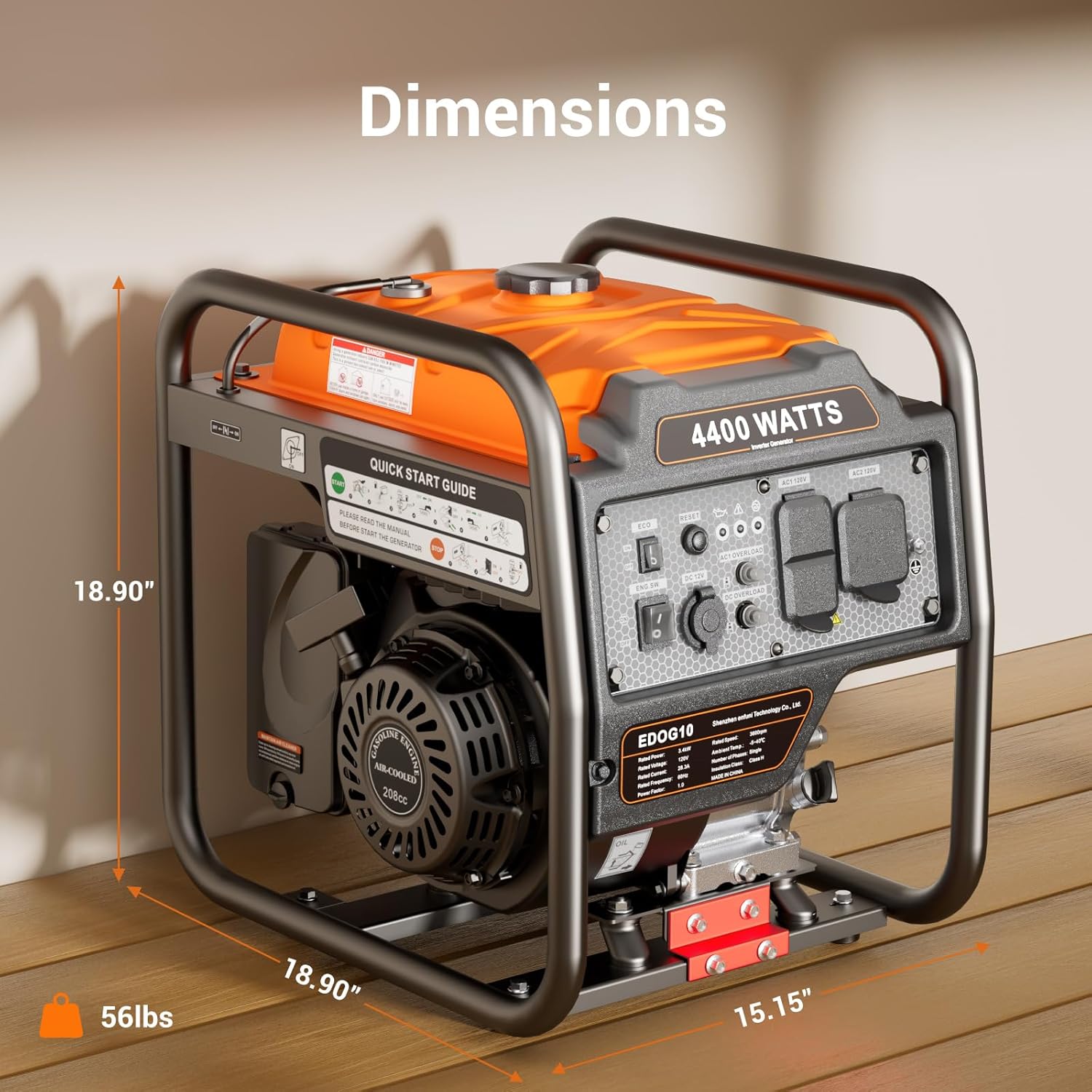
Image: The Efurden EDOG04 generator is displayed with its physical dimensions clearly marked, showing a height of 18.90 inches, a width of 18.90 inches, a depth of 15.15 inches, and indicating a total weight of 56 pounds.
| Feature | Detail |
|---|---|
| Model | EDOG04 |
| Brand | EFURDEN |
| Peak Wattage | 4400 Watts |
| Running Wattage | 3400 Watts |
| Fuel Type | Gasoline |
| Power Source | Fuel Powered |
| Voltage | 120 Volts |
| Engine Type | 208CC 4-Stroke OHV Engine |
| Fuel Tank Capacity | 2 Gallons (7.5 Liters) |
| Runtime (25% Load) | Up to 14 hours |
| Noise Level (100% load, 23ft) | 78 dBA |
| Special Features | Cold Start Technology, Extra-Long Run Time, Fuel Efficient, Low Oil Shutdown, Overload Protection, ECO Mode |
| Dimensions (L x W x H) | Approx. 18.90" x 15.15" x 18.90" |
| Weight | 56 lbs |
| Color | Orange |
9. Warranty and Support
This product is covered by a manufacturer's warranty. Please refer to the warranty card included with your purchase for specific terms and conditions. For technical assistance, replacement parts, or warranty claims, please contact Efurden customer support through the retailer where the product was purchased or visit the official Efurden website.