
1. Introduction
This manual provides essential information for setting up, operating, and maintaining your Ulefone RugKing 3 Pro rugged smartphone. Please read this manual carefully to ensure proper usage and to maximize the device's features and longevity. Keep this manual for future reference.
2. What's in the Box
Verify that all items are present in your product packaging:
- Ulefone RugKing 3 Pro Smartphone
- AC Power Charger (100~240V)
- USB-A to Type-C Data Cable (100cm)
- Screen Protector (Tempered Glass)
- SIM Tray Ejector
- Lanyard
- User Manual (this document)
- Warranty Card

Unboxing Video
Video: An unboxing video of the Ulefone RugKing 3 Pro, demonstrating the contents of the package and initial handling of the device.
3. Setup
3.1. SIM and MicroSD Card Installation
To install your SIM card(s) and/or MicroSD card:
- Locate the SIM card tray on the side of the phone.
- Insert the SIM tray ejector tool into the small hole next to the tray and press firmly until the tray pops out.
- Carefully pull out the tray.
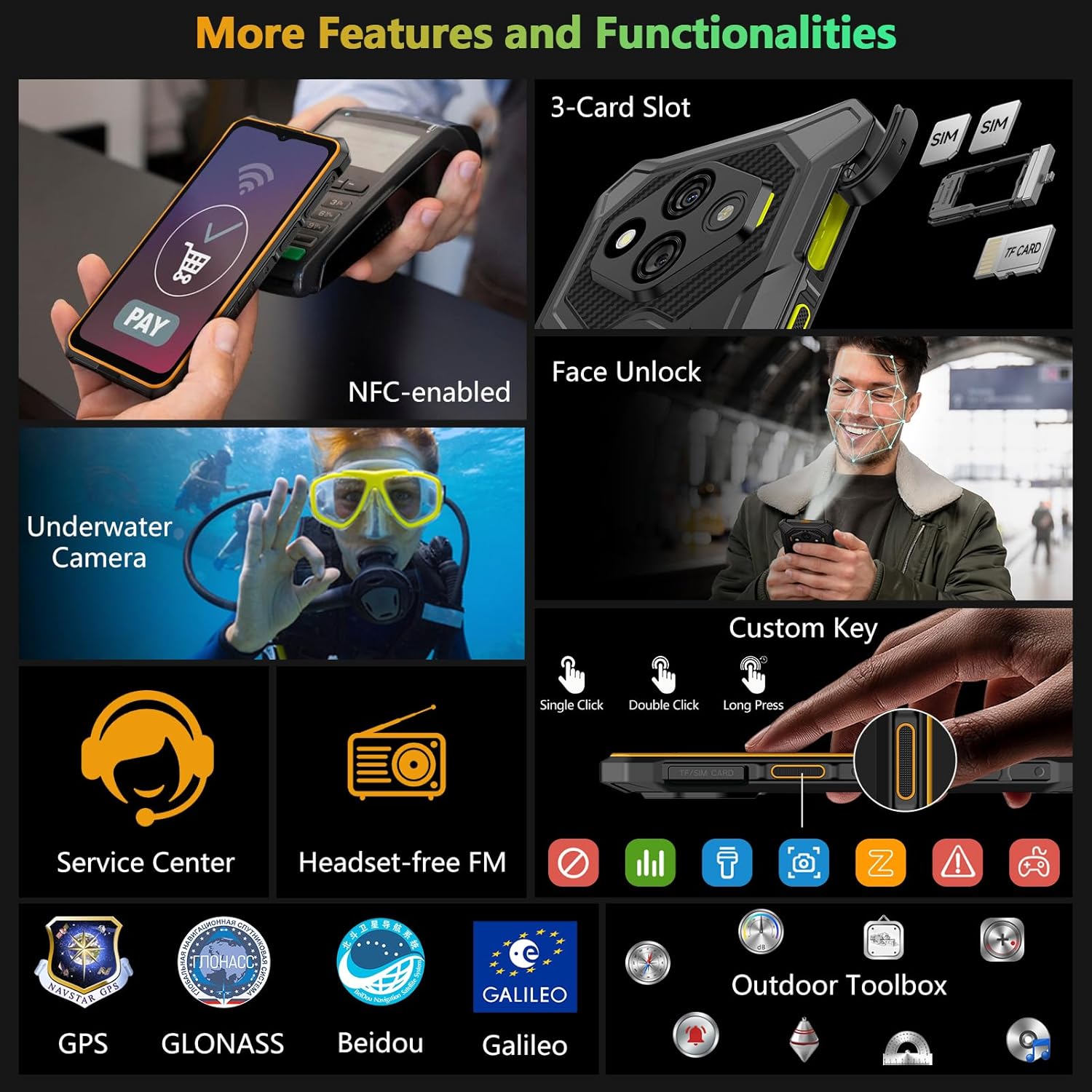
- Place your Nano-SIM card(s) and/or MicroSD card into the designated slots on the tray. Ensure the gold contacts face downwards. The phone supports a 3-card slot configuration (2 SIMs + 1 MicroSD).
- Gently push the tray back into the phone until it is flush with the device's body. Ensure the rubber seal is properly seated to maintain water resistance.
3.2. Initial Power On
Press and hold the Power button (located on the right side of the device) until the Ulefone logo appears on the screen. Follow the on-screen prompts to complete the initial setup, including language selection, Wi-Fi connection, and Google account setup.
4. Key Features
4.1. Performance and Operating System
The RugKing 3 Pro is powered by an Octa-core processor, providing a smooth and responsive user experience. It runs on Android 15, offering advanced features like enhanced theft detection, a private space for sensitive data, app pairing, and optimized large-screen functionality.
With 16GB RAM (8GB physical + 8GB virtual) and 128GB internal storage, the device supports smooth multitasking and ample space for applications, photos, and videos. Storage is expandable up to 2TB via a MicroSD card.

4.2. Display
Experience content on a 6.56-inch display with a 120Hz refresh rate and 720 x 1612 pixel resolution, offering smooth visuals and a bright 500 nits of screen brightness. The screen is protected by Corning Gorilla Glass for enhanced scratch resistance and durability.
The device is Widevine L1 certified, allowing for high-definition streaming on platforms like Amazon Prime Video, Netflix, and Hulu.

4.3. Camera System
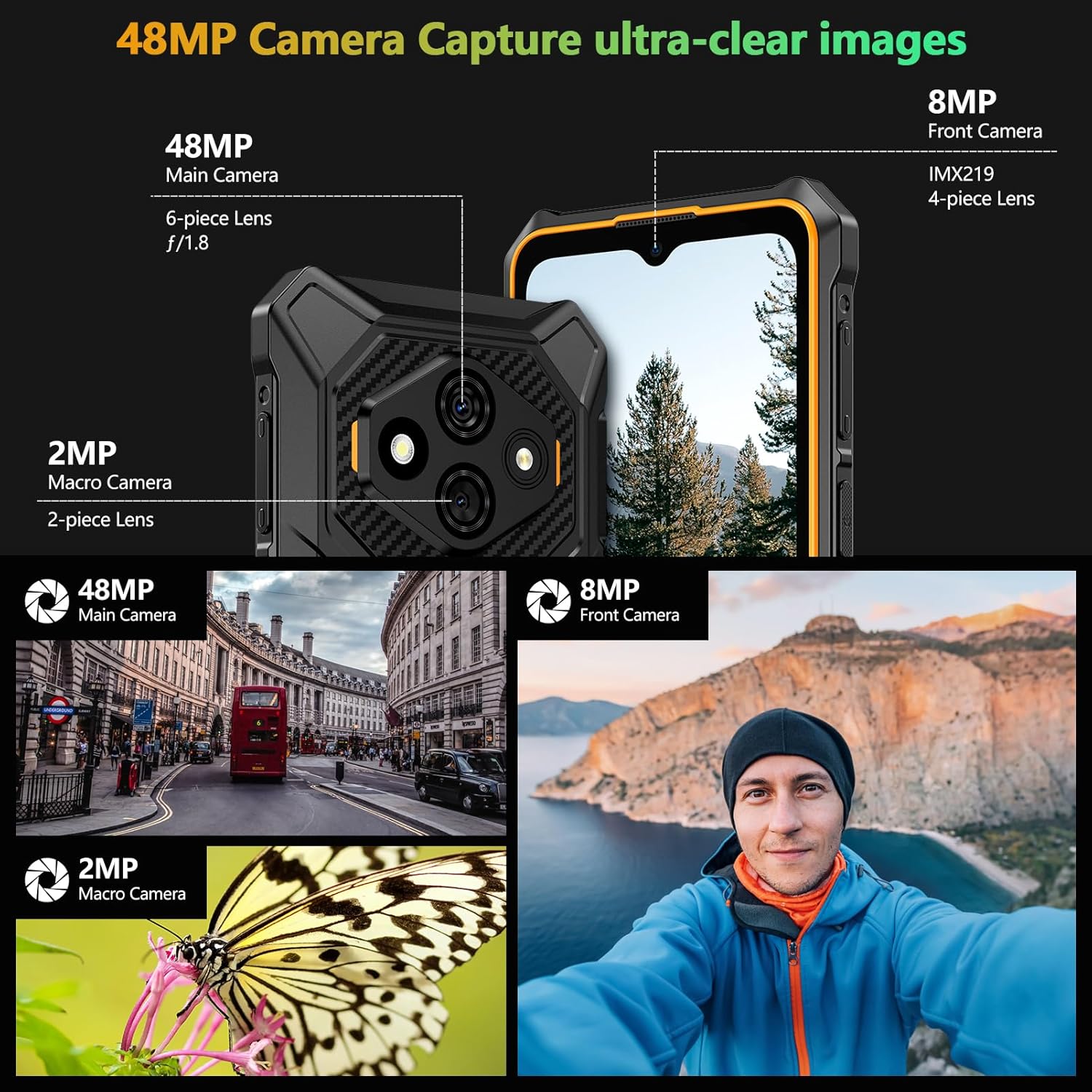
Capture detailed photos with the triple rear camera setup, featuring a 48MP main camera with an f/1.8 aperture and a 2MP macro camera for close-up shots. The 8MP front camera is ideal for selfies and video calls.
4.4. Battery and Charging
Equipped with a 5600mAh battery, the RugKing 3 Pro offers extended usage times: up to 430 hours standby, 28 hours talk time, and 9 hours video playback. It supports convenient dock charging (dock sold separately) and 5W wired reverse charging to power other devices.


4.5. Durability
The RugKing 3 Pro is built to withstand harsh environments, featuring IP68 and IP69K ratings for water and dust resistance, and MIL-STD-810H certification for shock resistance. It can endure submersion in water up to 2 meters for 30 minutes and drops from up to 2 meters.

4.6. 120 Lumens Flashlight
A powerful 120 lumens high-brightness flashlight is integrated into the device, providing ample illumination for various situations, from night shifts to outdoor adventures. It can be activated with a one-key shortcut.

4.7. AI Assistant (Gemini)
The device integrates an AI Assistant powered by Gemini, offering intelligent and productive features such as AI Recording Summary, AI Writing Assist (for smart formatting, style rewriting, translation, and proofreading), Ulefone Screen Search, and an AI Calculator for math problem solving.

4.8. Additional Features
The RugKing 3 Pro includes a range of additional functionalities:
- Dual 4G Connectivity: Supports two 4G SIM cards simultaneously.
- NFC: For contactless payments and data transfer.
- Headset-Free FM Radio: Enjoy FM radio without needing a headset as an antenna.
- Custom Key: A programmable physical button for quick access to chosen functions.
- Outdoor Toolbox: A suite of utility apps for outdoor activities.
- GPS Navigation: Supports GPS, GLONASS, Beidou, and Galileo for accurate positioning.
- Gloves Mode: Allows touchscreen operation while wearing gloves.
- Face Unlock: Secure and convenient device unlocking.
5. Operating Instructions
5.1. Water-Lock Mode
Water-Lock mode disables touchscreen input to prevent accidental touches when the phone is wet or submerged. To activate Water-Lock mode, access it from the Quick Settings panel (swipe down from the top of the screen) or assign it to the Custom Key. This mode is particularly useful for underwater photography or use in heavy rain.
5.2. Custom Key Configuration
The Custom Key, located on the left side of the phone, can be programmed for various functions:
- Single Click: Assign to open an app, launch the flashlight, or other quick actions.
- Double Click: Assign to a different function, such as taking a screenshot or opening the underwater camera.
- Long Press: Assign to an emergency SOS call or another frequently used feature.
To configure the Custom Key, navigate to Settings > Smart Assistant > Custom Key.
5.3. Using the AI Assistant (Gemini)
The integrated AI Assistant offers several tools:
- AI Recording Summary: Use the voice recorder app to transcribe and summarize conversations or lectures.
- AI Writing Assist: When typing, the AI can suggest formatting, rewrite sentences, translate text, or proofread your content.
- Ulefone Screen Search: Circle an object on your screen to perform a quick search for information about it.
- AI Calculator: Solve complex math problems by inputting them into the calculator app.
5.4. Design Overview Video
Video: A video showcasing the design and physical features of the Ulefone RugKing 3 Pro in various outdoor settings.
5.5. Hands-On Features Video
Video: A hands-on demonstration of the Ulefone RugKing 3 Pro, highlighting features like Water-Lock mode, macro camera usage, armor case, and the super torch.
6. Maintenance
6.1. Cleaning Your Device
To clean your Ulefone RugKing 3 Pro, use a soft, damp cloth. Avoid using harsh chemicals, abrasive cleaners, or compressed air, as these can damage the device's seals and finish. For stubborn dirt, a mild soap solution can be used, followed by rinsing with clean water and thorough drying.
6.2. Maintaining Water Resistance
The RugKing 3 Pro is designed to be water-resistant. To maintain this feature:
- Ensure all port covers (USB-C, SIM tray) are securely closed before exposing the device to water.
- Do not intentionally submerge the phone in water if it has been dropped or physically damaged, as this may compromise the seals.
- After exposure to water, dry the device thoroughly before charging or opening any ports.
7. Troubleshooting
7.1. Device Not Powering On
If your device does not power on, ensure it is sufficiently charged. Connect the phone to its charger and allow it to charge for at least 30 minutes before attempting to power it on again. If the issue persists, try holding the Power button for an extended period (10-15 seconds) to force a restart.
7.2. Network Connectivity Issues
If you experience problems with network connectivity (calls, data), check the following:
- Ensure your SIM card is correctly inserted and activated.
- Verify that Airplane Mode is not enabled.
- Check your network settings (Settings > Network & internet > Mobile network) to ensure correct APN settings for your carrier.
- Restart the device.
7.3. Touchscreen Unresponsive
If the touchscreen is unresponsive, try restarting the device. If the issue occurs in wet conditions, ensure Water-Lock mode is not active or that the screen is dry. If the problem persists, contact customer support.
8. Specifications
| Feature | Specification |
|---|---|
| Brand | Ulefone |
| Model Name | RugKing 3 Pro |
| Operating System | Android 15 |
| CPU Model | Mediatek Dimensity 9000 (Octa-core) |
| RAM Memory Installed Size | 16 GB (8GB physical + 8GB virtual) |
| Memory Storage Capacity | 128 GB |
| Flash Memory Supported Size Maximum | 2 TB (MicroSD) |
| Screen Size | 6.56 Inches |
| Display Resolution Maximum | 720 x 1612 Pixels |
| Refresh Rate | 120 Hz |
| Display Type | LCD |
| Rear Facing Camera Photo Sensor Resolution | 48 MP (Main), 2 MP (Macro) |
| Front Photo Sensor Resolution | 8 MP |
| Battery Capacity | 5600 Milliamp Hours |
| Phone Talk Time | 28 Hours |
| Water Resistance Level | IP68/IP69K Waterproof |
| Cellular Technology | 4G |
| Wireless Carrier | Unlocked |
| SIM Card Slot Count | Dual SIM (3-Card Slot) |
| Connector Type | USB Type C |
| Item Dimensions | 6.84 x 3.26 x 0.51 inches |
9. Warranty and Support
The Ulefone RugKing 3 Pro comes with a 12-month manufacturer warranty service in the US. For any questions, technical assistance, or warranty claims, please contact Ulefone customer support. You can find more information and support resources on the official Ulefone website or through their Amazon store page: Ulefone Amazon Store.


