1. Introduction
This manual provides essential information for the proper use and maintenance of your Oilsky H13 MP3/MP4 Player. The device features a 5-inch HD touchscreen, runs on Android 13, and offers extensive storage for music and videos. Please read this manual thoroughly before operating the device.
2. What's in the Box
Carefully unpack your Oilsky H13 MP3/MP4 Player and ensure all items are present:
- 1x Oilsky H13 Music Player
- 1x 128GB TF Card (pre-installed or separate)
- 1x USB Cable (Type-C)
- 1x Wired Earphones
- 1x Screen Protector Film
- 1x Protective Case
- 1x User Manual (this document)

Image: All components included in the Oilsky H13 MP3/MP4 Player package, including the device, USB cable, earphones, protective case, screen protector, and user manual.
3. Setup
3.1. Charging the Device
Before first use, fully charge the player. Connect the provided USB Type-C cable to the device's charging port and the other end to a USB power adapter (not included) or a computer's USB port.

Image: An illustration showing the internal structure of the Oilsky H13 MP3/MP4 Player, highlighting its 2500mAh battery and USB-C charging port.
3.2. Powering On/Off
- To Power On: Press and hold the Power button (located on the side) until the screen lights up.
- To Power Off: Press and hold the Power button, then select 'Power Off' from the options on the screen.
3.3. Inserting a MicroSD Card
The device comes with a 128GB TF card. If you wish to use a different or additional card (up to 1TB), locate the MicroSD card slot on the side of the player. Gently insert the card until it clicks into place.

Image: The Oilsky H13 MP3/MP4 Player shown with a MicroSD card being inserted into its slot, illustrating the expandable storage capability.
4. Operating Instructions
4.1. Basic Navigation
The Oilsky H13 features a 5-inch full touchscreen display. Navigate the Android 13 interface by tapping, swiping, and pinching gestures, similar to a smartphone.

Image: The Oilsky H13 MP3/MP4 Player's screen showing the Android 13 home interface with icons for various applications like Clock, Calendar, FM Radio, Spotify, and Play Store.
4.2. Music Playback
The player supports various lossless audio formats including MP3, WAV, APE, FLAC, and AAC. You can listen via the built-in speaker or connect earphones/headphones.
- Supported Formats: MP3, WAV, APE, FLAC, AAC.
- Built-in Speaker: For listening without headphones.
- Earphone Jack: Connect the included wired earphones or your preferred 3.5mm headphones.

Image: A person wearing headphones, enjoying music from the Oilsky H13 MP3/MP4 Player, which is displaying a music playback interface. This highlights the device's lossless audio capabilities.
4.3. Video Playback
Enjoy 1080P HD video playback on the 5.0-inch 720x1280 resolution IPS screen. The device supports most video formats without conversion.
- Supported Formats: AVI, MKV, RMVB, MP4, MPG, MOV.
- Screen: 5.0-inch IPS display with 720x1280 resolution for wide viewing angles.

Image: The Oilsky H13 MP3/MP4 Player showcasing a vibrant 1080P HD video on its 5-inch screen, demonstrating its full-format video playback capabilities.
4.4. Connectivity
The Oilsky H13 offers versatile connectivity options:
- Dual-band Wi-Fi (2.4GHz & 5GHz): Connect to wireless networks for streaming music, videos, and downloading apps.
- 2-Way Bluetooth 5.0: Easily pair with Bluetooth headphones, speakers, or car audio systems. Supports file transfer between devices.

Image: The Oilsky H13 MP3/MP4 Player shown with icons representing various Bluetooth connections, including speakers, headsets, computers, and earbuds, illustrating its 2-way Bluetooth 5.0 functionality.
4.5. App Management
The device runs on Android 13 and comes with popular music apps pre-installed. You can customize your app experience:
- Pre-installed Apps: Spotify, Pandora, Amazon Music, etc.
- Google Play Store: Download and install additional apps.
- Uninstalling Apps: Easily uninstall unnecessary applications or disable pre-installed ones to free up memory.
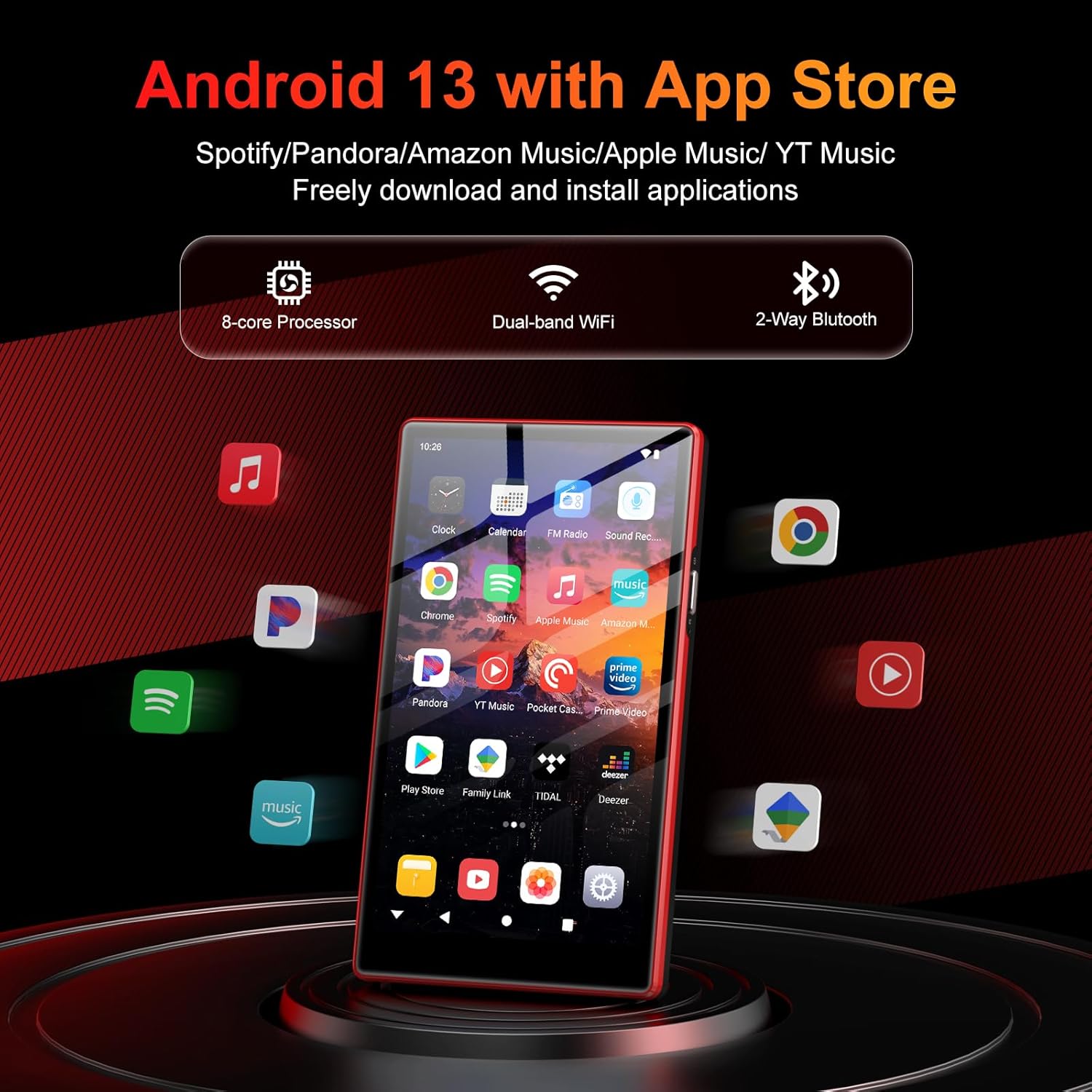
Image: The Oilsky H13 MP3/MP4 Player's screen showing various app icons, including Spotify, Pandora, Amazon Music, and the Google Play Store, indicating its Android 13 operating system and app download capabilities.
4.6. Parental Controls
The device includes pre-installed Family Link parental controls, allowing parents to manage usage for children and teenagers.
- Set time limits and schedules.
- Block and unblock applications.
- Schedule active learning times.

Image: The Oilsky H13 MP3/MP4 Player screen showing the Family Link parental control interface, with options for daily limits, downtime, school time, and blocked apps.
5. Storage
The Oilsky H13 offers substantial storage capacity:
- Internal Storage: 32GB ROM.
- RAM: 4GB.
- Included TF Card: 128GB.
- Expandable Storage: Supports external storage expansion up to 1TB via MicroSD card.
6. Battery Information
The device is equipped with a 2500mAh lithium battery designed for low power consumption.
- Music Playback: Up to 50-60 hours continuously.
- Video Playback: Up to 7-9 hours continuously.
7. Maintenance
- Cleaning: Use a soft, dry cloth to clean the device. Avoid liquid cleaners.
- Storage: Store the device in a cool, dry place away from direct sunlight and extreme temperatures.
- Software Updates: Periodically check for system updates to ensure optimal performance and security.
- Screen Protection: Apply the included screen protector to prevent scratches.
8. Troubleshooting
8.1. Device Does Not Turn On
- Ensure the battery is charged. Connect the device to a power source and try again.
- Press and hold the Power button for at least 10-15 seconds to perform a forced restart.
8.2. Screen Freezes or is Unresponsive
- Press and hold the Power button for 10-15 seconds to force a restart.
- If the issue persists, try clearing the cache of recently used apps or performing a factory reset (backup data first).
8.3. Cannot Connect to Wi-Fi/Bluetooth
- Ensure Wi-Fi/Bluetooth is enabled in the device settings.
- Restart the device and your router/Bluetooth accessory.
- Check if the Wi-Fi password is entered correctly.
- For Bluetooth, ensure the accessory is in pairing mode and within range.
8.4. Apps Crashing or Not Responding
- Clear the app's cache and data in Settings > Apps.
- Uninstall and reinstall the problematic app.
- Ensure the device has sufficient free storage space.
9. Specifications
| Feature | Detail |
|---|---|
| Brand | Oilsky |
| Model Number | H13 |
| Operating System | Android 13.0 |
| Processor | MTK 8-core |
| RAM | 4GB |
| Internal Storage (ROM) | 32GB |
| Included TF Card | 128GB |
| Max. Expandable Storage | 1TB (via Micro SD/TF card) |
| Screen Size | 5.0 Inches |
| Screen Resolution | 720x1280 (IPS) |
| Connectivity | Dual-band Wi-Fi (2.4GHz & 5GHz), Bluetooth 5.0 |
| Battery Capacity | 2500mAh Lithium Polymer |
| Music Playback Time | 50-60 hours |
| Video Playback Time | 7-9 hours |
| Supported Audio Formats | MP3, WAV, APE, FLAC, AAC |
| Supported Video Formats | AVI, MKV, RMVB, MP4, MPG, MOV |
| Dimensions | 17.1 x 14.6 x 2.3 cm |
| Weight | 340 g |

Image: A detailed diagram illustrating the MTK 8-core processor and internal architecture of the Oilsky H13 MP3/MP4 Player, emphasizing its Android 13.0 system and 4GB RAM for smooth performance.
10. Warranty and Support
For warranty information and customer support, please refer to the documentation provided with your purchase or visit the official Oilsky website. Keep your proof of purchase for warranty claims.


