
1. Introduction
This manual provides detailed instructions for the setup, operation, and maintenance of your PYY Cash Register with Scanner. Please read this manual thoroughly before using the device to ensure proper functionality and longevity.
Key Features:
- Scanner & Multi-Port Connectivity: Equipped with a high-speed barcode scanner (30 FPS) supporting three scan modes for efficient checkout. Includes 2 RS232 ports for scale/printer, 1 USB for PC, and 1 PS2 for keyboard integration.
- Speedy Sales & Smart Reports: Supports 200 departments, 10,000 products, 1,000 members, and 200 sessions with 9 customizable tax rates. Offers detailed reports by hour, cashier, item, department, refunds, and drawer openings.
- All-in-One Register Solution: Integrates a receipt printer, dual screens, and a secure cash drawer. Features a built-in thermal printer with a print speed of up to 90mm/s, a 2.8-inch TFT LCD for the cashier, and an 8-digit LED display for customers.
- Enhanced Security & Durable Build: Manages up to 50 cashiers with secure passwords. Includes 6 keys for cash drawer security. The cash drawer has 4 bill slots and 5 coin slots. Constructed with ABS housing for water and oil resistance.
2. What's in the Box
- Electronic Cash Register
- Wired Scanner
- 2-1/4 Inches Thermal Papers * 10 rolls
- Cash Box Keys * 6
- Power Cable
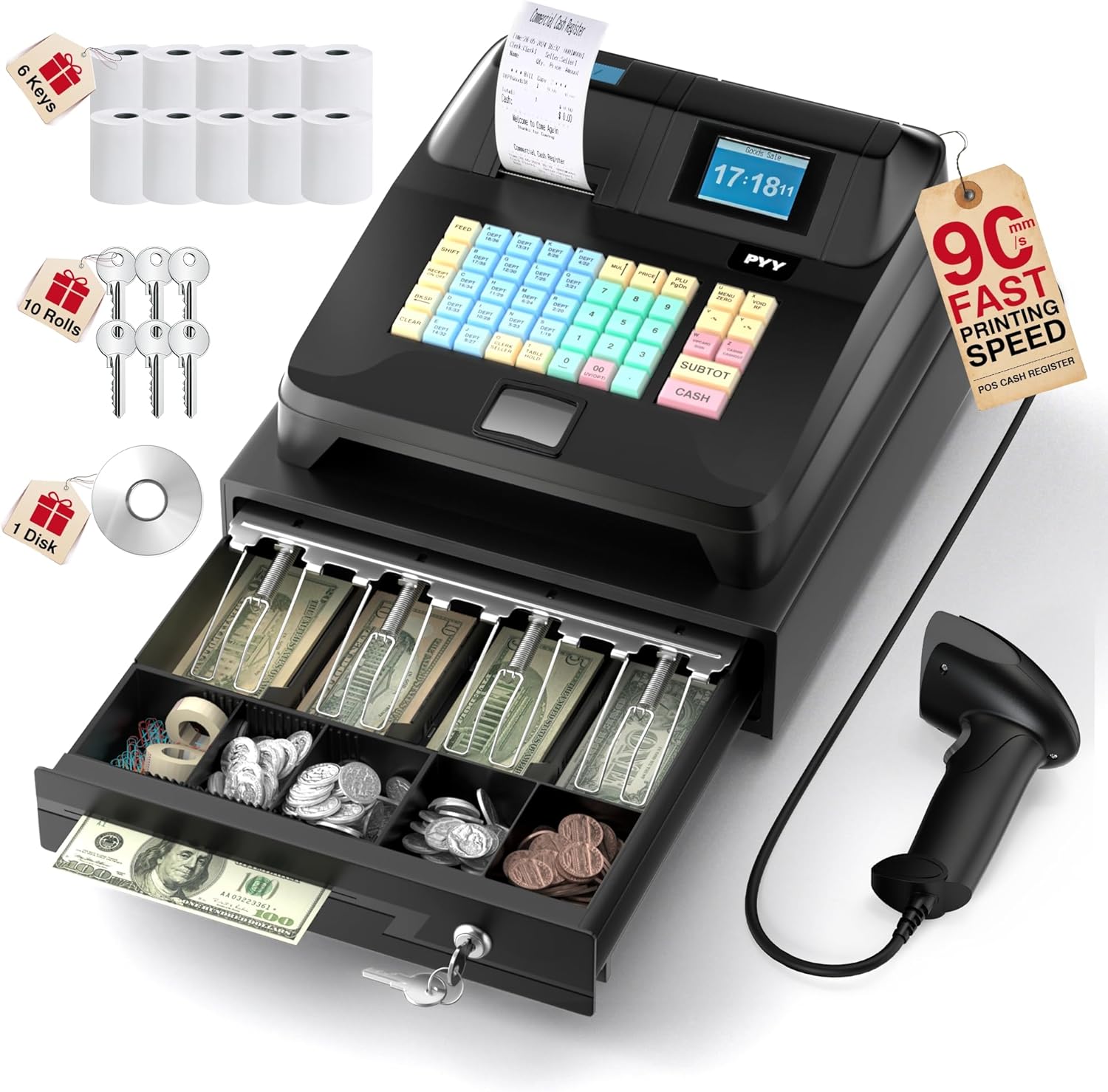
Figure 2.1: PYY Cash Register and its components.
3. Setup
Follow these steps to set up your PYY Cash Register for initial use.
- Power Connection: Connect the power cable to the cash register and a suitable power outlet (AC 100–240V, DC 12V/3A).
- Scanner Connection: Plug the wired barcode scanner into the designated port on the cash register. The scanner supports 3 scan modes for various barcode types.
- Peripheral Connections: Utilize the 2 RS232 ports for connecting external devices such as a scale or an additional printer. Use the 1 USB port for PC connectivity and the 1 PS2 port for a keyboard, if required.
- Thermal Paper Installation: Open the printer cover and insert a roll of 2 1/4" thermal paper, ensuring it feeds correctly.
- Cash Drawer Keys: Use the provided keys to secure the cash drawer.

Figure 3.1: Universal Interface for device connections.

Figure 3.2: Overview of the cash register system and included items.
4. Operating Instructions
This section covers the various functions and settings of your PYY Cash Register.
4.1 General Operation
The cash register features a 48-key keyboard with color-coded keys for easy operation: Blue for Department (DEPT), Red for Cash, Green for Number, and Yellow for Function. It also has a dual display for both cashier and customer visibility.

Figure 4.1: Clear Dual Display for staff and customers.

Figure 4.2: Easy Operation Keyboard Layout.
4.2 Bill Management - Reconciliation (X-Report)
Learn how to generate financial reports for daily or monthly reconciliation.
Video 4.2.1: Instructions on how to use the X-report function for bill management and reconciliation on the PYY Cash Register.
4.3 Help System
Access the built-in help system for detailed setup guides and operational steps.
Video 4.3.1: Guide on how to utilize the help system of the PYY Electronic Cash Register.
4.4 DEPT Settings
Configure department settings for product categorization.
Video 4.4.1: How to set up departments (DEPT) on the PYY Electronic Cash Register.
4.5 Rounding Settings
Adjust the rounding rules for product amounts.
Video 4.5.1: Instructions for setting rounding options on the PYY Electronic Cash Register.
4.6 Tax Settings
Set up and manage tax rates for your products.
Video 4.6.1: How to configure tax settings on the PYY Electronic Cash Register.
4.7 Member Checkout
Process transactions for members using the VIP program feature.
Video 4.7.1: Demonstrates how to perform member checkout on the PYY Electronic Cash Register.
4.8 Reprint Receipt
Instructions for reprinting a receipt.
Video 4.8.1: How to reprint a receipt using the PYY Electronic Cash Register.
4.9 Product Inventory Alert Settings
Set up alerts for product stock levels.
Video 4.9.1: Guide on setting up inventory alerts for products on the PYY Electronic Cash Register.
4.10 Additional Charge
How to apply additional charges during a transaction.
Video 4.10.1: Instructions for applying an additional charge on the PYY Cash Register.
4.11 PLU Settings
Configure Product Look-Up (PLU) codes for up to 10,000 products.
Video 4.11.1: How to set up PLU (Product Look-Up) codes on the PYY Electronic Cash Register.
4.12 Barcode Scanning
The integrated scanner offers super decoding ability for 1D and 2D QR codes, ensuring quick and accurate product identification.

Figure 4.12.1: Super Decoding Ability of the Barcode Scanner.
4.13 Fast Customized Printing
The built-in thermal printer provides fast and customizable receipt printing, reducing customer wait times. Receipts can include customized headers, time, order ID, clerk/seller details, sale details, settlement details, and tax details.

Figure 4.13.1: Fast Customized Printing Feature.
5. Maintenance
To ensure the longevity and optimal performance of your PYY Cash Register, follow these maintenance guidelines:
- Cleaning: The ABS housing is designed to resist water and oil. Wipe the exterior surfaces with a soft, damp cloth. Avoid using harsh chemicals or abrasive cleaners.
- Cash Drawer: Keep the cash drawer organized. The 4 bill slots and 5 coin slots are designed for neat arrangement. Regularly check for any obstructions that might prevent smooth opening and closing.
- Printer: Ensure the thermal paper is correctly loaded. Clean the printer head periodically with a specialized cleaning pen or isopropyl alcohol to prevent print quality issues.
- Scanner: Keep the scanner window clean and free of dust or smudges to maintain optimal scanning performance.

Figure 5.1: Large Orderly Cash Drawer for asset management.
6. Troubleshooting
If you encounter any issues with your PYY Cash Register, please refer to the following common solutions or contact customer support.
- Device Not Powering On: Check the power cable connection to both the cash register and the power outlet. Ensure the power switch is in the 'On' position.
- Printer Not Printing: Verify that thermal paper is loaded correctly and that the printer cover is closed. Check for any paper jams.
- Scanner Not Reading Barcodes: Ensure the scanner window is clean. Check the scanner's connection to the cash register. Try scanning different barcodes to isolate the issue.
- Display Issues: If the display is blank or showing errors, try restarting the cash register. Refer to the 'Help System' video for specific error codes.
- System Malfunction: The cash register features a powerful, reliable built-in system designed to avoid crashes. If persistent issues occur, refer to the 'Help System' or contact support.
7. Specifications
| Feature | Detail |
|---|---|
| Product Dimensions | 15 x 13.2 x 8.2 inches |
| Item Weight | 14.1 pounds |
| Item Model Number | Cash Register for Small Business |
| Manufacturer | PYY |
| Power Input | AC 100–240V, DC 12V/3A |
| Power Consumption | 36W |
| Certifications | RoHS, FCC |
8. Warranty and Support
The PYY Cash Register comes with a one-year coverage. For any technical issues or inquiries, professional one-on-one technical support is available. Please reach out to us if you encounter any issues.