
1. Safety Information
Always unplug the vanity before assembly or disassembly. Be cautious of sharp edges and pinch points during assembly and use. Do not place heavy objects on the vanity that could cause it to tip over. Keep the vanity away from heat sources and moisture. Do not use the vanity outdoors or in damp environments. Always follow the manufacturer's instructions for assembly, use, and maintenance.
2. Product Overview
The HUAHUU Vanity Desk is designed to provide a functional and organized space for your beauty routine. It features a large mirror with adjustable lighting, ample storage, and integrated power outlets.
Key Features:
- Large mirror with three adjustable lighting color modes (cool white, warm white, warm yellow).
- Six spacious drawers, one cabinet, two makeup trays, and one open shelf for organized storage.
- Integrated charging station with 2 standard AC sockets, 2 USB ports, and 1 Type-C socket.
- Dedicated hair dryer rack.
- Durable MDF board construction with upgraded steel ball-bearing drawer slides.
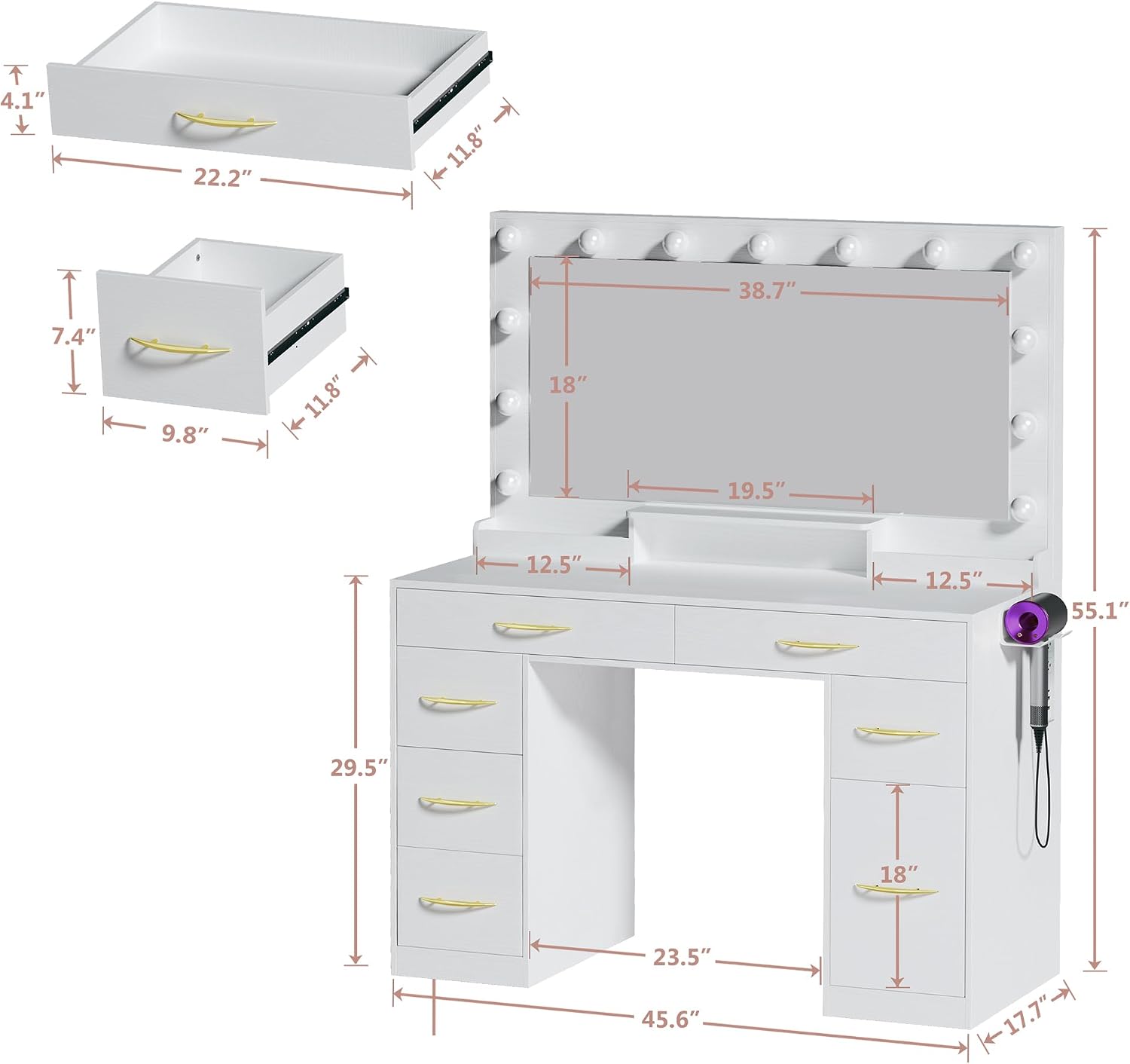
Figure 2.1: Overall dimensions and drawer measurements of the vanity desk.

Figure 2.2: Overview of the vanity desk's storage compartments, including large mirror, shelves, makeup trays, drawers, and cabinet.

Figure 2.3: Close-up details of the vanity desk, showing chic metal handles, upgraded steel ball-bearing drawer slides, and the interior of a large cabinet.
3. Setup and Assembly
The HUAHUU Vanity Desk requires assembly. Detailed instructions and all necessary accessories are included in the packaging. Please follow the step-by-step guide provided in the manual for proper assembly.
Included Components:
- Vanity Desk
- Mirror with Lights
- Assembly Hardware
- Instruction Manual
Video 3.1: An overview of the HUAHUU Vanity Desk, including unboxing, assembly steps, and demonstration of features like the mirror lights and storage. This video provides visual guidance for setting up your vanity desk.
4. Operating Instructions
4.1. Mirror Lighting
The vanity mirror features three adjustable lighting color modes: cool white, warm white, and warm yellow. Use the touch control on the mirror to cycle through these modes and adjust brightness to suit your preference and makeup needs.

Figure 4.1: The three adjustable lighting modes of the vanity mirror: Cool White, Natural White, and Warm White, with corresponding color temperatures.
4.2. Charging Station
The integrated charging station provides convenient access to power for your electronic devices. It includes:
- 2 Standard 125V/12A AC Outlets
- 2 USB Ports (5V/2A)
- 1 Type-C Socket
Plug in your hair dryer, phone, or other devices as needed. Ensure devices are compatible with the provided power specifications.

Figure 4.2: Close-up of the integrated charging station, showing 2 AC outlets, 2 USB ports, and 1 Type-C port, along with the hair dryer rack.
5. Maintenance and Care
5.1. Cleaning
- Surface: Wipe the vanity surfaces with a soft, damp cloth. Avoid abrasive cleaners or harsh chemicals that may damage the finish.
- Mirror: Clean the mirror with a glass cleaner and a lint-free cloth. Do not spray cleaner directly onto the mirror; apply it to the cloth first.
- Drawers: Periodically empty and wipe the inside of the drawers to remove dust and debris.
5.2. General Care
- Avoid placing hot items directly on the surface. Use coasters or protective pads.
- Do not overload drawers or shelves to prevent damage.
- Ensure all screws and fasteners remain tight. Periodically check and tighten if necessary.
6. Troubleshooting
6.1. Mirror Lights Not Working
- Check Power: Ensure the vanity is properly plugged into a working power outlet.
- Power Switch: Verify that the main power switch for the lights (if applicable) is turned on.
- Touch Sensor: Ensure the touch sensor on the mirror is clean and unobstructed. Try touching it firmly.
6.2. Charging Station Not Functioning
- Power Connection: Confirm the vanity is plugged in and receiving power.
- Device Compatibility: Ensure your device is compatible with the charging station's voltage and current specifications.
- Test Other Devices: Try plugging in a different device to determine if the issue is with the charging station or your device.
6.3. Drawers Sticking or Not Sliding Smoothly
- Check Alignment: Ensure the drawer slides are properly aligned during assembly.
- Obstructions: Remove any items that might be obstructing the drawer's movement.
- Lubrication: Apply a small amount of silicone-based lubricant to the drawer slides if they are stiff.
7. Specifications
| Model Number | VDML-25102401 |
| Brand | HUAHUU |
| Color | Milky White |
| Material | Engineered Wood (MDF) |
| Product Dimensions (D x W x H) | 17.7"D x 45.6"W x 55.1"H |
| Item Weight | 116.4 pounds |
| Number of Drawers | 6 |
| Power Outlet Specifications | 2 x 125V/12A AC Outlets, 2 x 5V/2A USB Ports, 1 x Type-C Socket |
8. Warranty and Support
8.1. Warranty Information
This product is covered by the manufacturer's standard warranty. Please refer to the warranty card included with your purchase or contact the seller for specific details regarding coverage and duration.
8.2. Customer Support
If you encounter any issues or have questions regarding your HUAHUU Vanity Desk, please contact the seller directly through the platform where you made your purchase. For Amazon customers, click "contact seller" on the product page to receive assistance.