
1. Introduction
The TOOLTOP 898D is a versatile 2-in-1 digital rework station combining a hot air station and a soldering station. Designed for precision work, it is suitable for SMD desoldering, soldering, and various electronic repair tasks. This manual provides essential information for safe operation, setup, maintenance, and troubleshooting.
2. Safety Instructions
Please read and understand all safety warnings and operating instructions before using this product. Failure to follow these instructions may result in electric shock, fire, or serious injury.
- Always operate the unit in a well-ventilated area to avoid inhaling fumes from soldering.
- Wear appropriate personal protective equipment, including safety glasses and heat-resistant gloves.
- Do not touch the hot air nozzle or soldering iron tip directly. They reach very high temperatures and can cause severe burns.
- Ensure the unit is placed on a stable, heat-resistant surface.
- Keep flammable materials away from the work area.
- Unplug the unit from the power outlet when not in use or before performing any maintenance.
- Never use the unit near water or in damp conditions.
- Do not allow children or untrained personnel to operate this equipment.
- Use only original or approved replacement parts and accessories.
3. Package Contents
Verify that all items are present in the package:
- TOOLTOP TT-Yihua-898D Rework Station
- Hot Air Gun
- Soldering Iron
- Hot Air Nozzles (various sizes)
- Soldering Iron Stand with cleaning sponge
- Power Cord
- User Manual
4. Product Features
- 2-in-1 Design: Combines a hot air rework station and a soldering station in one compact unit.
- Digital Display: Dual digital displays for precise temperature monitoring of both hot air and soldering iron.
- Rapid Heating: Quick temperature rise for efficient operation.
- Adjustable Temperature: Hot air temperature up to 480°C, soldering iron temperature up to 480°C.
- Adjustable Airflow: Hot air gun features adjustable airflow for various applications.
- Automatic Cooling: Hot air gun automatically cools down before shutting off, extending heater life.
- Automatic Start/Stop: Hot air gun automatically enters standby mode when placed in its holder and resumes operation when picked up.
- Compact Design: Dimensions of 13.5 x 15 x 10 cm for easy storage and portability.
5. Component Identification

Figure 1: Main unit with labeled components.
- SMD Rework Station Display: Shows hot air temperature.
- Soldering Station Display: Shows soldering iron temperature.
- Air Volume Adjustment Knob: Controls hot air flow.
- Temperature Adjustment Keys (Up/Down): Adjusts temperature for selected tool.
- Function Key (ENTER): Used for switching between hot air and soldering iron temperature adjustment, and for calibration.
- SMD Rework Station Power Switch: Powers the hot air gun.
- Soldering Station Power Switch: Powers the soldering iron.
- Hot Air Gun Connector Port.
- Soldering Iron Connector Port.
6. Setup
- Unpack: Carefully remove all components from the packaging.
- Placement: Place the main unit on a stable, heat-resistant, and non-flammable surface in a well-ventilated area.
- Connect Hot Air Gun: Insert the hot air gun connector into the designated port on the front panel. Ensure it is securely fastened.
- Connect Soldering Iron: Insert the soldering iron connector into its designated port. Place the soldering iron in its stand.
- Power Connection: Connect the power cord to the unit and then to a grounded electrical outlet.
- Initial Power On: Ensure both power switches (for hot air and soldering iron) are in the OFF position before plugging in.
7. Operating Instructions
7.1 General Operation

Figure 2: The 898D station ready for operation.
After connecting the unit to power, turn on the main power switch. The digital displays will illuminate.
7.2 Hot Air Rework Station Operation
- Turn on the SMD Rework Station Power Switch. The hot air display will show the current temperature.
- Press the Function Key (ENTER) until the hot air temperature display is selected (it may flash or indicate selection).
- Use the Temperature Adjustment Keys (Up/Down) to set the desired hot air temperature. The unit will quickly heat up to the set temperature.
- Adjust the Air Volume Adjustment Knob to control the airflow rate.
- When the hot air gun is placed in its holder, it will automatically enter standby mode and cool down. Picking it up will resume operation.
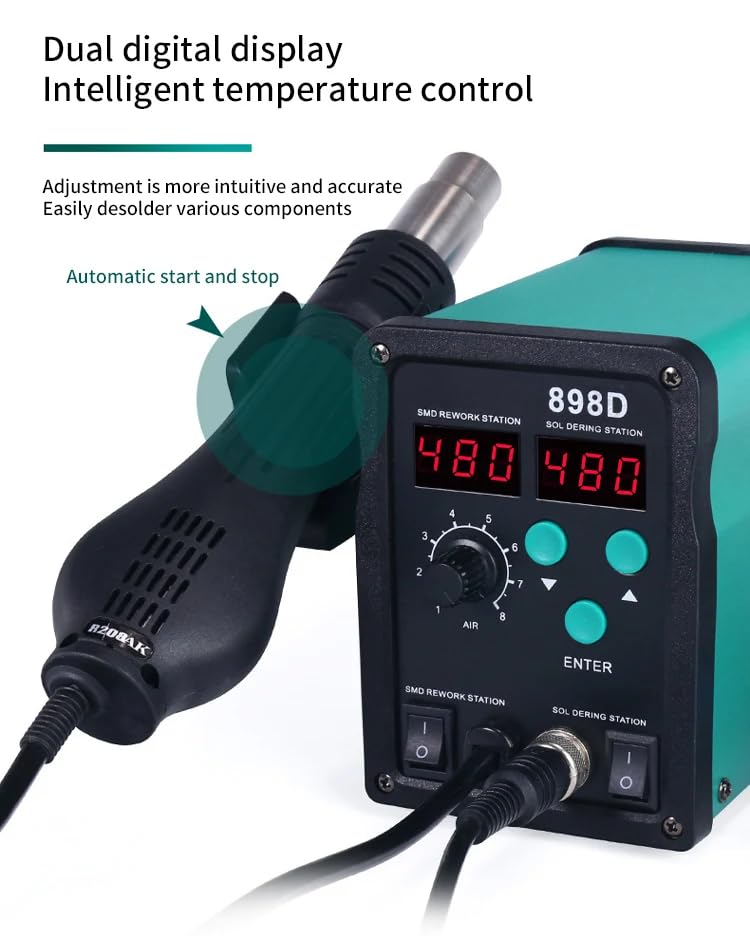
Figure 3: Dual digital display for precise control.
7.3 Soldering Station Operation
- Turn on the Soldering Station Power Switch. The soldering iron display will show the current temperature.
- Press the Function Key (ENTER) until the soldering iron temperature display is selected.
- Use the Temperature Adjustment Keys (Up/Down) to set the desired soldering iron temperature. The iron will heat up to the set temperature.
- Always clean the soldering iron tip with the damp sponge before and after use to ensure optimal performance and longevity.
7.4 One-Key Shift Function
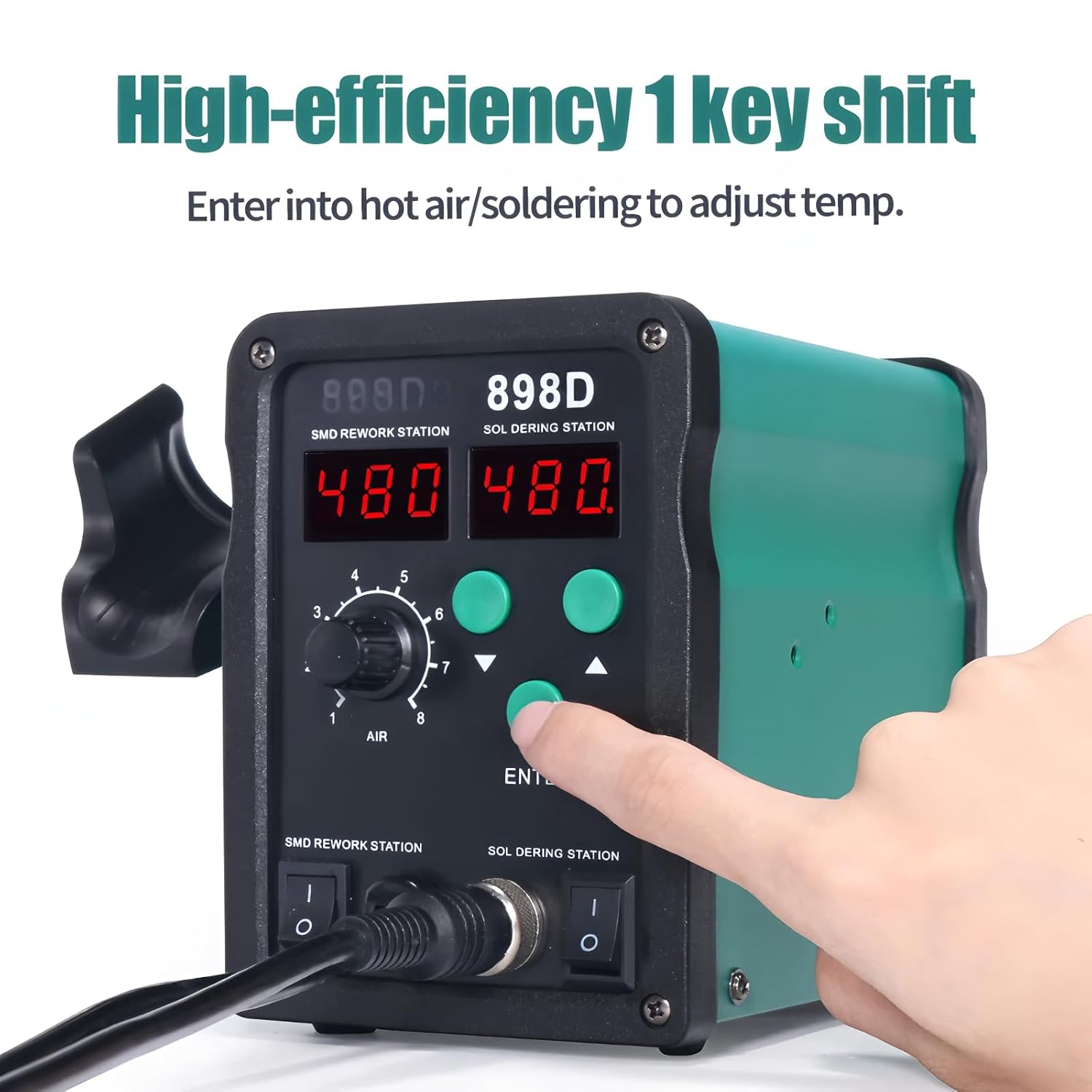
Figure 4: Using the one-key shift to adjust temperature.
The Function Key (ENTER) allows for a quick shift between adjusting the hot air temperature and the soldering iron temperature. Simply press this key to toggle between the two modes, then use the Up/Down keys to adjust the temperature for the selected tool.
7.5 Temperature Calibration
If the displayed temperature differs significantly from a known accurate temperature measurement (e.g., using a thermometer designed for soldering tips), you can calibrate the unit:
- Ensure the unit is powered on and at a stable operating temperature.
- Press and hold the Function Key (ENTER) for a few seconds until the display enters calibration mode (the displayed temperature might flash or show a specific calibration indicator).
- Use the Temperature Adjustment Keys (Up/Down) to adjust the displayed temperature to match your external temperature measurement.
- Press the Function Key (ENTER) again to save the calibration and exit the mode.
8. Maintenance
- Cleaning: Regularly clean the unit's exterior with a soft, dry cloth. Do not use abrasive cleaners or solvents.
- Soldering Tip Care: Keep the soldering iron tip clean by wiping it on a damp sponge or brass wool. Tin the tip with solder after each use to prevent oxidation. Replace tips when they become excessively worn or corroded.
- Hot Air Nozzles: Ensure hot air nozzles are free from obstructions. Clean them if necessary after the unit has cooled down.
- Storage: Store the unit in a dry, dust-free environment when not in use.
9. Troubleshooting
| Problem | Possible Cause | Solution |
|---|---|---|
| Unit does not power on | No power supply; Power cord loose; Unit switch off | Check power outlet; Ensure power cord is securely connected; Turn on unit switches |
| Hot air gun not heating | Hot air switch off; Heater element failure; Gun not seated in holder correctly (if auto-standby) | Turn on hot air switch; Contact support if heater failure suspected; Ensure gun is picked up from holder |
| Soldering iron not heating | Soldering iron switch off; Heater element failure; Tip not making good contact | Turn on soldering iron switch; Contact support if heater failure suspected; Check tip connection |
| Temperature display inaccurate | Needs calibration; Sensor issue | Perform temperature calibration (Section 7.5); Contact support if issue persists |
| Low airflow from hot air gun | Air volume knob set too low; Nozzle clogged | Adjust air volume knob; Clean hot air nozzle |
10. Specifications
| Feature | Specification |
|---|---|
| Model Number | TT-Yihua-898D |
| Total Power Consumption | 700W |
| Hot Air Temperature Range | 100°C - 480°C (212°F - 896°F) |
| Soldering Iron Temperature Range | 200°C - 480°C (392°F - 896°F) |
| Display Type | Dual Digital LED |
| Airflow Type | Brushless Fan, Soft Air |
| Dimensions (L x W x H) | 13.5 x 15 x 10 cm |
| Weight | Approx. 2.5 kg (5.5 lbs) |
| Safety Certifications | CE, RoHS |
11. Warranty and Support
This TOOLTOP 898D Soldering Rework Station comes with a 1-year warranty from the date of purchase, covering manufacturing defects. Please retain your proof of purchase for warranty claims.
For technical support, troubleshooting assistance, or warranty inquiries, please contact your retailer or the manufacturer directly. Refer to the contact information provided with your purchase or visit the official TOOLTOP website.