
1. Introduction
Welcome to the user manual for your TOOLTOP TT-Yihua-872D 2-in-1 Hot Air Rework Station and Soldering Iron. This versatile device integrates a hot air rework station and a precision soldering iron, making it an essential tool for electronic assembly, repair, and desoldering tasks. Designed with accurate temperature control and robust components, the TT-Yihua-872D ensures reliable performance for both professional and hobbyist use.
Key Features:
- Accurate Temperature Control: Utilizes microprocessor-PID programming for stable outlet temperatures and real-time calibration.
- Dual Functionality: Combines a hot air gun and a soldering iron in one compact unit.
- Celsius/Fahrenheit Display: User-selectable temperature units to suit regional preferences.
- Durable Construction: Features high-temperature silicone wire, a silent brushless-motor fan, and stainless steel tubing.
- Self-Detection Functionality: Machine components are equipped with self-detection for enhanced safety and operational reliability.
2. Safety Instructions
Please read and understand all safety instructions before operating the TOOLTOP TT-Yihua-872D. Failure to follow these instructions may result in electric shock, fire, or serious injury.
- Electrical Safety: Ensure the unit is connected to a properly grounded power outlet. Do not operate with wet hands or in damp conditions. Disconnect power before cleaning or maintenance.
- Heat Hazard: The hot air gun and soldering iron tip reach very high temperatures. Avoid direct contact with skin or flammable materials. Allow tools to cool completely before storing.
- Ventilation: Use the rework station in a well-ventilated area to dissipate fumes generated during soldering and desoldering.
- Personal Protective Equipment (PPE): Always wear safety glasses to protect your eyes from solder splatter and fumes. Consider using heat-resistant gloves.
- Flammable Materials: Keep the work area clear of flammable liquids, gases, and materials.
- Children and Pets: Keep the device out of reach of children and pets.
- Proper Use: Use the tool only for its intended purpose. Do not modify the unit or its components.
3. Package Contents
Verify that all items listed below are present in your package:
- 1 x TOOLTOP TT-Yihua-872D Main Unit
- 1 x Hot Air Gun
- 1 x Soldering Iron
- 1 x Soldering Iron Stand with Cleaning Sponge
- 1 x Power Cord
- 3 x Hot Air Nozzles (various sizes)
- 1 x User Manual (this document)
4. Product Overview
Familiarize yourself with the main components and controls of your rework station.
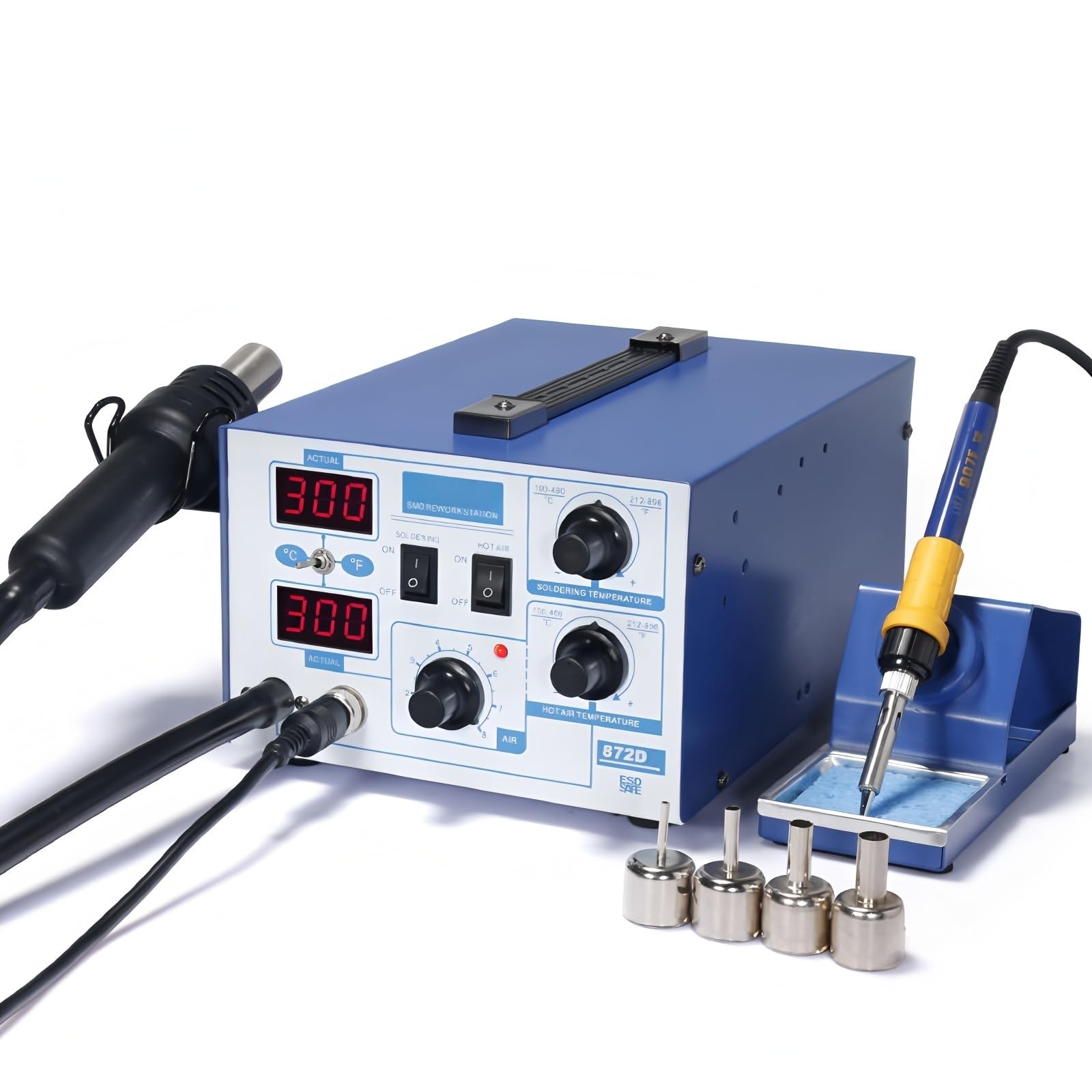
Figure 1: Front view of the TT-Yihua-872D main unit with hot air gun and soldering iron connected. The control panel features digital displays for actual and set temperatures, power switches for soldering and hot air, and adjustment knobs for temperature and airflow.

Figure 2: Rear view of the TT-Yihua-872D main unit, highlighting the main power switch and the power cord input socket.
Main Unit Controls:
- Digital Displays: Two LED displays show the actual and set temperatures for both the hot air gun and soldering iron.
- Celsius/Fahrenheit Button: Toggles temperature display units.
- SOLDERING ON/OFF Switch: Activates/deactivates the soldering iron.
- HOT AIR ON/OFF Switch: Activates/deactivates the hot air gun.
- SOLDERING TEMPERATURE Knob: Adjusts the soldering iron temperature.
- HOT AIR TEMPERATURE Knob: Adjusts the hot air gun temperature.
- AIR Knob: Adjusts the airflow rate for the hot air gun.
- Main Power Switch: Located on the rear of the unit, controls overall power to the station.
5. Setup
- Unpack: Carefully remove all components from the packaging.
- Connect Hot Air Gun: Plug the hot air gun connector into the designated port on the front of the main unit. Ensure it is securely fastened.
- Connect Soldering Iron: Plug the soldering iron connector into its designated port on the front of the main unit.
- Place Soldering Iron Stand: Position the soldering iron stand on a stable, heat-resistant surface near your work area. Insert the soldering iron into the stand.
- Connect Power: Insert the power cord into the power input socket on the rear of the main unit, then plug the other end into a grounded electrical outlet.
- Initial Power On: Flip the main power switch on the rear of the unit to the 'ON' position. The digital displays should illuminate.
6. Operating Instructions
6.1. Hot Air Rework Station Operation
- Ensure the main power switch on the rear is ON.
- Press the 'HOT AIR' ON/OFF switch on the front panel to activate the hot air gun.
- Adjust the 'HOT AIR TEMPERATURE' knob to set the desired temperature (range: 100°C-480°C). The display will show the set temperature, then the actual temperature as it heats up.
- Adjust the 'AIR' knob to control the airflow rate. Start with a lower setting and increase as needed for your application.
- To change temperature units, press the '°C/°F' button.
- After use, turn off the 'HOT AIR' switch. The hot air gun will enter a cooling mode before shutting down completely.
6.2. Soldering Iron Operation
- Ensure the main power switch on the rear is ON.
- Press the 'SOLDERING' ON/OFF switch on the front panel to activate the soldering iron.
- Adjust the 'SOLDERING TEMPERATURE' knob to set the desired temperature (range: 200°C-480°C). The display will show the set temperature, then the actual temperature as it heats up.
- To change temperature units, press the '°C/°F' button.
- Before and after each use, clean the soldering iron tip with the damp sponge in the stand and tin it with a small amount of solder.
- After use, turn off the 'SOLDERING' switch and place the iron back in its stand.
6.3. Temperature Calibration
The TT-Yihua-872D features advanced PID digitally programmed calibration and real-time temperature proofreading. This ensures high temperature stability and accuracy. Under normal operating conditions, user calibration is not typically required. If you suspect a significant temperature discrepancy, refer to advanced service procedures or contact customer support.
7. Maintenance
Regular maintenance ensures the longevity and optimal performance of your rework station.
- Cleaning the Unit: Disconnect power before cleaning. Wipe the main unit with a soft, damp cloth. Do not use abrasive cleaners or solvents.
- Soldering Tip Care: Always tin the soldering iron tip before and after use to prevent oxidation. Replace tips when they become pitted or corroded, as this affects heat transfer.
- Sponge Maintenance: Keep the cleaning sponge damp (not soaking wet) for effective tip cleaning. Replace the sponge when it becomes worn or heavily soiled.
- Hot Air Nozzle Care: Ensure hot air nozzles are free from debris or blockages. Clean them gently if necessary.
- Storage: Store the unit in a dry, dust-free environment when not in use. Ensure all components are cool before storage.
8. Troubleshooting
If you encounter issues with your TT-Yihua-872D, refer to the following common problems and solutions:
| Problem | Possible Cause | Solution |
|---|---|---|
| Unit does not power on | Power cord disconnected; Main power switch OFF; Power outlet issue | Check power cord connection; Ensure main power switch (rear) is ON; Test power outlet with another device. |
| Hot air gun or soldering iron not heating | Respective ON/OFF switch is OFF; Temperature set too low; Component connection issue | Ensure 'HOT AIR' or 'SOLDERING' switch is ON; Increase temperature setting; Check if hot air gun/soldering iron is securely connected. |
| Temperature display shows 'S-E' or similar error | Sensor error; Heating element fault | Turn off the unit, wait a few minutes, then restart. If the error persists, contact customer support. The unit's self-detection functionality may indicate internal issues. |
| Inconsistent hot air flow | Airflow knob set too low; Nozzle blocked | Adjust 'AIR' knob to a higher setting; Check and clean hot air nozzle for obstructions. |
If the problem persists after attempting these solutions, please contact customer support for further assistance.
9. Specifications
Technical specifications for the TOOLTOP TT-Yihua-872D 2-in-1 Hot Air Rework Station and Soldering Iron.

Figure 3: Detailed technical specifications for the TT-Yihua-872D (referred to as 972D in the image, but specifications match the 872D model).
| Parameter | Specification |
|---|---|
| Model Number | TT-Yihua-872D |
| Rated Voltage | AC 220V±10% 50Hz |
| Total Power | 670W |
| Operating Environment | 0~40°C, Relative humidity <80% |
| Storage Temperature | -20~80°C, Relative humidity <80% |
| Dimensions (L×W×H) | 33 × 27 × 20.2 cm |
| Weight | 4.7 KG |
| Hot Air Gun | |
| Operating Voltage | AC 220V±10% 50Hz |
| Output Power | 650W |
| Temperature Range | 100°C - 480°C |
| Air Supply Mode | Air pump |
| Airflow | 24 L/min (max) |
| Temperature Stability | ±5°C (static) |
| Display Mode | Red LED Digital Display |
| Heating Core | Ceramic Framed Heating Corer |
| Soldering Iron | |
| Operating Voltage | AC 26V±10% 50Hz |
| Output Power | 60W |
| Temperature Range | 200°C - 480°C |
| Temperature Stability | ±5°C (static) |
| Display Mode | Red LED Digital Display |
| Heating Core | Imported High-Powered Heating Core |
| Tip-to-Ground Impedance | <2Ω |
| Tip-to-Ground Voltage | <2mV |
| Specification Met | CE, RoHS |
10. Warranty and Support
The manufacturer provides a 1-year EU spare part availability duration for this product. For technical support, warranty claims, or service inquiries, please contact your retailer or the manufacturer directly. Please have your model number (TT-Yihua-872D) and purchase information ready when contacting support.
11. Disposal Information
Do not dispose of electrical appliances as unsorted municipal waste. Use separate collection facilities. Contact your local government for information regarding available collection systems. If electrical appliances are disposed of in landfills or dumps, hazardous substances can leak into the groundwater and get into the food chain, damaging your health and well-being.