
1. Introduction
The TOOLTOP MF2 is a portable micro spot welding machine designed for precise welding tasks, including battery assembly, mobile phone repair, and other delicate metal welding applications. It features an intelligent handheld welding pen and adjustable output power for various welding thicknesses.
Key Features:
- Adjustable output power with 611 gears for precise welding.
- Supports welding thicknesses from 0.1mm to 0.4mm.
- Equipped with a flexible, replaceable-pin welding pen.
- Built-in rechargeable battery with power bank function.
- Safety features: low voltage, over current, over-charge protection, low battery alarm, auto-off.
2. Safety Information
Please read all safety warnings and instructions carefully before using this product. Failure to follow these instructions may result in electric shock, fire, or serious injury.
- Always wear appropriate personal protective equipment (PPE), including safety glasses, gloves, and protective clothing, when operating the spot welder.
- Ensure the work area is well-ventilated and free from flammable materials.
- Do not operate the device in wet or damp conditions.
- Keep the device out of reach of children.
- Do not touch the welding pins or the welded material immediately after welding, as they will be hot.
- Use only the original or approved charging cable and accessories.
- Disconnect the power source before performing any maintenance or cleaning.
- If the device shows signs of damage or malfunction, discontinue use immediately and contact support.
3. Package Contents
Verify that all items listed below are included in your package:
- MF2 Spot Welder Unit
- WP110 Spot Welding Pen
- Magnets (2 pieces)
- Nickel Strip (2 meters)
- USB-A to USB-C Charging Cable
- Sandpaper (1 piece)

Figure 3.1: Contents of the TOOLTOP MF2 Spot Welding Machine package.
4. Product Overview
Familiarize yourself with the components and controls of your MF2 Spot Welding Machine.

Figure 4.1: TOOLTOP MF2 Spot Welder dimensions.
4.1 Main Unit
The main unit houses the control panel, battery, and power output ports. The display shows current settings and operational status. Control knobs or buttons allow for mode selection and power adjustment.
4.2 Welding Pen (WP110)
The WP110 welding pen is designed for comfortable and precise operation. It features replaceable soldering pins for extended usability.
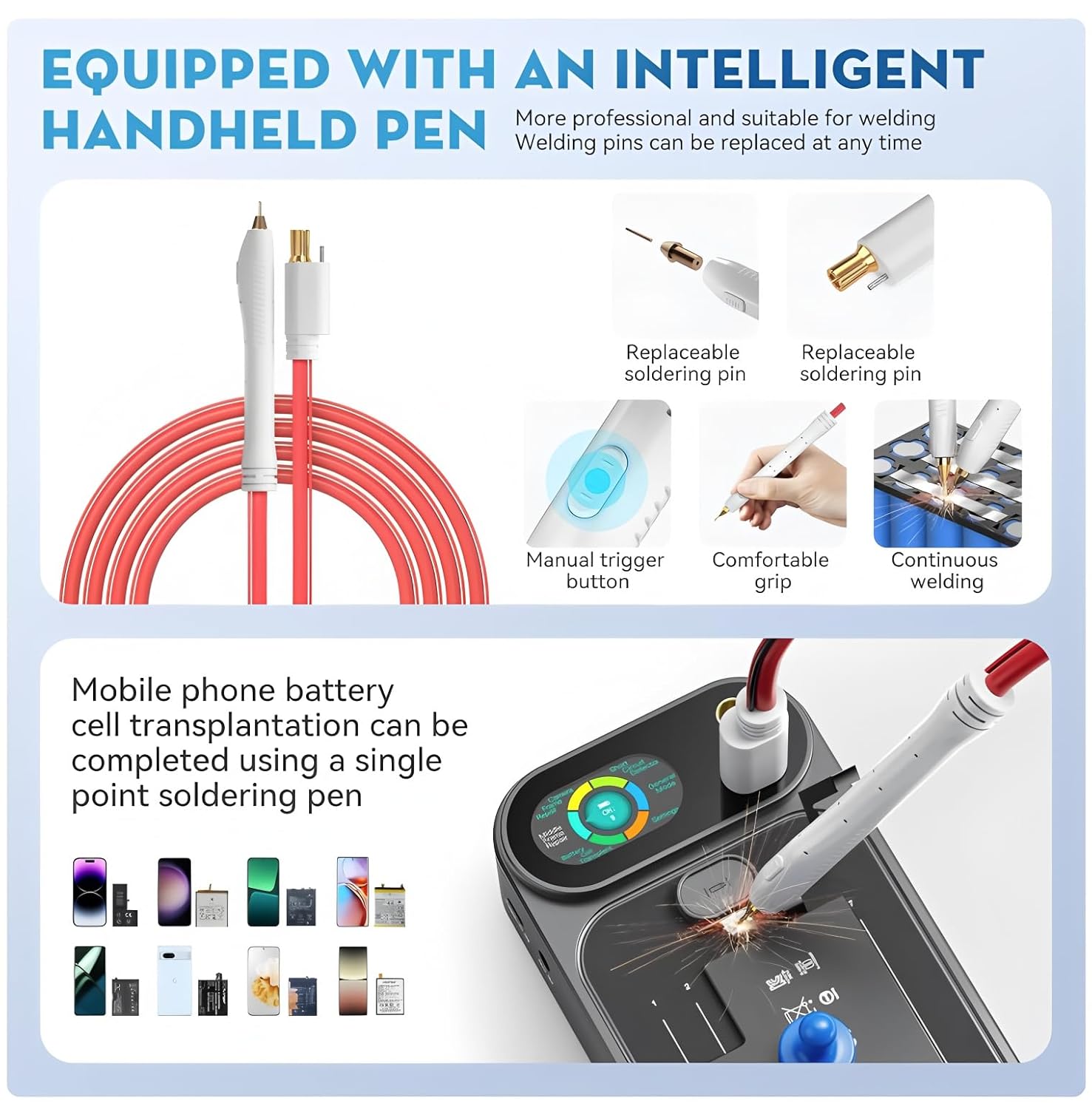
Figure 4.2: Intelligent Handheld Welding Pen features.
- Replaceable Soldering Pins: Allows for easy replacement when worn.
- Manual Trigger Button: Provides precise control over the welding process.
- Comfortable Grip: Ergonomically designed for extended use.
- Flexible Cable: Connects to the main unit for power and control.
5. Setup
5.1 Charging the Device
Before first use, fully charge the MF2 unit. Connect the USB-C end of the charging cable to the device's charging port and the USB-A end to a compatible USB power adapter (not included) or computer USB port. The charging indicator on the device will show the charging status.
5.2 Connecting the Welding Pen
Insert the connectors of the WP110 welding pen into the designated ports on the main MF2 unit. Ensure a secure connection. The welding pen is designed to be easily connected and disconnected.
6. Operating Instructions
6.1 Power On/Off
Press and hold the power button on the main unit to turn the device on or off. The display will illuminate upon power-on.
6.2 Adjusting Welding Parameters
The MF2 offers 611 gears of output power. Use the control knobs or buttons on the main unit to adjust the welding power according to the material thickness and type. Start with lower settings and gradually increase as needed to achieve optimal welds.

Figure 6.1: Welding thickness capabilities (0.1mm to 0.4mm).
Attention: It is necessary to connect an external power source for use when welding, especially for continuous or high-power applications.
6.3 Welding Process
- Prepare the materials to be welded. Ensure surfaces are clean and free of oxidation. Use the included sandpaper if necessary.
- Select the appropriate welding power setting on the MF2 unit.
- Position the two welding pins of the WP110 pen firmly and simultaneously onto the material where the weld is desired. Ensure good contact.
- Press the manual trigger button on the welding pen to initiate the weld. A spark will occur, and the weld will be completed in a fraction of a second.
- Release the trigger and lift the welding pen. Inspect the weld for strength and quality. Adjust settings if needed.
6.4 Applications
The TOOLTOP MF2 is versatile and can be used for various spot welding applications:
- Battery Assembly: Ideal for welding nickel strips to 18650, 26650, 32650 cylindrical batteries and mobile phone batteries.
- Mobile Phone Repair: Suitable for tasks like cell transplantation, repairing frames, and welding lens frames.
- General Metal Welding: Can be used for small-scale metal welding projects.
- Burner Function: Specific mode for certain applications.
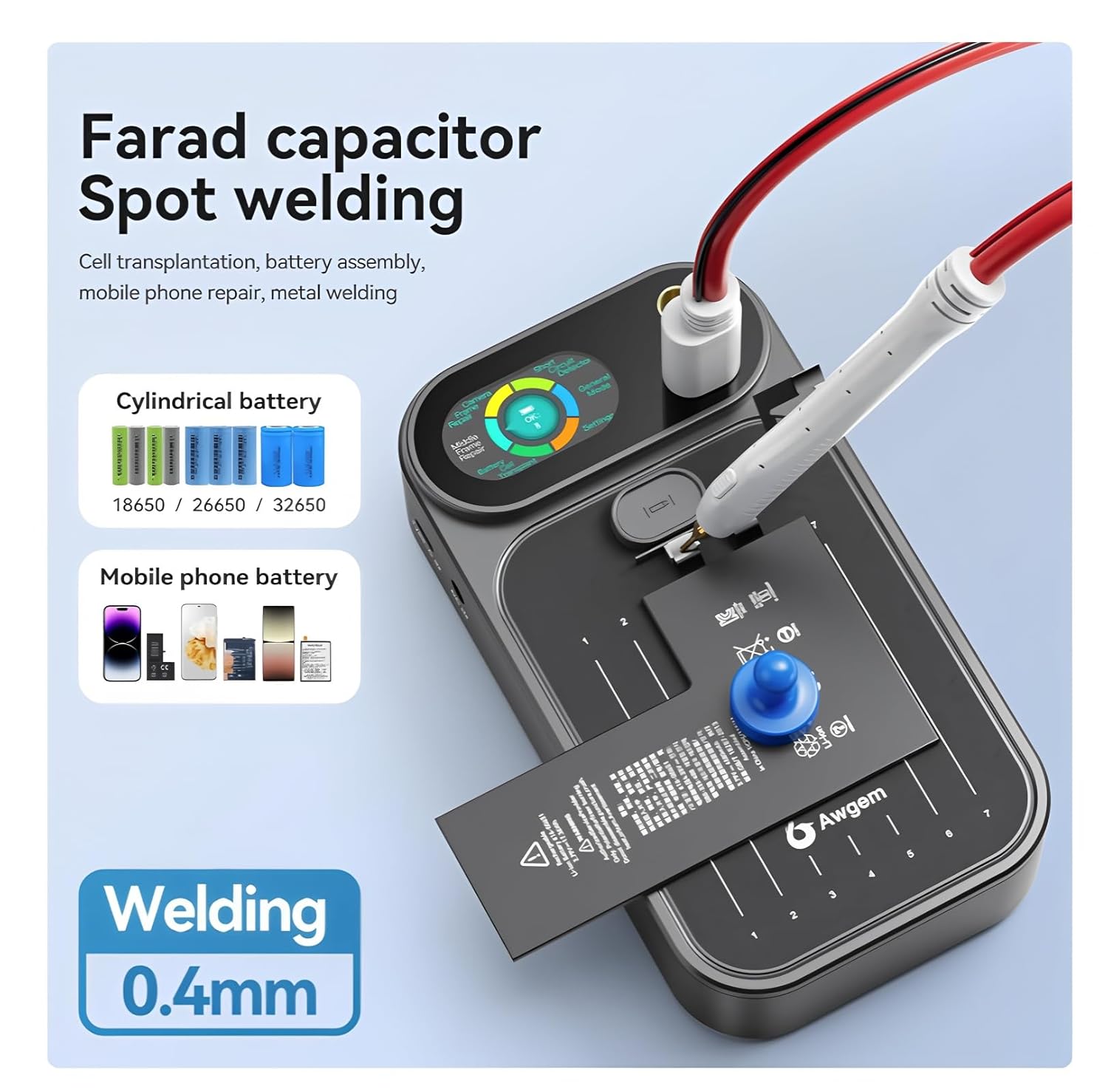
Figure 6.2: Farad capacitor spot welding applications.

Figure 6.3: Diverse applications of the MF2 Spot Welder.
7. Maintenance
7.1 Cleaning
Regularly clean the welding pins and the main unit. Use a dry, soft cloth to wipe down the device. For stubborn residue on the welding pins, use fine sandpaper (like the one included) to gently clean the tips. Ensure the device is powered off and disconnected from any power source before cleaning.
7.2 Replacing Welding Pins
Over time, the welding pins may wear down. To replace them, carefully unscrew the old pins from the welding pen and screw in new, compatible pins. Ensure they are securely fastened.
7.3 Storage
Store the MF2 Spot Welding Machine in a cool, dry place, away from direct sunlight and moisture. Keep it in its original packaging or a protective case to prevent damage.
8. Troubleshooting
| Problem | Possible Cause | Solution |
|---|---|---|
| Device does not power on | Low battery; Power button not pressed long enough | Charge the device; Press and hold the power button for 3-5 seconds |
| Weak or inconsistent welds | Insufficient power setting; Dirty welding pins; Poor contact with material; Low battery | Increase power setting; Clean welding pins with sandpaper; Ensure firm contact; Recharge device |
| No spark when triggering | Welding pen not connected properly; Device malfunction; Low battery | Check welding pen connection; Recharge device; Contact customer support if problem persists |
| Over-temperature warning | Continuous high-power use; Poor ventilation | Allow device to cool down; Ensure adequate ventilation |
9. Specifications
| Feature | Specification |
|---|---|
| Model Number | TT-Awithz-MF2 |
| Brand | TOOLTOP |
| Welding Thickness | 0.1mm - 0.4mm |
| Output Power Gears | 611 |
| Battery Capacity | 4000/5000mAh (Built-in rechargeable) |
| Protection Features | Low voltage, over current, over-charge protection, low battery alarm, auto-off |
| Dimensions (L x W x H) | 9.4cm x 16.9cm x 4.5cm (approx. 3.7in x 6.65in x 1.77in) |
| Certifications | CE, RoHS |
10. Warranty and Support
10.1 Warranty Information
This TOOLTOP MF2 Portable Spot Welding Machine comes with a 1-year warranty from the date of purchase. The warranty covers manufacturing defects and malfunctions under normal use. It does not cover damage caused by misuse, accidents, unauthorized modifications, or improper maintenance.
10.2 Customer Support
For technical assistance, warranty claims, or any questions regarding your TOOLTOP MF2 Spot Welding Machine, please contact your retailer or the manufacturer's customer service. Please have your model number (TT-Awithz-MF2) and proof of purchase ready when contacting support.