
1. Product Overview
The BETMI X5 Wireless Controller is designed for an enhanced gaming experience across multiple platforms. It features a 2.4GHz wireless connection, Hall Effect joysticks for precision, programmable back buttons, Turbo function, and dual vibration motors. This controller is compatible with Xbox One, Xbox Series X, Xbox Series S, and PC (Windows 10 or above).
Front view of the BETMI X5 Wireless Controller, showcasing its ergonomic design and button layout.
2. Setup and Connection
Initial Controller Reset (Important for Xbox Compatibility)
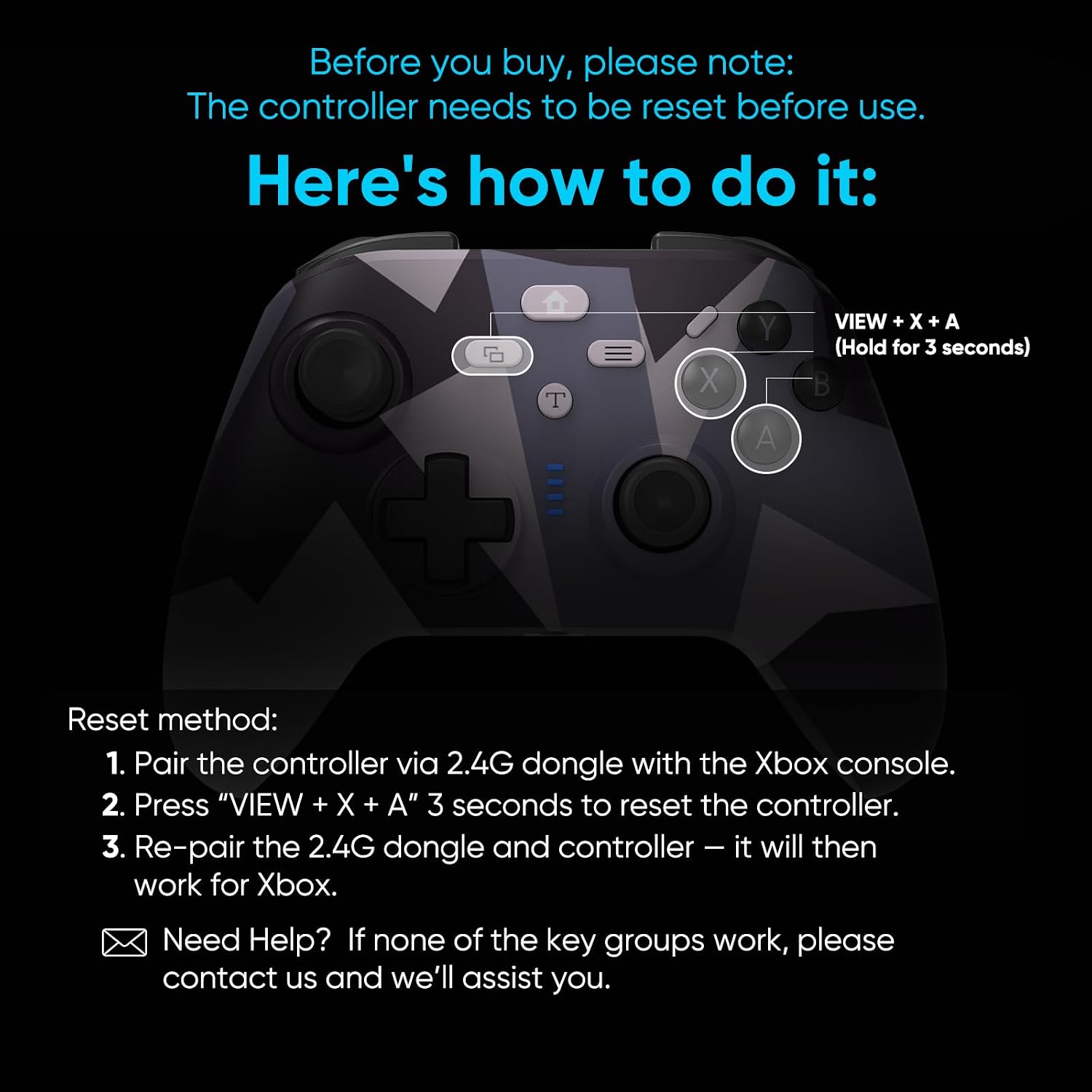
Before initial use, especially with Xbox consoles, a reset procedure may be required due to system updates. Follow these steps:
- Connect the controller and its 2.4G dongle to your Xbox console.
- Press and hold the VIEW button + X button + A button simultaneously for 3 seconds.
- The controller and receiver will disconnect, and the LED indicator will flash slowly.
- The controller and receiver will then automatically reconnect, and the LED will remain solid, indicating a successful reset and re-pairing.
If the controller still does not function correctly after this reset, proceed to try Key Group 2 and Key Group 3 as described in the Troubleshooting section.

Visual guide for connecting the controller to your console using the USB dongle.
Standard Connection Procedure
- Plug the USB dongle into an available USB port on your Xbox console or PC.
- The LED on the dongle will flash slowly, then quickly.
- Long press the Home button on the controller. The remote LED will flash slowly, then quickly, entering online pairing mode.
- Upon successful connection, both the dongle and controller LEDs will remain solid.

The controller is compatible with Xbox One, Xbox Series X, Xbox Series S, and PC (Windows 10/11).
3. Operating Instructions
Key Features and Functions
- Hall Effect Joysticks: Experience zero drift and precise control with a lifespan of up to 5 million cycles. Ideal for accurate movements in FPS and racing games.
- Turbo Mode: Activate rapid-fire input for any button. Press a single button to continuously fire or perform actions, reducing finger fatigue in fast-paced games.
- Macro Programming & Button Remapping: Program complex combo moves to a single button press or customize button layouts to suit your play style and game requirements.
- Dual Vibration: Enjoy realistic and responsive haptic feedback with dual shock motors, enhancing immersion in games.
- Dedicated Share Button: Easily record gameplay clips, take screenshots, and stream your gaming moments.
- 3.5mm Audio Jack: Connect your headset directly to the controller for in-game audio and communication.

Detailed view of the Hall Effect Joysticks for anti-drift and no-delay input, and upgraded linear triggers for low latency and frictionless operation.

Illustration of the Macro Function, allowing the 16 base keys to be extended to two game buttons (MR and ML) for personalized gameplay.

The Turbo Function provides a competitive edge by enabling rapid-fire mode for quick and efficient gameplay.
4. Maintenance and Charging
Charging the Controller
For optimal performance and battery safety, charge the controller using one of the following methods:
- Connect the controller to a PC USB port.
- Connect the controller to a game console USB port.
- Use a 5V/2A (or lower) power adapter.
The controller features a 600mAh battery, providing approximately 8 hours of playing time after a 1.5-hour charging period.

Illustration of the dual vibration motors and the internal 600mAh large capacity battery, offering extended playtime.
5. Troubleshooting
Xbox Compatibility Issues
If your controller is not compatible with Xbox after a system update, try the following key group switches:
- Switch to Key Group 2:
Connect the controller and the receiver to the Xbox console.
Press and hold VIEW + X + A for 3 seconds.
The controller and receiver will disconnect, the LED will flash slowly, then reconnect and the LED will stay solid. If the controller works normally, no further action is needed. - Switch to Key Group 3:
If Key Group 2 does not resolve the issue, press and hold VIEW + Y + B for 3 seconds.
The process for disconnection and reconnection is the same as for Key Group 2.
If none of the three key groups work, please contact BETMI customer support for further assistance.
6. Specifications
| Model Number | X5 controller mg |
| Connectivity | 2.4GHz Wireless |
| Compatibility | Xbox One, Xbox Series X, Xbox Series S, PC (Windows 10 or above) |
| Battery Capacity | 600mAh |
| Charging Time | Approx. 1.5 hours |
| Playing Time | Approx. 8 hours |
| Wireless Range | Up to 33 feet |
| Item Weight | 9.1 ounces |
| Package Dimensions | 6.22 x 4.57 x 2.56 inches |
7. Warranty and Support
Warranty Information
For detailed warranty information, please refer to the documentation included with your purchase or contact BETMI customer support directly. Warranty terms may vary by region and retailer.
Customer Support
If you encounter any issues not covered in this manual or require further assistance, please contact BETMI customer support. Refer to your product packaging or the BETMI official website for contact details.