Introduction
Thank you for choosing the VECELO TV Stand with Mount and Power Outlets. This manual provides detailed instructions for assembly, usage, maintenance, and troubleshooting to ensure optimal performance and longevity of your product. Please read all instructions carefully before assembly and retain this manual for future reference.
Package Contents
Before beginning assembly, verify that all parts listed below are present and undamaged. If any parts are missing or damaged, please contact customer support.
- Wooden Shelves (Top, Middle, Bottom)
- Metal Frame Components (Vertical supports, Horizontal bars, Mesh panels)
- TV Mounting Bracket (Vertical bars, Horizontal plate)
- Integrated Power Strip (4 AC outlets, 2 USB ports) with power cord
- Adjustable Feet
- Assembly Hardware (Screws, Bolts, Washers, Allen Wrench, Screwdriver)
- S-Hooks for side storage

Image: Detailed diagram illustrating all components and their respective dimensions for the VECELO TV Stand.
Assembly Instructions
Assembly is straightforward and can be completed with the provided tools. An impact driver can expedite the process. Ensure all holes face downwards when attaching shelves.
- Assemble Side Frames: Attach the adjustable feet to the bottom of the vertical metal frame components. Secure the mesh panels to the lower sections of the side frames using screws.
- Attach Middle Shelves: Connect the middle wooden shelves to the assembled side frames using screws. Ensure proper alignment.
- Connect Horizontal Bars: Attach the long horizontal support bars to the top of the assembled frame sections. Use screws to secure them firmly.
- Install Top Shelf: Place the top wooden shelf onto the frame, aligning the pre-drilled holes. Secure it with screws.
- Integrate Power Strip: Insert the integrated power strip into the designated cutout on the top shelf. Secure it with the provided screws.
- Assemble TV Mount Post: Connect the two sections of the TV mount post using bolts, washers, and nuts. Tighten securely with the provided wrench.
- Attach TV Mount Bracket: Secure the TV mounting bracket to the assembled post using screws.
- Attach TV Mount Post to Stand: Bolt the assembled TV mount post to the back of the TV stand's frame. Ensure it is centered and stable.
- Install TV Brackets on TV: Attach the vertical TV brackets to the back of your television using appropriate screws (not included with the stand, please refer to your TV's manual for correct hardware).
- Mount TV: Carefully lift your television and hook the attached brackets onto the TV mount plate on the stand. Secure the TV by tightening the set screws on the bottom of the TV brackets.
- Organize Cables: Utilize the cable management holes in the TV mount post to route your TV and device cables for a tidy setup.
- Add S-Hooks: Hang the provided S-hooks on the mesh side panels for additional storage of headphones or accessories.
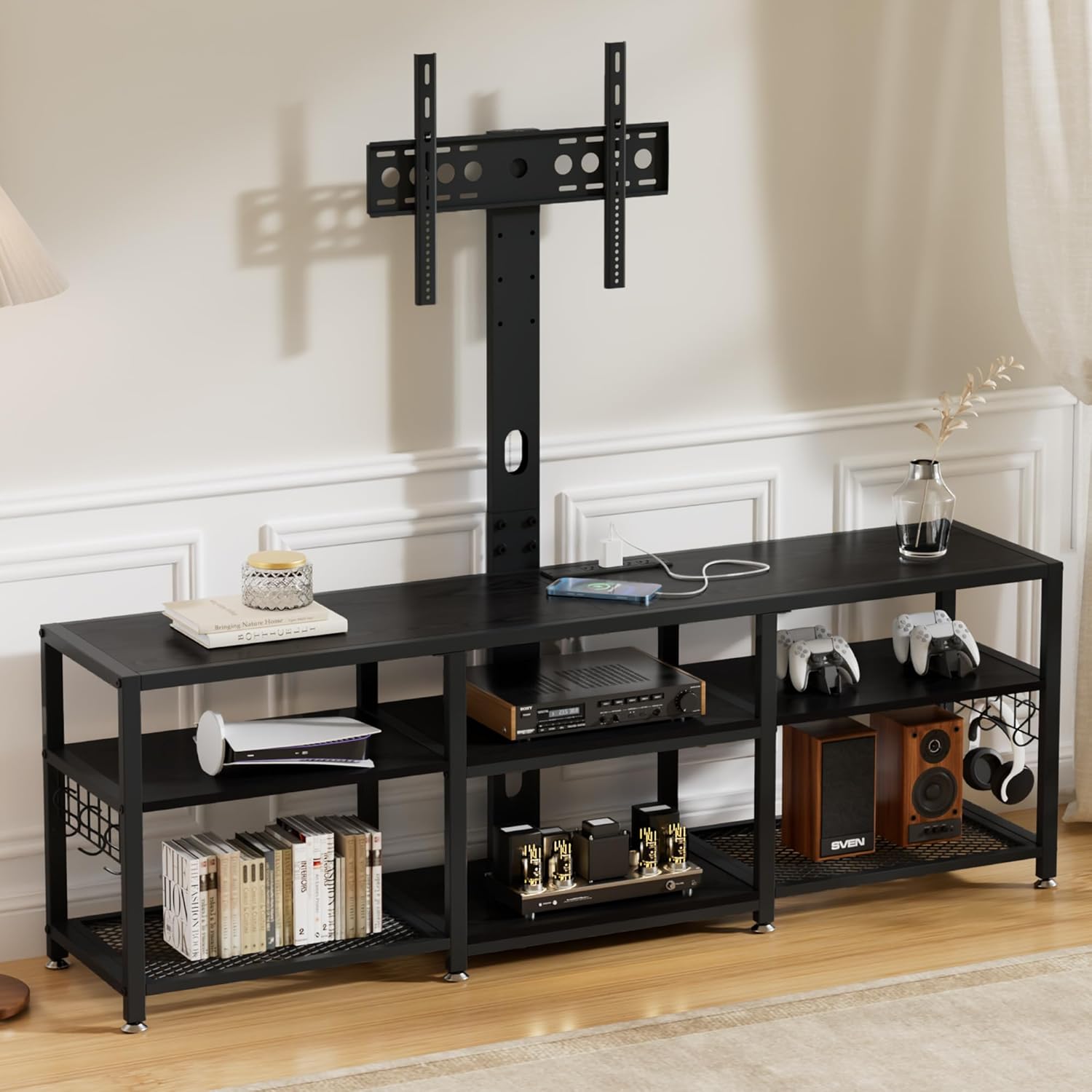
Image: The fully assembled VECELO TV Stand, showcasing the TV mount, multiple storage shelves, and the integrated power strip.
Note: TV mounting hardware (screws for attaching brackets to TV) is not included. Please ensure you have the correct screws for your specific TV model.
Features
- Adjustable & Secure TV Mount: The TV mount allows for easy adjustment of width (6.7"-24.6") and height (5.5"-15.3") to achieve optimal viewing angles. It securely holds most 40-80 inch TVs, providing a stable alternative to wall-mounting.
- Sturdy Build & High Weight Capacity: Constructed with premium engineered wood and a robust metal frame, ensuring stability and durability. The top surface supports up to 180 lbs, and storage shelves support up to 80 lbs.
- Built-in Power Strip & Cable Management: Features an integrated power strip with 4 AC outlets and 2 USB ports to keep devices charged. Smart cable management helps organize wires, reducing clutter.
- Spacious & Ventilated Storage: Generous open shelves (71"L x 15.7"W x 24"H) provide ample space for consoles, media players, and decor. The open design ensures proper airflow for electronics.
- Effortless Assembly & Maintenance: Designed for straightforward assembly with numbered parts and clear instructions. Water-resistant surfaces are easy to clean with a quick wipe.

Image: A detailed view of the built-in power strip, featuring four AC outlets and two USB ports for convenient device charging.

Image: The side storage area of the TV stand, featuring mesh shelves and convenient S-hooks for organizing items like headphones or gaming controllers.
Usage and Operation
The VECELO TV Stand is designed for versatile use in your living room or bedroom.
- TV Placement: Mount your TV directly onto the adjustable bracket for a floating look, or place it on the top shelf if preferred.
- Device Charging: Use the integrated power strip to charge mobile devices via USB or power media equipment using the AC outlets.
- Storage: Utilize the open shelves for media consoles, gaming systems, soundbars, books, or decorative items. The mesh shelves provide ventilation for electronics.
- Cable Management: Route all cables through the central column of the TV mount to maintain a clean and organized appearance.
Maintenance
To keep your VECELO TV Stand in excellent condition, follow these simple maintenance guidelines:
- Cleaning: Wipe surfaces with a soft, damp cloth. Avoid harsh chemicals or abrasive cleaners that could damage the finish.
- Spills: Promptly clean any spills to prevent staining, especially on the wooden surfaces.
- Inspection: Periodically check all screws and bolts to ensure they remain tight. Re-tighten if necessary to maintain stability.
- Weight Limits: Do not exceed the stated weight capacities for the top surface (180 lbs) and storage shelves (80 lbs) to prevent damage or injury.

Image: A close-up view of the VECELO TV Stand's construction, emphasizing the easy-to-clean wooden tabletop, solid wood and metal frame, and enhanced airflow mesh base.
Troubleshooting
- Stand Wobbles: Ensure all assembly screws and bolts are fully tightened. Check that the adjustable feet are evenly extended and making firm contact with the floor.
- TV Not Level: Adjust the height of the TV mounting brackets on the back of your TV or the position of the TV mount on the stand to achieve a level viewing angle.
- Power Strip Not Working: Verify that the power cord is securely plugged into a working wall outlet. Check the power strip's circuit breaker if applicable.
- Missing Parts: If any parts are missing upon arrival, refer to the package contents list and contact VECELO customer support for assistance.
Specifications
- Brand: VECELO
- Model: 71 Inch
- Color: Black
- Style: Modern
- Item Weight: 66 Pounds
- TV Size Compatibility: Most 40-80 inch TVs
- Top Surface Weight Capacity: Up to 180 lbs
- Storage Shelves Weight Capacity: Up to 80 lbs
- Power Strip: 4 AC Outlets, 2 USB Ports
Image: A comprehensive diagram detailing the dimensions of the VECELO TV Stand, including the adjustable range of the TV mounting bracket.
Warranty and Support
For warranty information, product support, or to report missing/damaged parts, please refer to the contact information provided with your purchase or visit the official VECELO website. Keep your purchase receipt as proof of purchase.


