
ERRBBIC PS92W
ERRBBIC Solar Charger Power Bank 49800mAh - Model PS92W Instruction Manual
Brand: ERRBBIC | Model: PS92W
1. Introduction
This manual provides essential information for the safe and efficient operation of your ERRBBIC Solar Charger Power Bank. Please read it thoroughly before using the device and retain it for future reference.
2. Safety Information
- Do not disassemble, open, or attempt to repair the device.
- Keep the device away from fire, water, and extreme temperatures.
- Avoid dropping or subjecting the device to strong impacts.
- Do not expose the device to direct sunlight for prolonged periods in enclosed spaces (e.g., car dashboard) to prevent overheating.
- Ensure proper ventilation during charging.
- Keep out of reach of children.
- Dispose of the device according to local regulations.
3. Package Contents
Verify that all items are present in the package:
- ERRBBIC Solar Power Bank
- Type-C USB Cable
- Carabiner
- User Manual
4. Product Overview
The ERRBBIC Solar Charger Power Bank is a high-capacity portable charging solution designed for outdoor enthusiasts and emergency preparedness. It features multiple charging options and robust construction.
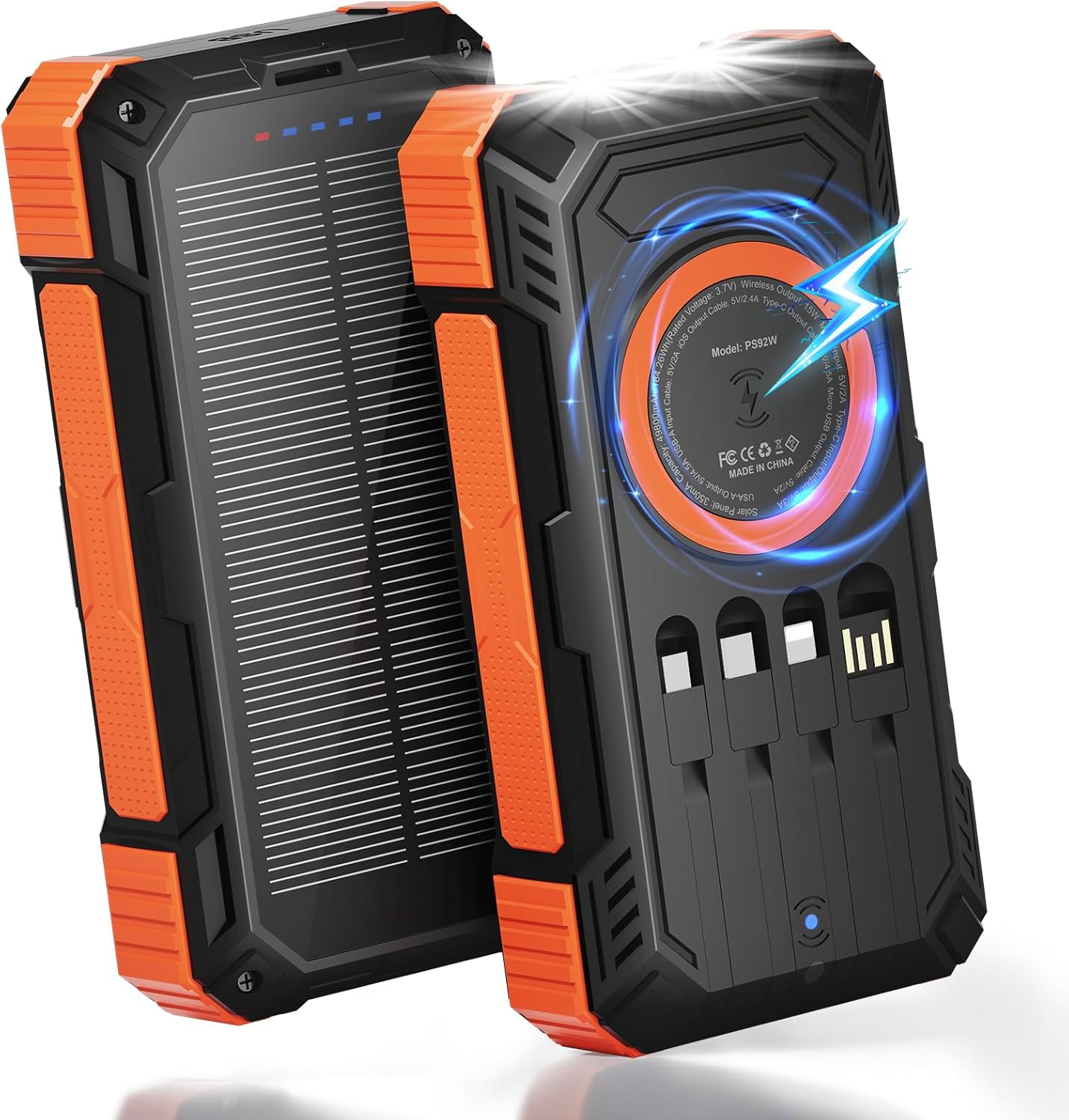
Figure 1: Front and back view of the ERRBBIC Solar Charger Power Bank, highlighting its rugged design and integrated solar panel.
Key Features:
- High Capacity: 49,800mAh battery for extended use.
- Multi-Device Charging: Built-in Type-C, Lightning, Micro, and USB-A cables.
- Multiple Output Ports: 1 USB-A and 1 PD Type-C.
- Wireless Charging: 15W fast wireless charging.
- Fast Charging: 22.5W wired PD fast charging.
- Solar Panel: 5.5V/350mA high-efficiency solar panel for emergency charging.
- Dual LED Flashlight: 3 modes (constant on, flashing, rescue).
- Durable Design: Waterproof, shockproof, and dustproof ABS material.
- Safety Features: Overheat, overcharge, short circuit, and temperature control protection.

Figure 2: Illustration of the power bank's high capacity and various charging outputs, including built-in cables and wireless charging.
5. Setup
Initial Charging of the Power Bank:
Before first use, fully charge the power bank using a wall adapter for optimal performance.
- Connect the provided Type-C USB cable to the power bank's Type-C input port.
- Connect the other end of the cable to a USB wall adapter (not included).
- The LED indicator lights will illuminate to show charging progress. All four lights will be solid when fully charged.
The power bank can also be charged via the Micro USB input port.

Figure 3: Visual representation of the various input options for charging the power bank, including solar, USB, Type-C, and Micro USB.
Solar Charging:
The solar panel is designed for emergency use and supplemental charging. For primary charging, use a wall adapter.
- Place the power bank in direct sunlight.
- The solar charging indicator light (usually green) will illuminate when charging via solar power.
- Solar charging speed depends on sunlight intensity.
6. Operating Instructions
Charging External Devices:
The power bank supports charging up to 6 devices simultaneously.
- Using Built-in Cables: Pull out the integrated Type-C, Lightning, Micro, or USB-A cable and connect it directly to your device.
- Using USB-A/PD Type-C Ports: Connect your device's charging cable to the respective USB-A or PD Type-C output port on the power bank.
- Wireless Charging: Place your wireless-charging-compatible device on the wireless charging pad on the back of the power bank. Ensure the device is centered for optimal charging.
- Press the power button once to initiate charging if it doesn't start automatically.
- The LED indicator lights will show the remaining power.

Figure 4: The power bank actively charging multiple smartphones and other devices using its various built-in cables, USB ports, and wireless charging pad.
Flashlight Operation:
The dual LED flashlight has three modes:
- Turn On/Constant On: Press and hold the power button for approximately 3 seconds.
- Flashing Mode: With the flashlight on, press the power button once.
- SOS (Rescue) Mode: With the flashlight in flashing mode, press the power button once more.
- Turn Off: Press the power button again from SOS mode, or press and hold for 3 seconds from any mode.

Figure 5: The integrated dual LED flashlight providing illumination, demonstrating its utility for outdoor activities and emergencies.
7. Maintenance
- Cleaning: Wipe the device with a soft, dry cloth. Do not use harsh chemicals or abrasive materials.
- Storage: Store the power bank in a cool, dry place away from direct sunlight and extreme temperatures.
- Battery Longevity: For optimal battery life, fully charge and discharge the power bank at least once every three months if not in regular use.
- Temperature Resistance: The device is designed to operate reliably in temperatures ranging from -20°C to 60°C (-4°F to 140°F).
8. Troubleshooting
| Problem | Possible Cause | Solution |
|---|---|---|
| Device not charging | Low power bank battery; loose cable connection; incompatible device. | Fully charge the power bank; ensure cables are securely connected; verify device compatibility. |
| Slow charging | Using solar charging as primary source; old/damaged cable; device drawing too much power. | Use wall adapter for faster charging; replace cable; charge one device at a time. |
| Flashlight not working | Low power bank battery; incorrect button press. | Charge the power bank; press and hold the power button for 3 seconds. |
| Power bank automatically shuts off | Overheat protection activated; 30-second inactivity. | Allow device to cool down; press power button to reactivate. |
9. Specifications
| Feature | Detail |
|---|---|
| Battery Capacity | 49800mAh |
| Wired Fast Charging | 22.5W PD |
| Wireless Charging | 15W |
| Solar Panel | 5.5V/350mA |
| Built-in Cables | Type-C, Lightning, Micro, USB-A |
| Output Ports | 1x USB-A, 1x PD Type-C |
| Input Ports | Type-C, Micro USB |
| Flashlight Modes | Constant On, Flashing, SOS |
| Material | Durable ABS |
| Protection | Overcharge, Short Circuit, Temperature Control, Overheat |
| Dimensions | 7 x 3.66 x 1.18 inches |
| Weight | 1.23 pounds |
| Model Number | PS92W |
10. Warranty and Support
ERRBBIC offers a one-year after-sales service for this product. If you encounter any issues or require assistance, please contact our customer support team. We aim to respond within 24 hours.
Contact information can typically be found on the product packaging or our official website.
11. Product Videos
Charge Anywhere with Solar Power Bank
This video demonstrates the versatility of the ERRBBIC Solar Power Bank, showcasing its ability to charge devices in various outdoor settings. It highlights the convenience of portable power for adventurers.
Is this the solar charger for outdoors? Emergencies? Power outages?
This video explores the suitability of the solar charger for outdoor activities, emergencies, and power outages, emphasizing its robust features and reliability in challenging situations.
Solar powered power bank - perfect for camping, hiking!
A demonstration highlighting the solar power bank's ideal use for camping and hiking, showcasing its portability and charging capabilities for outdoor adventures.
Ask a question about this manual
Ask about setup, troubleshooting, compatibility, parts, safety, or missing instructions. Manuals+ will review the question and use this page’s manual context to help answer it.