
Introduction
This manual provides essential information for setting up, operating, maintaining, and troubleshooting your XIAOMI Redmi Note 15 Pro 5G smartphone. Please read this guide carefully to ensure optimal performance and longevity of your device.
The Redmi Note 15 Pro 5G features a robust design, a powerful 6580 mAh battery with 45W turbo-charging, IP66/IP68 dust and water resistance, a 200 MP main camera, and a vibrant 6.83-inch 1.5K AMOLED display. It also incorporates an AI Assistant for enhanced user experience.
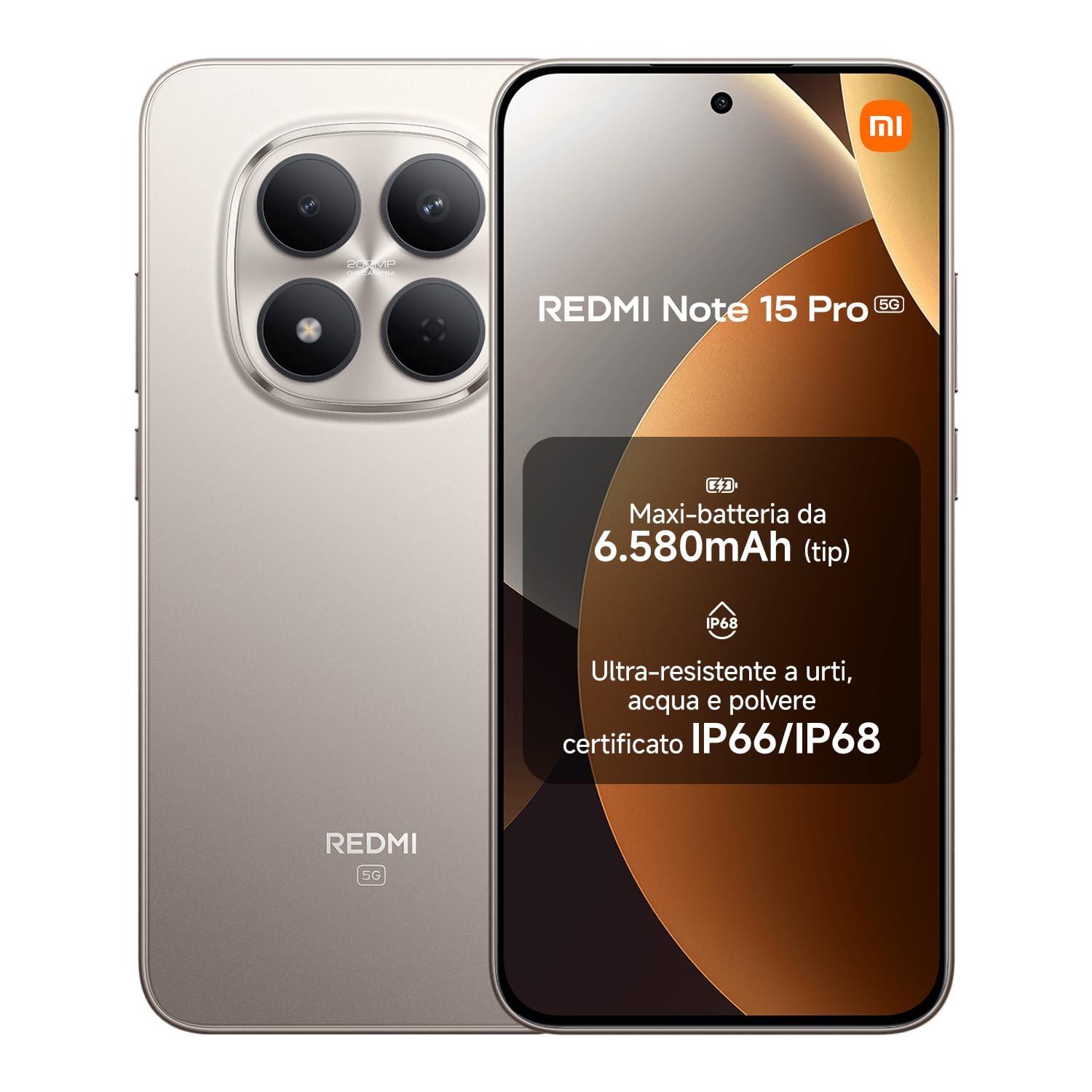
XIAOMI Redmi Note 15 Pro 5G smartphone, front and back view.
Package Contents
Verify that all items are present in your product package:
- XIAOMI Redmi Note 15 Pro 5G Smartphone
- USB-C Cable
- SIM Ejector Tool
- Silicone Protective Cover
- Ring Holder
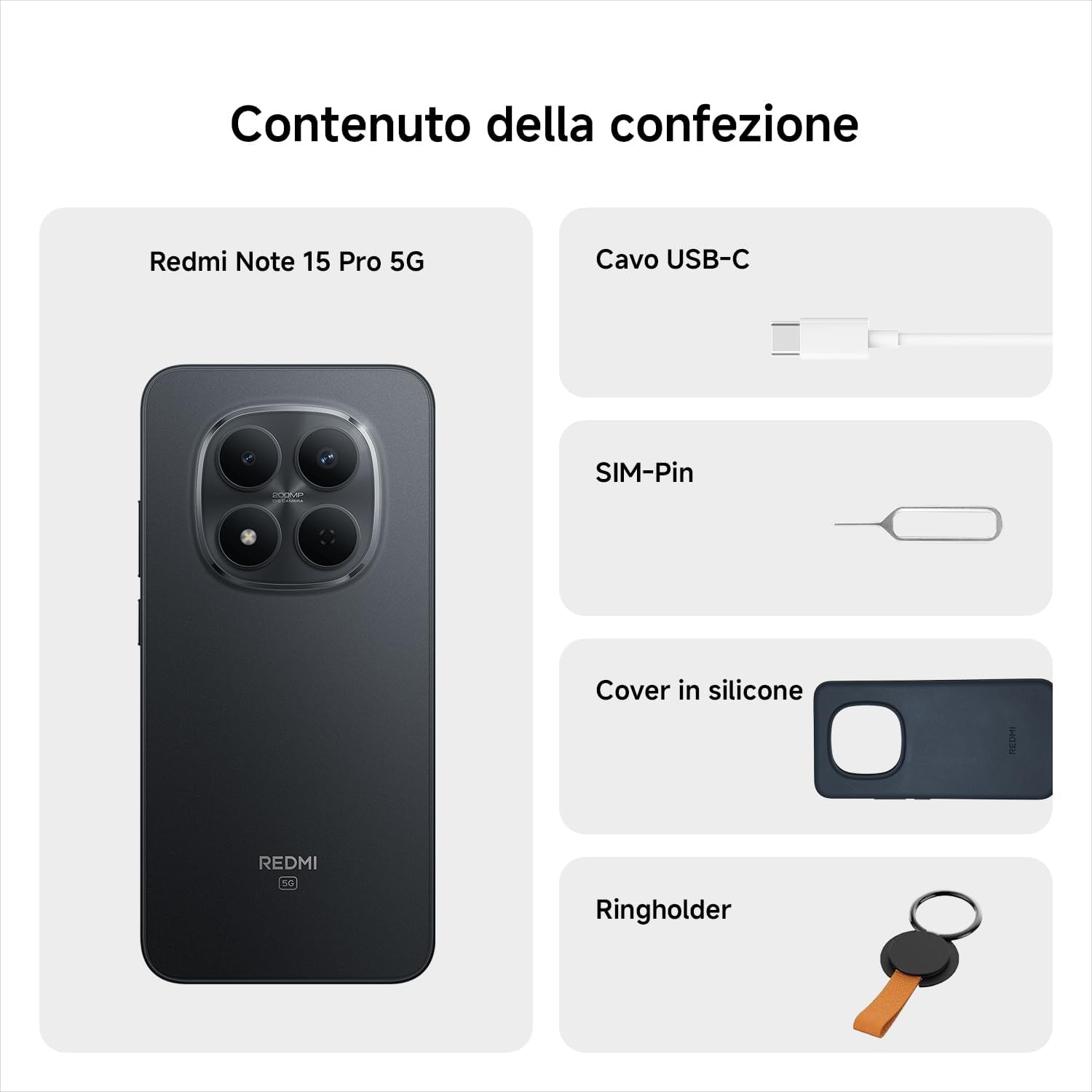
Contents of the Redmi Note 15 Pro 5G package, including the phone, USB-C cable, SIM ejector tool, silicone cover, and ring holder.
Note: A charger is not included in the package. Please use a compatible 45W turbo-charger for optimal charging performance.
Setup
1. Insert SIM Card
- Locate the SIM card tray on the side of your device.
- Insert the SIM ejector tool into the small hole next to the tray and push gently until the tray pops out.
- Place your Nano-SIM card(s) into the tray with the gold contacts facing down.
- Carefully push the tray back into the slot until it is flush with the phone's body.
2. Charge the Battery
Before first use, fully charge your smartphone. Connect the USB-C cable to the phone's charging port and the other end to a compatible 45W power adapter (not included) or a computer's USB port.

Redmi Note 15 Pro 5G charging via USB-C, next to wireless earbuds.
3. Power On/Off
- To power on: Press and hold the Power button until the XIAOMI logo appears.
- To power off: Press and hold the Power button, then select 'Power off' from the options on the screen.
4. Initial Setup
Follow the on-screen instructions to complete the initial setup, including language selection, Wi-Fi connection, Google account login, and security settings.
Operating Your Device
Touchscreen Navigation
- Tap: Select an item or open an app.
- Swipe: Scroll through screens or lists.
- Pinch: Zoom in or out on images and web pages.
- Long Press: Access contextual menus or move icons.

Close-up of the Redmi Note 15 Pro 5G's 6.83-inch AMOLED display.
Camera Usage
The Redmi Note 15 Pro 5G features a 200 MP main camera. Open the Camera app to capture photos and videos. Tap the shutter button to take a picture. Swipe left or right to switch between modes like Photo, Video, Portrait, and more.

User taking a selfie with the Redmi Note 15 Pro 5G in a snowy outdoor setting.
Making Calls and Sending Messages
Tap the Phone icon to make calls. Enter the number or select a contact. Tap the Messages icon to send text messages. Select a contact or enter a recipient, then type your message.

User making a call with the Redmi Note 15 Pro 5G in a scenic outdoor setting.
Internet and Connectivity
Connect to Wi-Fi networks via Settings > Wi-Fi. For mobile data, ensure your SIM card is active and mobile data is enabled in Settings > Mobile network. The device supports 5G connectivity.

User browsing social media on the Redmi Note 15 Pro 5G by a pool.
Maintenance
Cleaning Your Device
Use a soft, lint-free cloth to clean the screen and body of your smartphone. Avoid using harsh chemicals or abrasive materials. The device has IP66/IP68 dust and water resistance, allowing for gentle cleaning with a damp cloth if necessary, but avoid submerging it unnecessarily.

User interacting with the Redmi Note 15 Pro 5G near water, demonstrating its water-resistant capabilities.
Software Updates
Regularly check for and install software updates to ensure your device has the latest features, security patches, and performance improvements. Go to Settings > About phone > MIUI version to check for updates.
Battery Care
To prolong battery life, avoid exposing the device to extreme temperatures. Use the provided USB-C cable and a compatible 45W charger for optimal charging. Avoid completely draining the battery frequently.
Troubleshooting
Device Not Turning On
- Ensure the battery is charged. Connect the device to a charger for at least 30 minutes.
- Press and hold the Power button for 10-15 seconds to force a restart.
Apps Crashing or Freezing
- Close the problematic app and reopen it.
- Clear the app's cache and data in Settings > Apps.
- Restart your device.
Poor Network Connectivity
- Check if Airplane Mode is off.
- Ensure your SIM card is properly inserted.
- Restart your device.
- Reset network settings in Settings > Connection & sharing > Reset Wi-Fi, mobile networks, and Bluetooth.
Specifications
| Feature | Specification |
|---|---|
| Brand | XIAOMI |
| Model Name | Redmi Note 15 Pro 5G |
| Operating System | Hyper OS |
| RAM Memory Size | 12 GB |
| CPU Model | Mediatek Dimensity 9000 |
| Memory Capacity | 512 GB |
| Screen Size | 6.83 Inches |
| Resolution | 1560 x 720 |
| Wireless Service Provider | Unlocked |
| Cellular Technology | 5G |
The MediaTek Dimensity 7400-Ultra processor, powering the Redmi Note 15 Pro 5G.

EU Energy Label for the Redmi Note 15 Pro 5G, showing energy efficiency and durability ratings.

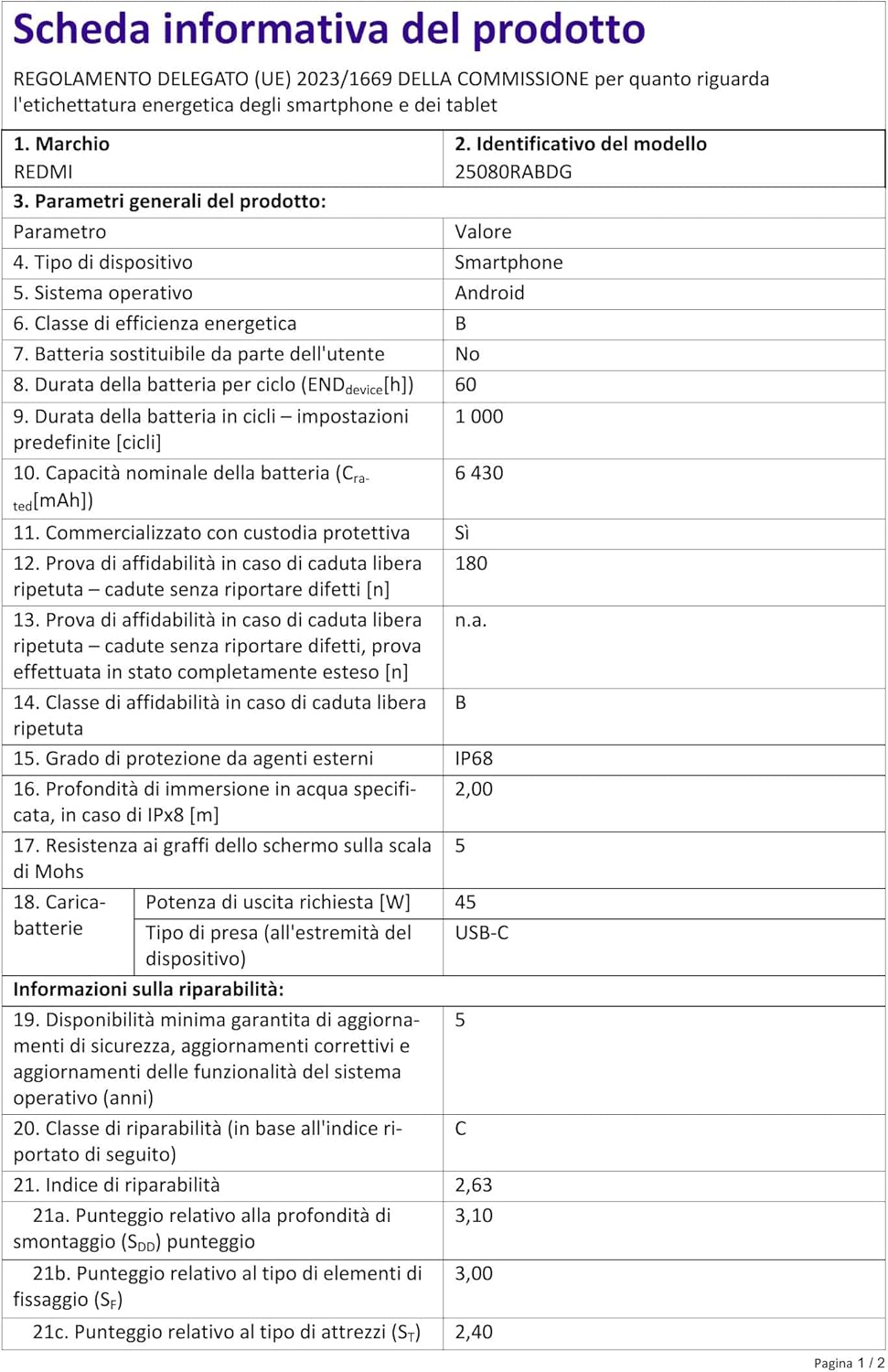
Detailed product information sheet for the Redmi Note 15 Pro 5G, including technical specifications and repairability index.
Durability Demonstration
Official video demonstrating the durability and resistance of the Redmi Note 15 Pro 5G smartphone.
Warranty and Support
The XIAOMI Redmi Note 15 Pro 5G comes with a 2-year limited warranty. For warranty claims or technical support, please refer to the official XIAOMI support channels or contact your retailer.
For further assistance, visit the official XIAOMI website or contact their customer service. Keep your proof of purchase for warranty purposes.


