
Introduction
The THE G-LAB KEYZ Elite 300 GRG is a 75% compact AZERTY mechanical gaming keyboard designed for performance and versatility. It features triple connection modes (2.4 GHz, Bluetooth, Wired), hot-swappable pre-lubricated linear switches, customizable RGB backlighting, and a durable 5-layer gasket structure. This manual provides essential information for setting up, operating, maintaining, and troubleshooting your keyboard.
Package Contents
- THE G-LAB KEYZ Elite 300 GRG Wireless Gaming Keyboard
- USB-A to USB-C Charging Cable
- USB 2.4 GHz Wireless Dongle
- Keycap Puller
- 4 x Replacement Switches
Product Overview and Features

Image: THE G-LAB KEYZ Elite 300 GRG TKL Mechanical Gaming Keyboard with key features highlighted. This image displays the keyboard, emphasizing its 5-layer gasket structure, triple connection mode, control knob, and side engraving. An exploded view illustrates the internal gasket structure.

Image: Top view of THE G-LAB KEYZ Elite 300 GRG 75% wireless keyboard highlighting linear pre-lubricated switches, 5-layer gasket structure, hot-swap switches, and RGB backlighting. A top-down view of the 75% compact wireless keyboard, showcasing its key features: pre-lubricated linear switches, 5-layer gasket structure, hot-swappable switch design, and RGB backlighting.
- Triple Wireless Mode: Seamlessly switch between ultra-fast 2.4 GHz wireless, versatile Bluetooth, or reliable wired USB-C connection.
- Mechanical Switches: Equipped with pre-lubricated linear switches, hot-swappable for customization, and rated for 80 million keystrokes.
- Compact Design: 75% compact AZERTY layout with durable PBT keycaps and a 5-layer gasket structure for enhanced typing comfort and sound.
- High Performance: Features a 1000Hz refresh rate and 100% NKRO anti-ghosting for precise and instant response. Supports 100% programmable macros.
- Long-lasting Battery: Integrated 4000mAh battery provides up to 80 hours of use without backlight or 20 hours with RGB backlight activated.
- Customizable RGB Backlight: Per-key and side RGB lighting with various effects and colors, fully programmable.
- Multi-System Compatibility: Compatible with Windows, Mac, PS4, PS5, Xbox, and Switch.
Setup
1. Connecting the Keyboard
The KEYZ Elite 300 GRG offers three connection methods:
- 2.4 GHz Wireless Mode:
- Locate the USB 2.4 GHz wireless dongle (usually stored in a compartment on the keyboard).
- Plug the dongle into an available USB-A port on your computer or compatible device.
- Ensure the keyboard's mode switch (if present) is set to 2.4 GHz mode. The keyboard should automatically connect.
- Bluetooth Mode:
- Set the keyboard's mode switch to Bluetooth mode.
- On your device (PC, smartphone, tablet), enable Bluetooth and search for new devices.
- Select "KEYZ Elite 300 GRG" from the list of available devices to pair.
- Follow any on-screen prompts to complete the pairing process.
- Wired Mode:
- Connect one end of the provided USB-A to USB-C cable to the keyboard's USB-C port.
- Connect the other end (USB-A) to an available USB port on your computer or device.
- The keyboard will function in wired mode and charge simultaneously.
2. Charging the Keyboard

Image: THE G-LAB KEYZ Elite 300 GRG keyboard highlighting its 4000mAh long-lasting battery and triple connectivity modes. This image illustrates the keyboard's 4000mAh long-lasting battery capacity and its versatile connectivity options: Bluetooth, 2.4 GHz wireless, and wired USB connection.
To charge the keyboard, connect the provided USB-A to USB-C cable to the keyboard and a power source (e.g., computer USB port, USB wall adapter). The charging indicator light will show the charging status. A full charge provides up to 80 hours of use without backlight or 20 hours with RGB backlight.
Operating Instructions
1. Mode Switching
Use the physical switch located on the keyboard to select your desired connection mode: 2.4 GHz, Bluetooth, or Wired.
2. RGB Backlight Control
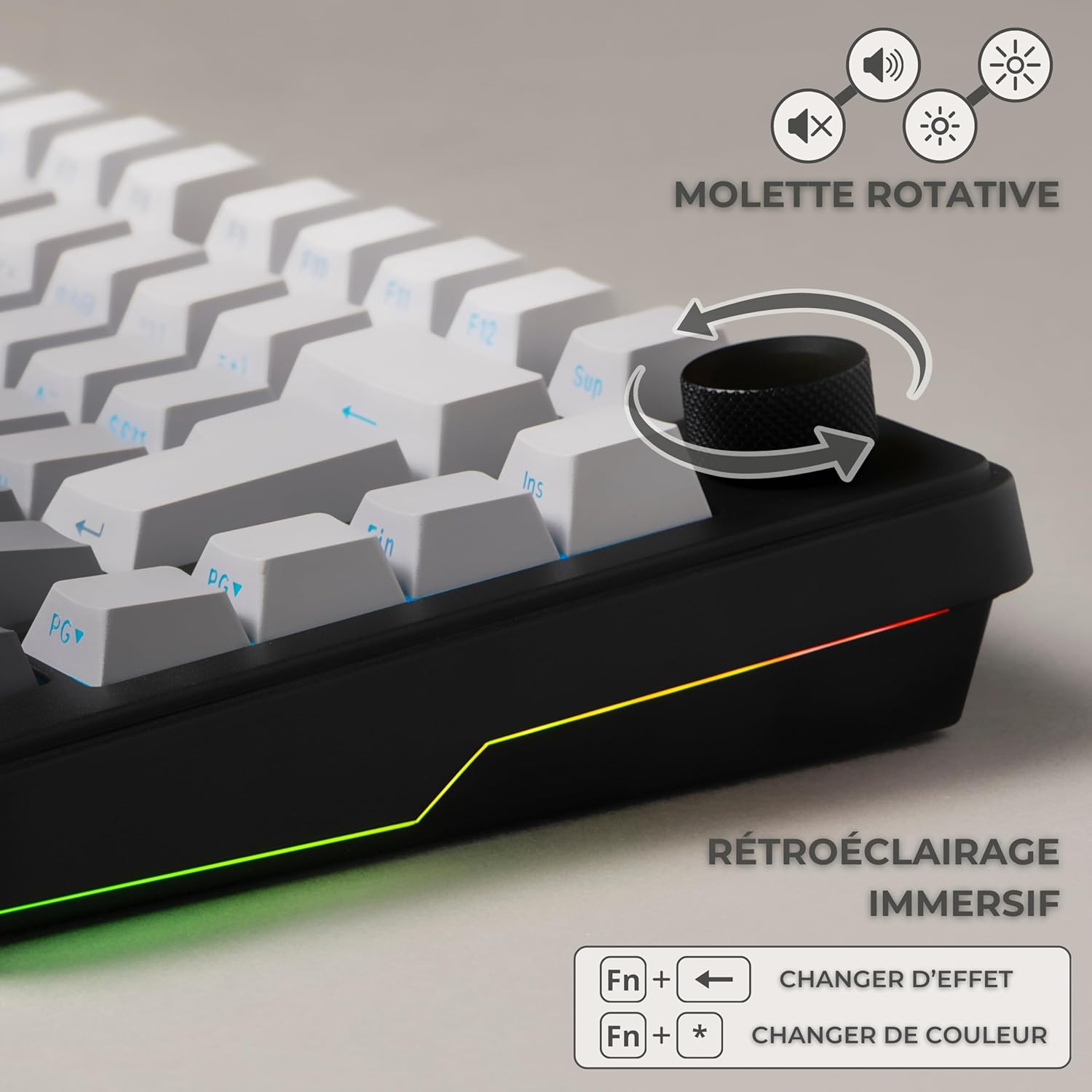
Image: Close-up of the rotary knob and immersive RGB backlighting. This image focuses on the keyboard's rotary control knob and the immersive RGB side lighting. It provides instructions for adjusting RGB effects ("Fn + Left Arrow") and changing colors ("Fn + Asterisk").
The keyboard features customizable RGB backlighting. Use the following key combinations to adjust:
- Change RGB Effect: Press Fn + Left Arrow
- Change RGB Color: Press Fn + Asterisk (*)
- Adjust Brightness: Use the rotary knob to increase or decrease backlight brightness.
3. Volume and Media Control
The rotary knob on the keyboard can also be used for volume control. Rotate it to adjust the system volume. Pressing the knob may mute/unmute audio or play/pause media, depending on the operating system and active application.
4. Macro Programming
The keyboard supports 100% programmable macros. Utilize the dedicated customization software (available from THE G-LAB's official website) to create and assign macros to specific keys for enhanced gaming and productivity.
Maintenance
1. Cleaning the Keyboard
To maintain optimal performance and appearance:
- Keycaps: Gently wipe keycaps with a soft, damp cloth. For deeper cleaning, use the keycap puller to remove them and wash with mild soap and water. Ensure they are completely dry before reattaching.
- Keyboard Body: Use a soft, dry cloth to wipe the keyboard surface. For dust between keys, use compressed air.
- Avoid using harsh chemicals or abrasive materials that could damage the keyboard's finish or keycap legends.
2. Hot-Swappable Switch Replacement

Image: Close-up of THE G-LAB KEYZ Elite 300 GRG hot-swappable mechanical switches. A detailed view of the keyboard's hot-swappable mechanical switches, indicating a pre-travel distance of 2mm, an operating force of 43g, and an end force of 55g. The image also shows the included keycap puller and spare switches.
The KEYZ Elite 300 GRG features hot-swappable switches, allowing you to easily replace them without soldering.
- Remove Keycap: Use the included keycap puller to gently remove the keycap from the switch you wish to replace.
- Remove Switch: Use the switch puller (often integrated with the keycap puller or a separate tool) to grasp the top and bottom clips of the switch. Gently pull the switch straight up and out of the PCB.
- Install New Switch: Align the pins of the new switch with the holes on the PCB. Press the switch firmly and evenly until it clicks into place. Ensure the pins are not bent.
- Reattach Keycap: Place the keycap back onto the new switch.
Troubleshooting
- Keyboard Not Responding:
- Check the connection mode (2.4 GHz, Bluetooth, Wired) and ensure it matches your device.
- Ensure the keyboard is charged. Connect the USB-C cable to charge.
- For 2.4 GHz, ensure the USB dongle is securely plugged in.
- For Bluetooth, ensure the keyboard is paired correctly and Bluetooth is enabled on your device. Try re-pairing.
- Try connecting in wired mode to rule out wireless issues.
- RGB Backlight Not Working/Incorrect:
- Ensure the backlight is not turned off or set to minimum brightness. Use the rotary knob or Fn key combinations to adjust.
- Check the customization software for any conflicting settings.
- Keys Not Registering:
- If a specific key is not working, try replacing its switch using the hot-swap feature and included spare switches.
- Ensure the keycap is properly seated on the switch.
- Connectivity Issues (Lag/Disconnections):
- For wireless modes, ensure there are no strong interferences (e.g., other wireless devices, large metal objects) between the keyboard and the receiver/device.
- Ensure the keyboard is within the effective range of the wireless connection.
- Update drivers for your device's Bluetooth or USB ports.
Specifications

Image: THE G-LAB KEYZ Elite 300 GRG keyboard demonstrating multi-system compatibility. This image highlights the keyboard's multi-system compatibility, showing it connected to a PC, Mac, and smartphone, and indicating support for PlayStation and Xbox consoles.

Image: Collage of THE G-LAB KEYZ Elite 300 GRG features. A comprehensive collage detailing various features including the TKL compact format, extended battery life (20 hours with RGB, 80 hours without), customizable RGB backlighting, pre-lubricated linear switches, durable double-injection PBT keycaps, Cherry layout, and low latency across different connection modes (1ms wired, 2ms 2.4GHz, 7ms Bluetooth).
| Brand | THE G-LAB |
| Model | KEYZELITE300GRG |
| Connectivity Technology | 2.4 GHz Wireless, Bluetooth, USB-A (Wired) |
| Keyboard Type | Mechanical |
| Switch Type | Linear (ktt_wine_red), Pre-lubricated, Hot-swappable |
| Keyboard Layout | AZERTY, 75% Compact (TKL) |
| Battery Capacity | 4000 mAh |
| Battery Life | Up to 80 hours (without backlight), 20 hours (with RGB backlight) |
| Dimensions (L x W x H) | 33.7 x 14.3 x 4.2 cm |
| Item Weight | 1 Kilogram |
| Material | Polybutylene Terephthalate (PBT), Silicone |
| Compatible Devices | PC, Gaming Console (PS4, PS5, Xbox, Switch), Smartphone, Tablet |
| Compatible Operating Systems | Windows, Mac, iOS |
| Special Features | 5-layer gasket structure, Hot Swap, RGB Backlight, Programmable Macros, Rotary Control Knob |
Warranty and Support
For detailed warranty information, technical support, and access to the latest drivers or customization software, please visit THE G-LAB's official website or contact their customer service directly. Keep your proof of purchase for any warranty claims.


