
1. Introduction
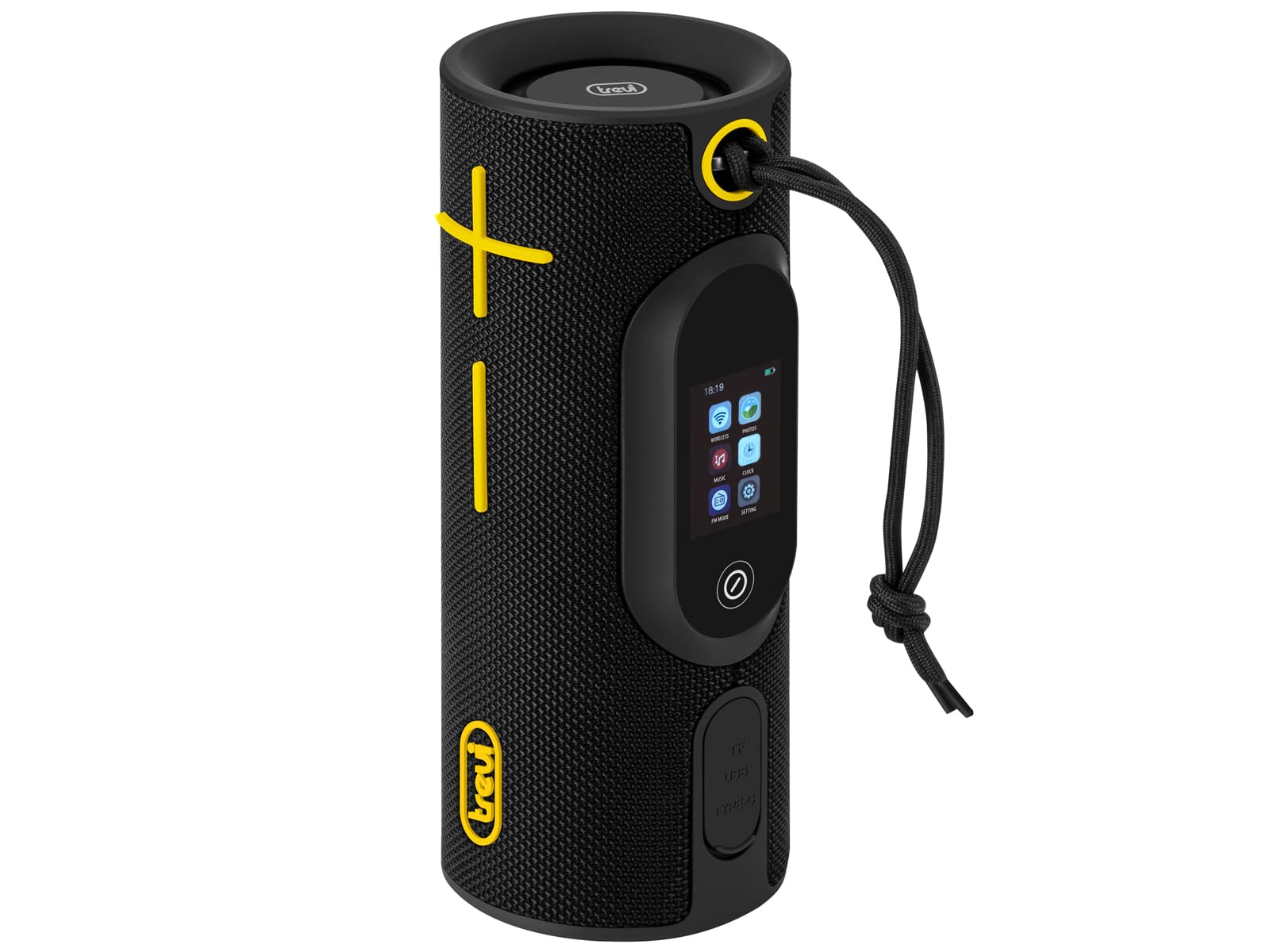
The Trevi XSC 8B30 BD is more than just a portable speaker; it is a complete audio system designed to offer an exceptional sound experience and unparalleled connectivity wherever you are. With a robust design and advanced features, it is the ideal companion for your music, adventures, and daily life. Enjoy rich and balanced sound thanks to the two 2.24-inch speakers and two passive woofers, which ensure deep bass and crystal-clear "Clear Sound". With a total power of 2x10W, the Trevi XSC 8B30 BD speaker fills any environment with your favorite music. Customize the listening experience with 3 available pre-equalizations, adapting the sound to every musical genre. Equipped with Audio Wireless v5.3, it ensures a stable and fast connection with all compatible devices. The true revolution is the ability to simultaneously connect up to 100 speakers to create a multi-room audio system that covers every corner of your home or event. Additionally, the TWS (True Wireless Stereo) function allows you to pair two speakers for an even more immersive and powerful stereo experience. Manage your music and settings with maximum ease thanks to the digital controls and the innovative 2-inch Touch Screen display. You will have full control over volume, playback, and pause, with an LED charging indicator and battery status always visible on the display. Not just music! The Trevi XSC 8B30 BD integrates Radio, Alarm, Clock, and Date, transforming into a complete multimedia center. Play your MP3 files directly from Micro SD and USB, offering endless options for your music library. Designed to accompany you everywhere, the Wireless Multi-room 2x10W USB Micro SD IPX5 Trevi XSC 8B30 BD Speaker is water-resistant with IPX5 certification, meaning it is protected from water splashes, making it perfect for outdoor use, by the pool, or in the bathroom. Power is provided by a rechargeable lithium battery with convenient Type-C charging, ensuring long battery life and practicality.
2. Initial Setup
2.1. Charging the Speaker
Before first use, fully charge your Trevi XSC 8B30 BD speaker. Use the provided USB-C cable and a compatible power adapter (not included) to connect the speaker to a power source. The LED indicator on the display will show the charging status. A full charge ensures long battery life.
2.2. Powering On/Off
- To power on: Press and hold the power button on the speaker's control panel until the display lights up.
- To power off: Press and hold the power button until the display turns off.
2.3. Bluetooth Pairing
- Ensure the speaker is powered on and in Bluetooth pairing mode (indicated by a flashing Bluetooth icon on the display).
- On your device (smartphone, tablet, etc.), go to Bluetooth settings and search for available devices.
- Select "Trevi XSC 8B30 BD" from the list.
- Once connected, the Bluetooth icon on the speaker's display will become solid.
2.4. True Wireless Stereo (TWS) Pairing
To enjoy an immersive stereo experience, you can pair two Trevi XSC 8B30 BD speakers:
- Ensure both speakers are powered on and not connected to any other Bluetooth device.
- On one speaker (this will be the primary speaker), press the TWS button (refer to the control panel diagram in the next section).
- The primary speaker will search for another Trevi XSC 8B30 BD speaker.
- Once connected, both speakers will play audio in stereo mode.
3. Operating Instructions
3.1. Control Panel Overview

Image: Top view of the Trevi XSC 8B30 BD speaker showing the touch display and control buttons.
- Power Button: Press and hold to turn on/off. Short press to switch modes (Bluetooth, USB, MicroSD, Radio).
- Volume Up/Down: Adjust playback volume.
- Play/Pause: Control music playback.
- Previous/Next Track: Skip between tracks.
- EQ Button: Cycle through 3 pre-equalization settings.
- TWS Button: Initiate True Wireless Stereo pairing.
- Touch Display: Provides visual feedback on mode, battery status, time, and other functions.
3.2. Music Playback
- Bluetooth: Connect your device via Bluetooth as described in the Setup section.
- USB/MicroSD: Insert a USB drive or MicroSD card into the respective port. The speaker will automatically switch to the correct mode and begin playing MP3 files.
- Radio: Press the Power button to cycle to Radio mode. Use the track skip buttons to scan for stations.
3.3. Multi-Room Function
The speaker supports connecting up to 100 compatible speakers for a multi-room audio experience. Refer to the specific instructions for the Multi-Room feature, usually found in the advanced settings via the touch display or a dedicated app (if available).
3.4. Clock, Alarm, and Date
The 2-inch touch display allows you to set the clock, alarm, and date. Navigate through the display menus using the touch interface to configure these features.
4. Maintenance
4.1. Cleaning
- Wipe the speaker with a soft, dry cloth.
- Do not use abrasive cleaners, waxes, or solvents.
4.2. Water Resistance (IPX5)

Image: Trevi XSC 8B30 BD speaker being splashed with water, demonstrating its IPX5 water resistance.
The Trevi XSC 8B30 BD is IPX5 water-resistant, meaning it is protected against water splashes from any direction. However, it is not designed to be submerged in water. Ensure all port covers are securely closed before exposing the speaker to water.
4.3. Storage
Store the speaker in a cool, dry place away from direct sunlight and extreme temperatures when not in use for extended periods.
5. Troubleshooting
| Problem | Possible Cause | Solution |
|---|---|---|
| Speaker does not turn on. | Low battery. | Charge the speaker using the USB-C cable. |
| Cannot pair via Bluetooth. | Speaker not in pairing mode; device too far; interference. | Ensure speaker is in pairing mode (flashing Bluetooth icon). Move device closer. Turn off other Bluetooth devices. |
| No sound from speaker. | Volume too low; incorrect input source; device not playing. | Increase speaker and device volume. Check input mode (Bluetooth, USB, MicroSD). Ensure music is playing on the connected device. |
| TWS pairing fails. | Speakers already connected to other devices; too far apart. | Disconnect both speakers from other devices. Ensure they are close to each other during pairing. |
6. Specifications
| Feature | Detail |
|---|---|
| Model Number | XSC 8B30 BD |
| Brand | Trevi |
| Audio Output Mode | Stereo |
| Speaker Output Power | 20 Watts |
| Speaker Size | 2.24 Inches |
| Wireless Technology | Bluetooth v5.3 |
| Control Method | Touch |
| Power Source | Battery Powered (Rechargeable Lithium, Type-C) |
| Water Resistance | IPX5 Certified |
| Included Components | Microphone |
| Product Dimensions | 34P x 32.6l x 74H cm (Note: This seems like an error in the source data, likely referring to a different product or misinterpretation of P, L, H) |
| Weight | 1 Kilogram |
| Compatible Devices | Smartphone, Tablet, Laptop, MP3 Player, Home theater |
7. Product Videos
The following videos showcase features and usage of similar portable speakers from other brands, demonstrating common functionalities and benefits that may also apply to your Trevi XSC 8B30 BD speaker.
OHAYO Bluetooth Speaker 40W
Description: This video showcases the features of the OHAYO Bluetooth Speaker, including its 40W power, EQ modes, LED lights, IPX7 waterproofing, and TWS pairing. It highlights the deep bass and stereo sound capabilities.
BOGASING M5 Powerful Bluetooth Speaker
Description: An unboxing and feature overview of the BOGASING M5 speaker, demonstrating its portability, battery indicator, three audio modes (3D Stereo, Vocal, Super Bass), and various input ports (AUX-IN, USB, USB-C, TF Card). It also highlights its IPX7 waterproof rating.
BOGASING G6 Portable Bluetooth Speaker
Description: This video highlights the BOGASING G6 Bluetooth speaker's features, including 35-hour battery life, extended passive radiator for deep bass, DSP technology, three EQ modes (3D Stereo, Vocal, Super Bass), Bluetooth 5.3, built-in microphone, IPX6 waterproofing, and multiple connectivity options (AUX-IN, USB, TF Card, Type-C). It also shows TWS pairing.
ZEALOT S76 Bluetooth Portable Speaker
Description: This video presents the ZEALOT S76 Portable Bluetooth Speaker, emphasizing its 50W high power output, 8000mAh battery for extended playtime, audio quality, dazzling RGB lights, dual bass radiators, versatile playback modes, adjustable strap, wireless interconnection for amplified sound, and IPX6 waterproof rating. It also showcases various color options.
BOGASING G4 Bluetooth Speaker
Description: This video highlights the BOGASING G4 speaker's features, including 50W immersive sound, exceptional audio with MEGA Bass, precise and powerful bass, 8-24 hours of continuous music playback, wireless stereo mode, IPX7 waterproofing, battery indicator, super portable and robust design, Bluetooth 5.3, and multiple input options (TF Card, AUX-IN, USB-C). It also mentions three sound effects: 3D stereo, vocal, and super bass.


