
Introduction
The Neakasa AirStep is a versatile 2-in-1 device designed to enhance your cat's litter box experience and improve air quality in your home. It functions as a sturdy step, providing easy access for your cat to the litter box, while simultaneously acting as an air purifier to control odors, dust, and pet hair.
This manual provides instructions for the setup, operation, maintenance, and troubleshooting of your Neakasa AirStep.

Image: The Neakasa AirStep serves as both an air purifier and a cat step, positioned next to a litter box. A cat is shown using the step, and a person is nearby, illustrating its dual functionality.
Safety Information
- Ensure the device is placed on a stable, level surface.
- Keep the device away from water and moisture to prevent electrical hazards.
- Do not block the air intake or exhaust vents.
- Unplug the device before cleaning or performing any maintenance.
- This product is intended for indoor use only.
- Keep out of reach of children and pets when not in use or during maintenance.
Package Contents
Verify that all components are present in the package:
- Neakasa AirStep Unit (Main Body and Top Shell)
- Activated Carbon Filter (pre-installed or separate)
- Power Adapter
- User Manual (this document)
Setup
Follow these steps to set up your Neakasa AirStep:
- Unpack Components: Carefully remove all items from the packaging.
- Position the AirStep: Place the AirStep on a flat surface directly in front of your cat's litter box. Ensure the 6.5-inch step height is suitable for your cat.
- Install Filter (if not pre-installed):
- Remove the top shell of the AirStep.
- Insert the activated carbon filter into the designated compartment. Ensure the protective film is removed from the new filter.
- Replace the top shell securely.
- Connect Power: Plug the power adapter into the DC input port on the back of the AirStep, then plug the adapter into a wall outlet.
Video: Quick Start Guide for the Neakasa AirStep, demonstrating unboxing, assembly, and initial power-on.

Image: The Neakasa AirStep is shown next to both an automatic litter box and a standard litter box, highlighting its 6.5-inch step height and compatibility with various litter box types.
Operating Instructions
The Neakasa AirStep features three airflow modes for optimal odor control:
- Power Button: Press to turn the device On or Off.
- Mode Button: Press to cycle through the three airflow modes.
- All-Day Mode (Green Light): Provides continuous, low-level air purification for ongoing freshness. This mode is energy-efficient and quiet, suitable for daily use.
- Boost Mode (Orange Light): Offers stronger odor control for situations requiring more intensive purification. Use this mode for moderate odor issues.
- Max Mode (Red Light): Activates a powerful 1-minute odor cleanup cycle immediately after your cat uses the litter box. This mode provides rapid odor adsorption for immediate freshness.
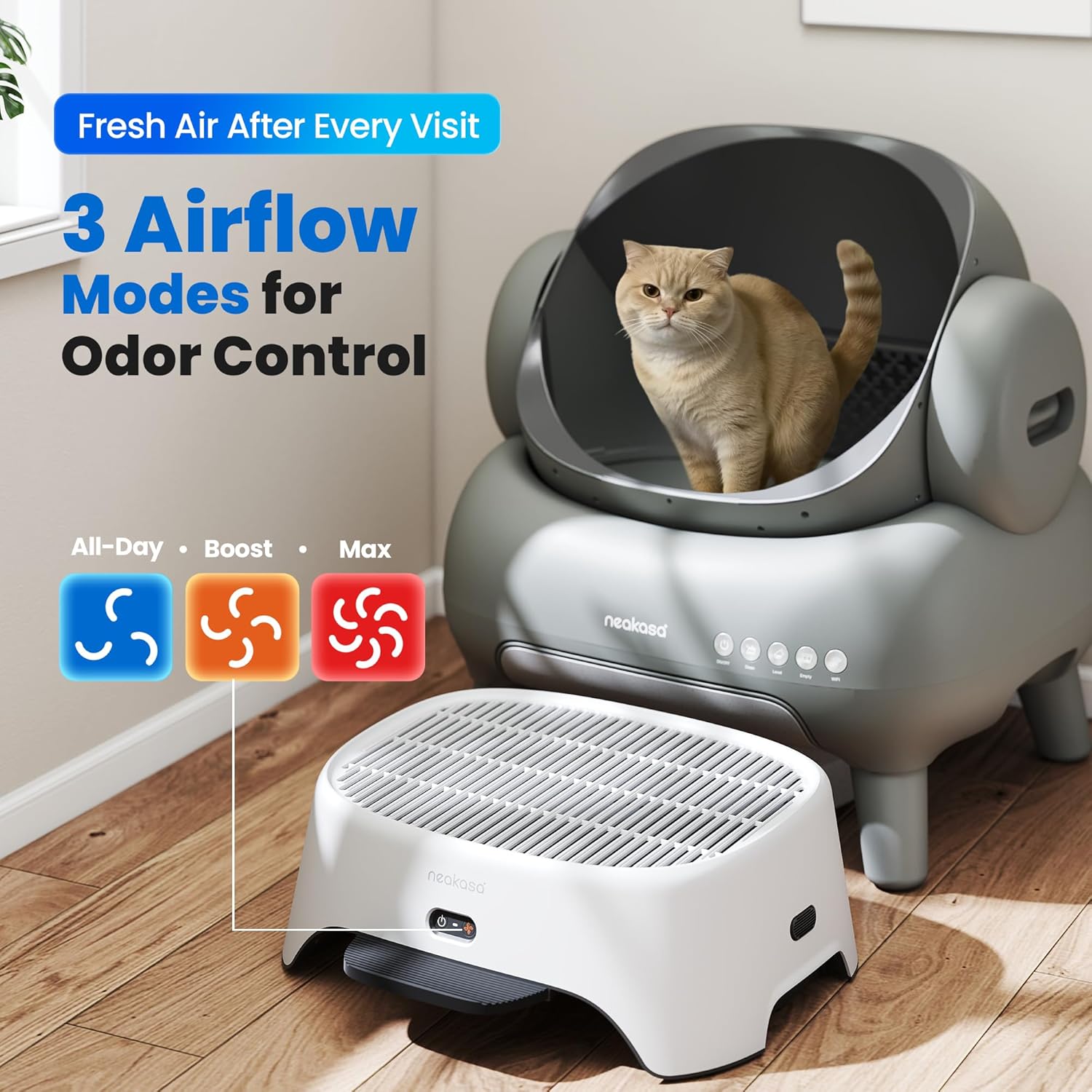
Image: The Neakasa AirStep control panel shows the three distinct airflow modes: All-Day (green light), Boost (orange light), and Max (red light), indicating different levels of odor control.

Image: A visual representation of the Neakasa AirStep's Max Mode, which provides rapid air purification within one minute after a cat's visit to the litter box.
Maintenance
Regular maintenance ensures optimal performance and longevity of your Neakasa AirStep.
Filter Replacement
For best odor control and air purification, replace the activated carbon filter every 2–3 months. Households with multiple cats may require more frequent replacements.
- Power Off: Unplug the AirStep from the power outlet.
- Open: Gently remove the top shell of the AirStep.
- Remove Old Filter: Carefully lift out the used activated carbon filter.
- Unwrap New Filter: Remove the new filter from its packaging and peel off any protective film.
- Insert New Filter: Place the new filter into the compartment, ensuring it fits snugly.
- Close: Reattach the top shell, ensuring it clicks securely into place.
- Reconnect Power: Plug the AirStep back into the power outlet.
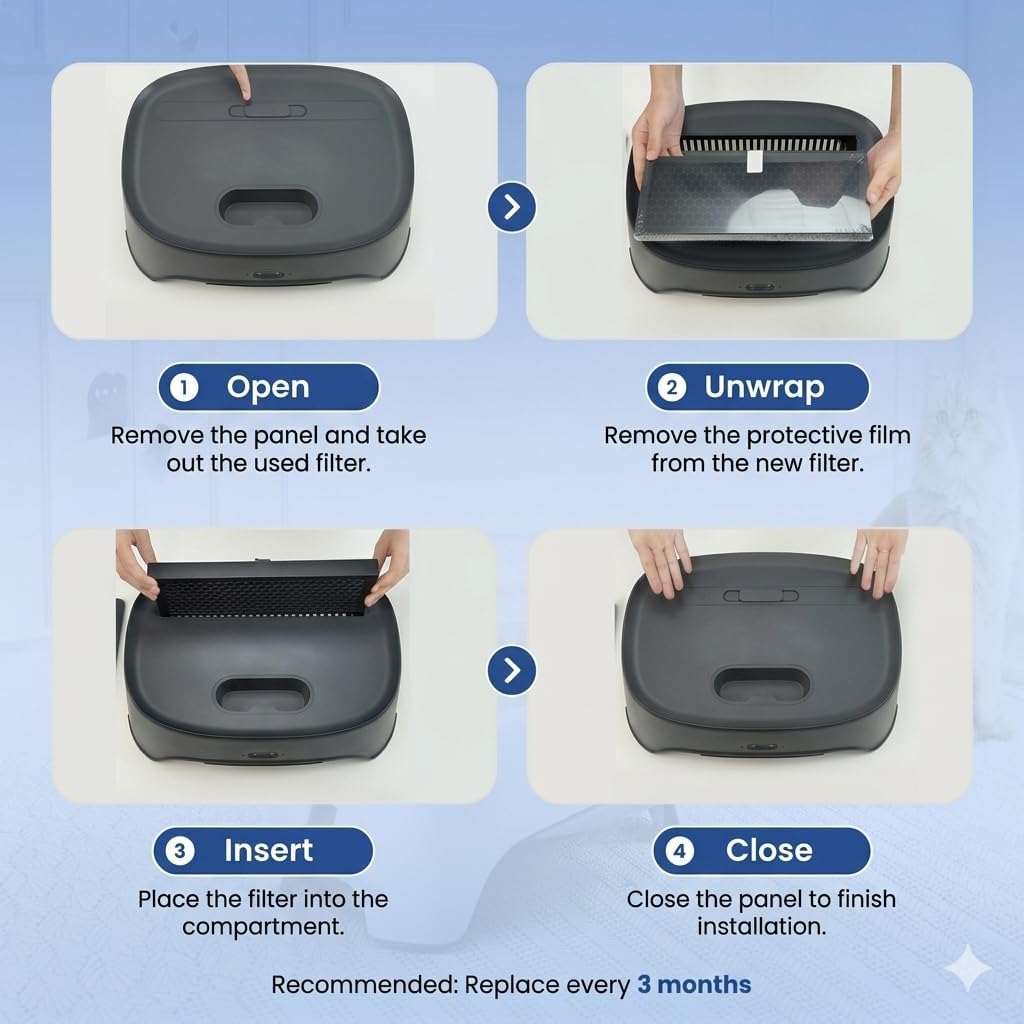
Image: A step-by-step guide illustrating the process of replacing the activated carbon filter in the Neakasa AirStep.

Image: An exploded diagram showing the main components of the Neakasa AirStep, including the removable top shell, activated carbon filter, litter collection tray, and electronic control module.
Cleaning the Litter Collection Tray
The removable litter collection tray helps capture tracked litter. Empty and clean it regularly as needed.
- Power Off: Unplug the AirStep.
- Remove Tray: Slide out the litter collection tray from the front of the unit.
- Empty and Clean: Dispose of collected litter. Wipe the tray with a damp cloth and mild detergent if necessary. Ensure it is completely dry before reinserting.
- Reinsert Tray: Slide the clean tray back into its slot until it is secure.
- Reconnect Power: Plug the AirStep back into the power outlet.

Image: The hidden litter collection tray of the Neakasa AirStep is shown, illustrating its function in gathering tracked litter and debris.
Troubleshooting
If you encounter issues with your Neakasa AirStep, refer to the following common problems and solutions:
| Problem | Possible Cause | Solution |
|---|---|---|
| Device does not power on. | Not plugged in; power outlet issue; faulty adapter. | Ensure the power adapter is securely plugged into both the device and a working wall outlet. Try a different outlet. |
| Odor control is ineffective. | Filter is old or clogged; incorrect mode selected. | Replace the activated carbon filter (recommended every 2-3 months). Ensure the device is operating in an appropriate mode (Boost or Max for stronger odors). |
| Excessive litter tracking. | Litter collection tray is full or improperly installed. | Empty and clean the litter collection tray. Ensure it is correctly seated in its slot. |
| Device is noisy. | Operating in Boost or Max mode; obstruction in fan. | Noise levels are higher in Boost and Max modes. Switch to All-Day mode for quieter operation. Check for any obstructions in the fan area (after unplugging). |
If the problem persists, please contact customer support.
Specifications
| Feature | Detail |
|---|---|
| Model Number | PS0390WE |
| Product Dimensions (L x W x H) | 12.6" x 6.5" x 17.4" |
| Item Weight | 2.7 Kilograms (5.95 Pounds) |
| Material | Plastic |
| Color | White |
| Power Consumption | 1.6–5.4 W (across all modes) |
| Filter Type | Activated Carbon Filter |
| Compatibility | Neakasa, PETKIT, Petlibro, most self-cleaning and basic litter boxes |
| Additional Features | Air Purifier, Cat Step, Litter Dust Control, Odor Control |
Warranty
The Neakasa AirStep comes with a 1-year warranty from the date of purchase. This warranty covers manufacturing defects and malfunctions under normal use. It does not cover damage caused by misuse, accidents, unauthorized modifications, or failure to follow the instructions in this manual. Please retain your proof of purchase for warranty claims.
Support
For further assistance, technical support, or warranty inquiries, please contact Neakasa customer service. Neakasa offers 24-hour customer service.
You can visit the official Neakasa Store for more information and contact details: Neakasa Store on Amazon


