
1. Introduction
This manual provides essential information for the safe and effective use of your WALKINGPAD A1Pro Foldable Walking Pad. Please read all instructions carefully before operation and retain this manual for future reference.

The WALKINGPAD A1Pro is designed for convenient home and office use, featuring a foldable design for easy storage.
2. Safety Information
Always prioritize safety when using the walking pad. Failure to follow safety instructions may result in injury or damage to the product.
- Read all instructions carefully before first use.
- Ensure the walking pad is placed on a flat, stable surface.
- Maximum weight recommendation: 230 lbs.
- Recommended age for users: 14-60 years old.
- Keep children and pets away from the walking pad during operation.
- Do not use the walking pad if it is damaged or malfunctioning.
- Always unplug the power cord before moving or cleaning the device.
- If using on a GFCI outlet, an isolation transformer (at least 500W capacity) may be required to prevent tripping due to motor power draw.
3. Package Contents
- WALKINGPAD A1Pro Walking Pad
- Power Cord
- Remote Control
- Tool Kit
- User Manual
4. Product Overview & Features
The WALKINGPAD A1Pro is designed for convenience and performance, offering several key features:
- Foldable Design: Folds completely in half, reducing its footprint by 50% for easy storage under beds, sofas, or desks.
- Durable Finish: Features a matte-black finish resistant to scratches and daily wear.
- Integrated Front Display: A larger, clearer display shows speed, time, and distance directly on the unit.
- Adaptive Speed Control: Adjustable speed between 0.5 and 3.75 mph to suit various walking paces.
- Upgraded Brushless Motor: Provides quieter and smoother operation with a consistent performance.
- Comfort & Quiet: EVA cushioning offers a comfortable feel, and the lower platform contributes to quieter walking.

The foldable design allows for convenient storage under furniture, minimizing space requirements.

Utilize the walking pad with a standing desk for an active work environment.

The multi-layer design with EVA cushioning ensures comfort and reduces noise during use.
5. Setup
The WALKINGPAD A1Pro requires minimal assembly and is designed for quick setup:
- Unboxing: Carefully remove the walking pad from its packaging.
- Placement: Place the folded walking pad on a flat, stable surface.
- Unfolding: Gently lift the rear section of the walking pad and unfold it until it lies flat. Ensure the folding mechanism locks securely into place.
- Power Connection: Plug the power cord into the designated port on the walking pad and then into a suitable electrical outlet.
For a visual guide on setup and initial use, please refer to the video below:
This video demonstrates the unboxing, unfolding, and initial operation of the Walkingpad A1 Pro, including remote control usage and display features.
6. Operating Instructions
The WALKINGPAD A1Pro offers flexible control options:
6.1 Powering On/Off
- To power on, press the power button on the remote control or the main unit.
- To power off, press and hold the power button on the remote control or the main unit.
6.2 Remote Control Functions
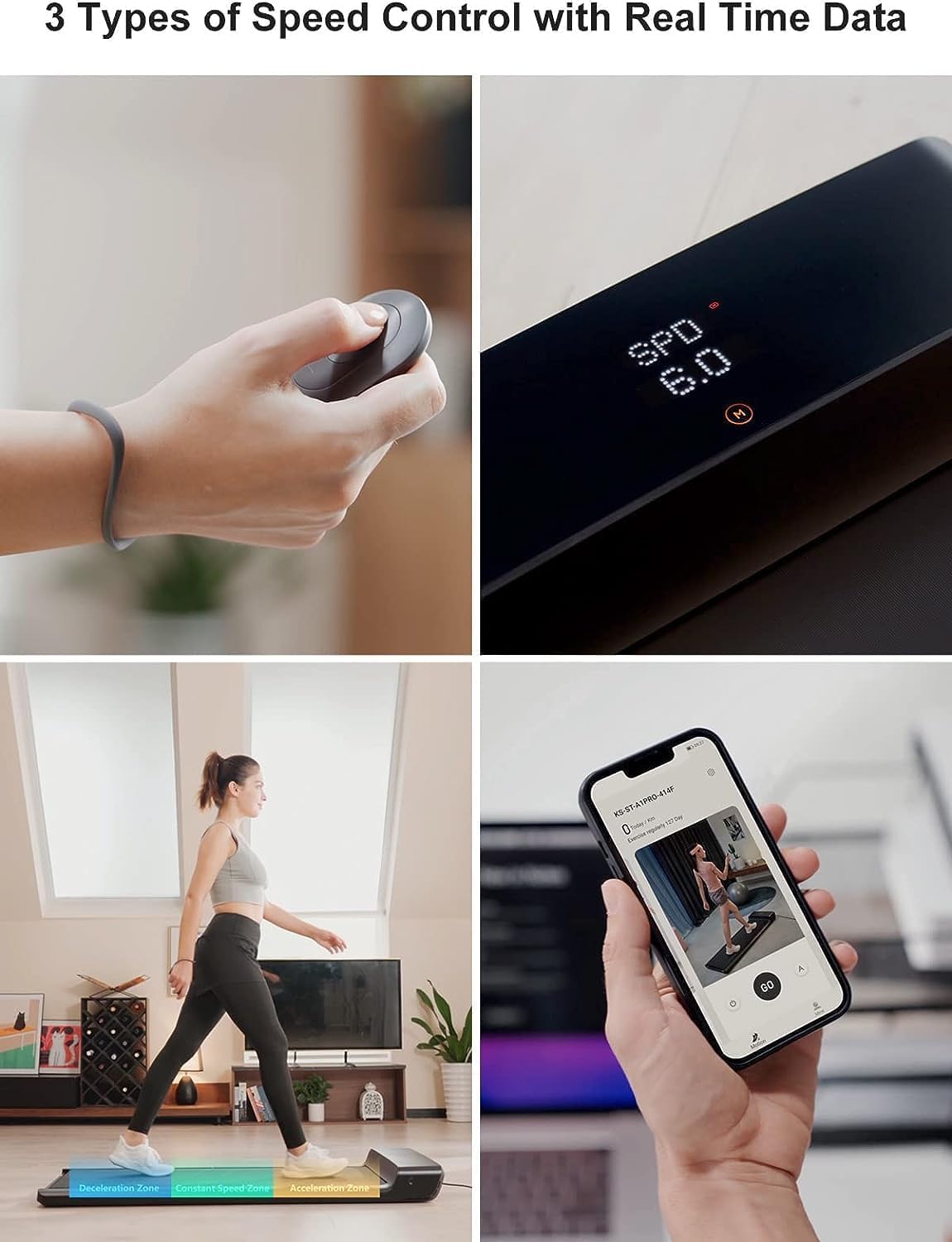
The remote control allows for easy adjustment of speed and mode selection.
- Start/Stop Button: Press to start or pause the walking pad.
- Speed +/- Buttons: Adjust the walking speed in increments.
- Mode Switch Button: Toggle between Manual (M) and Automatic (A) modes.
6.3 Operating Modes
- Manual Mode (M): Control the speed directly using the remote control's +/- buttons or the KS App.
- Automatic Mode (A): The walking pad automatically adjusts speed based on your position on the belt. Walking towards the front increases speed, while walking towards the rear decreases it.
6.4 KS App Integration
Download the KS App from your device's App Store to unlock additional features:
- Control the walking pad directly from your smartphone.
- Track your workout data (time, distance, speed, calories burned, steps).
- Access various walking programs and settings.
7. Maintenance
Regular maintenance ensures the longevity and optimal performance of your walking pad:
- Lubrication: Apply silicone oil to the walking belt every 3 months or as needed, following the instructions in the tool kit.
- Cleaning: Regularly wipe down the walking pad with a damp cloth to remove dust and sweat. Avoid using abrasive cleaners.
- Belt Alignment: Periodically check the walking belt for proper alignment. If the belt shifts to one side, adjust it according to the instructions in the user manual to prevent fraying.
8. Troubleshooting
If you encounter issues with your WALKINGPAD A1Pro, consider the following common solutions:
- Power Trips on GFCI Outlet: The motor's initial power draw can trip GFCI circuits. Consider using an isolation transformer (at least 500W) if operating on a GFCI-protected outlet.
- Belt Fraying: This can occur if the belt is not properly aligned and rubs against the frame. Adjust the belt alignment as per the manual's instructions.
- Unusual Noise: Ensure the walking pad is on a flat surface. Check for any obstructions under the belt. If the noise persists, contact customer support.
- App Connectivity Issues: Ensure Bluetooth is enabled on your device and the walking pad is powered on. Restarting both the app and the walking pad may resolve the issue.
9. Specifications
| Brand | WALKINGPAD |
| Model Name | WALKINGPAD A1 Pro |
| Color | Black |
| Product Dimensions | 56.5"D x 21.5"W x 5"H |
| Folded Size | 28.25 x 10.75 x 5 inches |
| Item Weight | 59 Pounds |
| Material | Aluminum |
| Maximum Speed | 3.75 Miles per Hour |
| Minimum Speed | 0.5 Miles per Hour |
| Maximum Weight Recommendation | 230 Pounds |
| Power Source | Corded Electric |
| Metrics Measured | Calories Burned, Distance, Speed, Time |
10. Warranty and Support
Your WALKINGPAD A1Pro comes with a one-year warranty from the date of purchase.
For customer support, technical assistance, or warranty claims, please refer to the contact information provided in your product packaging or visit the official WALKINGPAD website.
You can also find additional support and resources by visiting the WALKINGPAD Store on Amazon.


