
Blukar K9175
Blukar K9175 Rechargeable EDC Flashlight
Instruction Manual
Introduction
Thank you for choosing the Blukar K9175 Rechargeable EDC Flashlight. This compact and powerful flashlight is designed for daily carry, emergency situations, camping, working, and various outdoor activities. Please read this manual carefully before use to ensure proper operation and to maximize the product's lifespan.
Safety Information
- Do not look directly into the light beam to avoid eye injury.
- Keep out of reach of children.
- Do not disassemble or modify the flashlight, as this may void the warranty and cause damage.
- Use only the provided USB-C cable for charging.
- Avoid exposing the flashlight to extreme temperatures or direct sunlight for prolonged periods.
- Ensure the charging port cover is securely closed when not charging to maintain IPX6 waterproof rating.
Package Contents
- Blukar K9175 Rechargeable EDC Flashlight
- USB-C Charging Cable
- User Manual
Product Overview
The Blukar K9175 features a compact design with multiple light sources and intuitive controls.

Figure 1: Blukar K9175 EDC Flashlight Overview
Key Components:
- XPG White Light LED: Primary spotlight source.
- COB White Light LED: Wide floodlight source.
- Red Light LED: For night vision preservation or signaling.
- Power/Brightness Switch: Controls power on/off and brightness levels.
- Mode Switch: Cycles through different light modes.
- USB-C Charging Port: For recharging the internal battery.
- Battery Indicator Light: Shows charging status and low battery warning.
- Versatile Clip: For attaching to pockets, backpacks, or headbands.
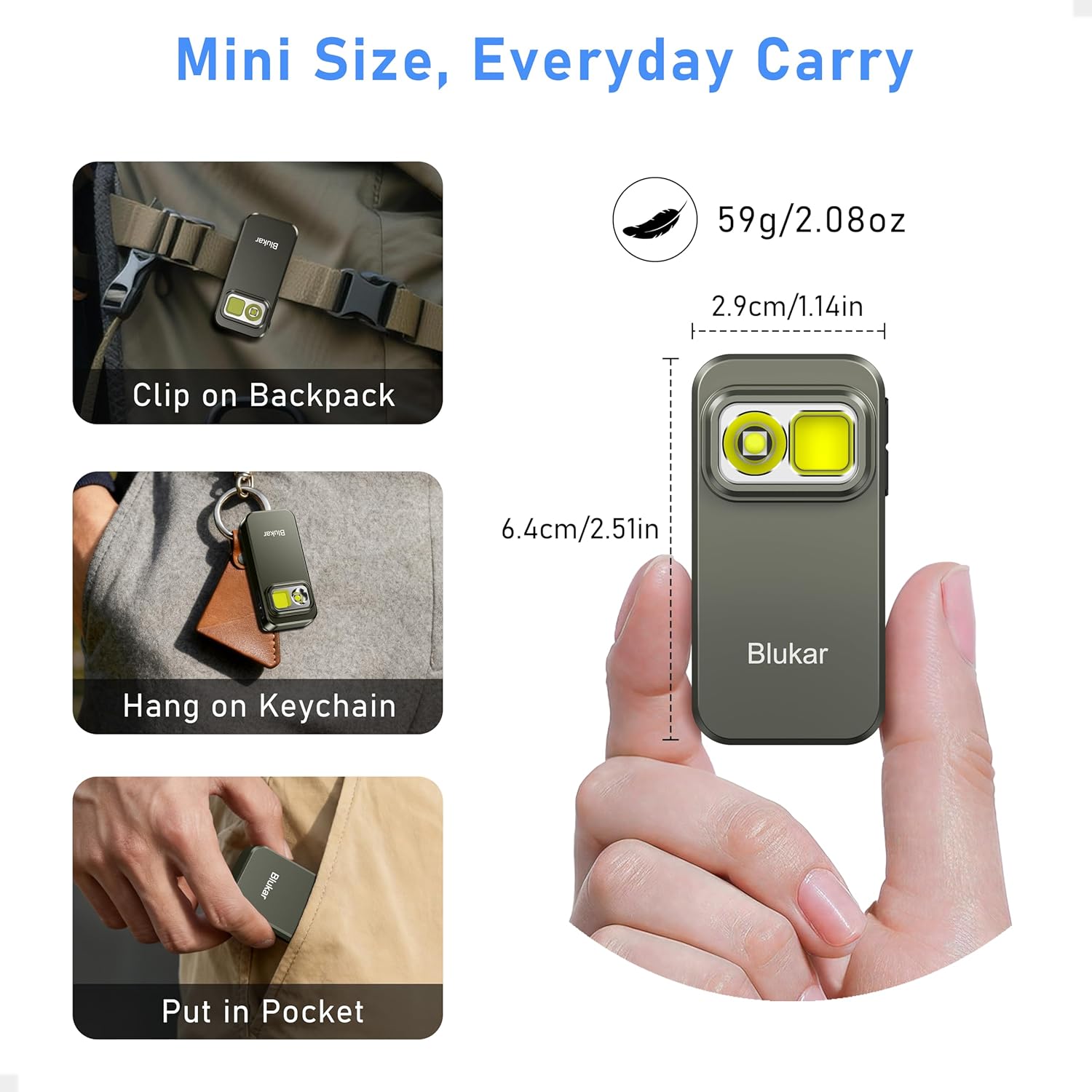
Figure 2: Compact Size and Everyday Carry Options
Setup
Charging the Flashlight:
- Locate the USB-C charging port on the side of the flashlight.
- Open the protective rubber cover of the USB-C port.
- Connect the included USB-C cable to the flashlight's port and the other end to a USB power source (e.g., wall adapter, computer, power bank).
- The battery indicator light will show red during charging.
- Once fully charged, the indicator light will turn green.
- Close the rubber cover securely after charging to maintain water resistance.
Note: The indicator light will blink red when the battery is low, signaling that charging is required.

Figure 3: USB-C Charging and Battery Indicator
Operating Instructions
Power On/Off:
- To Turn On: Short press the Power/Brightness Switch (
 ). The flashlight will turn on in the last used mode and brightness level (memory function).
 - To Turn Off:
- Quick Off: Long press the Power/Brightness Switch for approximately 1 second in any mode.
- Alternatively, if the flashlight has been on for more than 8 seconds without any button presses, a short press of the Power/Brightness Switch will turn it off.
Adjusting Brightness Levels:
While the flashlight is on, short press the Power/Brightness Switch () to cycle through the 4 brightness levels:
- Ultra Bright (Turbo)
- High
- Medium
- Low
Figure 4: Lighting Modes and Brightness Levels
Changing Lighting Modes:
While the flashlight is on, short press the Mode Switch () to cycle through the 5 lighting modes:
- XPG White Light (Spotlight)
- COB White Light (Floodlight)
- XPG & COB White Light (Spotlight + Floodlight)
- COB Red Light
Strobe Mode: Double-click the Mode Switch () from any state (on or off) to activate the XPG & COB white light strobe mode. Short press the Mode Switch again to exit strobe mode and return to the previous mode.

Figure 5: Spotlight and Floodlight Illumination
Memory Function:
The flashlight remembers the last used lighting mode and brightness level. When you turn it on again, it will resume from where you left off.
Using the Versatile Clip:
The integrated clip allows for hands-free operation. Attach it to:
- Pockets
- Backpack straps
- Headbands
- Hat brims

Figure 6: Hands-Free Use with Sturdy Clip
Maintenance
- Cleaning: Wipe the flashlight with a soft, damp cloth. Do not use abrasive cleaners or solvents.
- Storage: Store the flashlight in a cool, dry place away from direct sunlight and extreme temperatures. For long-term storage, charge the battery every 3-6 months to maintain its health.
- Water Resistance: The flashlight is IPX6 waterproof, meaning it is protected against powerful water jets. It is not designed for submersion. Ensure the USB-C port cover is sealed when exposed to water.

Figure 7: IPX6 Waterproof and Durability
Troubleshooting
| Problem | Possible Cause | Solution |
|---|---|---|
| Flashlight does not turn on. | Low battery. | Charge the flashlight using the provided USB-C cable. |
| Light output is dim. | Low battery. | Charge the flashlight. |
| Flashlight gets warm during use. | Normal operation, especially on higher brightness modes. | This is normal. If it becomes excessively hot, reduce brightness or turn off for a short period. |
| Cannot change modes or brightness. | Buttons not pressed correctly or flashlight is off. | Ensure the flashlight is on. Short press the respective buttons firmly. |
| Charging indicator not working. | Cable or power source issue; flashlight already fully charged. | Try a different USB-C cable or power source. Check if the light turns green, indicating full charge. |
Specifications
| Model Number | K9175 |
| Light Sources | XPG White Light, COB White Light, COB Red Light |
| Battery Capacity | 800mAh Lithium Ion |
| Charging Port | USB-C |
| Waterproof Rating | IPX6 |
| Drop Resistance | 1.2M / 4Ft |
| Material | Aluminum Alloy |
| Dimensions (L x W x H) | 6.4 x 2.9 x 2.38 cm (2.51 x 1.14 x 0.94 inches) |
| Weight | 59 g (2.08 oz) |
Warranty and Support
Blukar products come with a standard manufacturer's warranty. For specific warranty details, please refer to the warranty card included with your purchase or visit the official Blukar website. If you encounter any issues or have questions regarding your Blukar K9175 Flashlight, please contact our customer support team:
- Email: support@blukar.com
- Website: www.blukar.com
Please have your model number (K9175) and purchase information ready when contacting support.
Related documentsK9175

Ask a question about this manual
Ask about setup, troubleshooting, compatibility, parts, safety, or missing instructions. Manuals+ will review the question and use this page’s manual context to help answer it.