
Introduction
This manual provides essential information for the proper installation, operation, and maintenance of your ASAHOM S1070 16.4ft Extension Lights. These extension lights are designed to expand your existing ASAHOM S1070 AI RGBCW Permanent Outdoor Lights system. Please read these instructions carefully before use to ensure optimal performance and safety. This product is an extension segment and requires a compatible ASAHOM S1070 main control system (not included) for operation.
Package Contents
Verify that all items listed below are included in your package. If any items are missing or damaged, please contact ASAHOM customer support.
- 1 x ASAHOM 16.4ft S1070 Extension Light String (with 12 LEDs)
- 3 x Extra Adhesive Stickers
- 2 x Screws Pack
NOTE: The power adapter and control box are NOT included with this extension light package. These components are part of the main ASAHOM S1070 AI RGBCW Permanent Outdoor Lights system.
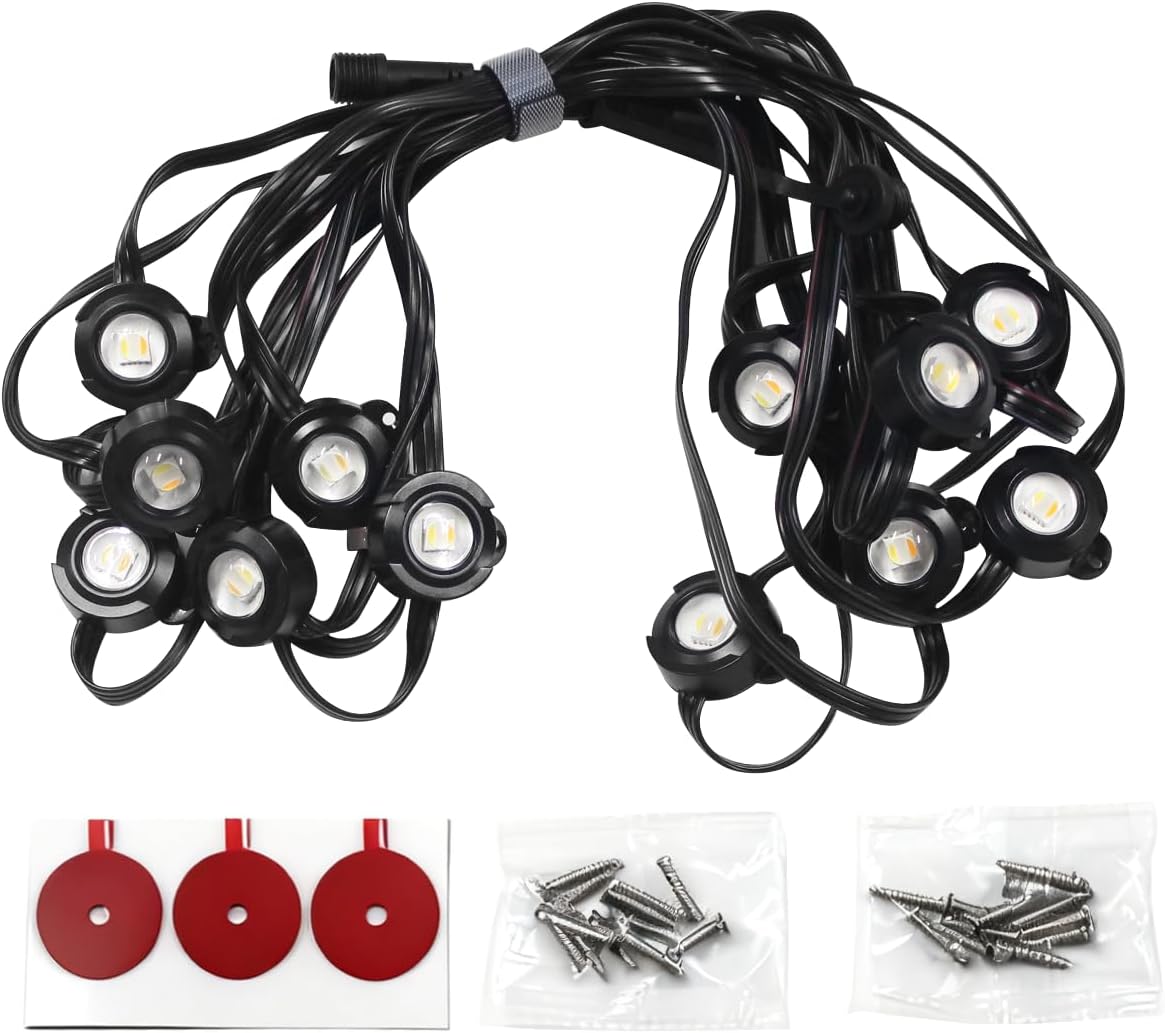
Image: The ASAHOM S1070 16.4ft Extension Lights, featuring 12 individual LED light points along the string.

Image: A pack containing screws and adhesive stickers, used for securing the light string during installation.
Setup
Follow these steps to properly install your ASAHOM S1070 Extension Lights.
- Preparation: Ensure your existing ASAHOM S1070 AI RGBCW Permanent Outdoor Lights system is powered off before connecting any extension lights.
- Identify Connection Point: Locate the end connector of your existing S1070 light string or an available port on a compatible T-splitter or control box.
- Connect Extension: Align the male connector of the extension light string with the female connector of your existing system. Push firmly until a secure connection is made. Ensure the waterproof caps are tightened if applicable.
- Mounting: Plan the desired path for your extension lights. Use the provided adhesive stickers or screws to secure the lights to your desired surface (e.g., soffits, eaves). For long-term outdoor installation, using screws is recommended for greater stability.
- Power On: Once all connections are secure and lights are mounted, power on your main ASAHOM S1070 system. The new extension lights should illuminate and be recognized by the system.

Image: An example of an ASAHOM S1070 extension light string, illustrating the individual light nodes and wiring.

Image: A waterproof junction box and wire connectors, used for securing and protecting electrical connections in outdoor environments.
Operating
The ASAHOM S1070 Extension Lights operate as an integrated part of your main ASAHOM S1070 AI RGBCW Permanent Outdoor Lights system. Control is primarily managed through the dedicated mobile application for the main system.
- App Control: Use the ASAHOM app (or compatible smart home app) to manage the lighting effects, colors (RGBCW), brightness, and schedules for your entire connected light system, including these extension lights.
- Color Changing: These lights support full RGBCW (Red, Green, Blue, Cool White, Warm White) color changing capabilities, allowing for a wide range of static colors and dynamic effects.
- Synchronization: The extension lights will automatically synchronize with the settings and patterns applied to the rest of your S1070 system.
Refer to the user manual of your main ASAHOM S1070 AI RGBCW Permanent Outdoor Lights system for detailed instructions on app usage and advanced features.
Maintenance
Proper maintenance ensures the longevity and optimal performance of your extension lights.
- Cleaning: Periodically clean the light nodes and wiring with a soft, damp cloth to remove dirt, dust, and debris. Avoid using harsh chemicals or abrasive materials.
- Connection Check: Annually, or if you notice inconsistent lighting, inspect all connections to ensure they are secure and free from corrosion. Re-tighten any loose waterproof caps.
- Damage Inspection: Regularly check the light string and wiring for any signs of physical damage, such as cuts, fraying, or exposed wires. If damage is found, discontinue use and contact customer support.
- Water Resistance: The lights are water resistant, but avoid submerging them in water or exposing them to high-pressure water jets. Ensure all connectors are properly sealed to maintain water resistance.
Troubleshooting
If you encounter issues with your ASAHOM S1070 Extension Lights, consider the following common solutions:
- Lights Not Illuminating:
- Ensure the main ASAHOM S1070 system is powered on and functioning correctly.
- Check all connections between the extension lights and the main system for proper seating and tightness.
- Verify that the extension lights are compatible with your specific S1070 system model.
- Inconsistent Lighting/Flickering:
- Inspect connections for any looseness or corrosion.
- Ensure the total length of your light system (including extensions) does not exceed the maximum capacity of your main S1070 control box and power supply. Overloading can cause performance issues.
- App Control Issues:
- Confirm that your main S1070 control box is properly connected to your home network and the app.
- Restart the app and/or the main S1070 control box.
For persistent issues, consult the full manual for your main ASAHOM S1070 system or contact ASAHOM customer support.
Specifications
| Feature | Specification |
|---|---|
| Model Number | A1037 |
| Item Length | 16.4 Feet (5 meters) |
| Number of Light Sources | 12 LEDs |
| Light Source Type | LED (RGBCW) |
| Color | Black |
| Material Type | Plastic |
| Indoor/Outdoor Usage | Outdoor |
| Water Resistance Level | Water Resistant |
| Voltage | 28.8 Volts (DC) - Requires compatible S1070 power supply |
| Special Feature | Color Changing |
| Controller Type | App Control (via main S1070 system) |
| Item Weight | 8 ounces |
Warranty and Support
Warranty: This ASAHOM S1070 Extension Light product is covered by a 3-year manufacturer's warranty from the date of purchase. This warranty covers defects in materials and workmanship under normal use. Please retain your proof of purchase for warranty claims.
Customer Support: For technical assistance, troubleshooting beyond this manual, or warranty inquiries, please contact ASAHOM customer support. You can typically find contact information on the official ASAHOM website or through your purchase platform.
When contacting support, please have your product model number (A1037) and purchase details ready.

