
Introduction
This manual provides instructions for the proper setup, operation, and maintenance of your Skechers Brynwood Analog-Digital Watch, Model SR2153. This timepiece combines traditional analog hands with a digital display, offering versatile timekeeping functions. Please read these instructions carefully to ensure optimal performance and longevity of your watch.
Product Features
- Dual Time Display: Analog (hour, minute, second hands) and Digital (hour, minute, second, date).
- Quartz Movement: Ensures accurate timekeeping for both analog and digital displays.
- Water Resistance: Rated for 100 meters (330 feet), suitable for swimming and showering, but not for diving.
- Durable Construction: Polycarbonate case and polyurethane band for everyday wear.
- Scratch-Resistant Crystal: Protects the watch face from minor abrasions.
- Backlight Function: Illuminates the digital display for visibility in low light conditions.
Setup
1. Setting Analog Time
- Gently pull the crown (the small knob on the right side of the watch case) outwards until it clicks.
- Turn the crown in either direction to move the hour and minute hands to the desired time.
- Once the correct time is set, push the crown back in firmly to secure it and start the analog movement.
2. Setting Digital Time and Date
The watch features multiple buttons for digital display control. Refer to the image below for button identification.

Image: Side view of the Skechers Brynwood watch, highlighting the crown and control buttons labeled 'LIGHT', 'ST/STP', 'RESET', and 'MODE'.
- Press the MODE button repeatedly to cycle through the digital display modes: Time, Date, Alarm, Stopwatch.
- When in the desired setting mode (e.g., Time or Date), press and hold the RESET button until the digits begin to flash.
- Use the ST/STP button to adjust the flashing digit (increment the value).
- Press the MODE button to move to the next digit or setting option.
- Once all settings are correct, press the RESET button again to exit the setting mode.
3. Adjusting the Strap
The watch features an adjustable polyurethane strap with a tang buckle closure.

Image: Rear view of the Skechers Brynwood watch, displaying the pink polyurethane strap and the rose gold-tone tang buckle with 'SKECHERS' engraved.
- Place the watch on your wrist.
- Insert the tang (pin) of the buckle into one of the holes on the strap that provides a comfortable and secure fit.
- Thread the excess strap through the two loops to keep it neatly in place.
Operating
Digital Display Modes
Use the MODE button to cycle through the following functions:
- Time Display: Shows hours, minutes, seconds, and AM/PM indicator.
- Date Display: Shows month, day, and day of the week.
- Alarm: Allows setting a daily alarm.
- Stopwatch: Measures elapsed time with start, stop, and reset functions.
Using the Backlight
Press the LIGHT button (typically located on the upper left side of the watch case) to illuminate the digital display for a few seconds, enhancing visibility in dark environments.
Water Resistance Guidelines
Your Skechers Brynwood watch is water resistant to 100 meters (330 feet). This means it is suitable for:
- Splashes, rain, and accidental immersion.
- Showering and swimming in shallow water.
Important: Do not operate the crown or any buttons while the watch is wet or submerged. This can compromise the water resistance and lead to internal damage. Avoid exposure to hot water or steam, as this can also affect the watch's seals.
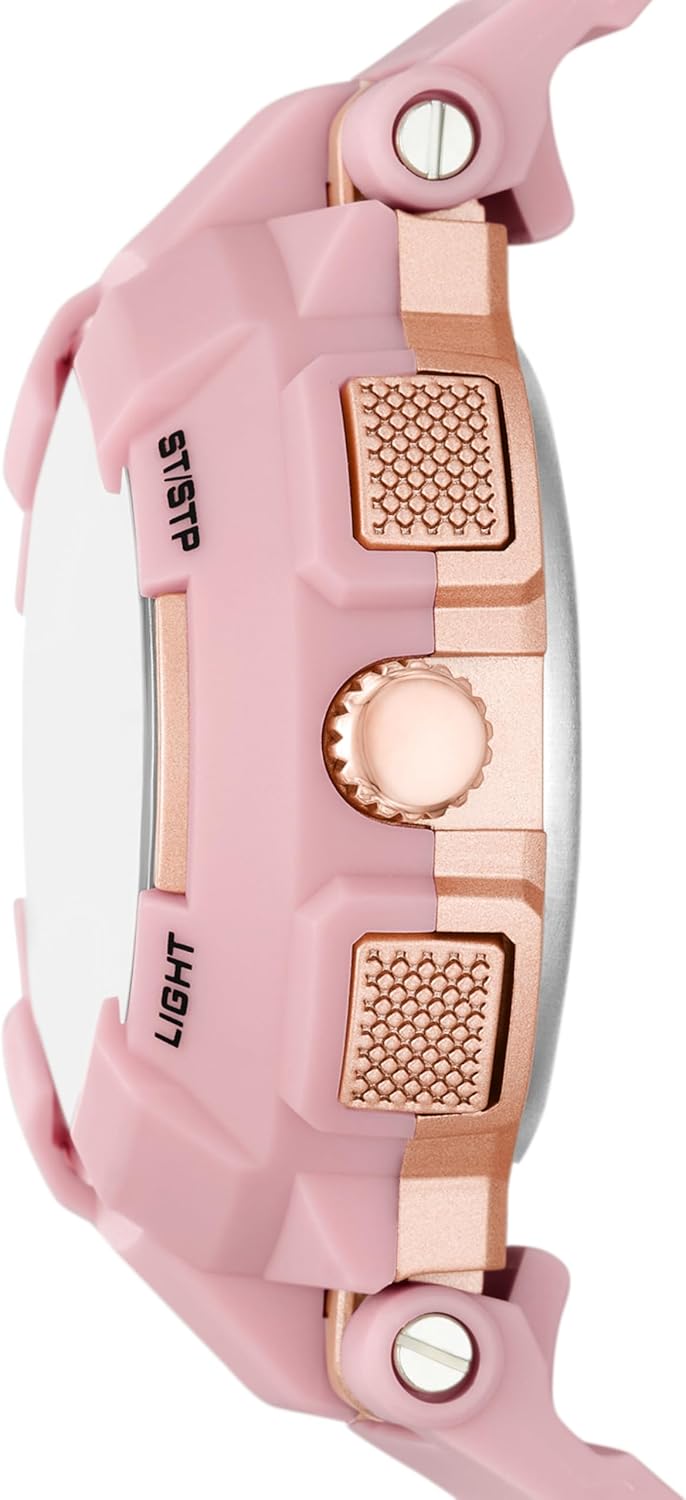
Image: The Skechers Brynwood watch worn on a wrist, displaying its pink case, strap, and the analog-digital dial with glitter accents.
Maintenance
Cleaning Your Watch
To maintain the appearance of your watch:
- Wipe the case and strap with a soft, damp cloth.
- For stubborn dirt, use a mild soap solution and rinse thoroughly with clean water, then dry completely.
- Avoid using harsh chemicals, solvents, or abrasive cleaners, as these can damage the watch's materials.
Battery Replacement
The watch is powered by a quartz battery. When the analog hands stop moving or the digital display becomes dim, it is an indication that the battery needs replacement. It is recommended to have the battery replaced by a qualified watch technician to ensure the water resistance seal is properly maintained.
Storage
When not in use, store your watch in a cool, dry place away from direct sunlight, extreme temperatures, and strong magnetic fields. The original packaging box can be used for storage.

Image: A dark blue Skechers branded watch box with a white base, suitable for storing the watch.
Troubleshooting
- Analog hands not moving: Check if the crown is pushed in completely. If it is, the battery may need replacement.
- Digital display is blank or dim: The battery may need replacement.
- Incorrect time/date: Follow the 'Setting Digital Time and Date' instructions to re-set.
- Condensation inside the watch: This indicates a breach in the water resistance. Stop using the watch immediately and seek professional service.
Specifications
| Feature | Detail |
|---|---|
| Model Number | SR2153 |
| Display Type | Analog-Digital |
| Watch Movement | Quartz |
| Case Material | Polycarbonate |
| Band Material | Polyurethane |
| Crystal Type | Crystal |
| Water Resistance Depth | 100 Meters (330 Feet) |
| Case Diameter | 42 Millimeters |
| Case Thickness | 16 Millimeters |
| Band Width | 18 Millimeters |
| Band Length | 190 Millimeters |
| Clasp Type | Tang Buckle |
| Item Weight | 49 Grams |
| UPC | 807320012559 |
Warranty Information
Your Skechers Brynwood watch is covered by a Limited Warranty. For specific details regarding warranty coverage, terms, and conditions, please refer to the warranty card included with your purchase or visit the official Skechers website. Keep your proof of purchase for warranty claims.
Customer Support
If you have any questions, require assistance with your watch, or need to arrange for service, please contact Skechers customer support. You can typically find contact information on the official Skechers website or through the retailer where the watch was purchased.