
1. Introduction
This manual provides essential information for the assembly, operation, and maintenance of your Dowinx Vanity Desk, Model QL-66S14. Please read these instructions carefully before assembly and use to ensure safe and optimal performance of your product. Keep this manual for future reference.
2. Safety Information
- Electrical Safety: Ensure the power outlet for the LED mirror and integrated power strip is easily accessible and properly grounded. Do not overload the power strip. Disconnect power before cleaning or maintenance.
- Assembly: Follow all assembly steps precisely. Do not overtighten screws. Ensure all connections are secure before use.
- Stability: Place the vanity desk on a flat, stable surface. Avoid placing heavy objects on the mirror or desk top that could compromise stability.
- Weight Limit: Do not exceed the recommended weight capacity for the desk surface or drawers.
- Children: Keep small parts and assembly tools out of reach of children.
3. Package Contents
Verify that all components are present before beginning assembly. If any parts are missing or damaged, please contact customer support.
- Vanity Desk Panels (various sizes)
- 9 Drawer Components
- Large HD Mirror with 12 LED Bulbs
- Power Adapter for LED Lights
- Integrated Power Outlet Strip (AC & USB ports)
- Crystal Handles (9 pieces)
- Assembly Hardware (screws, dowels, etc.)
- Optional Removable Adhesive Diamond Surface Stickers (9 pieces)
- Instruction Manual
4. Setup and Assembly
Assembly is required for this vanity desk. Please refer to the detailed step-by-step instructions included in your product packaging for specific guidance. The following provides a general overview and visual aids.

Figure 4.1: Overview of vanity desk features and components.
4.1 General Assembly Steps
- Unpack all components and verify against the package contents list.
- Assemble the main desk frame according to the provided diagrams.
- Construct the 9 drawers and install the crystal handles.
- Install the drawers into the desk frame using the smooth metal sliderails.
- Attach the HD mirror with LED bulbs to the desk top.
- Connect the power adapter for the LED lights and the integrated power outlet.

Figure 4.2: Detail of drawer construction with smooth sliderails and crystal handles.
4.2 Optional Customization: Glitter Stickers
The vanity desk includes optional removable adhesive diamond surface stickers to customize the drawer fronts. These stickers are designed to adhere securely without creating a glitter mess.
- Ensure the drawer surface is clean and dry.
- Carefully peel the backing from the adhesive sticker.
- Align the sticker with the drawer front and press firmly, smoothing out any air bubbles.

Figure 4.3: Applying the optional diamond surface stickers for a customized look.
5. Operating Instructions
5.1 LED Mirror Lights
The integrated mirror features 12 LED bulbs with three distinct lighting modes and adjustable brightness.
- Power On/Off: Use the power button located on the side of the mirror frame or the inline remote control to turn the lights on or off.
- Change Lighting Mode: Press the mode button on the remote control to cycle through Warm, Natural, and Cool lighting settings.
- Adjust Brightness: Use the '+' and '-' buttons on the remote control to increase or decrease the brightness level.
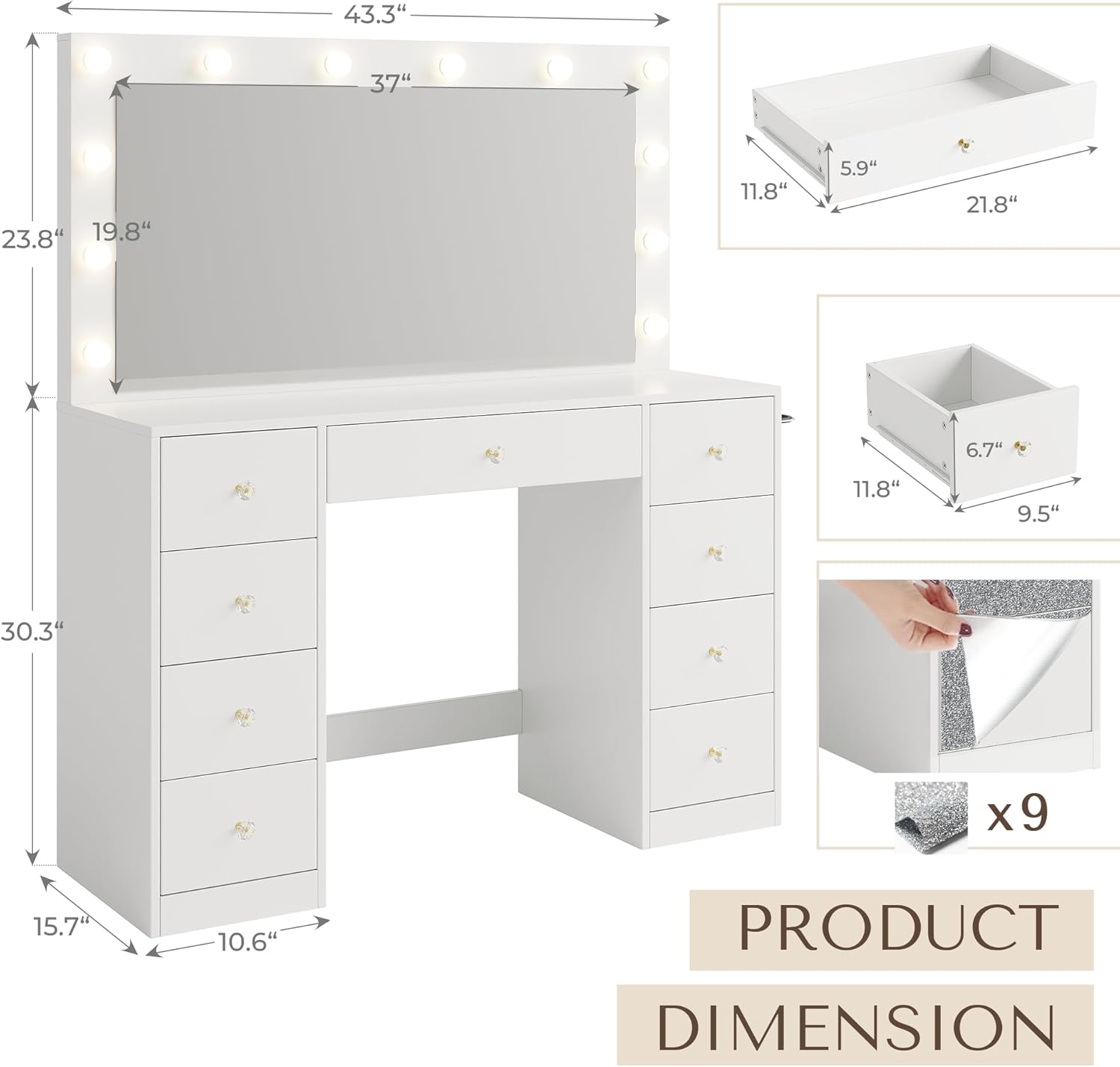
Figure 5.1: LED mirror lighting modes and brightness control.
5.2 Integrated Power Outlet
The vanity desk includes a built-in power strip for convenient access to electrical outlets.
- AC Ports: Two 125V/12A AC outlets are available for plugging in hair dryers, curling irons, or other electrical appliances.
- USB Ports: Two 5V/2.1A USB outlets are provided for charging mobile devices or other USB-powered accessories.
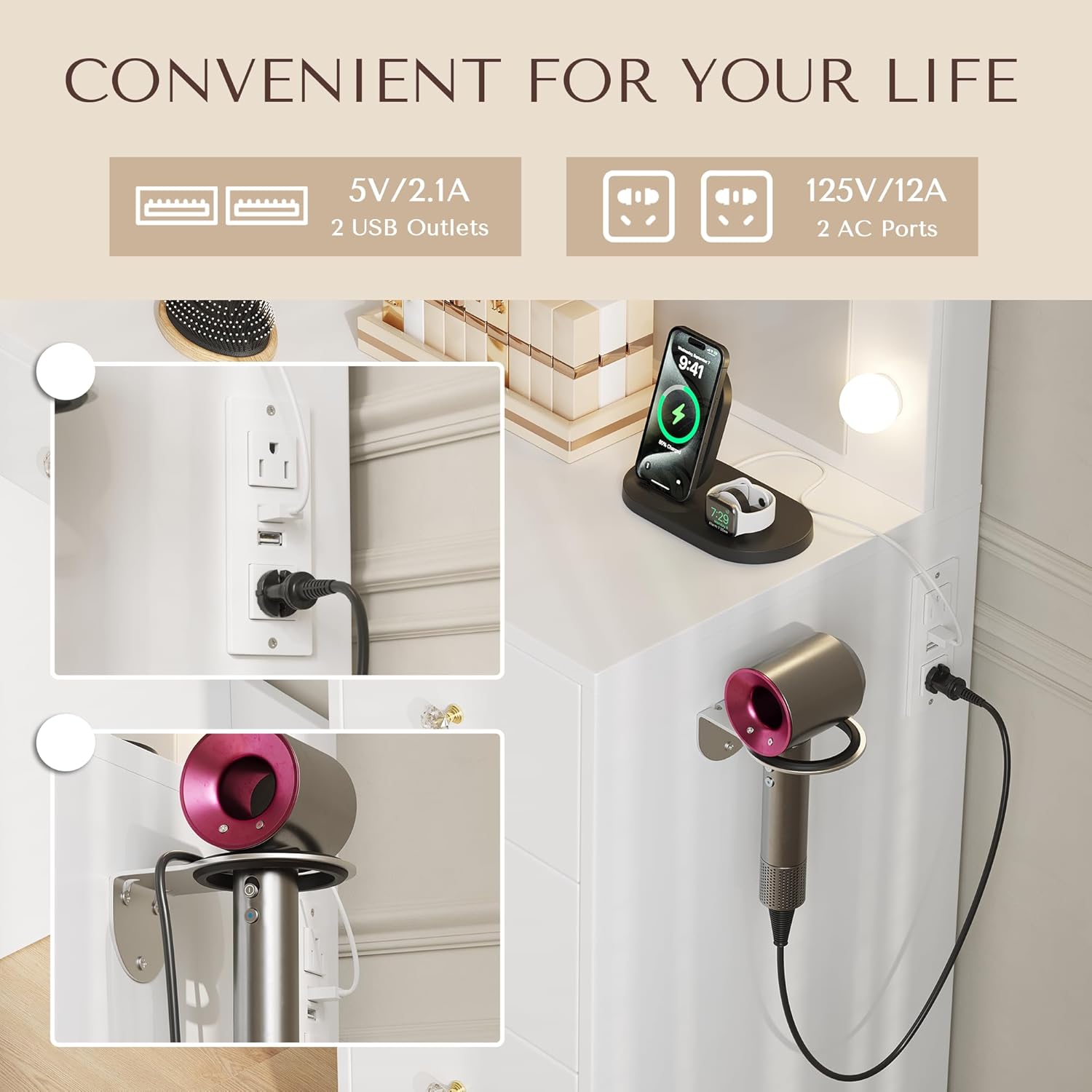
Figure 5.2: Integrated power and USB charging ports.
5.3 Storage Drawers
The vanity desk features 9 spacious drawers designed for organizing cosmetics, skincare products, jewelry, and other personal items.

Figure 5.3: Ample storage provided by the 9 drawers.
6. Maintenance
- Cleaning: Wipe the desk surface and mirror with a damp cloth. Avoid abrasive cleaners or harsh chemicals that may damage the finish or mirror coating.
- Dusting: Regularly dust the vanity desk to prevent buildup.
- Drawer Care: Ensure drawers slide smoothly. If they become stiff, check for obstructions or apply a silicone-based lubricant to the sliderails.
- Light Bulbs: The LED bulbs are designed for long life. If a bulb needs replacement, contact customer support for compatible replacements.
7. Troubleshooting
- Lights Not Turning On:
- Check if the power adapter is securely plugged into both the mirror and a working wall outlet.
- Ensure the power button on the mirror or remote control is pressed. - Power Outlets Not Working:
- Verify the main power cord for the vanity desk is plugged into a live wall outlet.
- Check if the wall outlet itself is functioning by plugging in another device. - Drawers Sticking/Not Closing Properly:
- Ensure drawers are not overloaded.
- Check for any objects obstructing the drawer's path or the sliderails.
- Inspect sliderails for damage or misalignment. - Mirror Image Distorted:
- Ensure the mirror is clean and free of smudges or residue.
- Verify the mirror is securely mounted and not warped.
8. Specifications

Figure 8.1: Product dimensions for planning your space.
| Feature | Specification |
|---|---|
| Brand | Dowinx |
| Model Number | QL-66S14 |
| Product Dimensions | 15.74"D x 43.3"W x 54.52"H |
| Item Weight | 90 pounds |
| Frame Material | Wood |
| Color | White |
| Assembly Required | Yes |
| Mirror Type | HD Mirror with 12 LED Bulbs |
| Lighting Modes | 3 (Warm, Natural, Cool) with adjustable brightness |
| Power Outlets | 2 AC (125V/12A), 2 USB (5V/2.1A) |
| Number of Drawers | 9 |
| Product Care | Wipe with Damp Cloth |
9. Warranty and Support
For warranty information, product support, or to order replacement parts, please refer to the contact details provided with your purchase documentation or visit the official Dowinx website. Please retain your proof of purchase for warranty claims.