
1. Product Overview
This manual provides detailed instructions for the AINAVI 10-inch (4G+64G) Touchscreen Car Stereo, designed as a radio replacement and upgrade kit for Dodge Ram 1500, 2500, and 3500 models manufactured between 2009 and 2012. This unit features Android 13 OS, wireless CarPlay, Android Auto, 5G WiFi, Bluetooth 5.0, and GPS navigation.
Key Features:
- Android 13 OS with 4GB RAM + 64GB ROM: Ensures a fast and smooth user experience.
- 10-inch QLED Touchscreen: Features 1280x720 resolution, G+G full lamination technology, and 178-degree full-viewing angles for clear visibility.
- Wireless & Wired CarPlay/Android Auto: Seamless integration for navigation, calls, messages, and music with voice command support ("Hey Siri" or "Hey Google").
- Built-in GPS Navigation: Supports online and offline maps, providing traffic information when connected to a network.
- 5G WiFi & Bluetooth 5.0: Offers high-speed internet access and stable Bluetooth connectivity for hands-free calls and music streaming.
- 1080P AHD Camera: Includes a 170° ultra-wide angle camera to eliminate blind spots.
- AM/FM Radio: Built-in radio with a 4*45W amplifier for enhanced sound quality.
- Plug and Play Installation: Custom-fit design for Dodge Ram 1500, 2500, 3500 (2009-2012) with included wiring harness, CANbus decoder, and frame panel.

Image: A close-up of the AINAVI 10.2-inch HD IPS Touch Screen, highlighting its 1280x720 resolution and full lamination for enhanced clarity.
2. What's Included
The product package contains the following components:
- 1x Android Car Stereo (Head Unit with Screen)
- 1x Wiring Harness Power Cable with CANbus Decoder
- 1x Radio Antenna Adaptor
- 1x GPS Antenna
- USB & Audio Cables (2x USB cables, RCA cable)
- 1x AHD 1080P Backup Camera
- 1x External Microphone
- 1x Frame Removal Tool
- Installation Guide

Image: Overview of included components: head unit, power cable, RCA cable, microphone, GPS module, USB cables, reversing control cable, 1080P rear view camera, and frame removal tool.
Video: Unboxing and overview of the components included in the AINAVI car stereo package for Dodge Ram (2009-2012).
3. Setup & Installation
This AINAVI car stereo is designed for a plug-and-play installation in Dodge Ram 1500, 2500, and 3500 models from 2009-2012. No modification to your car's original cables is typically required. It supports most original vehicle functions, including steering wheel controls and reverse signals.
3.1 Compatibility
This unit is specifically compatible with Dodge Ram 1500, 2500, and 3500 models from 2009, 2010, 2011, and 2012.
3.2 General Installation Steps
- Preparation: Ensure the vehicle's power is off. Gather all included components and tools, including the frame removal tool.
- Remove Original Radio: Carefully use the frame removal tool to detach the existing radio and surrounding trim. Disconnect all cables from the original unit.
- Connect Wiring Harness: Connect the provided wiring harness and CANbus decoder to the vehicle's existing wiring. Ensure all connections are secure.
- Install GPS Antenna: Mount the GPS antenna under the dashboard, away from metal obstructions, for optimal signal reception.
- Connect External Microphone: Plug in the external microphone for improved call quality.
- Connect Backup Camera (Optional): If installing the backup camera, connect its cables to the designated inputs on the head unit and route the camera to the rear of the vehicle.
- Mount New Head Unit: Secure the AINAVI head unit into the dashboard opening using the provided installation frame and mounting hardware.
- Test Functionality: Before fully reassembling the dashboard, turn on the vehicle and test all functions of the new stereo, including audio, touch screen, CarPlay/Android Auto, GPS, and backup camera.
- Reassemble Dashboard: Once all functions are verified, carefully reassemble the dashboard trim.

Image: Visual comparison showing the original Dodge Ram dashboard and the upgraded dashboard with the AINAVI 10-inch touchscreen car stereo installed.

Image: The AINAVI car stereo seamlessly integrated into the dashboard of a 2009 Dodge Ram.
4. Operating Instructions
4.1 Basic Operation
- Power On/Off: The unit powers on automatically with the vehicle ignition. Press and hold the power button on the unit for a few seconds to manually turn it off or on.
- Touchscreen Interface: Navigate through menus and applications using the responsive 10-inch touchscreen.
- Volume Control: Adjust volume using the physical buttons on the unit or steering wheel controls (if supported and configured).
4.2 Wireless CarPlay & Android Auto
Connect your iPhone or Android smartphone wirelessly or via USB to access CarPlay or Android Auto features. This allows for integrated navigation, hands-free calls, messaging, and music playback.
- Connection: Enable Bluetooth and Wi-Fi on your smartphone. On the car stereo, select the CarPlay or Android Auto application and follow the on-screen prompts to pair your device. For wired connection, use a USB cable.
- Voice Commands: Activate voice assistants by saying "Hey Siri" for CarPlay or "Hey Google" for Android Auto to control functions hands-free.
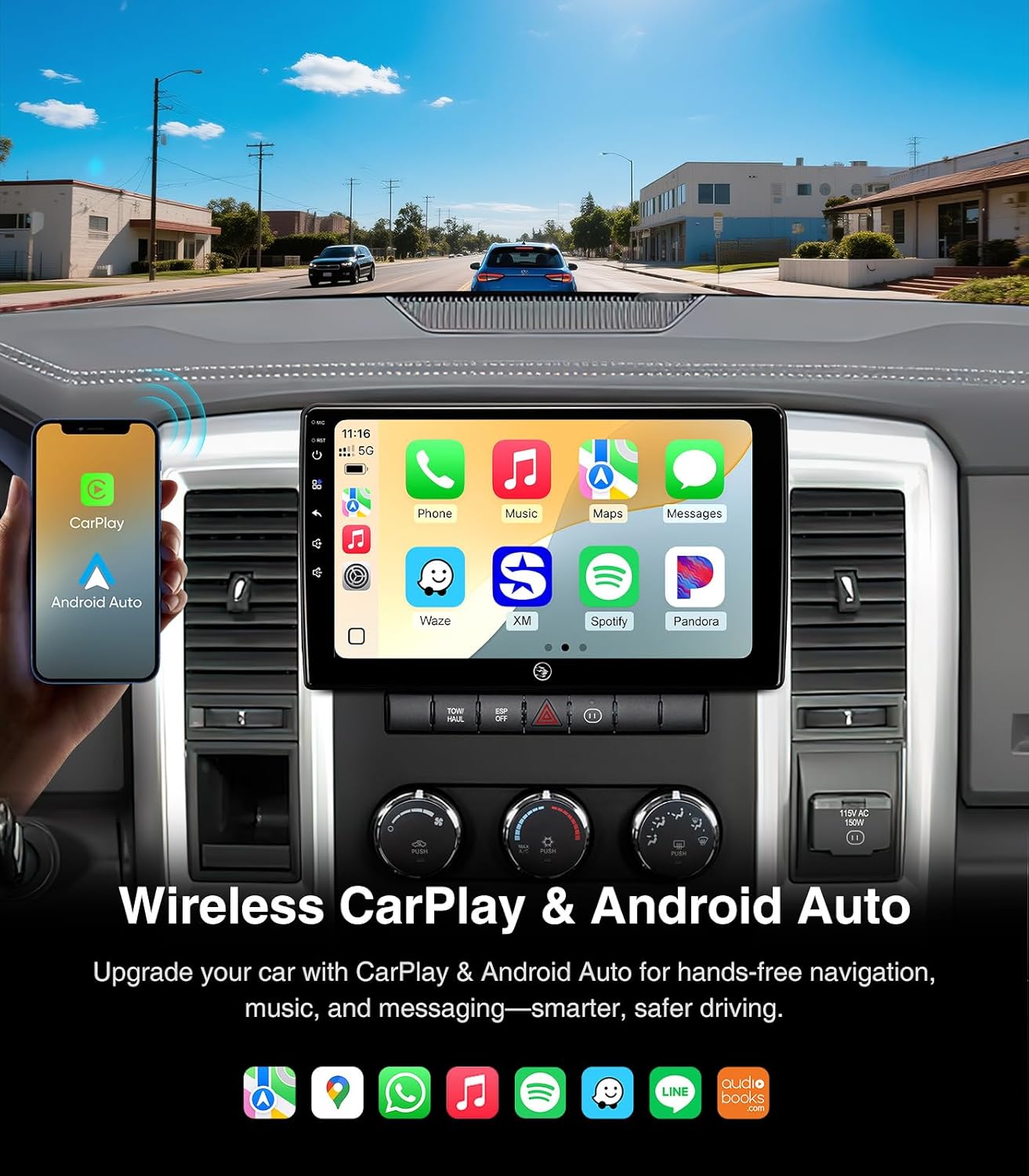
Image: The car stereo screen showing both Wireless CarPlay and Android Auto interfaces, highlighting smartphone integration for navigation, music, and communication.

Image: A split display demonstrating the distinct user interfaces for iOS CarPlay and Android Auto on the AINAVI car stereo.
4.3 GPS Navigation
The unit features built-in GPS navigation. You can use online maps when connected to a network or download offline maps for navigation without internet access.
- Online Navigation: Connect to a 5G WiFi hotspot to receive real-time traffic information and use online mapping services.
- Offline Navigation: Download map data for your desired regions to the unit's internal storage. This allows for navigation even in areas without network coverage.

Image: The car stereo screen showing a detailed GPS navigation map with route guidance and estimated arrival time.
4.4 5G WiFi & Bluetooth 5.0
The unit supports dual-band WiFi (2.4GHz & 5GHz) for fast and stable internet access, and Bluetooth 5.0 for seamless device connectivity.
- WiFi Connection: Go to Settings > Network & Internet > Wi-Fi to connect to available hotspots.
- Bluetooth Pairing: Go to Settings > Connected devices > Bluetooth to pair your smartphone for hands-free calls and music streaming.
- Hands-Free Calling: Once paired, you can make and receive calls directly from the car stereo interface, enhancing driving safety.

Image: The car stereo screen showing the phone dialer interface and a smartphone connected via Bluetooth, illustrating hands-free communication and music streaming capabilities.

Image: A visual guide emphasizing the safety benefits of using Bluetooth hands-free connection for calls while driving, contrasting it with unsafe phone handling.
4.5 AM/FM/RDS Radio
Access local radio stations with the built-in AM/FM tuner. RDS (Radio Data System) provides additional information like station name and song title where available.
- Tuning: Use the touchscreen interface to scan for stations or manually tune to a specific frequency.
- Presets: Save your favorite stations for quick access.

Image: The car stereo screen showing the AM/FM radio interface, with options for tuning and displaying radio information.
4.6 Audio Settings
Customize your audio experience with the multi-band audio equalization feature.
- Equalizer: Access the equalizer settings to adjust frequency bands for optimal sound output.
- Sound Presets: Choose from various preset sound profiles (e.g., Pop, Rock, Jazz) or create custom settings.

Image: The car stereo screen showing the multi-band audio equalization interface, allowing users to fine-tune sound output.
4.7 Split Screen & Screen Mirroring
Enhance multitasking and content sharing with split screen and screen mirroring functionalities.
- Split Screen: Run two applications simultaneously on the screen, such as navigation and music player.
- Screen Mirroring: Mirror your smartphone's display onto the car stereo screen.

Image: The car stereo screen illustrating the split screen function with two apps open, and the screen mirroring feature showing a smartphone's display mirrored on the unit.
4.8 Rear View Camera
The included 1080P AHD backup camera provides a 170° ultra-wide angle view, automatically activating when the vehicle is in reverse.
- Automatic Activation: The camera display automatically appears on the screen when shifting into reverse gear.
- Enhanced Safety: The wide-angle view helps eliminate dangerous blind spots during parking and reversing maneuvers.

Image: The car stereo screen showing the clear, wide-angle view provided by the 1080P AHD rearview camera, assisting with safe reversing.
5. Maintenance
Proper maintenance ensures the longevity and optimal performance of your car stereo.
- Screen Cleaning: Use a soft, lint-free cloth to gently wipe the touchscreen. For stubborn smudges, slightly dampen the cloth with water or a screen-safe cleaner. Avoid harsh chemicals or abrasive materials.
- Software Updates: Periodically check for and install software updates to ensure the system runs efficiently and has the latest features and security patches.
- Cable Connections: Ensure all cables remain securely connected to prevent intermittent issues.
- Environmental Care: Avoid exposing the unit to extreme temperatures, direct sunlight for prolonged periods, or excessive moisture.
6. Troubleshooting
This section addresses common issues you might encounter with your AINAVI car stereo.
| Problem | Possible Cause | Solution |
|---|---|---|
| Unit does not power on. | Loose power connection, blown fuse in vehicle. | Check all power cable connections. Inspect and replace any blown fuses in the vehicle's fuse box (refer to your vehicle's manual for fuse locations). |
| Radio freezes or stutters during music playback. | Outdated software, temporary system glitch. | Check for and install any available software updates for the unit. Restart the unit by pressing the reset button (if available) or turning the vehicle off and on. |
| Slow booting up or app loading. | System resources overloaded, outdated software. | Close unnecessary background applications. Ensure the unit's software is up to date. A factory reset might be considered as a last resort (note: this will erase all user data). |
| No sound or poor sound quality. | Incorrect wiring, volume settings, or equalizer settings. | Verify all audio connections (RCA cables, speaker wires). Check the volume level and equalizer settings. Ensure the correct audio output source is selected. |
| GPS signal is weak or inaccurate. | GPS antenna improperly placed or obstructed. | Ensure the GPS antenna is mounted in a clear location, free from metal obstructions, typically under the dashboard. |
| CarPlay/Android Auto not connecting. | Bluetooth/Wi-Fi issues, incorrect settings, incompatible phone. | Ensure Bluetooth and Wi-Fi are enabled on both the unit and your phone. Try restarting both devices. Verify your phone's operating system is compatible. Try a different USB cable for wired connections. |
7. Specifications
| Feature | Detail |
|---|---|
| Brand | AINAVI |
| Model | 4G+64G |
| Operating System | Android 13 |
| Memory Storage Capacity | 64 GB |
| Screen Size | 10 Inches |
| Display Type | QLED, Capacitive Touch Screen |
| Connectivity Technology | Bluetooth 5.0, USB, Wi-Fi (2.4Ghz & 5Ghz), Wired Android Auto, Wireless CarPlay |
| Supported Navigation System | BeiDou, GPS, Galileo (Supports Europe, North America, South America, Worldwide maps) |
| Audio Output Mode | Surround Sound Stereo (Max. output 4*45W amplifier) |
| Rear View Camera | AHD 1080P, 170° ultra-wide angle |
| Compatible Vehicle Type | Dodge Ram 1500, 2500, 3500 (2009-2012) |
| Item Weight | 2.02 Kilograms |
| UPC | 610371336303 |
8. Warranty and Support
AINAVI provides comprehensive support for its products.
- Warranty: This product comes with a 12-month manufacturer guarantee.
- Technical Support: For any installation or operational assistance, please contact technical support via Amazon email. The seller, HomeCar, also provides customer service.
- Contact Information: You can reach customer service via Amazon's messaging system or by calling +1 833 838 5016 (as listed by seller HomeCar).

Image: Guide on how to access customer installation support through Amazon, directing users to contact the seller HomeCar for assistance.