
1. Product Overview
The Acer Gadget 25W MagSafe Car Mount Charger is designed to provide wireless charging and secure phone mounting in a vehicle. It features a cooling fan, integrated backlight, and a stable vent attachment mechanism. This device is compatible with specific iPhone models and includes a 45W car adapter for optimal performance.

Image 1.1: Acer Gadget 25W MagSafe Car Mount Charger in use within a vehicle.
Video 1.1: This video provides a concise overview of the Acer 25W MagSafe Car Mount Charger, demonstrating its key features and functionality.
2. Package Contents
Verify that all items listed below are included in your package:
- 1 x 25W MagSafe Car Mount Charger
- 1 x USB-C Cable
- 1 x Car Charger (45W)
- 1 x User Manual

Image 2.1: All components included in the product packaging.
3. Setup and Installation
Follow these steps to install the car mount charger in your vehicle:
- Identify a suitable air vent in your car. Ensure the vent type is compatible with the hook mechanism.
- Mount the charger onto the vent blade. Adjust the hook length to fit securely.
- Rotate the locking buckle until the connection is tight and stable.
- Connect the USB-C cable to the charger and the included 45W car adapter.
- Insert the car adapter into your vehicle's 12V power outlet.

Image 3.1: Visual guide for mounting the charger onto a car vent, including compatible vent types.
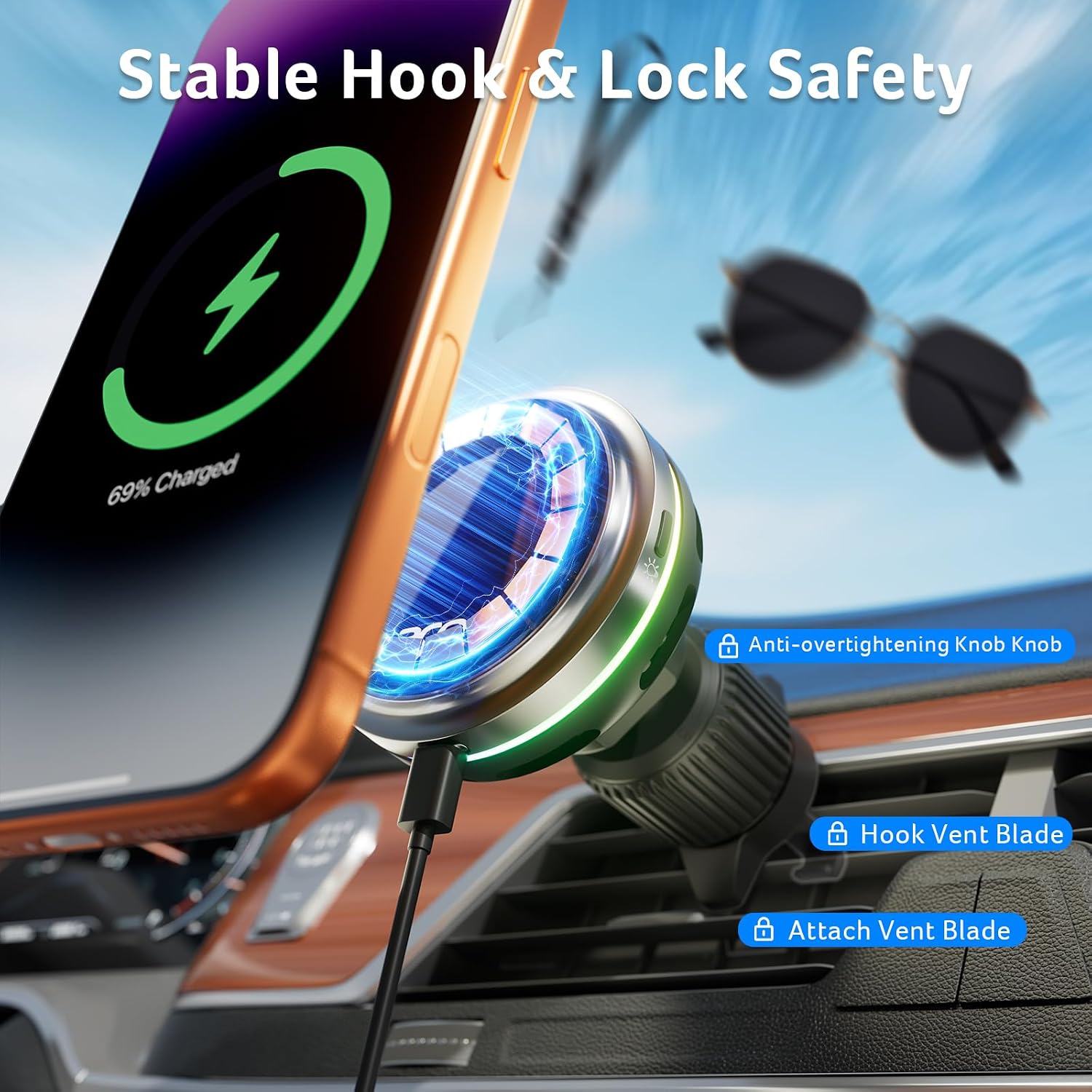
Image 3.2: Detail of the stable hook and lock safety features for secure installation.
Video 3.1: This video demonstrates the step-by-step installation process of the Acer Wireless Car Charger onto a car's air vent, ensuring a secure fit.
4. Operating Instructions
4.1 Wireless Charging
Once the charger is installed and powered, place your compatible iPhone onto the magnetic charging surface. The device will automatically begin wireless charging. For optimal 25W fast charging, use the included 45W car charger.

Image 4.1: Comparison of 25W ultra-fast charging with lower wattage chargers.
4.2 Cooling Fan Operation
The built-in cooling fan activates automatically during charging to dissipate heat and maintain efficient charging performance. The fan operates with low noise. Pressing the fan key on the charger will turn off the cooler, and the fan has a 20-second auto-off delay.
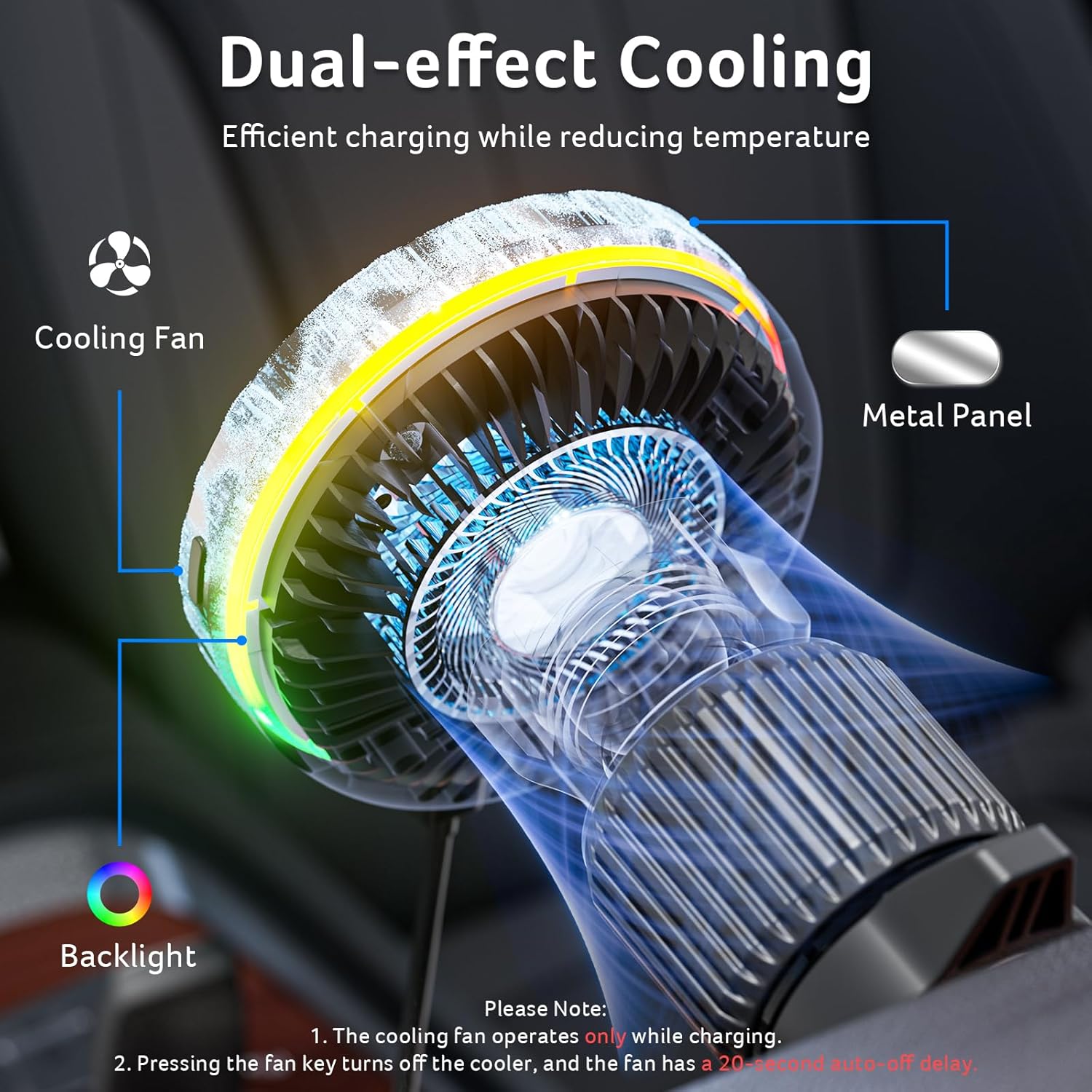
Image 4.2: Illustration of the dual-effect cooling system with a cooling fan and metal panel.
4.3 Backlight Control
The charger features an integrated backlight. During charging or when fully charged, it displays an ice blue color. You can change the backlight mode by pressing the backlight button on the side of the charger. Available modes include:
- Color Cycling (Red/Green/Blue/Ice Blue/Yellow/Purple/White)
- Steady Ice Blue
- Steady Yellow
- Steady Purple
- Steady White
Note: Steady light modes (2-5) do not cycle; the color remains fixed.

Image 4.3: The charger's built-in backlight feature.
Video 4.1: This video showcases the Acer MagSafe wireless car charger in action, highlighting its magnetic attachment and the dynamic backlight feature.
5. Key Features
5.1 Strong Magnetic Attraction
The charger incorporates a ring-shaped magnet to provide a secure hold for your phone, even on uneven roads or during sudden stops. It is designed to hold phones firmly, including those with MagSafe-compatible cases.
5.2 360° Adjustable Positioning
A 360° rotating ball joint allows for seamless adjustment of your phone's viewing angle. This enables switching between landscape and portrait modes for navigation, video calls, or media playback, enhancing convenience and safety.

Image 5.1: The 360-degree rotatable sphere allows for flexible angle adjustments.
6. Compatibility
This charger is compatible with the following iPhone series:
- iPhone 17 Pro Max/Air series
- iPhone 16 series
- iPhone 15 series
- iPhone 14 series
- iPhone 13 series
- iPhone 12 series
Maximum charging speeds vary by phone model:
- 25W Peak: iPhone 17 Series and iPhone 16 Plus/16 Pro Max (with included 45W adapter)
- 22.5W Peak: iPhone 16/16 Pro
- 15W: iPhone 15/14/13/12 Series
For phone cases, use a MagSafe-compatible case or no case. Non-MagSafe cases thicker than 2mm may affect magnetic attraction and charging efficiency.

Image 6.1: Detailed compatibility information for iPhone models and phone cases.
7. Troubleshooting
- Q: Charging speed is slow?
- A: To achieve 25W fast charging, use the included 45W car charger. Other chargers must be 45W or higher for comparable performance. Ensure the cooling fan is active, as phone charging may slow if the device is overheating.
- Q: Why does charging keep disconnecting?
- A: Ensure the 45W car charger is firmly plugged in; re-insert if loose. The phone case should be 2mm thick or less and contain no metal; consider charging without the case. The car’s Start/Stop system may briefly pause charging.
- Q: Magnet feels weak?
- A: Test without a case. If the magnet is weak, use a MagSafe case or a MagSafe-compatible ring.
- Q: Is the 25W charging power applicable to all phones?
- A: No. Maximum charging speeds vary by phone model as detailed in the Compatibility section.
- Q: Is the product too large or heavy for my car vent?
- A: The product dimensions are: Width: 2.72 inches, Installed length: 4.13 inches, Weight: 4.3 ounces. Please verify these dimensions against your car's vent space.
- Q: Cooling fan not running?
- A: The cooling fan operates only while charging. Pressing the fan key turns off the cooler, and the fan has a 20-second auto-off delay.
- Q: Mount is shaky or loose in vent?
- A: Ensure the hook is fitted firmly onto the vent blades. Adjust the hook length to match your vent. Rotate the locking buckle until the connection is tight and stable.
- Q: How do I change the backlight?
- A: Press the backlight button on the side of the charger. Refer to section 4.3 for available modes.
- Q: Does it support CarPlay/Android Auto?
- A: No, this product does not support CarPlay or Android Auto. It provides wireless charging via the included USB-C cable and car charger.
8. Specifications
| Feature | Detail |
|---|---|
| Brand | Acer |
| Model Name | IC-Q1 |
| Connector Type | USB Type C |
| Compatible Devices | iPhone 17 Pro Max/Air 16 15 14 13 series |
| Wattage | 25 watts |
| Mounting Type | Vent Mount |
| Special Feature | Heat Resistant, Cooling Fan, Backlight |
| Total USB Ports | 1 (on car adapter) |
| UPC | 195133190824 |
9. Warranty and Support
This product comes with a 24-month extended warranty. For any inquiries, technical assistance, or warranty claims, please contact Acer customer support. Refer to the product packaging or the official Acer website for contact details.


