
Introduction
The LUFTRUM C3500 Air Purifier is designed to improve indoor air quality in large rooms, covering up to 2250 sq ft. It features a dual 3-stage filtration system, smart WiFi connectivity, and quiet operation modes. This manual provides essential information for the safe and efficient use of your air purifier.

Figure 1: LUFTRUM C3500 Air Purifier
Setup
Unpack the air purifier and its components. Ensure all packaging materials are removed. Place the unit on a flat, stable surface. The unit features dual filters, which need to be installed correctly before first use.
Filter Installation
- Gently open the side panels of the air purifier.
- Insert the new filters into their respective slots, ensuring they are correctly oriented as indicated on the filter frame.
- Close the side panels securely until they click into place.

Figure 2: Filter installation process
Operating Instructions
The LUFTRUM C3500 offers multiple operating modes and controls for customized air purification.
Control Panel Functions
- Power On/Off: Press the power button to turn the unit on or off.
- Fan Speed Adjustment: Use the fan speed button to cycle through 4 adjustable fan speed settings.
- Auto Mode: The precise PM2.5 sensor tracks air quality and displays real-time AQI. In Auto Mode, the fan speed automatically adjusts based on detected pollution levels (yellow or red display indicates increased pollution, leading to higher fan speeds).
- Sleep Mode: Activates a whisper-quiet 20dB operation for undisturbed rest.
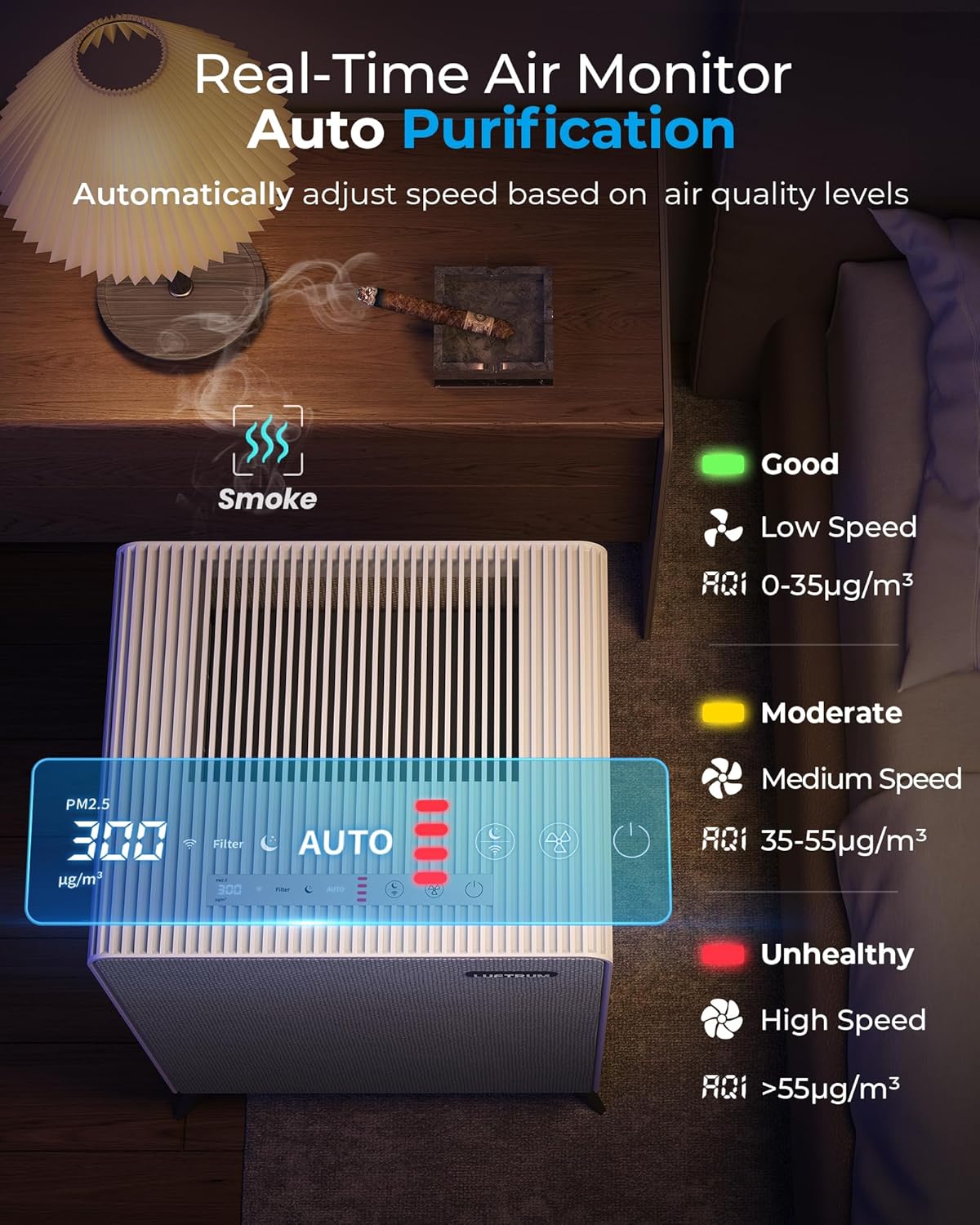
Figure 3: Intuitive Control Panel
Smart WiFi Control
Connect the air purifier to your home's 2.4GHz WiFi network to control it remotely via a smartphone application. This allows for convenient operation anytime, anywhere. Ensure your device supports 2.4GHz WiFi for connection.

Figure 4: Smart Air Purifier with Remote App Control
Maintenance
Regular maintenance ensures optimal performance and extends the lifespan of your air purifier. The unit uses a dual 3-stage filter system: a washable pre-filter, an activated carbon filter, and a True H13 HEPA filter.
Filter System Overview

Figure 5: Dual True H13 HEPA Filters System
Pre-Filter Cleaning
The pre-filter can be removed and washed to maintain efficiency. Ensure it is completely dry before re-inserting it into the unit.

Figure 6: Washing the Pre-Filter
Filter Replacement
The filter indicator light on the control panel will illuminate when it is time to replace the main filters. Replace both filters simultaneously for optimal performance. After replacing the filters, press and hold the filter reset button on the control panel for approximately 3-5 seconds until the indicator light turns off. This resets the filter life counter.
Troubleshooting
If you encounter issues with your LUFTRUM C3500 Air Purifier, refer to these common solutions:
- Filter Indicator Remains On After Replacement: Press and hold the filter reset button on the control panel for approximately 3-5 seconds until the indicator light turns off.
- Unit Not Powering On: Ensure the power cord is securely plugged into a working electrical outlet. Check if the power button has been pressed. Verify that the side panels are closed correctly, as safety interlocks may prevent operation if open.
- Poor Air Purification: Check if the filters are installed correctly and not excessively dirty. Clean or replace filters as needed. Ensure the unit is placed in an open area, not obstructed by furniture or walls.
- WiFi Connection Issues: Confirm your router is broadcasting a 2.4GHz WiFi signal. Ensure the air purifier is within range of your WiFi router. Follow the app's instructions for pairing the device.
Specifications
| Product Dimensions | 14.17 x 12.99 x 16.73 inches |
| Weight | 12.94 Pounds |
| Model Number | C3500 |
| Power Source | AC |
| Control Method | Touch, WiFi |
| Filter Type | HEPA (Dual 3-stage: washable pre-filter, activated carbon, True H13 HEPA) |
| Floor Area Coverage | Up to 2250 Square Feet (1 air change per hour) |
| CADR | 300 CFM |
| Noise Level | 20 Decibels (in Sleep Mode) |
| Particle Retention Size | 0.1 Micron |
| Contaminant Filtration Capability | Cigarette smoke, dust, odors, pet dander, pet hair, pollen, volatile organic compounds (VOCs), wildfire smoke |
| Smart Home Compatibility | Yes |
Warranty and Support
LUFTRUM provides dedicated customer support for its products.
- Return Policy: This product is eligible for a 30-day refund/replacement policy from the date of purchase.
- Machine Service: Enjoy 2 years of machine service for your LUFTRUM C3500 Air Purifier.
- Contact Support: For any questions or assistance, please log in to your Amazon account, navigate to 'Your Orders', find the order ID for your LUFTRUM C3500, and click 'Contact Seller'. Support typically replies within 24 hours.


