
Introduction
This manual provides essential information for the safe and effective operation, maintenance, and troubleshooting of your Niceday Walking Pad Treadmill Model 6706Y. Please read it thoroughly before initial use and retain it for future reference.
Safety Instructions
To ensure your safety and prolong the life of your treadmill, please observe the following precautions:
- Place the treadmill on a flat, stable surface, away from water and heat sources.
- Ensure adequate clearance around the treadmill for safe operation.
- Do not allow children or pets near the treadmill unsupervised.
- Always wear appropriate athletic footwear.
- Do not use the treadmill if you feel dizzy, faint, or experience pain. Consult a physician immediately.
- The treadmill is designed for walking and light jogging. Avoid running at high speeds without proper support.
- Maximum user weight capacity is 400 lbs. Do not exceed this limit.
- Ensure the power cord is not damaged or pinched. Plug into a grounded outlet.
- This product is independently tested by SGS and certified to ASTM, FCC, and other safety standards.
Parts & Accessories List
Your Niceday Walking Pad Treadmill package includes the following components:
- Main Treadmill Unit
- Remote Control (with magnetic back)
- Power Cord
- Tool Kit (includes Hex Key for belt adjustment)
- Lubricating Oil (for maintenance)
- User Manual

Figure 1: Treadmill components including display, remote, and belt features.
Setup
The Niceday Walking Pad Treadmill requires minimal setup:
- Unpack the treadmill from its packaging.
- Place the treadmill on a flat, stable surface.
- Plug the power cord into the treadmill's power input and then into a grounded electrical outlet.
- Locate the power switch (usually near the power cord input) and turn it ON.
- Insert the battery into the remote control (if not pre-installed).
Video: Niceday Walking Pad with Auto Incline, 400 LBS Support. This video demonstrates the basic setup and features of the walking pad.
Operating Instructions
Your treadmill can be operated using the included remote control or a dedicated mobile application.
Starting a Workout:
- Step onto the treadmill belt.
- Press the Power button on the remote control. The display will light up.
- Press the Play/Start button. The treadmill will begin with a countdown before the belt starts moving at a low speed (0.6 MPH).
Adjusting Speed and Incline:
- Use the '+' and '-' buttons on the remote to increase or decrease the speed (0.6 to 4.0 MPH).
- Use the Incline '+' and '-' buttons to adjust the auto incline level (0% to 10%). The incline adjusts smoothly.
Setting Goals:
You can set custom goals for time, distance, or calories. The treadmill will provide a gentle alert upon achievement.
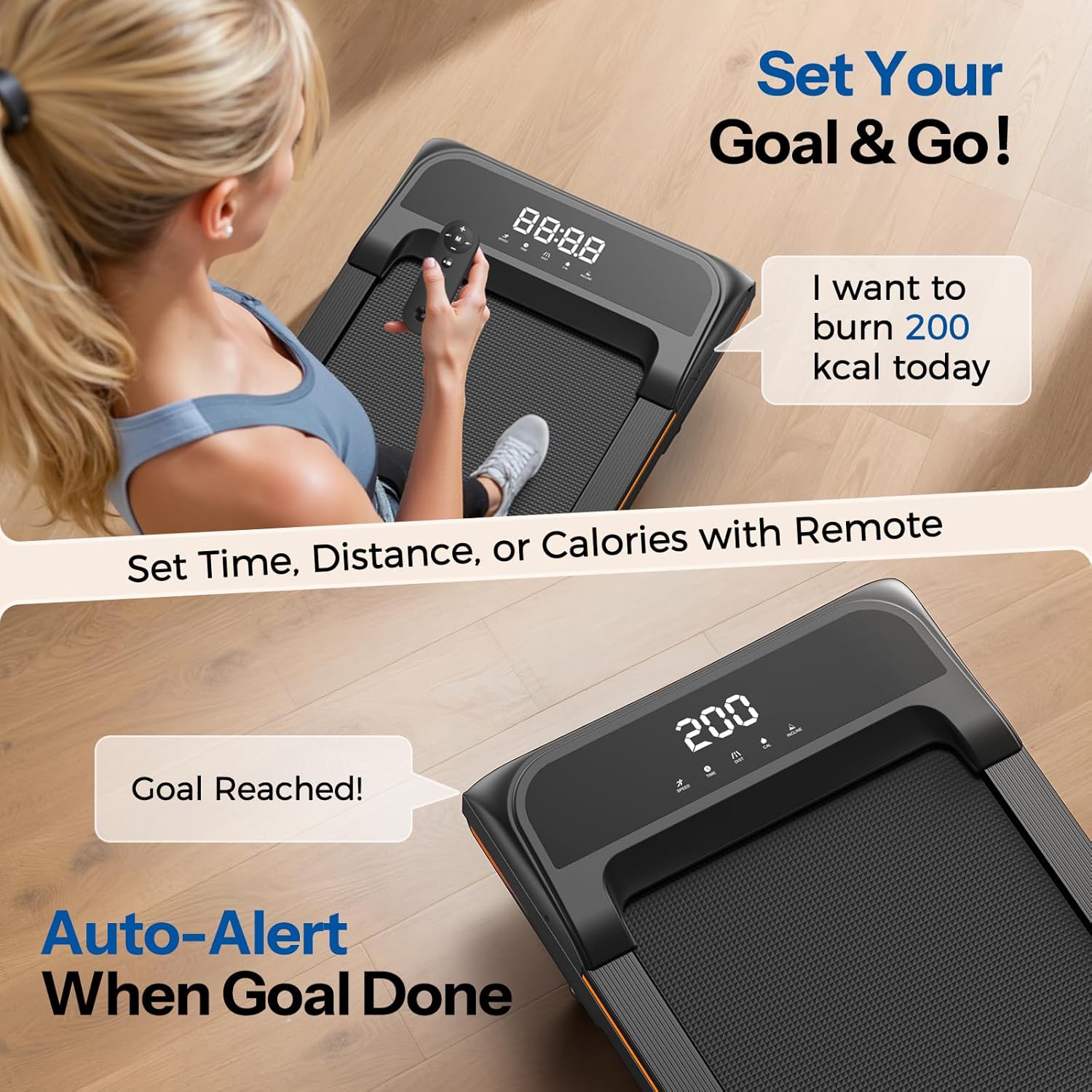
Figure 2: Setting workout goals and receiving alerts on the display.
Stopping the Treadmill:
- Press the Stop/Pause button on the remote. The belt will gradually slow down and stop.
- To completely power off, press the Power button on the remote or the main power switch.
Maintenance
Regular maintenance ensures optimal performance and longevity of your treadmill.
Lubrication:
- Apply lubricating oil under the walking belt every 3 months to 1 year, depending on usage frequency. Refer to the user manual for specific instructions on application.
Belt Adjustment:
If the walking belt shifts to one side, use the provided hex key to adjust the idler roller screws. This process should be done while the treadmill is running at a low speed (1-2 minutes) and you are walking on it to ensure proper centering.
Video: How to Adjust the Walking Belt on Your Niceday Walking Pad. This video provides a visual guide for adjusting the treadmill belt.
Troubleshooting
For common issues, refer to the table below. For more complex problems, contact customer support.
| Problem | Possible Cause | Solution |
|---|---|---|
| Treadmill does not start | Power cord unplugged, power switch off, remote battery low. | Check power connections, ensure switch is ON, replace remote battery. |
| Belt slips or shifts | Belt needs adjustment or lubrication. | Adjust belt tension/centering with hex key, apply lubricant. |
| Unusual noise | Lack of lubrication, loose components. | Lubricate belt, check for loose screws and tighten if necessary. |
Specifications
- Model Name: 6706Y
- Product Dimensions: 47.8"D x 20.05"W x 5.2"H
- Item Weight: 51.8 Pounds
- Material: Alloy Steel
- Maximum Speed: 4 Miles per Hour
- Minimum Speed: 0.6 Miles per Hour
- Maximum Horsepower: 3 Horsepower
- Maximum Incline Percentage: 10%
- Maximum Weight Recommendation: 400 Pounds
- Running Belt Dimensions: 40" x 16.5"
- Special Feature: Wheeled for easy movement
- Metrics Measured: Calories Burned, Distance, Incline, Speed, Time
- Power Source: Corded Electric

Figure 3: Key features and robust construction of the treadmill.
Warranty & Support
Your Niceday Walking Pad Treadmill comes with a 2-year warranty. For any questions, issues, or warranty claims, please contact Niceday customer support. They offer 12-hour issue resolution and have U.S. local warehouses for support.
Contact information can be found in your user manual or on the official Niceday website.