
1. Introduction
Thank you for choosing the FOTING 5000PSI Electric Pressure Washer. This manual provides essential information for the safe and efficient operation, maintenance, and troubleshooting of your new pressure washer. Please read this manual thoroughly before first use and keep it for future reference.
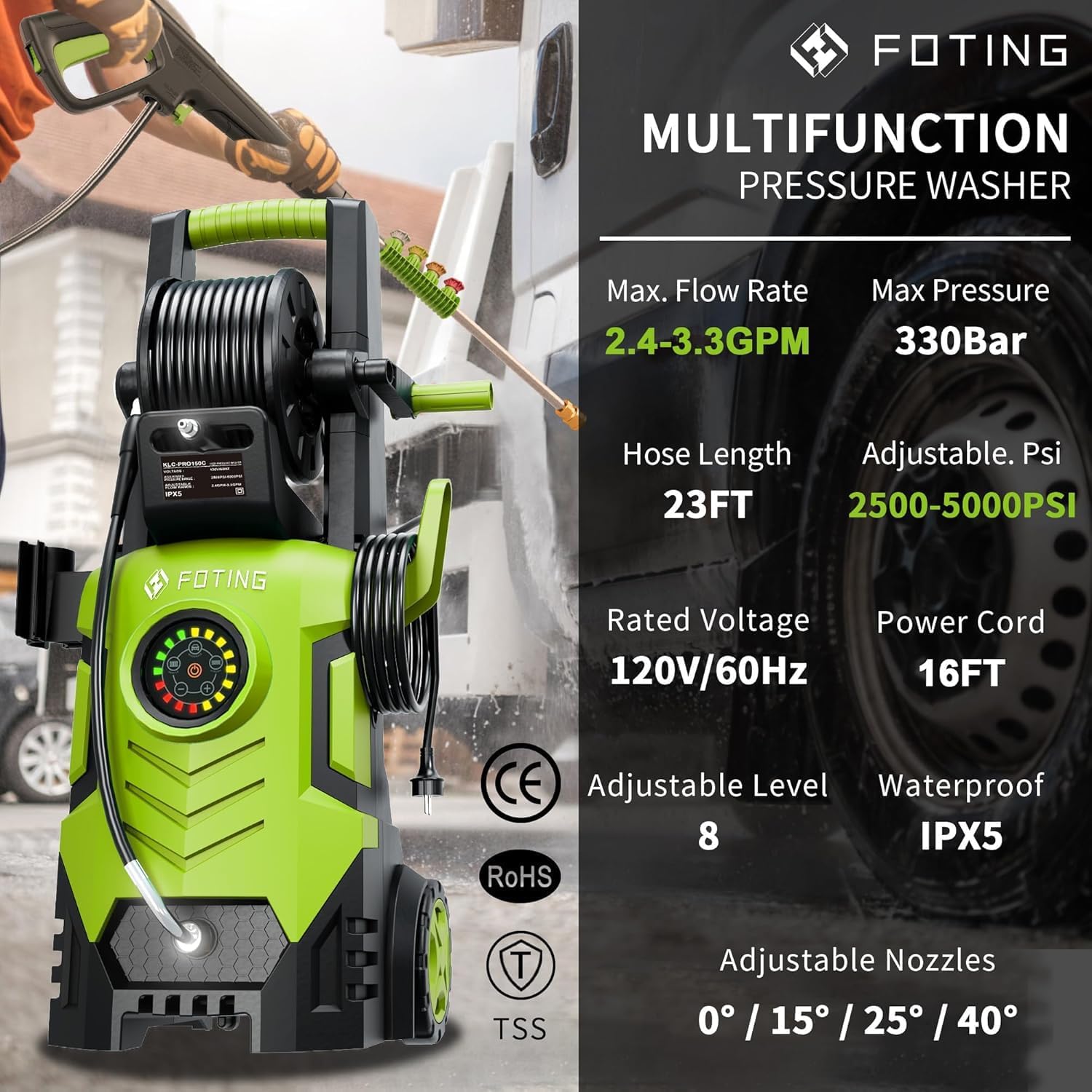
This powerful electric pressure washer is designed for a variety of cleaning tasks around your home and outdoor spaces, including decks, terraces, driveways, siding, sheds, cars, and outdoor power equipment. Its advanced features, such as the adjustable touchscreen and quick-connect nozzles, ensure a versatile and effective cleaning experience.
2. Important Safety Information
Always follow basic safety precautions when using this product to reduce the risk of injury or damage. Failure to follow these instructions may result in serious injury or property damage.
- Read All Instructions: Familiarize yourself with the controls and proper use of the pressure washer.
- Eye Protection: Always wear ANSI Z87.1 approved safety goggles with side shields.
- Hearing Protection: Wear appropriate hearing protection during operation.
- Footwear: Wear sturdy, non-slip footwear to prevent accidental slips.
- Electrical Safety: Ensure the power outlet is properly grounded. Do not operate with damaged cords or plugs. Keep all electrical connections dry and off the ground.
- High Pressure Hazard: The high-pressure stream can cause serious injury. Never direct the spray at people, pets, or electrical devices.
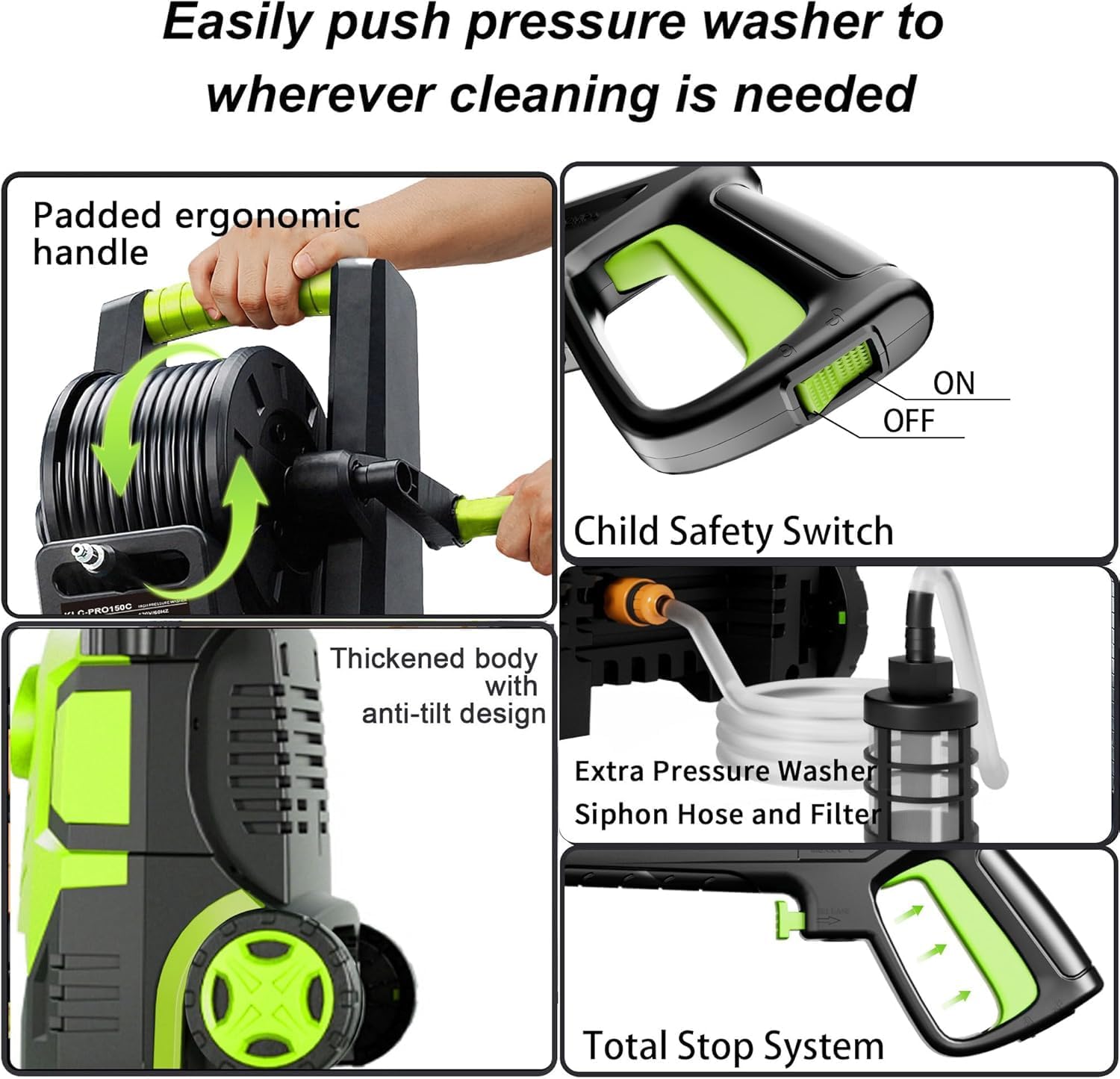
- Child Safety: Keep children and pets away from the operating area. The unit features a child safety switch on the spray gun.
- Water Supply: Ensure a stable and clean water supply. Do not use dirty or contaminated water.
- Total Stop System (TSS): The TSS automatically shuts off the pump when the trigger is not engaged, prolonging pump life and enhancing safety.
3. Package Contents
Verify that all items are present and in good condition upon unpacking.
- FOTING 5000PSI Electric Pressure Washer Unit
- High-Pressure Hose (23 ft) with Hose Reel
- Spray Gun with Wand
- Quick-Connect Nozzles (0°, 15°, 25°, 40°)
- Detergent Bottle (500ml Foam Cannon)
- Inlet Hose with Filter (Siphon Hose)
- Power Cord (16 ft)
- Mounting Handle
- Mounting Brackets for Accessories
- Nozzle Cleaning Tool
4. Product Overview
The FOTING Electric Pressure Washer is designed for user convenience and powerful cleaning. Key components include:
- Main Unit: Houses the motor, pump, and touchscreen control panel. Features a thickened body with anti-tilt design and wheels for easy mobility.
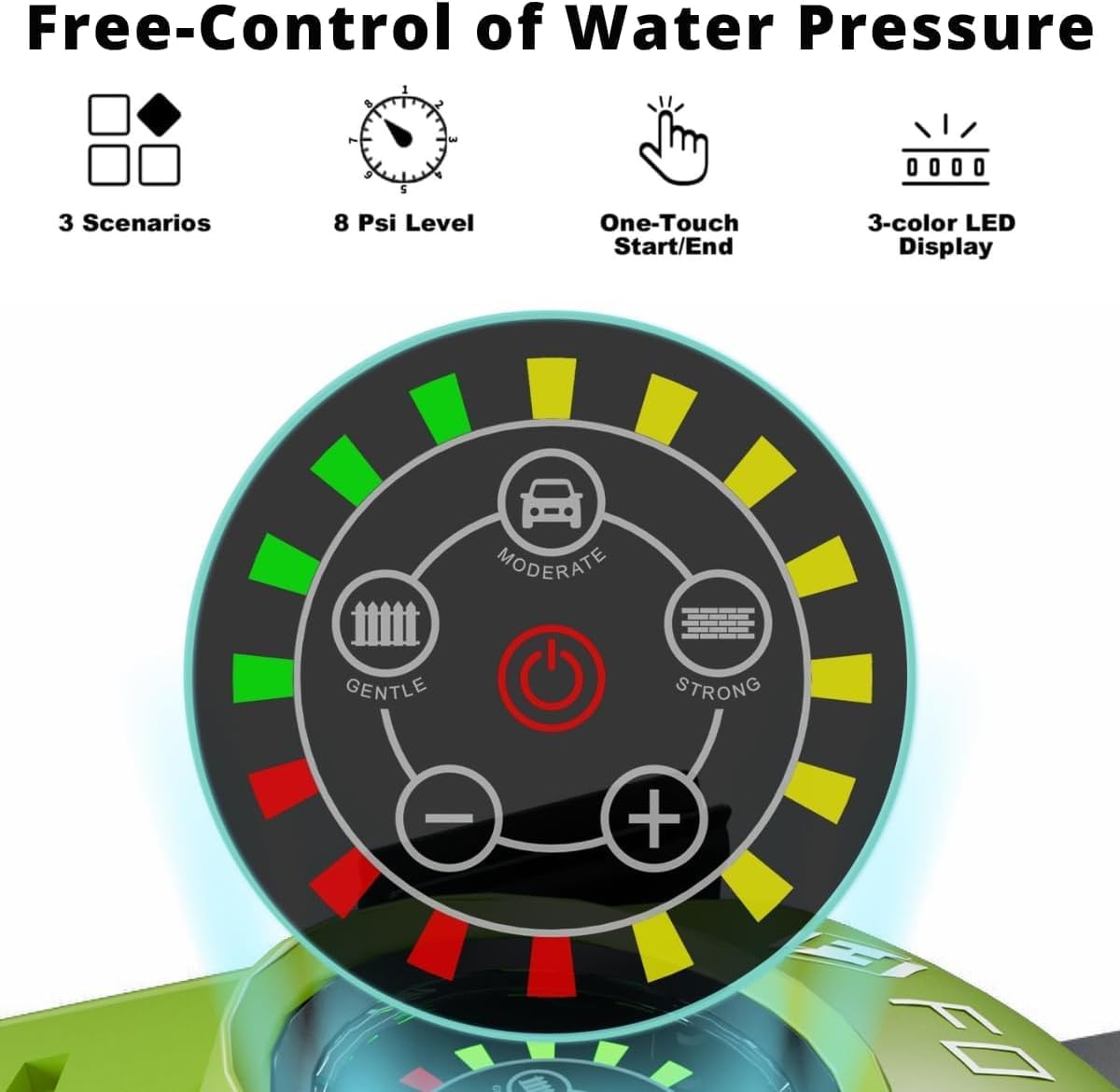
- Touchscreen Interface: Waterproof control panel with 8 adjustable pressure levels (2500PSI to 5000PSI) and 3 scenario modes (Gentle, Moderate, Strong).
- Hose Reel: Integrated reel for mess-free storage of the 23ft high-pressure hose.
- Spray Gun: Ergonomically designed with a child safety switch and quick-connect fitting for nozzles and detergent bottle. Features a durable stainless steel gun barrel.
- Accessory Storage: Dedicated slots and hooks for the spray gun, nozzles, and power cord for convenient storage.
5. Setup Instructions
Follow these steps to assemble and prepare your pressure washer for use:
- Mount the Handle and Hose Reel: Slide the handle with the hose reel onto the top of the main unit until it clicks into place. Secure it with the provided screws at the back.
- Attach Accessory Brackets: Snap the mounting brackets for the spray gun and power cord onto the sides of the main unit.
- Connect High-Pressure Hose to Spray Gun: Insert the high-pressure hose into the spray gun handle until it snaps securely.
- Connect High-Pressure Hose to Main Unit: Connect the other end of the high-pressure hose from the reel to the high-pressure outlet on the main unit. Ensure it is tightly secured.
- Connect Water Inlet:
- Garden Hose: Attach your garden hose to the water inlet connector on the pressure washer. Ensure a tight, leak-free connection.
- Siphon Hose (from bucket/reservoir): If using a bucket or reservoir, connect the siphon hose with the filter to the water inlet. Drop the filter end into your water source.
- Connect Power Cord: Plug the 16ft power cord into a grounded 120V/60Hz outdoor outlet.

Video 1: This video demonstrates the assembly process of the FOTING pressure washer, including connecting the hose reel, spray gun, and water supply.
6. Operating Instructions
Operating your FOTING pressure washer is intuitive with its touchscreen interface.
- Power On: Press the power button on the touchscreen interface. The LED display will illuminate.
- Adjust Pressure: Use the '+' and '-' buttons on the touchscreen to adjust the pressure level from 2500PSI to 5000PSI. The 8-level indicator will show the current setting.
- Select Scenario Mode: Choose between 'Gentle' (for fences/wood), 'Moderate' (for cars), or 'Strong' (for concrete/brick) modes by tapping the corresponding icon on the touchscreen.
- Engage Spray: Point the spray gun at the cleaning surface and press the trigger. The Total Stop System (TSS) will activate the pump only when the trigger is pressed.
- Child Safety Lock: Always engage the child safety switch on the spray gun when not in use to prevent accidental operation.
Video 2: This video highlights the touchscreen interface and its functionality for adjusting pressure and selecting cleaning modes.
7. Nozzle Guide
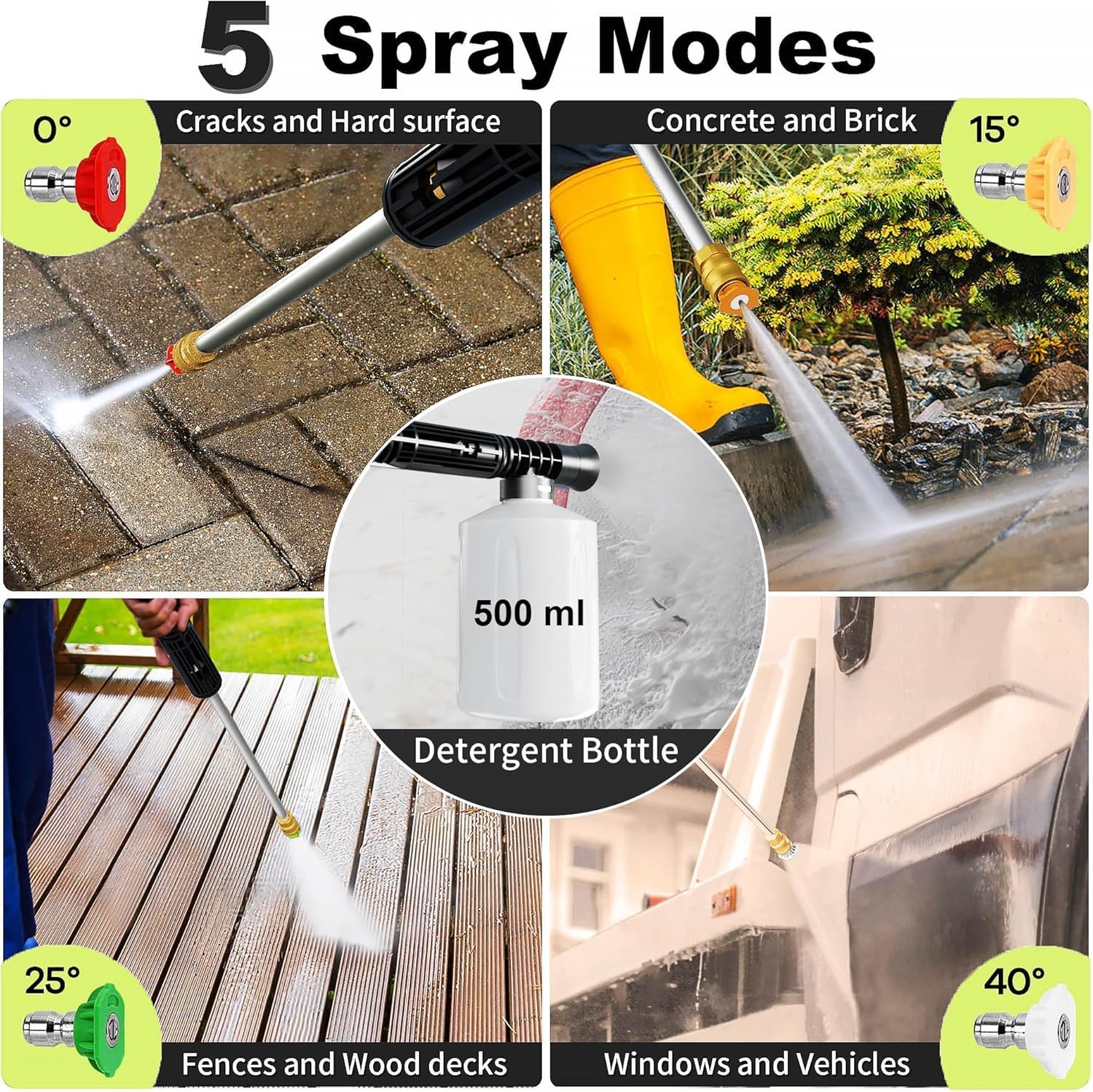
Your pressure washer comes with 4 quick-connect nozzles, each designed for specific cleaning tasks. Always select the appropriate nozzle to prevent damage to the cleaning surface.
- 0° Red Nozzle (Powerful Jet): Delivers a concentrated, high-pressure stream. Ideal for tough stains on concrete, asphalt, or metal surfaces. Use with extreme caution.
- 15° Yellow Nozzle (Focused Cleaning): Provides a powerful, narrow spray. Best for removing stubborn dirt and grime from hard surfaces like concrete and brick.
- 25° Green Nozzle (Suitable Use): Offers a wider, medium-pressure spray. Suitable for general cleaning of decks, fences, and terraces.
- 40° White Nozzle (General Cleaning): Produces a wide, gentle spray. Perfect for cleaning vehicles, windows, and outdoor furniture.

8. Detergent Application
For enhanced cleaning, use the included 500ml foam cannon:
- Fill Bottle: Unscrew the detergent bottle and fill it with your desired pressure washer-safe detergent.
- Attach to Spray Gun: Remove the selected nozzle from the spray gun. Attach the filled detergent bottle directly to the spray gun's quick-connect fitting.
- Apply Detergent: Point the spray gun at the surface and press the trigger to apply a rich foam spray.
- Rinse: After applying detergent, remove the foam cannon and reattach the appropriate cleaning nozzle to rinse the surface thoroughly.

9. Storage
Proper storage ensures the longevity of your pressure washer and keeps your workspace tidy.
- Drain Water: Disconnect the water supply and power. Squeeze the spray gun trigger to release any remaining pressure and drain water from the hose and pump.
- Hose Reel: Use the integrated hose reel to neatly wind the 23ft high-pressure hose.
- Power Cord: Wrap the 16ft power cord around the designated hook on the side of the unit.
- Accessory Storage: Store the spray gun in its side-mounted holder and place the quick-connect nozzles in their dedicated slots.
- Location: Store the pressure washer in a dry, frost-free area.

10. Maintenance
Regular maintenance ensures optimal performance and extends the life of your pressure washer.
- Nozzle Cleaning: Use the provided nozzle cleaning tool to clear any blockages from the quick-connect nozzles.
- Inlet Filter: Regularly check and clean the water inlet filter to prevent debris from entering the pump.
- Hose Inspection: Inspect the high-pressure hose for any signs of wear, cuts, or leaks before each use. Replace if damaged.
- General Cleaning: Wipe down the unit with a damp cloth after each use to remove dirt and grime.
11. Troubleshooting
If you encounter issues, refer to this table for common problems and solutions:
| Problem | Possible Cause | Solution |
|---|---|---|
| Unit does not start | No power supply; Power button not pressed; Trigger not engaged (TSS) | Check power connection; Press power button; Squeeze spray gun trigger |
| Low pressure | Insufficient water supply; Clogged nozzle; Air in pump; Incorrect pressure setting | Ensure full water flow; Clean nozzle; Bleed air from system; Adjust pressure on touchscreen |
| Water leaks | Loose connections; Damaged O-rings/seals | Tighten all connections; Inspect and replace O-rings/seals if necessary |
| Motor runs continuously (without trigger) | TSS malfunction; Internal leak | Contact customer support |
12. Specifications
| Feature | Specification |
|---|---|
| Brand | FOTING |
| Model Number | CBK-KLC-T3-GN018 |
| Max Pressure | 5000 PSI |
| Max Flow Rate | 3.3 Gallons Per Minute (GPM) |
| Power Source | AC (120V/60Hz) |
| Hose Length | 23 Feet |
| Power Cord Length | 16 Feet |
| Item Weight | 23 Pounds |
| Product Dimensions | 13.4"L x 19.3"W x 19.3"H |
| Waterproof Rating | IPX5 |
13. Warranty and Support
FOTING provides a 36-month warranty for this pressure washer, ensuring peace of mind with your purchase. For any questions, troubleshooting assistance, or warranty claims, please contact FOTING customer support through your retailer or the official FOTING website.
Always refer to the official FOTING resources for the most up-to-date support information.
