
1. Introduction
This manual provides essential information for the safe and efficient operation of your LEFANT M2 Robot Vacuum and Mop. Please read it thoroughly before using the device and retain it for future reference.
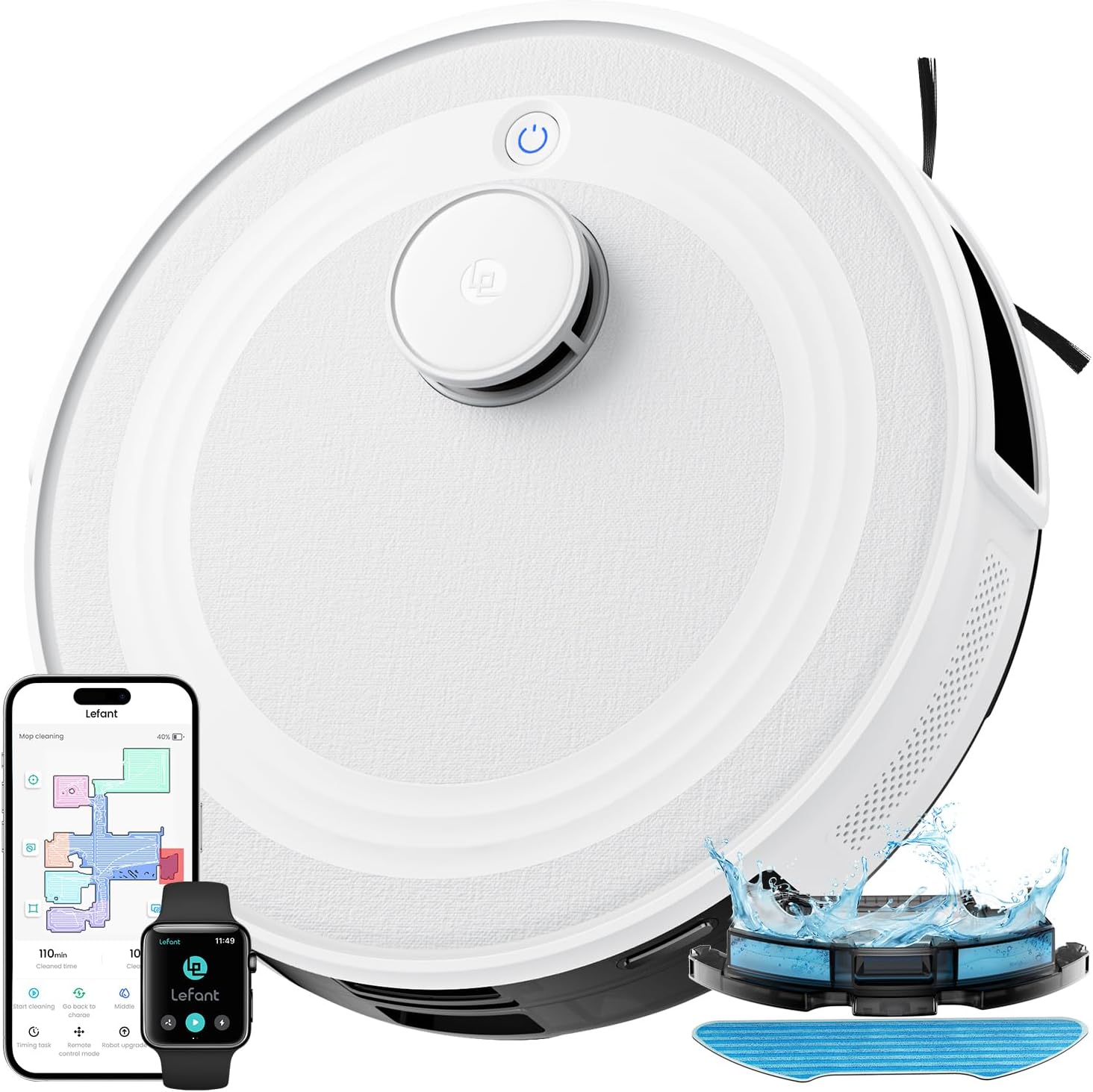
Image: The LEFANT M2 Robot Vacuum and Mop, showcasing its sleek design and accompanying app interface.
2. Safety Instructions
Observe the following safety precautions to prevent injury or damage:
- Do not operate the robot near open flames or flammable materials.
- Keep hair, loose clothing, fingers, and all body parts away from openings and moving parts.
- Ensure the robot is used on dry surfaces only, unless specifically in mopping mode.
- Do not allow children to operate the robot. Supervise children and pets when the robot is in use.
- Use only the manufacturer-specified power adapter and charging base.
- Before cleaning or maintenance, always turn off the robot and unplug the charging base.
- Remove any loose cables, small objects, or fragile items from the cleaning path to prevent entanglement or damage.
3. Package Contents
Verify that all items are present in the package:

Image: An exploded view of the LEFANT M2 robot vacuum and its accessories, including the charging base, water tank, and brushes.
- M2 Robot Vacuum
- Water Tank
- Charging Base
- Power Adapter
- Cleaning Brush
- Mop Holder
- Side Brushes (x2)
- Washable Mop Pad
- User Manual
- Disposable Mop Pads (x5)
- HEPA Filter
4. Product Overview
The LEFANT M2 is a 2-in-1 robot vacuum and mop designed for efficient floor cleaning. It features advanced dToF laser navigation, PSD obstacle avoidance, and customizable cleaning options.

Image: The LEFANT M2 demonstrating its 2-in-1 vacuuming and mopping capabilities with a detachable water tank and mop pad.
Key Features:
- dToF Laser Navigation: Precise mapping and efficient cleaning paths.
- PSD Obstacle Avoidance: 190° detection to prevent collisions and entanglement.
- 6000Pa Suction Power: Effectively removes dust, debris, and pet hair.
- 2-in-1 Vacuum and Mop: Simultaneous cleaning with an electronically controlled water tank.
- Multi-level Mapping: Supports mapping for up to three levels of your home.
- Customized Cleaning: Zone cleaning, spot cleaning, and virtual forbidden zones via app.
- Long Battery Life: 3200 mAh battery for up to 160 minutes of continuous cleaning.
- Quiet Operation: Designed for a peaceful home environment.
- Dual-Band WiFi (2.4G/5G): Stable and fast connection for app control.
5. Setup
5.1 Charging Base Placement
Place the charging base against a wall in an open area, ensuring there are no obstacles within 1 meter (3 feet) to the sides and 2 meters (6 feet) in front of the base. Plug in the power adapter.
5.2 Initial Charging
Place the robot on the charging base. Ensure the charging contacts on the robot align with those on the base. The robot will automatically begin charging. Fully charge the robot before its first use.
5.3 Connecting to the Lefant App

Image: A step-by-step guide on connecting the LEFANT M2 robot to the Lefant mobile application.
- Download the Lefant App from your device's app store.
- Connect your phone to a 2.4GHz or 5GHz Wi-Fi network.
- Open the Lefant App and tap "Add Device."
- Select the M2 model and enter your home Wi-Fi password. Confirm the password is correct, then tap "Next."
- Press and hold the robot's power button for 3 seconds to turn it on. Once on, press and hold the robot's power button for 6 seconds until you hear two beeps, then release.
- Wait for the app to scan for the device. Select the device to connect and wait for the connection to complete.
5.4 Connecting to Alexa / Google Home

Image: A visual guide detailing the process of linking the LEFANT M2 robot vacuum with Amazon Alexa for voice control.
- Connect your Alexa device to the internet and associate it with your Amazon account.
- Open the Lefant App. Select "Me."
- Find "Third-Party Voice Services" (or similar), choose "Alexa" or "Google Assistant," and tap "One-click Bind."
- Tap "Link to Amazon account."
- Click "Link." Then click "Back."
- Alexa is now correctly associated. You can open "Amazon Alexa" to view associated devices under "Devices."
5.5 Controlling with Apple Watch

Image: Instructions for controlling the LEFANT M2 robot vacuum using an Apple Watch, showing app selection and control interface.
- Download the Lefant App and the Lefant Watch App on your mobile phone.
- Pair your Apple Watch with your iPhone.
- Select the Lefant App on your Apple Watch.
- You must click on the Lefant App on your phone and log in.
- Once logged in, connect your robot vacuum.
- Return to your Apple Watch, from which you can now control your robot.
6. Operating Instructions
6.1 Starting/Pausing Cleaning
Press the power button on the robot or use the Lefant App to start or pause a cleaning cycle.
6.2 Cleaning Modes
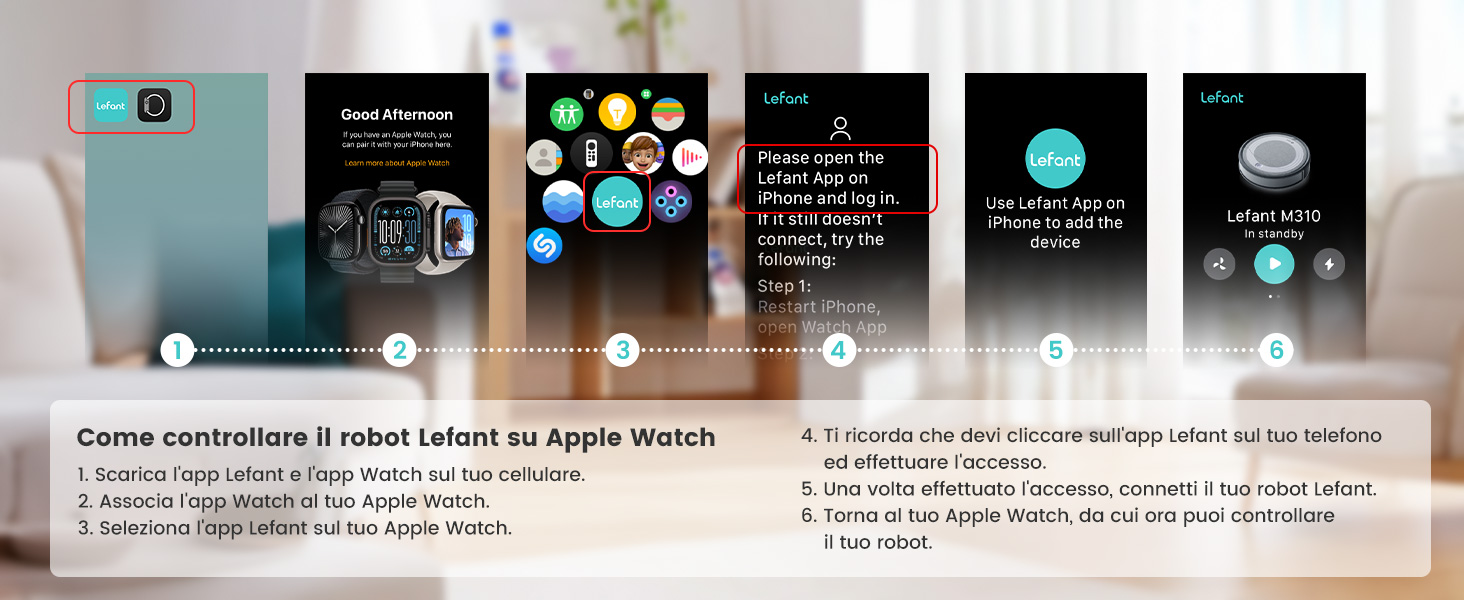
Image: An overhead view illustrating various cleaning patterns of the LEFANT M2, including casual, spot, edge, and zig-zag cleaning.
- Auto Cleaning: The robot intelligently plans a path for comprehensive cleaning.
- Spot Cleaning: Focuses on a specific area for intensive cleaning.
- Edge Cleaning: Cleans along walls and furniture edges.
- Zig-zag Cleaning: A systematic cleaning pattern for efficient coverage.
6.3 Customized Cleaning

Image: A visual representation of the LEFANT M2's customizable mapping feature, allowing users to define and schedule cleaning for specific rooms.
The Lefant App allows for personalized cleaning:
- Zone Cleaning: Select specific rooms or areas to clean.
- Spot Cleaning: Designate a precise point for deep cleaning.
- Scheduling: Set cleaning times and frequencies for different areas.
- Map Editing: Divide or merge rooms to create custom cleaning schedules.
6.4 Setting Forbidden Zones
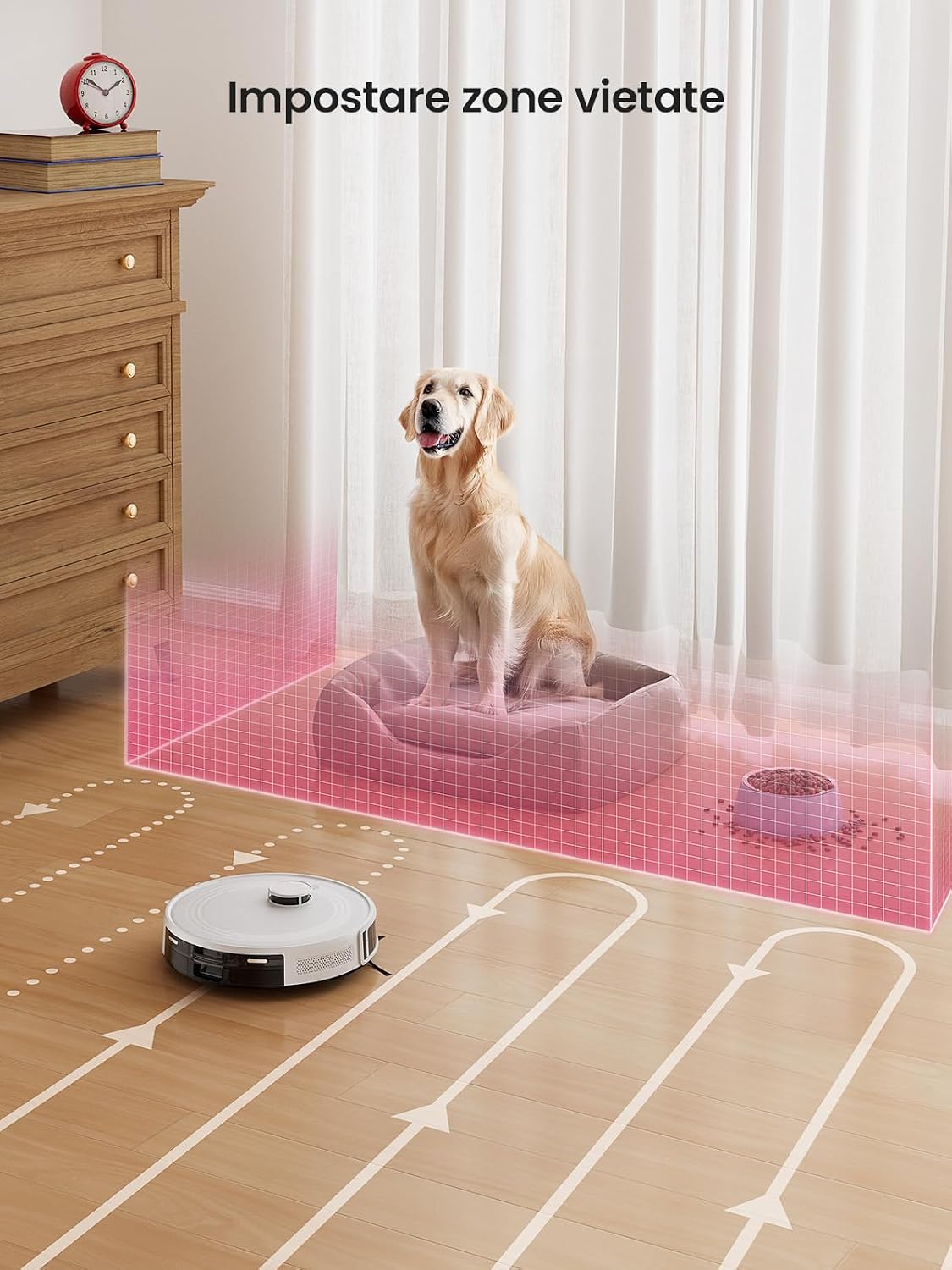
Image: The LEFANT M2 robot vacuum avoiding a virtual forbidden zone set around a pet bed and food bowls.
Use the Lefant App to set virtual boundaries, preventing the robot from entering specific areas. This is useful for protecting pet areas, play zones, or fragile furniture.
6.5 Automatic Recharge and Resume

Image: The LEFANT M2 robot vacuum returning to its charging base and then resuming cleaning, illustrating its automatic recharge and resume function.
When the battery is low or a cleaning cycle is complete, the robot will automatically return to its charging base. If cleaning is not finished, it will resume from its last position after charging to 80%.
6.6 Carpet Detection

Image: The LEFANT M2 robot vacuum detecting a carpeted area and adjusting its cleaning mode, highlighting its automatic carpet detection feature.
In vacuuming and mopping mode, the robot automatically detects carpets. It will avoid carpets during mopping to prevent wetting them and increase suction power when vacuuming carpets for deeper cleaning.
7. Maintenance
Regular maintenance ensures optimal performance and extends the lifespan of your robot vacuum.
7.1 Dustbin and Filter Cleaning
- Empty the dustbin after each use.
- Clean the HEPA filter and sponge filter regularly with the cleaning brush. Do not wash the HEPA filter with water.
7.2 Side Brush Cleaning
- Check side brushes for tangled hair or debris. Remove and clean them as needed.
- Replace side brushes every 3-6 months, or when visibly worn.
7.3 Water Tank and Mop Pad Cleaning
- Empty any remaining water from the tank after each mopping session.
- Wash the reusable mop pad thoroughly after each use and allow it to air dry.
7.4 Sensor Cleaning
- Wipe the cliff sensors, anti-collision sensors, and charging contacts with a clean, dry cloth periodically to ensure proper function.
8. Troubleshooting
If you encounter issues with your LEFANT M2, refer to the following common problems and solutions:
| Problem | Possible Cause | Solution |
|---|---|---|
| Robot does not turn on | Low battery; Power button not pressed correctly | Charge the robot; Press and hold the power button for 3 seconds. |
| Robot cannot connect to Wi-Fi | Incorrect Wi-Fi password; Router too far; Incorrect Wi-Fi band | Verify password; Move robot closer to router; Ensure 2.4GHz or 5GHz network is used. |
| Robot gets stuck frequently | Too many obstacles; Loose cables | Clear the cleaning area; Use virtual forbidden zones for problem areas. |
| Poor cleaning performance | Full dustbin; Clogged filter; Worn brushes | Empty dustbin; Clean/replace filter; Clean/replace brushes. |
| Robot does not return to charging base | Charging base obstructed; Robot too far from base | Ensure clear path to base; Manually place robot on base if needed. |
9. Specifications
| Feature | Specification |
|---|---|
| Brand | LEFANT |
| Model Name | M2 |
| Color | White |
| Product Dimensions | 32 x 32 x 9.4 cm |
| Item Weight | 3.82 Kilograms |
| Dustbin Capacity | 450 Milliliters |
| Voltage | 19 Volts |
| Material | Plastic |
| Noise Level | 60 Decibels |
| Battery Capacity | 3200 mAh |
| Run Time | Up to 160 minutes |
| Compatible Devices | Amazon Echo, Google Home, Lefant App |
| Special Features | dToF Laser Mapping, 2-in-1, 6000Pa Suction, PSD Anti-Obstacle Navigation, App/Alexa Control, Ideal for Pet Hair |
| Recommended Surfaces | Hard Floor, Carpet, Parquet, Tiles |
10. Warranty and Support
LEFANT provides a standard warranty for this product. Please refer to the warranty card included in your package for specific terms and conditions. For technical support, troubleshooting assistance, or warranty claims, please contact LEFANT customer service through the official website or the contact information provided in your warranty documentation.
For further assistance, visit the LEFANT Store on Amazon.


