
Introduction
The YARDCARE N1600 Pro is an advanced robotic lawnmower designed for efficient and precise lawn care. It features a high-precision RTK system combined with a vision system for centimeter-level localization and stable navigation, even in complex garden layouts. With a 135° × 73° field of view, it analyzes the 3D environment in real-time, recognizes lawn edges, and detects over 300 types of obstacles, ensuring safe and continuous operation. This manual provides essential information for setting up, operating, and maintaining your N1600 Pro robot lawnmower.

Figure 1: The YARDCARE N1600 Pro utilizing RTK and AI Vision for precise navigation across a 1600m² lawn, guided by satellite signals.
1. Setup
1.1 Unboxing and Components
Before starting, ensure all components are present in the package. Refer to the list below and the accompanying image.

Figure 2: Included components for the YARDCARE N1600 Pro.
- YARDCARE N1600 Pro Robot Lawnmower
- Charging Station
- RTK Mounting Pole (x2)
- Trident Ground Stake
- RTK Reference Station Module
- RTK Base Station Extension Cable
- Charging Station Fixing Screws (x6)
- Blade Screws M4*10 (x3)
- Cutting Blades (x3)
- Hex Wrench
- Power Adapter
- Battery Pack
- Instruction Manual
1.2 RTK Station Placement and Installation
The RTK (Real-Time Kinematic) system requires an optimal location for stable GPS reception. Select an open area without obstructions for the RTK base station. The charging station should be placed in a shaded and level area.

Figure 3: Overview of the setup process.
- Choose RTK Location: Select an open area with clear sky view for the RTK base station to ensure stable GPS reception.
- Connect and Install: Configure your network, mount the RTK base station, and place the charging station in a shaded, level area.
1.3 App Configuration and Smart Mapping
The N1600 Pro eliminates the need for perimeter wires. All setup and mapping are done through the dedicated YARDCARE application. Define working zones and restricted areas freely within the app.

Figure 4: Using the app for custom mapping and control.
- Map Your Lawn: Use the application to draw the cutting area and achieve precise coverage.
- Initiate Full Mowing: Press the start button in the app, and the N1600 Pro will automatically mow the entire lawn.
2. Operating Instructions
2.1 Mowing Patterns and Edge Cutting
The N1600 Pro begins each mowing cycle with edge cutting and then proceeds with a systematic U-pattern. This method minimizes overlaps, prevents missed spots, and ensures a uniform, professional finish. The cutting width is 18 cm.

Figure 5: High-efficiency U-pattern mowing.

Figure 6: Precise edge cutting with centimeter accuracy.
2.2 Obstacle Avoidance and Safety
The robot's vision system detects over 300 types of obstacles, including trees, people, pets, toys, and tools, ensuring safe operation and preventing collisions.

Figure 7: The N1600 Pro identifies and avoids over 300 types of obstacles.
2.3 Multi-Zone Management and App Control
The YARDCARE app allows you to adjust cutting height (20–60 mm), schedule cycles, and manage multiple zones. Restricted areas can be easily configured. The robot supports areas up to 1600 m² with up to 100 minutes of autonomy.

Figure 8: Multi-zone management for complex garden layouts.
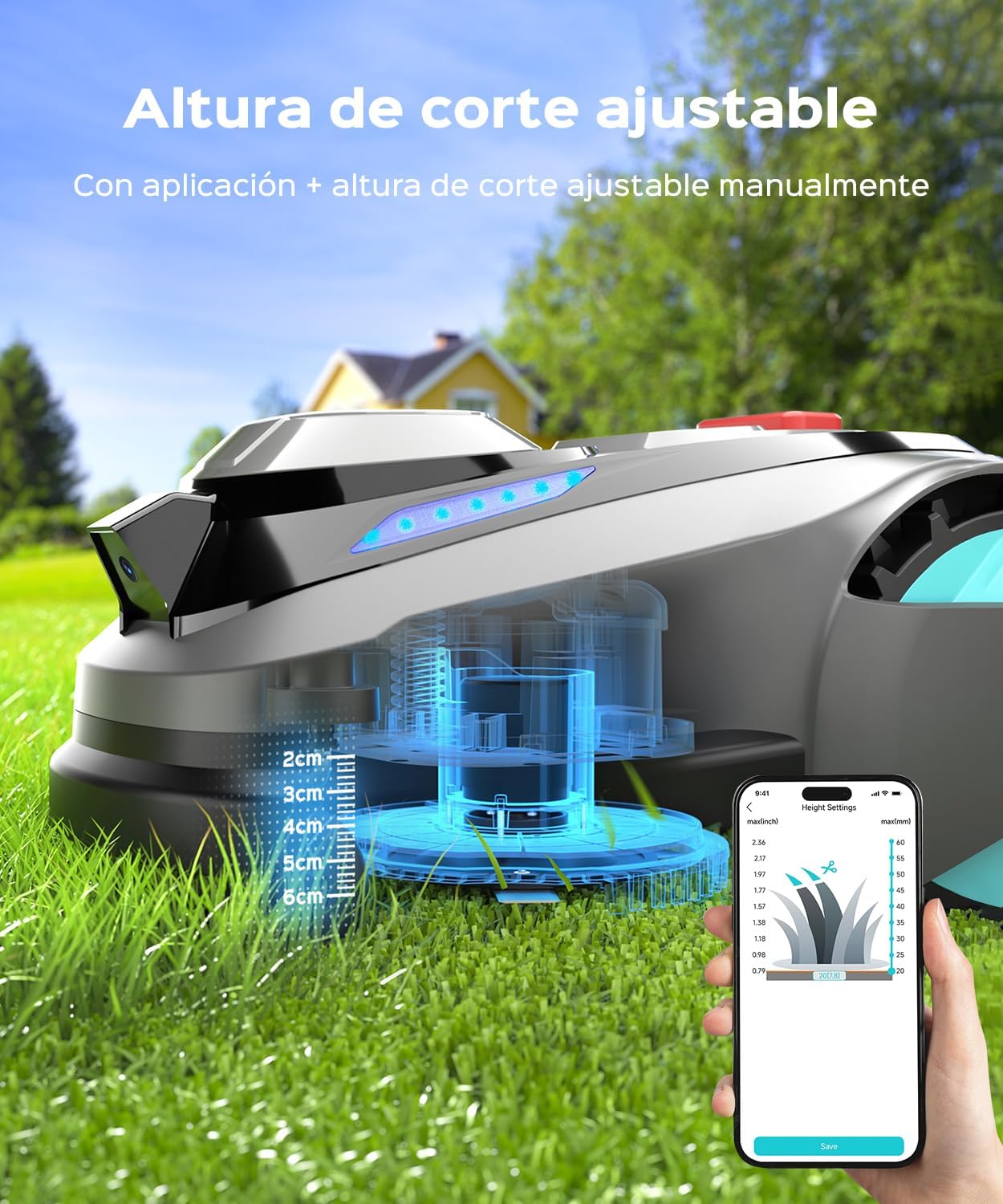
Figure 9: Adjustable cutting height (20-60mm) via app or manually.
2.4 Automatic Resume and Charging
When the battery level drops below 20%, the N1600 Pro automatically returns to its charging base. It resumes mowing from the exact spot where it stopped once fully charged, ensuring complete lawn coverage.

Figure 10: Automatic return to charging station and integrated rain sensor.

Figure 11: Intelligent mowing with automatic resume function.
3. Maintenance
3.1 Cleaning
The N1600 Pro has an IPX4 water resistance rating, making it easy to clean. Use a low-pressure water stream to rinse off grass clippings and dirt from the underside and exterior of the robot.

Figure 12: Easy cleaning with IPX4 water resistance.
3.2 Software Updates (OTA)
Keep your device updated with the latest features and optimizations through Over-The-Air (OTA) software updates. Ensure the robot is connected to a stable 2.4 GHz Wi-Fi network and is within range of the router during updates.

Figure 13: Performing OTA software updates via the app.
3.3 Blade Replacement
Regularly inspect the cutting blades for wear and tear. Replace dull or damaged blades to maintain optimal cutting performance. Refer to the included components for spare blades and the hex wrench for replacement.
4. Troubleshooting
| Problem | Possible Cause | Solution |
|---|---|---|
| Robot does not connect to WLAN / Update fails | Weak Wi-Fi signal, incorrect Wi-Fi band (only 2.4 GHz supported), robot not on charging station during update. | Ensure the robot is on the charging station. Verify a strong 2.4 GHz Wi-Fi signal near the robot. Move the router closer or use a Wi-Fi extender if necessary. Try updating via Bluetooth if Wi-Fi fails. |
| Unstable GPS signal / Mapping issues | RTK base station obstructed, poor satellite visibility, environmental interference. | Relocate the RTK base station to an open area with clear sky view. Ensure no tall objects or buildings are blocking the signal. Re-map the lawn if the initial mapping was incomplete or inaccurate. |
| Robot ignores scheduled tasks | Incorrect schedule settings in the app, software glitch, robot not in designated zone. | Check and reconfigure the mowing schedule in the YARDCARE app. Ensure the robot is within its assigned working zone. Perform an OTA software update to resolve potential glitches. |
| Robot gets stuck frequently | Obstacles not detected, uneven terrain, "No-Go Zones" not properly defined. | Ensure all permanent obstacles are correctly identified by the vision system. Define "No-Go Zones" in the app for areas where the robot should not enter. Check for excessively uneven terrain that might impede movement. |
4.1 Anti-Theft Design
The integrated GPS tracking helps recover your device in case of theft. Monitor its location via the YARDCARE app.

Figure 14: Anti-theft design with integrated GPS tracking.
5. Specifications
| Feature | Detail |
|---|---|
| Model Number | N1600Pro-B |
| Brand | YARDCARE |
| Product Dimensions | 62 x 51.6 x 31.5 cm |
| Product Weight | 18.5 kg |
| Battery Type | 1 Lithium Ion (included) |
| Cutting Width | 18 cm |
| Adjustable Cutting Height | 20 - 60 mm |
| Operating Mode | Automatic |
| Max Slope Capacity | 45% (20°) |
| Water Protection Rating | IPX4 |
| Noise Level | 60 dB |
| Recommended Area | Up to 1600 m² |
| Autonomy | Up to 100 minutes |
6. Warranty Information
Specific warranty details for the YARDCARE N1600 Pro Robot Lawnmower are not provided in the product data. Please refer to the warranty card included in your product packaging or contact YARDCARE customer support for detailed warranty terms and conditions.
7. Customer Support
For technical assistance, troubleshooting, or any other inquiries regarding your YARDCARE N1600 Pro, please refer to the contact information provided in your product documentation or visit the official YARDCARE website. The product data does not include specific customer support contact details.
