
1. Introduction
Thank you for choosing the Bukumo 0.3 Cuft Digital Home Safe Box 17EH. This manual provides essential information for the safe and efficient operation of your new safe. Please read these instructions carefully before use and retain them for future reference.
This safe is designed to provide secure storage for your valuables, including cash, jewelry, documents, and other personal items. It features an electronic keypad, emergency key access, and an alarm system for enhanced security.

Image 1.1: Bukumo 0.3 Cuft Digital Home Safe Box.
2. Package Contents
Please check the package to ensure all components are present:
- 1 x Bukumo 0.3 Cuft Home Safe Box
- 1 x User Manual (this document)
- 2 x Emergency Spare Keys
- 4 x Expansion Bolts for mounting
- 1 x Fireproof Bag
- 1 x External Battery Case
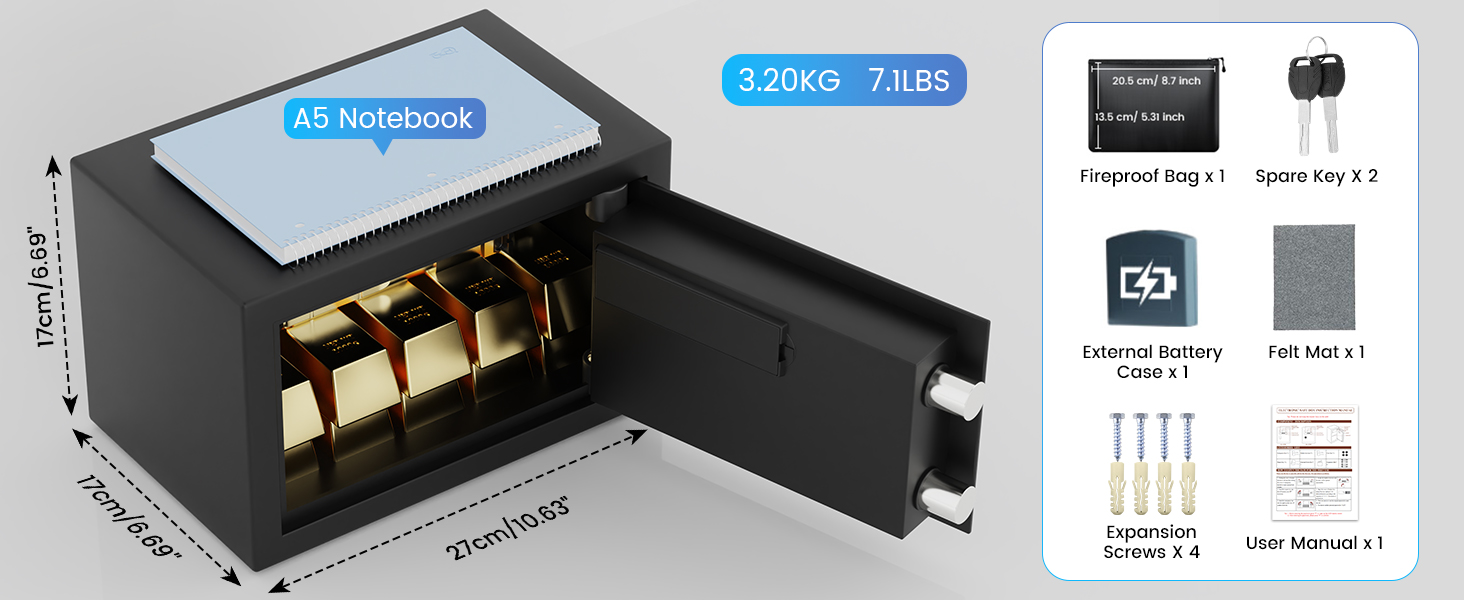
Image 2.1: Included components of the safe box.
3. Product Overview
3.1 Specifications
- Brand: Bukumo
- Model: 17EH
- Capacity: 0.3 Cubic Feet
- Product Dimensions: 10.63" W x 6.69" D x 6.69" H (27cm W x 17cm D x 17cm H)
- Lock Type: Electronic Combination Lock
- Material: Alloy Steel
- Item Weight: 6.5 Pounds (3.20 KG)
- Color: Black
- Mounting Type: Wall Mount
- Special Features: Alarm System, Anti-Theft, Combination Lock, Sensor Light

Image 3.1: Product dimensions and capacity.
3.2 Construction Details
The safe features a robust alloy steel construction with a 42mm thick door and 20mm bolts for enhanced physical protection. It is designed to deter unauthorized access.

Image 3.2: Detailed view of the safe's construction.
4. Setup
4.1 Initial Opening with Emergency Key
Before first use, you must open the safe using the emergency key to install batteries.
- Locate the keyhole cover on the electronic keypad.
- Gently pry open the keyhole cover.
- Insert one of the provided emergency keys into the keyhole.
- Turn the key clockwise while simultaneously turning the knob clockwise to open the safe door.
Video 4.1: Demonstrates how to open the safe using the emergency key and install batteries.
4.2 Battery Installation
The safe requires 4 AA batteries (not included) for the electronic keypad to function.
- With the safe door open, locate the battery compartment on the inside of the door.
- Open the battery compartment cover.
- Insert 4 AA batteries, ensuring correct polarity (+/-).
- Close the battery compartment cover.
4.3 Mounting the Safe
For added security, the safe can be mounted to a wall or floor using the provided expansion bolts.
- Choose a suitable location for mounting. Ensure the surface is solid and can support the weight of the safe and its contents.
- With the safe door open, locate the pre-drilled holes on the back or bottom of the safe.
- Mark the drilling points on the wall or floor through these holes.
- Drill holes at the marked positions using an appropriate drill bit.
- Align the safe with the drilled holes and insert the expansion bolts.
- Tighten the bolts securely to fix the safe in place.

Image 4.1: Wall and floor mounting design.
5. Operating Instructions
5.1 Opening the Safe with Password
After battery installation, the initial password is 159#.
- Enter the initial password: 159#.
- The indicator light will turn green.
- Within 5 seconds, turn the knob clockwise to open the safe door.

Image 5.1: Two ways to open the safe.
5.2 Setting the User Code
You can set a personal user code (3-8 digits) for daily access.
- With the safe door open, press the red reset button located on the inside of the door, near the battery compartment.
- The yellow indicator light on the keypad will illuminate.
- Enter your new 3-8 digit user code.
- Press the "#" button to confirm. The yellow light will turn off, and a beep will confirm the new code is set.
Video 5.2: Demonstrates how to set the user code and master code.
5.3 Setting the Master Code
The master code provides an additional layer of security and can also be used to open the safe.
- With the safe door open, press "00" then press the red reset button.
- The yellow indicator light on the keypad will illuminate.
- Enter your new 3-8 digit master code.
- Press the "#" button to confirm. The yellow light will turn off, and a beep will confirm the new code is set.
5.4 Alarm System
The safe is equipped with a dual security alarm system:
- If an incorrect password is entered three times consecutively, the safe will trigger an alarm sound and lock for 20 seconds.
- If an incorrect password is entered six times consecutively, the safe will trigger an alarm sound and lock for 5 minutes.
This system is designed to deter unauthorized access.

Image 5.2: Anti-theft alarm system.
5.5 Mute Function
You can mute or unmute the keypad sounds:
- To mute the keypad sounds, press *633.
- To unmute the keypad sounds, press *66.
Video 5.3: Demonstrates the alarm system and mute function.
6. Maintenance
- Battery Replacement: Replace batteries promptly when the low battery indicator appears to ensure continuous operation. If batteries die completely, use the external battery case or emergency key to open the safe.
- Cleaning: Clean the safe's exterior with a soft, damp cloth. Avoid abrasive cleaners or solvents that could damage the finish.
- Key Storage: Always store emergency keys in a secure location away from the safe.
7. Troubleshooting
| Problem | Possible Cause | Solution |
|---|---|---|
| Safe does not open with password. | Incorrect password entered; batteries are low or dead. | Verify the password and try again. Replace batteries or use the external battery case. Use the emergency key if necessary. |
| Keypad is unresponsive. | Dead batteries; keypad malfunction. | Replace batteries. If still unresponsive, use the emergency key and contact support. |
| Alarm sounds unexpectedly. | Incorrect password attempts; physical tampering. | Ensure correct password entry. The alarm will reset after the lockout period. |
| Forgotten password. | User code or master code forgotten. | Use the emergency key to open the safe, then reset the user or master code as per section 5.2 or 5.3. |
8. Warranty and Support
Bukumo provides long-term technical support and replacement of accessories for your safe box. If you encounter any issues or require assistance, please contact Bukumo customer service. We are committed to ensuring your satisfaction and the security of your valuables.