
1. Introduction
This manual provides comprehensive instructions for the KQPZ YND-2000C Remote Control. Designed for use with compatible air conditioning units, this remote offers convenient control over various functions. Please read this manual carefully before operating the device to ensure proper use, optimal performance, and to maintain its longevity. Keep this manual for future reference.
2. Safety Information
Observe the following safety precautions to prevent damage to the remote control or injury to yourself:
- Do not expose the remote control to direct sunlight, high temperatures, or high humidity.
- Avoid dropping the remote control or subjecting it to strong impacts.
- Do not attempt to disassemble or modify the remote control. This will void the warranty.
- Keep batteries out of reach of children. If swallowed, seek immediate medical attention.
- Dispose of used batteries according to local regulations. Do not mix old and new batteries, or different types of batteries.
- If the remote control will not be used for an extended period, remove the batteries to prevent leakage.
3. Package Contents
Carefully unpack your KQPZ YND-2000C Remote Control and check that all items are present and in good condition. If any item is missing or damaged, please contact your retailer.
- 1 x KQPZ YND-2000C Remote Control
- 1 x User Manual (this document)
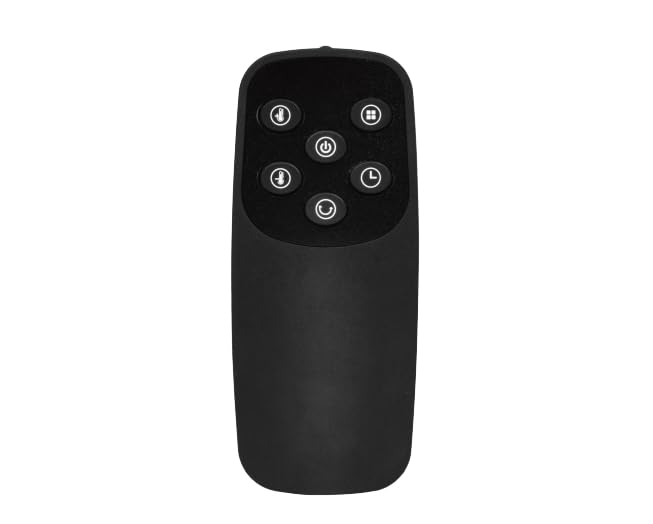
Image: The KQPZ YND-2000C Remote Control. This image displays the front view of the remote control, showing its buttons and display area.
4. Setup
4.1 Battery Installation
The KQPZ YND-2000C Remote Control requires two AAA batteries (not included) for operation.
- Locate the battery compartment cover on the back of the remote control.
- Slide the cover downwards or press the latch and lift to open the compartment.
- Insert two AAA batteries, ensuring the positive (+) and negative (-) terminals align correctly with the markings inside the compartment.
- Replace the battery compartment cover by sliding it back into place until it clicks securely.
Note: If the remote control does not respond after battery installation, check the battery orientation and ensure they are fresh.
4.2 Initial Use and Pairing (if applicable)
The YND-2000C Remote Control is typically pre-programmed for compatible KQPZ air conditioning units. For first-time use, point the remote control directly at the air conditioner's receiver window and press the Power button. If the air conditioner does not respond, refer to your air conditioner's user manual for specific pairing or code-setting instructions, as some models may require a specific setup procedure.
5. Operating Instructions
The KQPZ YND-2000C Remote Control provides various functions for your air conditioning unit. Button layouts may vary slightly, but common functions are described below.
| Button/Function | Description |
|---|---|
| Power (On/Off) | Turns the air conditioner unit on or off. |
| Mode | Cycles through operating modes: Cool, Heat, Fan, Dry, Auto. |
| Temp ▲ / ▼ | Adjusts the desired temperature setting up or down. |
| Fan Speed | Changes the fan speed (e.g., Low, Medium, High, Auto). |
| Swing | Activates or deactivates the automatic louver swing function. |
| Timer | Sets a timer for the unit to turn on or off automatically. Refer to your AC unit's manual for detailed timer settings. |
| Sleep / Eco | Activates a power-saving or comfort-optimized mode for sleeping. |
For specific advanced functions or button combinations, please consult the user manual provided with your KQPZ air conditioning unit.
6. Maintenance
6.1 Cleaning the Remote Control
To maintain the appearance and functionality of your remote control:
- Wipe the surface with a soft, dry cloth.
- For stubborn dirt, lightly dampen the cloth with water and a mild detergent, then wipe dry immediately.
- Do not use abrasive cleaners, alcohol, or solvents, as these can damage the surface.
6.2 Battery Replacement
Replace the batteries when the remote control's range decreases significantly or if the air conditioner no longer responds reliably. Follow the battery installation steps in Section 4.1. Always replace both batteries at the same time with new ones of the same type (AAA).
6.3 Storage
If the remote control will not be used for an extended period, remove the batteries to prevent potential leakage and store the remote in a cool, dry place away from direct sunlight.
7. Troubleshooting
If you encounter issues with your KQPZ YND-2000C Remote Control, refer to the following common problems and solutions:
| Problem | Possible Cause | Solution |
|---|---|---|
| Remote control not working. | Dead or incorrectly installed batteries. | Replace batteries with new ones, ensuring correct polarity (+/-). |
| Air conditioner does not respond. | Obstruction between remote and AC unit; remote out of range; AC unit power off. | Ensure clear line of sight to AC unit's receiver; move closer to the unit; check if AC unit is powered on. |
| Buttons are unresponsive or sticky. | Dirt or debris under buttons; internal damage. | Clean the remote control as described in Section 6.1. If problem persists, contact support. |
| Remote display is dim or blank. | Low battery power. | Replace batteries. |
If the problem persists after trying these solutions, please contact KQPZ customer support.
8. Specifications
The following are the technical specifications for the KQPZ YND-2000C Remote Control:
- Model: YND-2000C
- Brand: KQPZ
- Connectivity Technology: Infrared
- Compatible Devices: Air Conditioner
- Max Number of Supported Devices: 1
- Special Feature: Lightweight
- Item Weight: 1.13 ounces (approximately 32 grams)
- Package Dimensions: 6.06 x 4.09 x 0.79 inches (approximately 15.4 x 10.4 x 2.0 cm)
- Power Source: 2 x AAA Batteries (not included)
9. Warranty and Support
9.1 Warranty Information
KQPZ products are manufactured to high-quality standards. For specific warranty terms and conditions applicable to your YND-2000C Remote Control, please refer to the warranty card included with your purchase or visit the official KQPZ website. The warranty typically covers manufacturing defects for a specified period from the date of purchase.
Note: Damage caused by improper use, unauthorized repairs, or failure to follow instructions in this manual may void the warranty.
9.2 Customer Support
If you have any questions, require technical assistance, or need to report a problem with your KQPZ YND-2000C Remote Control, please contact KQPZ customer support through the following channels:
- Website: Visit the official KQPZ website for support resources, FAQs, and contact forms.
- Email: Refer to your product packaging or the KQPZ website for customer service email addresses.
- Phone: Check the KQPZ website for regional customer service phone numbers.
Please have your product model number (YND-2000C) and purchase details ready when contacting support.


