
1. Introduction
Thank you for purchasing the Mikado MD-SBT27 Bluetooth Soundbar Speaker. This portable soundbar features Bluetooth 5.3 connectivity, RGB lighting, an alarm clock, and support for TF cards and USB flash drives. Please read this manual carefully before using the product to ensure proper operation and to maximize its lifespan.
2. Safety Information
- Do not expose the device to extreme temperatures, direct sunlight, or high humidity.
- Avoid dropping or subjecting the device to strong impacts.
- Do not disassemble, repair, or modify the device yourself. Contact qualified service personnel for any repairs.
- Keep the device away from water or other liquids to prevent electric shock or damage.
- Use only the specified charging cable and power adapter (if included) to charge the device.
- Clean the device with a soft, dry cloth. Do not use abrasive cleaners or solvents.
3. Package Contents
Please check the package for the following items:
- Mikado MD-SBT27 Soundbar Speaker
- Type-C Charging Cable
- User Manual
4. Product Overview
4.1 Front View and Display
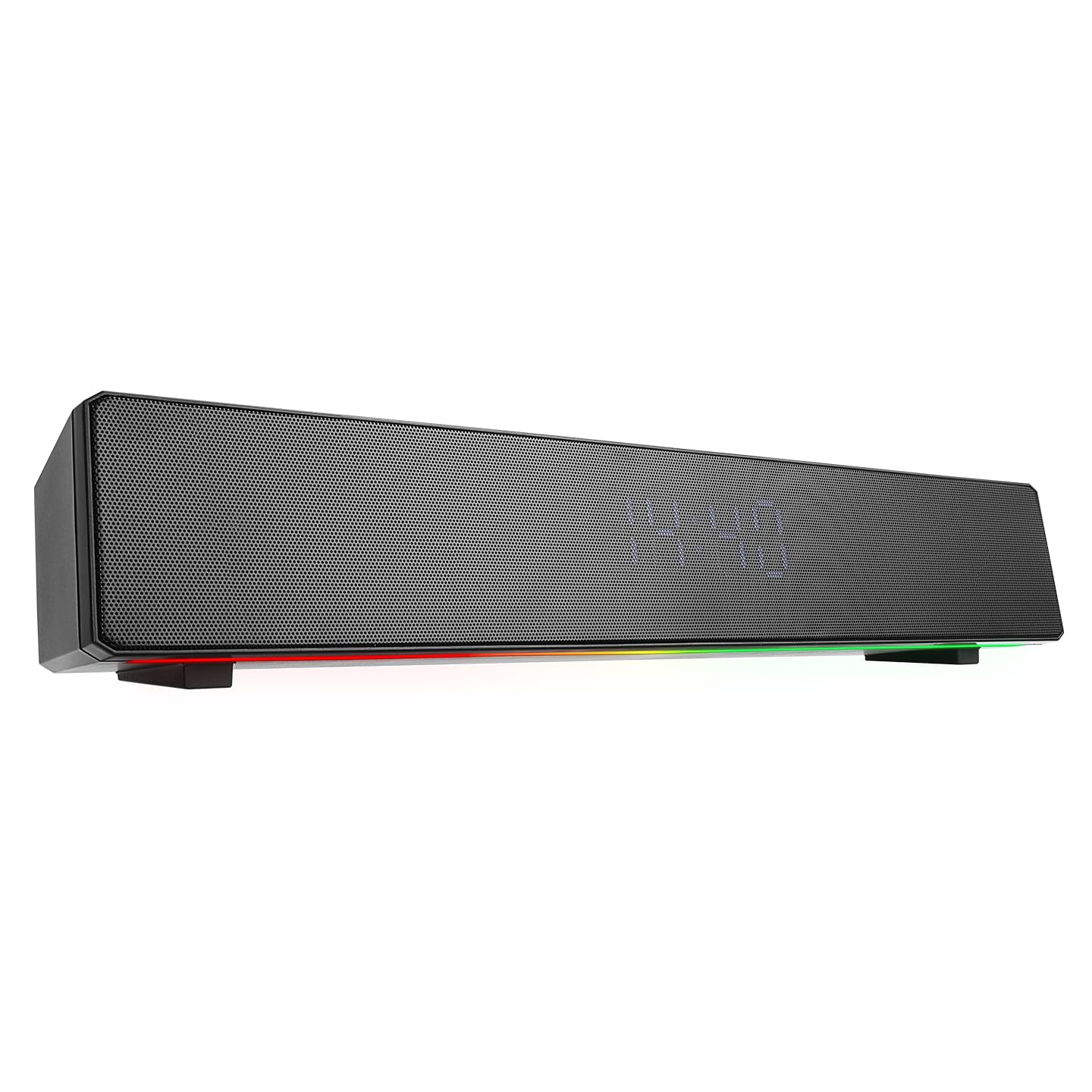
The front of the soundbar features a digital display for time and mode indicators, along with dynamic RGB lighting strips on both sides.
4.2 Top Panel Controls

This image shows the control buttons located on the top surface of the soundbar.
- Power Button: Press and hold to power on/off. Short press to play/pause in music mode, or answer/end calls.
- M (Mode) Button: Short press to switch between Bluetooth, TF Card, USB, and AUX modes.
- Previous Track / Volume Down (-): Short press for previous track. Long press to decrease volume.
- Next Track / Volume Up (+): Short press for next track. Long press to increase volume.
- SET Button: Used for setting the clock and alarm.
- Light Button: Short press to change RGB lighting modes or turn off the lights.
4.3 Rear Panel Ports

The rear panel includes the power switch, audio input, and media ports.
- OFF/ON Switch: Main power switch for the device.
- AUX Port: 3.5mm audio input for connecting external devices.
- USB Port: For playing audio from a USB flash drive.
- TF/USB Slot: Slot for a TF (MicroSD) card.
- DC/5V (Type-C) Port: Charging port for the soundbar.
5. Setup
5.1 Charging the Soundbar
Before first use, fully charge the soundbar. Connect the provided Type-C charging cable to the DC/5V port on the rear panel and the other end to a 5V USB power adapter (not included). The charging indicator (if available, usually on the display) will show charging status. A full charge takes approximately 2 hours and provides up to 4 hours of playback time.
5.2 Powering On/Off
- To power on: Flip the OFF/ON switch on the rear panel to ON. Then, press and hold the Power Button on the top panel for a few seconds until the display lights up.
- To power off: Press and hold the Power Button on the top panel for a few seconds. For complete power off, also flip the OFF/ON switch on the rear panel to OFF.
6. Operating Instructions
6.1 Bluetooth Pairing
- Ensure the soundbar is powered on and in Bluetooth mode. If not, short press the M (Mode) Button until "BT" or a similar indicator appears on the display.
- On your mobile device (smartphone, tablet, computer), enable Bluetooth and search for available devices.
- Select "MD-SBT27" from the list of found devices.
- Once paired, the soundbar will emit a confirmation tone, and the display will indicate a successful connection.
6.2 USB / TF Card Playback
- Insert a USB flash drive into the USB port or a TF card into the TF/USB slot on the rear panel.
- The soundbar should automatically switch to USB or TF card mode. If not, short press the M (Mode) Button to select the correct mode.
- Use the Previous Track and Next Track buttons to navigate your music.
- Press the Power Button to play or pause.
6.3 AUX Mode
- Connect one end of a 3.5mm audio cable (not included) to the AUX port on the rear panel of the soundbar.
- Connect the other end of the audio cable to the audio output of your external device (e.g., PC, MP3 player).
- Short press the M (Mode) Button until "AUX" appears on the display.
- Control playback from your connected device.
6.4 Clock and Alarm Settings
- Setting the Clock: In standby mode or clock display mode, press and hold the SET Button. The hour digits will flash. Use the Previous Track (-) and Next Track (+) buttons to adjust the hour. Short press SET to confirm and move to minute adjustment. Repeat for minutes. Press SET again to exit.
- Setting the Alarm: After setting the clock, short press the SET Button. The alarm icon or "AL" will appear. Press and hold SET again. The alarm hour digits will flash. Adjust using Previous Track (-) and Next Track (+). Short press SET to confirm and move to alarm minute adjustment. Press SET again to activate/deactivate the alarm.
- Snooze/Stop Alarm: When the alarm sounds, short press the Power Button for snooze (if available) or any other button to stop the alarm.
6.5 RGB Lighting Control
Short press the Light Button on the top panel to cycle through different RGB lighting modes. Continue pressing to change patterns or turn the lighting off.
6.6 Volume Control
Long press the Volume Down (-) button to decrease the volume. Long press the Volume Up (+) button to increase the volume.
7. Maintenance
- Keep the soundbar clean by wiping it with a soft, dry cloth.
- Do not use liquid or aerosol cleaners directly on the device.
- Store the device in a cool, dry place when not in use for extended periods.
- Avoid blocking the speaker grilles to ensure optimal sound quality and prevent overheating.
8. Troubleshooting
| Problem | Possible Cause | Solution |
|---|---|---|
| No power | Battery is depleted; Power switch is OFF. | Charge the soundbar; Ensure the rear OFF/ON switch is ON and the Power button is pressed. |
| No sound | Volume is too low; Incorrect mode selected; Device not connected properly. | Increase volume; Press 'M' button to select correct mode; Re-pair Bluetooth or re-connect AUX/USB/TF. |
| Bluetooth pairing fails | Soundbar not in pairing mode; Device too far; Bluetooth disabled on source. | Ensure soundbar is in Bluetooth mode; Move devices closer; Enable Bluetooth on your device. |
| USB/TF card not playing | Incorrect mode; Corrupted files; Unsupported format. | Press 'M' button to select USB/TF mode; Ensure files are in supported format (e.g., MP3); Try another USB/TF card. |
9. Specifications
- Brand: Mikado
- Model: MD-SBT27
- Color: Black
- Lighting: RGB
- Battery: 2400mAh
- Bluetooth Version: 5.3
- Frequency Response: 35Hz-16KHz
- Speaker Impedance: 4ohm
- Connectivity: Aux, Bluetooth, Type-C (for charging)
- Charge Time: Approximately 2 hours
- Playback Time: Up to 4 hours (depending on volume and features used)
- Usage: PC, Phone, Sound Systems, Music Player
- Power Output: 10W
- Product Dimensions (WxHxD): 420mm x 70mm x 70mm
- Weight: 0.94 kg
10. Warranty and Support
This Mikado MD-SBT27 Soundbar Speaker comes with a 24-month warranty from the date of purchase. Please retain your proof of purchase for warranty claims.
The warranty covers manufacturing defects and malfunctions under normal use. It does not cover damage caused by misuse, accidents, unauthorized modifications, or improper maintenance.
For technical support, warranty service, or further inquiries, please contact your retailer or the authorized service center.
