1. Important Safety Instructions
Please read this entire manual carefully before operating the UREVO Foldimix 5L Treadmill Walking Pad. Retain this manual for future reference.
- Consult a Physician: Before starting any exercise program, consult your physician, especially if you have pre-existing health conditions.
- Proper Attire: Wear appropriate athletic footwear and clothing. Avoid loose clothing that could get caught in moving parts.
- Clear Area: Ensure a minimum clearance of 2 meters (6.5 feet) behind the treadmill and 0.6 meters (2 feet) on each side.
- Children and Pets: Keep children and pets away from the treadmill at all times, especially during operation.
- Emergency Stop: Familiarize yourself with the emergency stop function and safety key. Always attach the safety key clip to your clothing during use.
- Power Cord: Do not place the power cord under the treadmill or in a location where it could be damaged or create a tripping hazard.
- Weight Limit: Do not exceed the maximum user weight of 400 pounds (181 kg).
- Stable Surface: Place the treadmill on a solid, level surface.
- Unplug When Not in Use: Always unplug the treadmill from the power outlet when not in use, before cleaning, or before performing maintenance.
2. Package Contents
Verify that all components are present in the package:
- UREVO Foldimix 5L Treadmill Walking Pad
- User Manual
- Tablet Mount
- Safety Key
- Lubricating Oil
- Power Cable
- Hex Tool - M5

Image: All included components of the UREVO Foldimix 5L Treadmill, including the main unit, user manual, tablet mount, safety key, lubricating oil, power cable, and hex tool.
3. Product Overview
The UREVO Foldimix 5L is a versatile treadmill and walking pad designed for home and office use. It features an adjustable handle bar, dual brushless motors for quiet operation, and a 14-point shock absorption system.
- Multi-Functional Design: Functions as both a walking pad and a treadmill with an adjustable handle bar.
- Auto-Incline: Features 9 levels of 9% automatic incline for varied workout intensity.
- Dual Brushless Motors: Provides stable and quiet operation, with noise levels as low as 40dB.
- Shock Absorption: Equipped with an advanced 14-point shock absorption system for joint protection.
- Smart Controls: Connects to the UREVO App for real-time feedback and AI-powered workout programs.
- Compact & Foldable: Designed for easy storage, folding down to a compact size.
- High Load Capacity: Supports users up to 400 lbs.

Image: The UREVO Foldimix 5L Treadmill in its upright position with the handle bar extended, showing the auto-incline feature and a user running. An inset shows the treadmill used as a walking pad under a standing desk.

Image: Illustration highlighting the quiet operation of the UREVO Foldimix 5L Treadmill, indicating a noise level of 40dB, with a view of the dual brushless motors.

Image: Visual representation of the UREVO Foldimix 5L Treadmill's robust construction, demonstrating its 400 lbs superior load capacity.
4. Setup and Assembly
4.1 Unpacking
- Carefully remove the treadmill and all components from the packaging.
- Place the treadmill on a flat, stable surface.
4.2 Unfolding the Handle Bar
- Locate the locking mechanisms on the sides of the handle bar.
- Release the locks and carefully lift the handle bar to its upright position.
- Secure the handle bar in place using the locking mechanisms. Ensure it is firmly locked before use.
- Attach the tablet mount to the designated slot on the handle bar if desired.

Image: A user demonstrating the folding mechanism of the UREVO Foldimix 5L Treadmill's handle bar, showing how it can be lowered for compact storage or walking pad mode.
4.3 Folding for Storage
- Ensure the treadmill is powered off and unplugged.
- Release the handle bar locking mechanisms and gently lower the handle bar until it rests flat against the running deck.
- The treadmill can then be easily moved or stored under furniture due to its compact design.
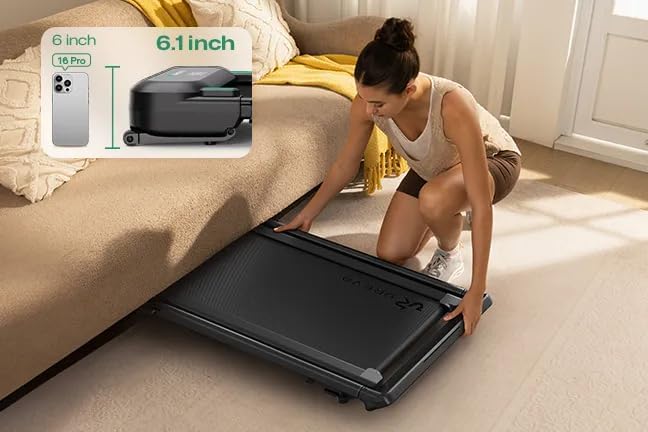
Image: A user easily sliding the UREVO Foldimix 5L Treadmill under a bed, illustrating its compact folded dimensions (6.1 inches height) for convenient storage.

Image: A visual comparison of the UREVO Foldimix 5L Treadmill in its unfolded and folded states, highlighting its space-saving design and dimensions for easy storage.
5. Operating Instructions
5.1 Power On/Off
- Connect the power cable to the treadmill and a grounded electrical outlet.
- Flip the main power switch (usually located near the power cord inlet) to the 'ON' position.
- The display will illuminate. To turn off, flip the main power switch to 'OFF' and unplug the unit.
5.2 Using the Remote Control
The included remote control allows for convenient adjustment of speed and incline.
- Start/Stop: Press to begin or end a workout.
- Speed +/-: Adjusts the running belt speed.
- Incline +/-: Adjusts the incline level (when handle bar is upright).
- Mode: Cycles through different workout modes or programs.
5.3 Speed and Incline Adjustment
The treadmill offers a speed range of 0.6 to 7.6 mph and up to 9 levels of 9% auto-incline.
- Speed: Use the 'Speed +/-' buttons on the remote or the UREVO App to increase or decrease the belt speed.
- Auto-Incline: When the handle bar is in the upright position, use the 'Incline +/-' buttons on the remote or the UREVO App to adjust the incline level from 0% to 9%.
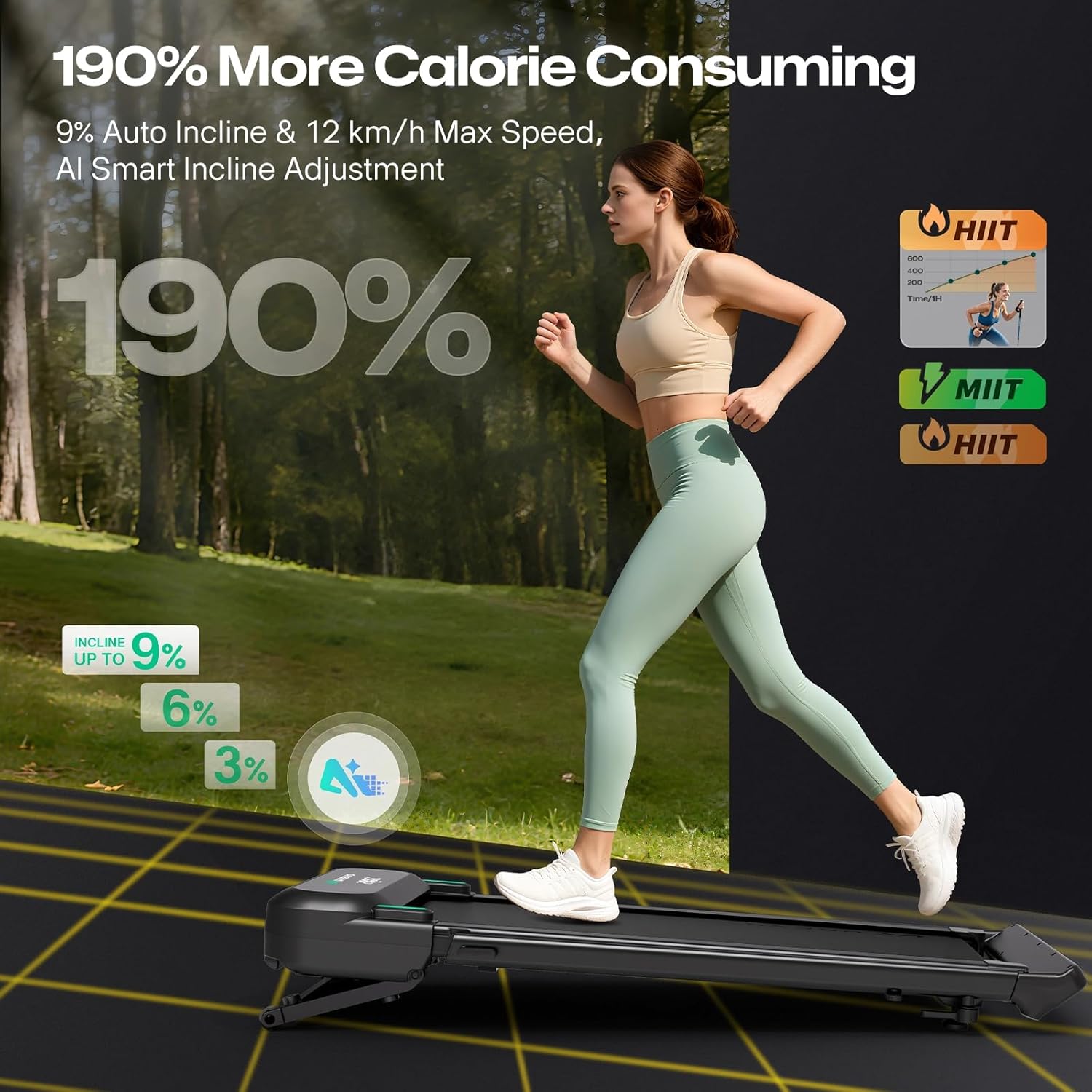
Image: A user running on the UREVO Foldimix 5L Treadmill, with a graphic illustrating the adjustable incline levels up to 9% and the potential for increased calorie consumption.
5.4 Multiple Workout Modes
The Foldimix 5L supports various exercise needs:
- Walking Mode: Typically 0.6-4.0 mph, ideal for light activity or workstation use.
- Jogging Mode: Typically 2.5-4.0 mph, suitable for moderate cardio.
- Running Mode: Typically 0.6-7.6 mph, for more intense workouts.

Image: Three distinct scenarios demonstrating the UREVO Foldimix 5L Treadmill's versatility: a user running with the handle bar up, a user jogging at a standing desk, and a user walking with the handle bar folded down, illustrating the multiple speed modes.
5.5 UREVO Smart App Integration
Enhance your workout experience by connecting to the UREVO App.
- Real-Time Feedback: Track time, speed, distance, and calories burned directly on your device.
- AI-Powered RhythmFit: Experience AI-generated music that matches your pace and seamless rhythm transitions.
- Outdoor Scene Mode: Immerse yourself in simulated outdoor routes with AI-powered incline and speed changes.
- Data Center: Monitor your wellness data, track progress, and develop healthier habits.
- Challenges & Leaderboards: Engage in personalized workouts, goal programs, and compete globally.
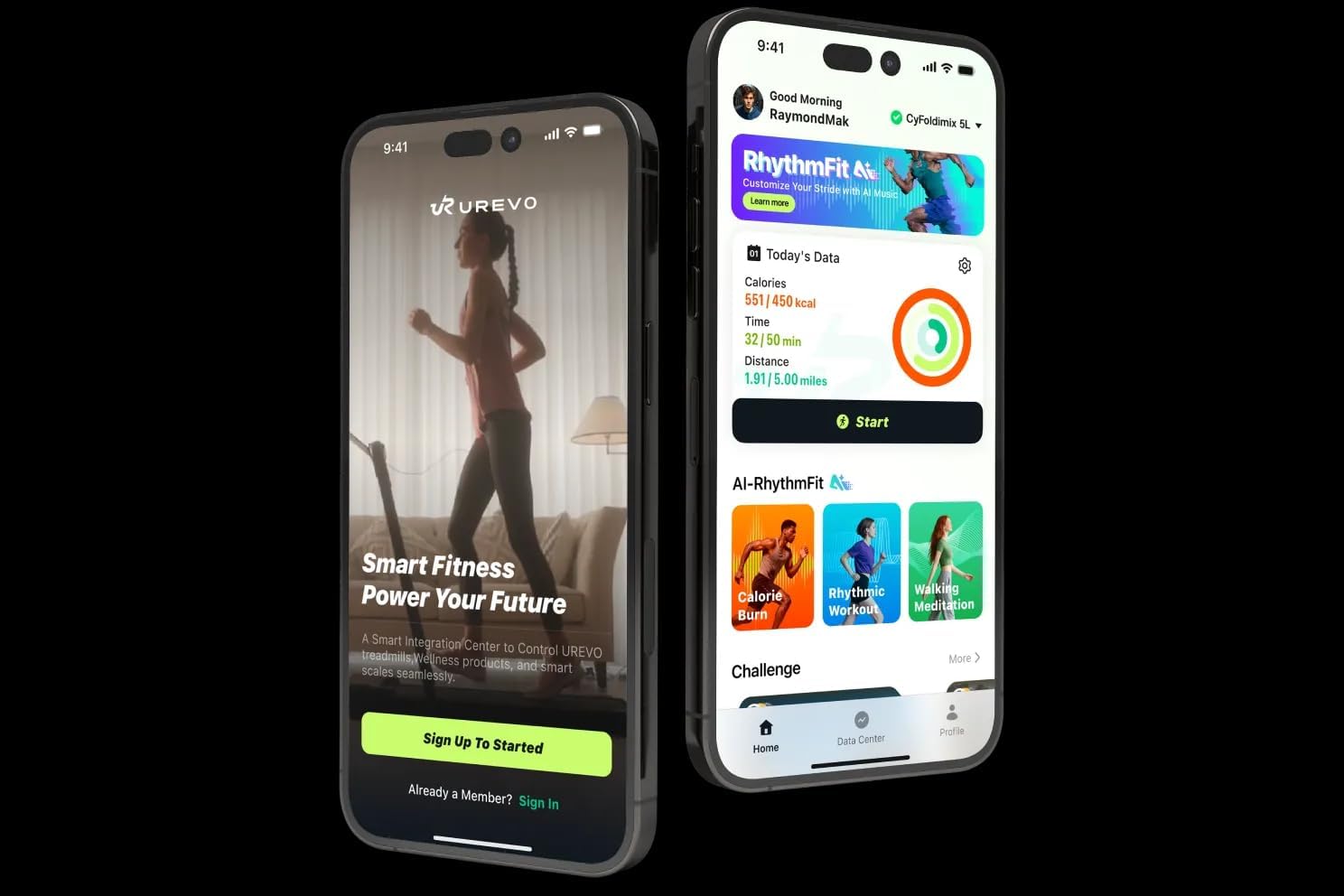
Image: Two smartphone screens displaying the UREVO Smart Fitness App interface, showcasing its features for tracking workouts and managing wellness data.

Image: A user running on the treadmill, with an overlay showing the AI-Powered RhythmFit interface, displaying workout metrics like distance, steps, and calories, alongside a rhythm tracker.

Image: A user's feet on the treadmill belt, with a digital display showing workout time, calories, and distance, alongside a graphic representing AI-generated music that adapts to the user's pace.

Image: A user exercising on the treadmill while viewing a simulated outdoor route on a screen, demonstrating the immersive outdoor scene mode available through the UREVO Workout App.
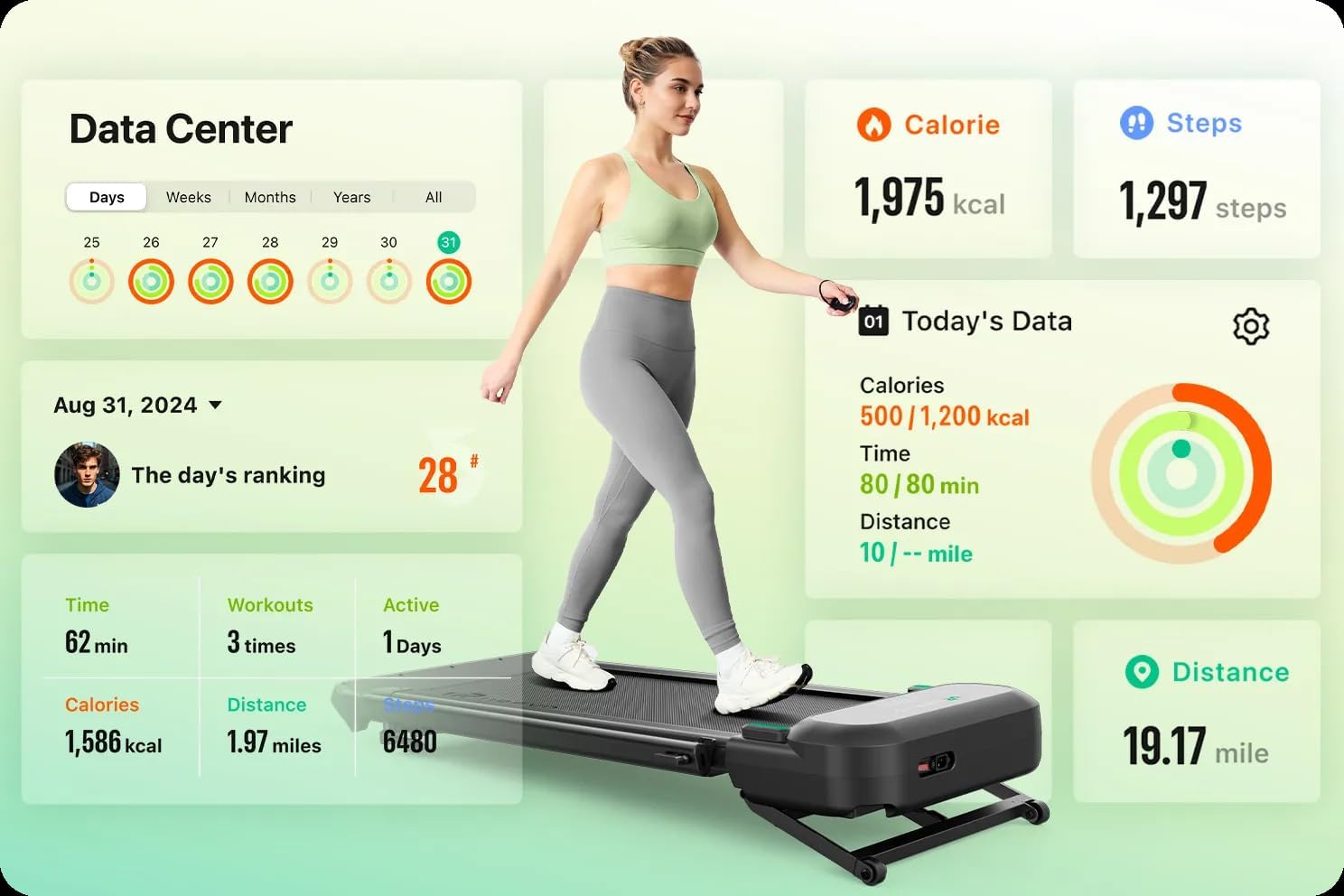
Image: A user walking on the treadmill, accompanied by a detailed 'Data Center' display from the UREVO App, showing daily, weekly, and yearly workout statistics including calories, steps, time, and distance.

Image: A vibrant graphic representing the 'Ultimate Workout Freedom' feature of the UREVO App, showcasing personalized workouts, goal programs, challenge modes, and global leaderboards for competitive engagement.
6. Maintenance
6.1 Cleaning
- Always unplug the treadmill before cleaning.
- Wipe down the console and exterior surfaces with a soft, damp cloth. Avoid abrasive cleaners or solvents.
- Periodically vacuum underneath the treadmill to prevent dust and debris buildup.
6.2 Lubrication
Regular lubrication of the running belt is crucial for optimal performance and longevity. Use the provided lubricating oil.
- Unplug the treadmill.
- Loosen the rear roller bolts slightly to lift the running belt.
- Apply a small amount of silicone lubricant (provided) evenly under the center of the running belt.
- Tighten the rear roller bolts.
- Run the treadmill at a low speed for a few minutes to distribute the lubricant.
- Lubricate every 3-6 months depending on usage.
6.3 Belt Adjustment
If the running belt shifts to one side or slips, it may need adjustment.
- Centering the Belt: If the belt drifts to the left, turn the left rear roller bolt clockwise in 1/4 turn increments. If it drifts to the right, turn the right rear roller bolt clockwise. Run the treadmill at a low speed and observe. Repeat until centered.
- Tightening the Belt: If the belt slips during use, turn both rear roller bolts clockwise in 1/4 turn increments until the slipping stops. Do not overtighten.
7. Troubleshooting
Refer to this section for common issues and their solutions.
| Problem | Possible Cause | Solution |
|---|---|---|
| Treadmill does not power on. | Power cord not plugged in; Main power switch off; Circuit breaker tripped. | Ensure power cord is securely plugged in; Turn main power switch to 'ON'; Check household circuit breaker. |
| Running belt slips. | Belt too loose; Insufficient lubrication. | Tighten running belt (refer to 6.3); Lubricate running belt (refer to 6.2). |
| Running belt drifts to one side. | Belt not centered. | Adjust running belt (refer to 6.3). |
| Unusual noises during operation. | Loose components; Lack of lubrication; Foreign object. | Check all bolts and screws for tightness; Lubricate belt; Inspect for any foreign objects under the belt. |
| Remote control not responding. | Dead batteries; Obstruction. | Replace remote control batteries; Ensure no obstruction between remote and treadmill sensor. |
If you encounter issues not listed here or if problems persist, please contact UREVO customer support.
8. Specifications
| Feature | Detail |
|---|---|
| Brand | UREVO |
| Model Name | Foldimix 5L |
| Product Grade | Auto Incline |
| Product Dimensions (LxWxH) | 52.4"D x 24.6"W x 6.1"H (Folded) |
| Item Weight | 75 Pounds |
| Material | Alloy Steel |
| Maximum Speed | 7.6 Miles per Hour |
| Special Features | AI Rhythm Tempo Run, Adjustable Height, Auto Incline, Foldable |
| Recommended Uses | Bad Weather, Indoor Exercise |
| Target Audience | Adult, Seniors, Youth |
| Maximum Horsepower | 2.5 Horsepower |
| Maximum Weight Recommendation | 400 Pounds |
| Part Number | URTM047 |
9. Warranty and Support
9.1 Warranty Information
The UREVO Foldimix 5L Treadmill Walking Pad comes with a 1-year warranty from the date of purchase. This warranty covers manufacturing defects and malfunctions under normal use. Please retain your proof of purchase for warranty claims.
The warranty does not cover damage caused by improper use, accidents, unauthorized modifications, or normal wear and tear.
9.2 Customer Support
For technical assistance, warranty claims, or any questions regarding your UREVO Foldimix 5L Treadmill, please contact UREVO customer support through the official website or your retailer.
When contacting support, please have your model name (Foldimix 5L) and part number (URTM047) ready, along with a detailed description of the issue.


