
1. Introduction
The TrustFire T80 is a high-performance tactical LED flashlight designed for various outdoor activities including hunting, search and rescue, and camping. It features a powerful LED, deep reflector, and dual-switch operation for versatile use.

Image 1.1: The TrustFire T80 Tactical Flashlight, highlighting its maximum output of 3800 lumens and a beam distance of 1050 meters.
2. Safety Instructions
- Do not shine the flashlight directly into eyes. The high intensity light can cause temporary vision impairment or permanent damage.
- Keep out of reach of children.
- Do not disassemble the flashlight head, as this may damage the reflector or LED.
- Use only the recommended batteries. Incorrect battery types may cause damage or explosion.
- Avoid exposing the flashlight to extreme temperatures or direct sunlight for prolonged periods.
- If the flashlight becomes excessively hot during use, it may automatically reduce brightness to prevent damage. This is a normal safety feature.
3. Package Contents
Verify that all items are present in your package:
- TrustFire T80 Tactical LED Flashlight
- Rechargeable Batteries (2x, non-standard type)
- USB-C Charging Cable
- User Manual
- Lanyard (if included in specific kit)
- Holster (if included in specific kit)

Image 3.1: An illustration of the typical package contents for the TrustFire T80 flashlight, showing the flashlight, batteries, charging cable, and other accessories.
4. Product Overview
The TrustFire T80 features a robust design with a dual-switch system for intuitive control.
Key Components:
- Head: Contains the LED and reflector.
- Body: Houses the battery compartment.
- Tail Switch: Tactical switch for momentary or constant on/off.
- Side Switch: Functional switch for mode selection.
- USB-C Charging Port: For convenient battery charging.
- Battery Indicator: Displays current battery level.
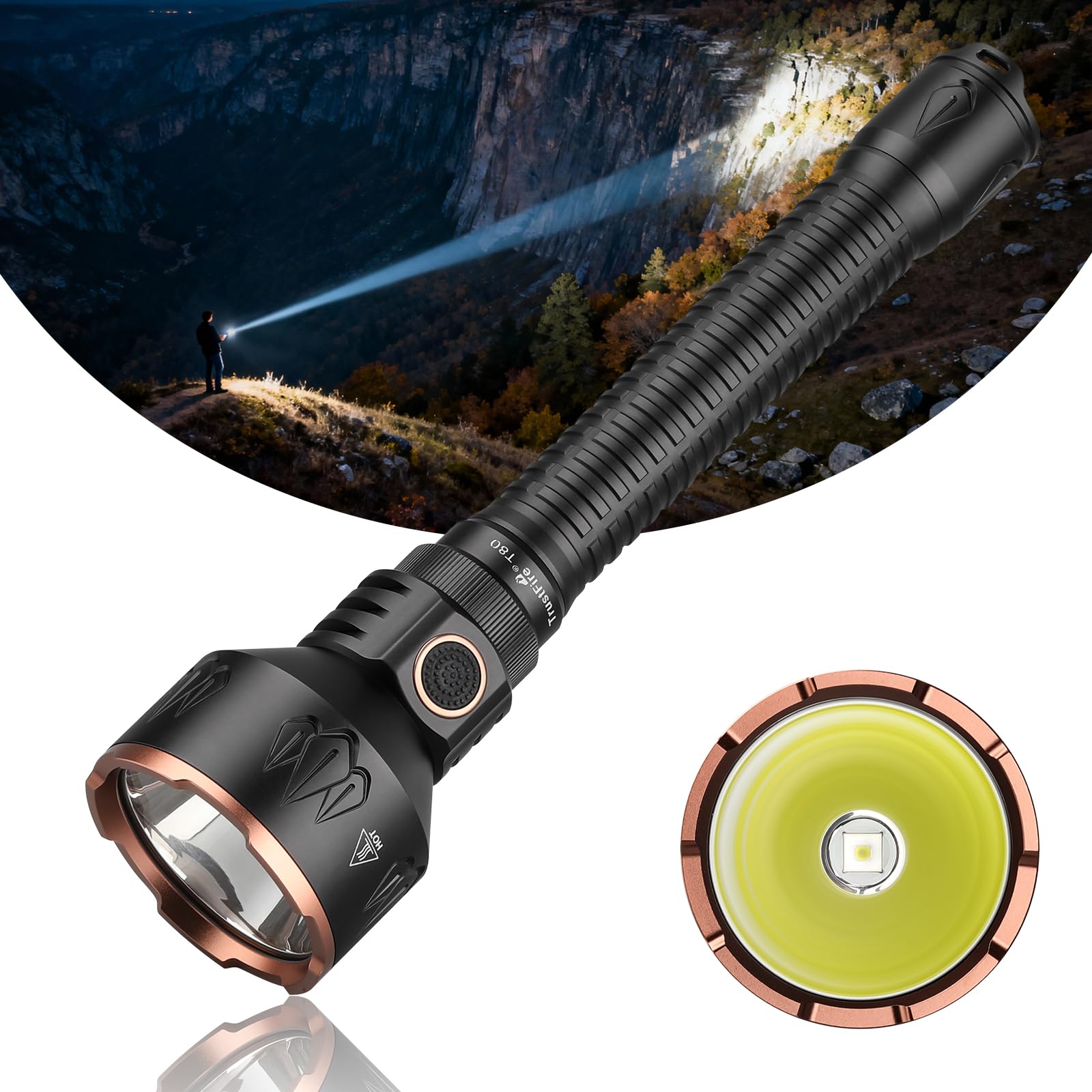
Image 4.1: A full view of the TrustFire T80 flashlight, illustrating its overall design and proportions.
5. Setup
5.1 Battery Installation
- Unscrew the tail cap of the flashlight by turning it counter-clockwise.
- Insert the two rechargeable batteries with the positive (+) terminal facing towards the head of the flashlight.
- Screw the tail cap back on clockwise until it is securely tightened. Ensure the O-rings are properly seated to maintain water resistance.
5.2 Initial Charging
Before first use, fully charge the batteries. Refer to the "6. Charging" section for detailed instructions.
6. Operating Instructions
6.1 Power On/Off
- To turn on: Fully press the tail switch until it clicks.
- To turn off: Fully press the tail switch again until it clicks.
- Momentary On: Lightly press and hold the tail switch for momentary illumination. Release to turn off.
6.2 Mode Selection (Side Switch)
When the flashlight is on, press the side switch to cycle through the brightness modes:
Low → Medium → High → Maximum
The flashlight will remember the last used brightness mode (except for special modes) when turned off and on again.
6.3 Special Modes (Strobe/SOS)
- Instant Strobe: From any state (on or off), press and hold the side switch for approximately 2 seconds to activate Strobe mode. Release to return to the previous state or turn off.
- SOS Mode: From Strobe mode, press the side switch again to activate SOS mode. Press again to return to Strobe, or press and hold to turn off.
7. Charging
The TrustFire T80 features a convenient USB-C charging port. Ensure the flashlight is turned off before charging.
- Locate the USB-C charging port on the flashlight body.
- Connect the provided USB-C cable to the flashlight and the other end to a USB power source (e.g., wall adapter, power bank, computer USB port).
- The battery indicator will show the charging status.
7.1 Battery Indicator
The battery indicator provides real-time feedback on the battery level:
- Green Light: Battery level is sufficient (e.g., 80-100%).
- Yellow Light: Battery level is moderate (e.g., 30-80%).
- Red Light: Battery level is low (e.g., 5-30%). Recharge soon.
- Flashing Red Light: Battery is critically low (below 5%). Recharge immediately.

Image 7.1: The USB-C charging port on the TrustFire T80, showing the connection point for the charging cable.

Image 7.2: Visual representation of the battery indicator lights on the TrustFire T80, illustrating different charge statuses.
8. Maintenance
- Cleaning: Clean the flashlight body with a soft, damp cloth. Do not use abrasive cleaners or solvents.
- Threads and O-rings: Periodically lubricate the threads and O-rings with silicone grease to maintain water resistance and smooth operation.
- Battery Care: If the flashlight will not be used for an extended period, remove the batteries to prevent leakage. Store batteries in a cool, dry place.
- Water Resistance: The T80 is IPX8 rated, meaning it is submersible up to 2 meters. Ensure all caps are tightly sealed before exposing to water.

Image 8.1: The TrustFire T80 flashlight undergoing water resistance testing, confirming its IPX8 rating for submersion.
9. Troubleshooting
| Problem | Possible Cause | Solution |
|---|---|---|
| Flashlight does not turn on. |
|
|
| Light output is weak or flickers. |
|
|
| Flashlight gets hot quickly. |
|
|
| Charging indicator does not light up. |
|
|
10. Specifications
| Feature | Detail |
|---|---|
| Model Number | TF-T80-001-ES |
| Light Source | XN7070 LED |
| Maximum Brightness | 3800 Lumens |
| Maximum Beam Distance | 1050 meters |
| Modes | 6 (Maximum, High, Medium, Low, Strobe, SOS) |
| Runtime (Low Mode) | Up to 65 hours |
| Power Source | 2x Non-standard Lithium-Ion Rechargeable Batteries (Included) |
| Charging Port | USB Type-C |
| Material | Aeronautical Grade Aluminum Alloy |
| Water Resistance | IPX8 (Submersible up to 2 meters) |
| Impact Resistance | 1 meter |
| Dimensions (L x W x H) | 26.4 cm x 2.7 cm x 6.4 cm |
| Weight | 465.3 grams (with batteries) |
| Special Features | Dual Switch, Battery Indicator, Temperature Sensor for Overheat Protection |
Brightness and Runtime Details:
- Maximum: 3800 lumens / 170 minutes
- High: 850 lumens / 5 hours
- Medium: 220 lumens / 18 hours
- Low: 30 lumens / 65 hours
11. Warranty and Support
Warranty Information:
TrustFire provides a 3-year after-sales service for this product. Please retain your proof of purchase for warranty claims.
Customer Support:
For any questions, technical assistance, or warranty claims, please contact TrustFire customer support through the retailer where you purchased the product or visit the official TrustFire website for contact information.
You can also visit the TrustFire Store on Amazon for more information and support resources.


