
1. Introduction
Thank you for choosing the Angrox Backlit Universal Remote Control for LG Smart TVs. This remote is designed to provide a seamless and enhanced television viewing experience, especially in low-light conditions. It serves as a direct replacement for your original LG TV remote, offering broad compatibility and ease of use without requiring complex setup procedures. This manual provides detailed instructions for setting up, operating, maintaining, and troubleshooting your new remote control.
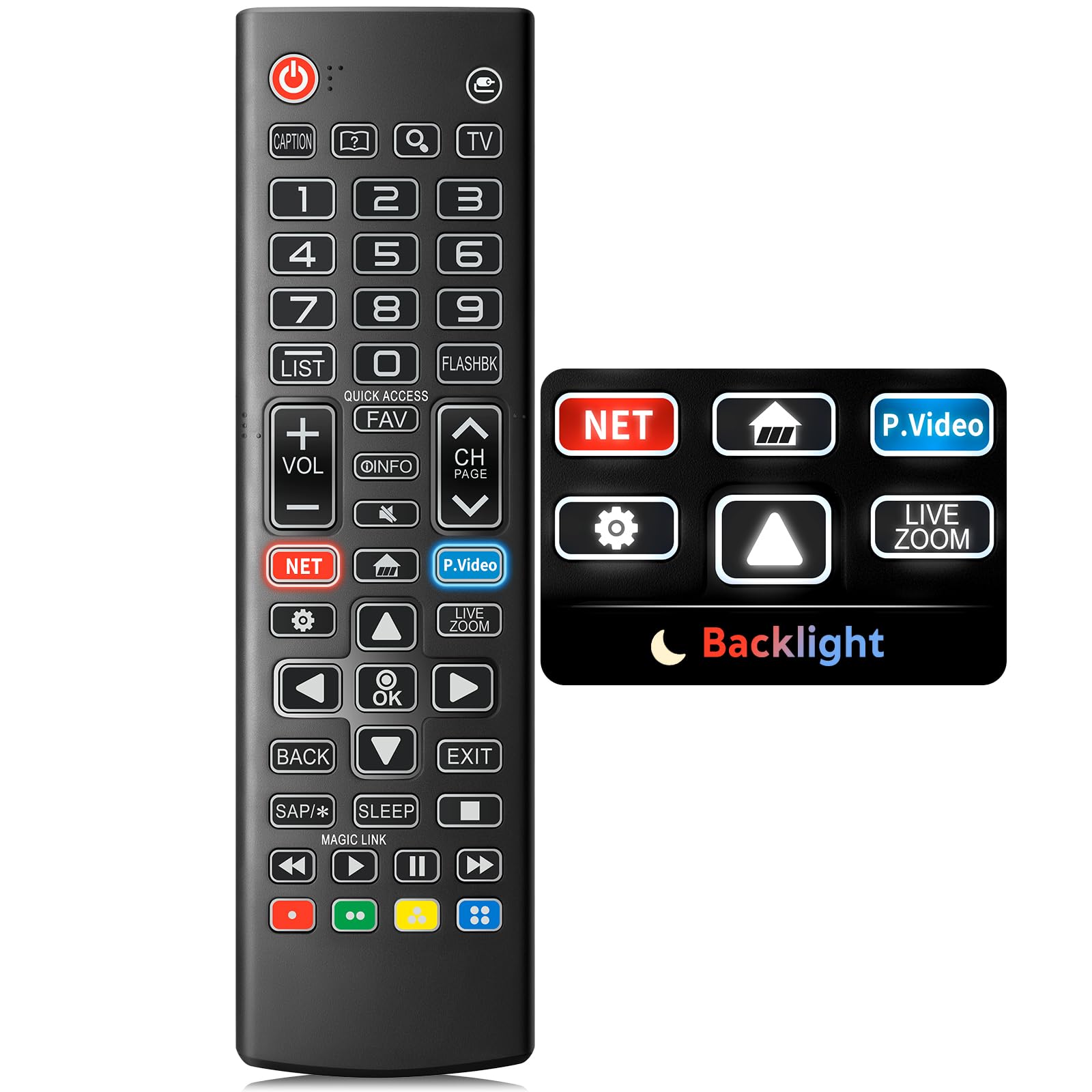
Image: The Angrox Backlit Universal Remote Control, a sleek black remote with clearly labeled buttons.
2. Key Features
- Easy Nighttime Operation: Features soft glow buttons that illuminate, allowing for clear visibility and use in dark environments without causing glare. The backlight activates with any button press and automatically turns off after 10 seconds of inactivity.
- Universal Compatibility: Designed as a direct replacement for LG TV remotes, compatible with all LG TV models. No programming or complex pairing is required; it works immediately out of the box.
- High-Quality Performance: Equipped with sensitive buttons and stable signal transmission for smooth and responsive operation.
- Ergonomic Design: Shaped to fit comfortably in the hand, reducing fatigue during extended use. The button layout is intuitive for users of all ages.
- Durable and Reliable: Constructed from high-quality, sturdy materials to withstand daily use and accidental drops, ensuring a long lifespan.

Image: A comparison showing the remote control with its backlight off and then with its buttons illuminated, highlighting the easy nighttime operation feature.

Image: The remote control displayed alongside various LG TV models (OLED, UHD, QNED, NanoCell), illustrating its broad compatibility.
3. Setup Instructions
3.1 Battery Installation
- Locate the battery compartment cover on the back of the remote control.
- Slide the cover downwards or press the latch to open the compartment.
- Insert two (2) AAA batteries, ensuring the positive (+) and negative (-) terminals align correctly with the indicators inside the compartment.
- Replace the battery compartment cover by sliding it back into place until it clicks securely.
Note: Batteries are not included with the remote control. Please use new AAA alkaline batteries for optimal performance.

Image: A visual guide demonstrating the correct insertion of two AAA batteries into the remote control's battery compartment.
3.2 Initial Use (No Pairing Required)
The Angrox Backlit Universal Remote Control is designed for immediate use with LG Smart TVs. No pairing or programming steps are necessary. Once batteries are installed, the remote is ready to control your LG television.
4. Operating Instructions
This section details the functions of the buttons on your Angrox remote control.

Image: A comprehensive layout of the remote control, with labels pointing to each button and describing its primary function.
4.1 Basic Functions
- Power (
 ): Turns the TV on or off.
 - Input (): Changes the input source (e.g., HDMI 1, HDMI 2).
- Volume Up/Down (VOL +/-): Adjusts the volume level.
- Channel Up/Down (CH Page): Changes the television channel.
- Mute (): Mutes or unmutes the TV audio.
- Number Buttons (0-9): Directly enters channel numbers or other numerical inputs.
- Navigation Buttons (Up/Down/Left/Right): Used to scroll through menus and options.
- OK Button: Selects menu items or confirms your input.
4.2 Special Function Buttons
- Netflix Button: Launches the Netflix application directly.
- Amazon Prime Video Button: Launches the Amazon Prime Video application directly.
- Quick Access: A feature that allows you to enter a specified app or Live TV directly by pressing and holding the number buttons.
- List: Accesses the saved programs list.
- Flashback: Returns to the previously viewed channel or input.
- Info: Displays information on the current program.
- Fav: Access your favorite channel list.
- Settings (): Accesses the Quick Settings menu.
- Back: Clears on-screen displays and returns to TV viewing.
- Exit: Exits the current menu.
- Sleep: Accesses the sleep timer.
- Media Control Buttons (Play, Pause, Stop, Fast Forward, Rewind): Controls media content playback.
4.3 Backlight Function
The remote control features a soft backlight for easy use in the dark. Simply press any button, and the backlight will turn on. It will automatically turn off after 10 seconds of inactivity to conserve battery life.
Video: A demonstration of the Angrox Backlit Remote for LG Smart TV, showcasing its easy nighttime use and responsive buttons. This video highlights the convenience of the backlit feature in dark environments.
5. Specifications
| Brand | Angrox |
| Model Name | AKB75095307 |
| Model Number | AKB75095307 |
| Special Features | Backlit, Ergonomic, Lightweight, No Programming Required, Universal |
| Compatible Devices | Television (All LG TV models) |
| Max Number of Supported Devices | 1 |
| Connectivity Technology | Infrared |
| Button Quantity | 30 |
| Controller Type | Button Control |
| Maximum Range | 10 Meters (approximately 33 feet) |
| Number of Batteries Required | 2 AAA batteries |
| Battery Type | Alkaline |
| Item Dimensions (L x W x H) | 9.25"L x 1.89"W x 0.73"H |
6. Troubleshooting
If you encounter issues with your remote control, please refer to the following common solutions:
- Remote not responding:
- Ensure batteries are inserted correctly with the correct polarity (+/-).
- Replace old batteries with new AAA alkaline batteries.
- Check for any obstructions between the remote control and the TV's infrared receiver.
- Ensure you are within the maximum operating range (10 meters) of the TV.
- Backlight not working:
- Verify battery power. Low batteries may affect backlight functionality.
- The backlight is designed to turn off after 10 seconds of inactivity. Press any button to reactivate it.
- Specific buttons not working (e.g., Netflix, Amazon Prime):
- Ensure your LG Smart TV is connected to the internet and the respective applications are installed and updated.
- Some smart TV features or app shortcuts may vary slightly depending on your TV's model and region.
- Remote feels sluggish or unresponsive:
- Replace batteries with fresh ones.
- Clean the remote's infrared emitter (at the top) and the TV's IR receiver with a soft, dry cloth to ensure a clear signal path.
7. Maintenance
To ensure the longevity and optimal performance of your Angrox remote control, follow these maintenance guidelines:
- Cleaning: Use a soft, dry cloth to clean the remote's surface. Avoid using liquid cleaners, aerosols, or harsh chemicals, as they may damage the remote.
- Battery Replacement: Replace batteries promptly when the remote's performance declines or if the backlight becomes dim. Remove batteries if the remote will not be used for an extended period to prevent leakage.
- Storage: Store the remote in a cool, dry place away from direct sunlight, extreme temperatures, and high humidity.
- Avoid Drops: While durable, repeated drops can damage internal components. Handle the remote with care.
8. Warranty & Support
8.1 Warranty Information
The Angrox Backlit Universal Remote Control (Model AKB75095307) is covered by a 90-day warranty from the date of purchase. This warranty covers manufacturing defects and ensures the product functions as described under normal use. It does not cover damage caused by misuse, accidents, unauthorized modifications, or normal wear and tear.
8.2 Customer Support
For any questions, technical assistance, or warranty claims, please contact Angrox customer support through the retailer where you purchased the product or visit the official Angrox store online. Please have your purchase receipt and product model number available when contacting support.
