
Introduction
This manual provides detailed instructions for the proper setup, operation, and maintenance of your MARVO HG9084W PULZ 80W Wireless Gaming Headset. Please read this manual thoroughly before using the product to ensure optimal performance and longevity.
Product Features
- 50mm Speaker Drivers: Experience powerful stereo sound with clear audio and deep bass.
- Ergonomic Design: Lightweight construction for extended comfort during long gaming sessions.
- Static RGB Backlight: Integrated RGB lighting to complement your gaming setup.
- Wide Compatibility: Supports Windows, Mac, iOS, Android, and other devices.
- Long Battery Life: Up to 50 hours of continuous playback on a single charge.
- Detachable Microphone: Provides clear voice communication and can be removed when not in use.
Package Contents
Verify that all items are present in the package:
- MARVO HG9084W PULZ 80W Wireless Gaming Headset
- Detachable Microphone
- USB Wireless Dongle
- USB-C Charging Cable
- User Manual (this document)

Image: The MARVO HG9084W PULZ 80W Wireless Gaming Headset, shown with its detachable microphone and USB wireless dongle. The headset features black earcups with RGB lighting accents and a yellow inner headband.
Setup
- Charging the Headset:
Connect the provided USB-C charging cable to the headset's charging port and the other end to a USB power source (e.g., computer USB port, wall adapter). The LED indicator will show charging status. A full charge provides up to 50 hours of playback.
- Attaching the Microphone:
Align the detachable microphone's connector with the microphone port on the left earcup and gently push until it clicks into place.

Image: The MARVO HG9084W PULZ 80W Wireless Gaming Headset, with its detachable microphone and USB wireless dongle laid out. This image highlights the modular components.
- Connecting via 2.4GHz Wireless (USB Dongle):
Insert the USB wireless dongle into an available USB port on your computer or compatible device. Power on the headset. The headset should automatically pair with the dongle. The LED indicator on the headset will confirm a successful connection.
- Connecting via Bluetooth:
Ensure the headset is powered on. Activate Bluetooth pairing mode on the headset (refer to the 'Operating Instructions' section for specific button presses). On your device (smartphone, tablet, etc.), go to Bluetooth settings and select 'MARVO HG9084W' from the list of available devices to pair.
Operating Instructions
- Power On/Off: Press and hold the Power button (usually located on the earcup) for approximately 3 seconds. An audible prompt or LED indicator will confirm the status.
- Volume Control: Use the volume roller or buttons on the earcup to adjust the audio output level.
- Microphone Mute/Unmute: Press the dedicated microphone mute button on the earcup to toggle the microphone on or off.
- RGB Lighting Control: A dedicated button or a combination of buttons may control the static RGB backlight. Press briefly to cycle through modes or turn off.
- Playback Controls (if applicable): For Bluetooth connections, buttons may allow for play/pause, skip track forward/backward. Refer to the specific button layout on your headset.
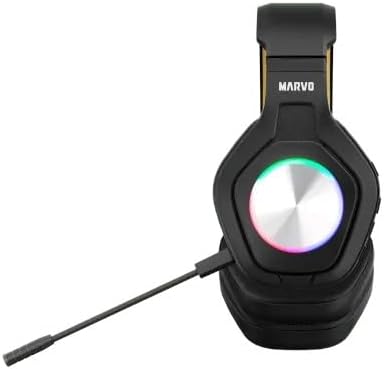
Image: A close-up side view of the MARVO HG9084W PULZ 80W Wireless Gaming Headset, highlighting the control buttons and ports located on the earcup.
Maintenance
- Cleaning: Use a soft, dry cloth to clean the headset. For earcups, a slightly damp cloth can be used, but ensure no moisture enters the speaker grilles or ports. Avoid harsh chemicals.
- Storage: Store the headset in a cool, dry place away from direct sunlight and extreme temperatures.
- Battery Care: To prolong battery life, avoid fully discharging the headset frequently. Charge it regularly, even if not in constant use.
Troubleshooting
| Problem | Possible Solution |
|---|---|
| No sound from headset | Ensure headset is powered on and charged. Check volume levels on both headset and device. Verify correct audio output device is selected in your system settings. Re-pair the headset. |
| Microphone not working | Ensure microphone is securely attached and not muted. Check microphone input settings on your device. Test with another application. |
| Headset not connecting | Ensure headset is in pairing mode (for Bluetooth) or dongle is properly inserted (for 2.4GHz). Move closer to the device. Remove previous pairings and try again. |
| Short battery life | Ensure headset is fully charged. Reduce volume or turn off RGB lighting to conserve power. Battery performance may degrade over time. |
Specifications
| Feature | Detail |
|---|---|
| Brand | MARVO |
| Model Name | HG9084W PULZ 80W |
| Colour | Black |
| Form Factor | Over Ear |
| Connectivity Technology | Bluetooth |
| Speaker Drivers | 50mm |
| Playback Time | Up to 50 Hours |
| Included Components | User Manual |
Warranty and Support
This product is covered by a manufacturer's warranty. For detailed warranty information, please refer to the warranty card included with your purchase or visit the official MARVO website. For technical support or service inquiries, please contact MARVO customer service through their official channels.
