
1. Product Overview
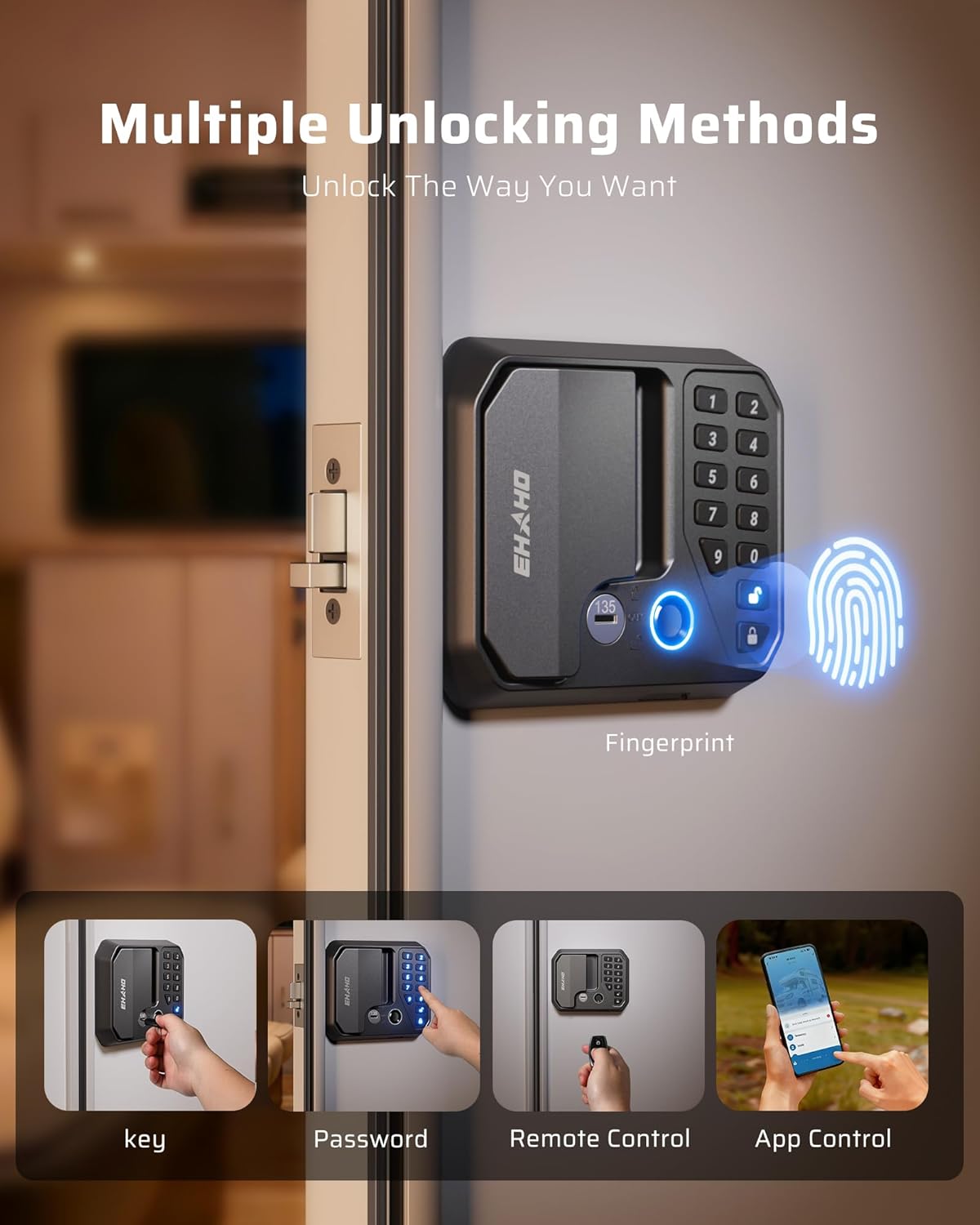
The Ehaho Smart RV Door Lock Keyless Entry offers a secure and convenient 5-in-1 access solution for your RV, camper, or travel trailer. This advanced door latch replacement integrates multiple unlocking methods, including fingerprint recognition, an LED backlit keypad, Bluetooth app control, remote fobs, and traditional mechanical keys. Designed for durability and ease of use, it features IP65 waterproofing, auto-lock functionality, and anti-peeping password protection to enhance your vehicle's security.
Key Features:
- 5-in-1 Keyless Entry: Fingerprint, LED backlit keypad, 100ft Bluetooth app, 2 remotes, and 2 mechanical keys.
- Smart App Control: Manage access, check entry history, create temporary PINs, add up to 50 users, and monitor battery status via the Tuya App.
- Durable and Weatherproof: Constructed from zinc alloy and aluminum with IP65 waterproof and anti-rust ratings, ensuring reliable operation in various weather conditions (-25°C to 65°C).
- Enhanced Security: Features 10-99s custom auto-lock, anti-peeping code function, voice alerts, and a 60-second lockout after 5 incorrect password attempts. An independent safety lock provides additional protection.
- Easy DIY Installation: Designed for universal fit with standard RV/trailer cutouts (2.75"W × 3.75"H) and door thicknesses (1.25"-1.5"). All necessary tools are included for a 15-30 minute drill-free installation.
2. Setup and Installation
Proper installation is crucial for the optimal performance and security of your Ehaho Smart RV Door Lock. Please follow these instructions carefully.
2.1. Compatibility and Dimensions
This RV door lock is designed to fit standard RV and trailer doors with cutouts measuring 2.75 inches wide by 3.75 inches high, and a door thickness between 1.25 inches and 1.5 inches. Please verify your door's dimensions before proceeding with installation.

2.2. Installation Steps
The installation process is designed to be straightforward and drill-free, typically taking 15-30 minutes.
- Remove Existing Lock: Unscrew and remove your current RV door lock.
- Prepare Wiring: Carefully feed the wiring from the exterior panel through the door cutout.
- Install Exterior Panel: Insert the exterior panel into the door cutout, ensuring it sits flush.
- Connect Interior Panel: Connect the wiring to the interior panel and align it with the exterior panel.
- Secure Panels: Fasten the interior and exterior panels together using the provided screws.
- Install Strike Plate: Attach the new strike plate to the door frame.
- Insert Batteries: Open the battery compartment on the interior panel and insert four AA batteries.

2.3. Installation Video Guide
Video: This video provides a detailed guide on how to install the Ehaho Smart RV Door Lock, covering each step of the process for Class C RVs.
Video: A comprehensive installation guide for the CARMTEK 10 Digits RV Door Lock, demonstrating the physical setup and wiring.
3. Operating Instructions
The Ehaho Smart RV Door Lock offers multiple convenient ways to secure and access your RV.
3.1. Unlocking Methods
- Fingerprint Unlock: Place your registered finger on the fingerprint sensor for quick access.
- LED Backlit Keypad: Enter your personalized passcode on the illuminated keypad.
- Bluetooth App Control: Use the Tuya App on your smartphone to unlock the door via Bluetooth within a 100ft range.
- Remote Control: Utilize the provided remote fobs for convenient wireless unlocking.
- Mechanical Keys: Use the traditional mechanical keys as a reliable backup.

3.2. Setting Passwords and Codes
You can set and change your primary and secondary passwords for keypad access. The default password is typically "1234".
Video: This video demonstrates the process of setting and changing user passwords on the Ehaho Smart RV Door Lock keypad.
Video: Detailed instructions on how to use the keypad and change the code for the electronic RV door lock.
3.3. Remote Control Pairing
To pair your remote control with the lock:
- Ensure the lock's remote control switch (located on the interior panel) is in the "ON" position.
- Press the "FOB LEARN" button on the lock (usually a small button near the battery compartment).
- While the lock is in pairing mode, press the "UNLOCK" button on your remote fob. You should hear a "beep" sound confirming successful pairing.
- If you have multiple locks, you can pair one fob to control multiple locks by repeating the process for each lock.
Video: This video demonstrates the various locking and unlocking options, including remote control pairing, for the Kohree 4-in-1 Keyless Entry RV Door Lock.
3.4. Silent Mode and Auto-Lock
- Silent Mode: To adjust the sound volume or activate silent mode, use the Tuya App or refer to the detailed instructions in the manual for keypad-based sound settings.
- Auto-Lock: The lock features a customizable auto-lock function (10-99 seconds) for added security. This can be configured via the Tuya App.
4. Maintenance
4.1. Battery Replacement
The lock operates on four 1.5V AA batteries (included). Typically, these batteries last about one year before needing replacement. The lock will provide voice alerts and low battery alarms when power is low.
- Locate the battery compartment on the interior panel of the lock.
- Unscrew the cover of the battery compartment.
- Remove the old batteries and insert four new 1.5V AA batteries, ensuring correct polarity.
- Replace the battery compartment cover and secure it with the screw.
Note: Replacing the batteries will not affect your existing password settings or remote control pairings.

4.2. Emergency Power Supply
In case of complete battery depletion, the lock can be temporarily powered using a Type-C charging port for emergency unlocking. Connect a portable power bank to the Type-C port on the exterior panel to provide temporary power.
5. Troubleshooting
Here are solutions to some common issues you might encounter:

- Q: Can this lock be installed on an RV door with glass?
A: Before installation, please measure your door cutout size carefully to ensure compatibility. If the dimensions do not match, do not force the installation, as this may damage the door frame or the glass structure. - Q: The lock's prompt sound feels too loud. Can I reduce it?
A: Yes, you can easily adjust it through the app. The volume has 5 levels (1-5) for your preference. - Q: Which batteries does the lock use, and how long do they last?
A: It comes with four 1.5V AA batteries included. Typically, they last about one year before needing replacement. If the batteries run out, you can simply use the Type-C charging port to temporarily power the lock and unlock your RV door.
6. Specifications
| Brand | Ehaho |
| Model Number | JD-RV2 |
| Lock Type | Combination Lock |
| Special Features | Anti-Peeping Password, Auto-Lock, Fingerprint, Fob Unlock, Passcode Unlock |
| Material | Metal (Zinc Alloy and Aluminum) |
| Item Dimensions (L x W x H) | 18.7 x 12.3 x 9.7 Centimetres |
| Recommended Uses | RV doors |
| Connectivity Protocol | Bluetooth |
| Control Method | Push Button, Remote, Touch |
7. Package Contents
The Ehaho Smart RV Door Lock package includes the following items:
- Exterior Panel
- Interior Panel
- Installation Tool Kit
- 4 x 1.5V AA Batteries
- Lock & Frame Plates
- 2 x Remote Fobs
- 2 x Mechanical Keys
- Cushion Pad
8. Warranty and Support
The Ehaho Smart RV Door Lock (Model JD-RV2) comes with a 2-year manufacturer's warranty. For any support inquiries, troubleshooting assistance, or warranty claims, please contact Ehaho customer service through the retailer's platform or visit the official Ehaho brand store.
For further assistance, please refer to the contact information provided with your purchase or visit the Ehaho Store.