
Introduction
This manual provides detailed instructions for the installation, operation, and maintenance of your Night Owl 2K Battery Wi-Fi Smart Dual-Powered Video Doorbell, Model H4DB-B. Please read this manual thoroughly before using the product to ensure proper functionality and safety.
The Night Owl 2K Video Doorbell offers 4MP HD video, smart alerts for people and vehicles, 2-way audio communication, and flexible storage options including local, cloud, and compatible Night Owl recorder storage. It is designed for both wired and wireless installations and is weather-resistant for outdoor use.
What's in the Box
Verify that all components are present before beginning installation:
- 1x 4MP Video Doorbell
- 1x Flat Mount
- 1x Screwdriver
- Mounting Hardware (screws, anchors)
Setup
1. Power Options
Your Night Owl Video Doorbell can be powered in two ways:
- Battery Powered: For a completely wireless setup, the doorbell operates on its internal battery. Ensure the battery is fully charged before installation.
- Wired Connection: Connect to existing doorbell wiring (8-24 VAC) for continuous power and to utilize your existing chime. The internal battery acts as a backup during power outages.
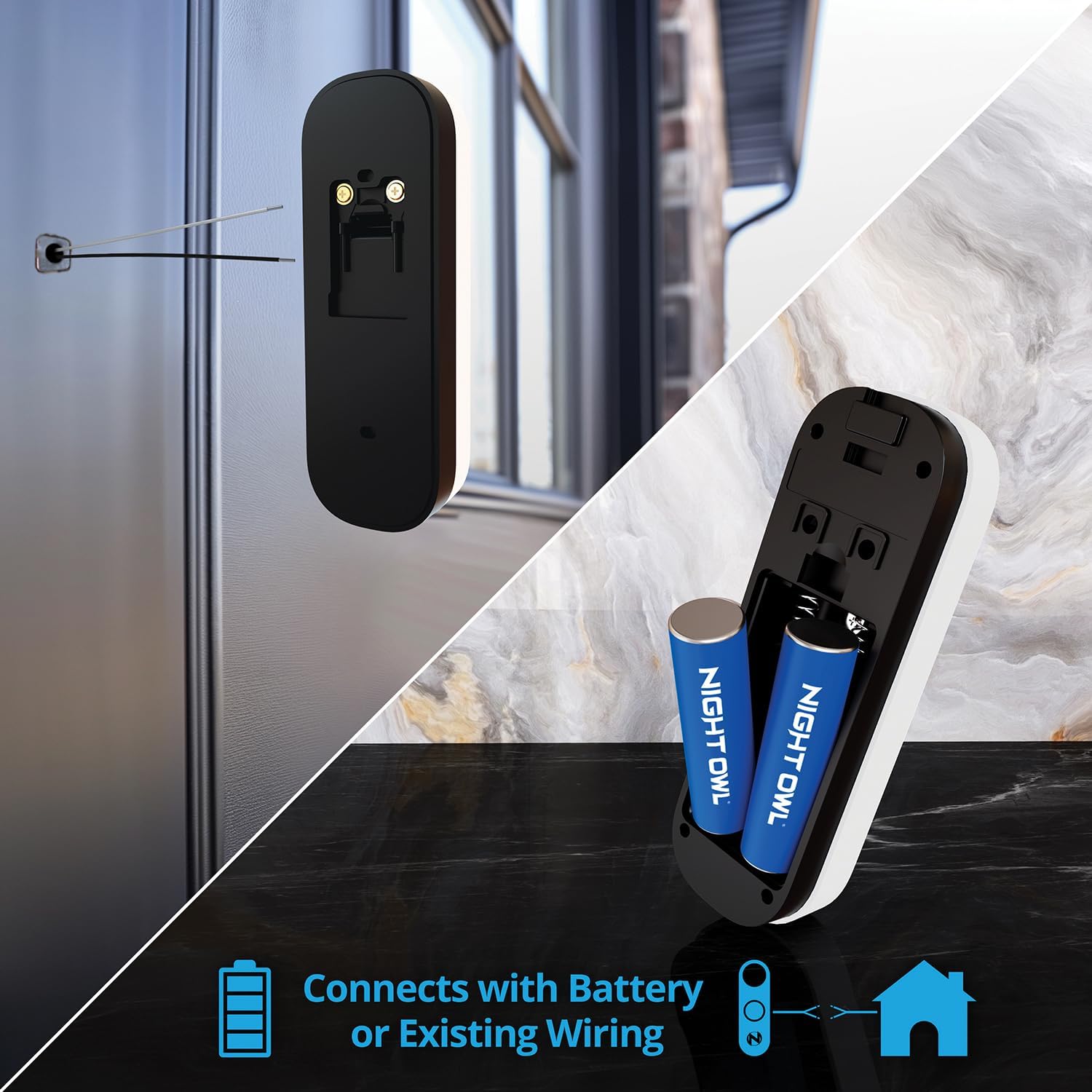
Figure 1: Dual Power Setup - Battery or Existing Wiring. This image illustrates the back of the doorbell, showing compartments for batteries and terminals for wired connection.

Figure 2: Wired Power with Battery Backup. This image highlights the benefit of combining wired power with rechargeable batteries for uninterrupted operation.
2. Mounting the Doorbell
- Choose Location: Select a suitable location near your door, ensuring a clear view and good Wi-Fi signal.
- Mark Holes: Use the flat mount as a template to mark the drilling holes on your wall or door frame.
- Drill Holes: Drill pilot holes if necessary, and insert wall anchors if mounting on masonry or stucco.
- Connect Wires (if applicable): If using existing wiring, connect the doorbell wires to the terminals on the back of the flat mount. Ensure power is off at the breaker before connecting.
- Secure Mount: Attach the flat mount to the wall using the provided screws.
- Attach Doorbell: Slide the doorbell onto the mounted bracket until it clicks into place. Use the included pin tool to release the camera from the mounting case if removal is needed.

Figure 3: Mounted Doorbell. This image shows the Night Owl doorbell installed on a residential exterior wall.
3. App Installation and Pairing
- Download App: Download the Night Owl Protect app from your smartphone's app store (iOS or Android).
- Create Account: Open the app and create a new account or log in to an existing one.
- Add Device: Follow the in-app instructions to add your new video doorbell. This typically involves scanning a QR code on the device or manually entering its serial number.
- Connect to Wi-Fi: The app will guide you through connecting the doorbell to your home's 2.4GHz Wi-Fi network.
- Complete Setup: Once connected, you can customize settings such as motion detection zones, notification preferences, and chime options.
Operating Instructions
1. Live View and 2-Way Audio
- Access Live View: Open the Night Owl Protect app and select your doorbell from the device list to view live 4MP HD video.
- Use 2-Way Audio: While in live view or when receiving a doorbell notification, tap the microphone icon in the app to speak through the doorbell's speaker. Tap the speaker icon to hear audio from the doorbell's microphone.

Figure 4: 2-Way Audio in Use. This image demonstrates how the 2-Way Audio feature allows communication with visitors via the smartphone app.
2. Smart Alerts
The doorbell is equipped with AI detection to identify people and vehicles. When motion is detected, you will receive instant notifications on your smartphone. You can customize alert sensitivity and detection zones within the Night Owl Protect app to minimize false alarms.
3. Video Storage Options
Your doorbell offers flexible options for storing recorded video footage:
- Local Storage (microSD Card): Insert a microSD card (up to 128GB, sold separately) into the designated slot on the doorbell for local recording without monthly fees.
- Cloud Storage: Subscribe to a Night Owl Cloud plan for secure off-site storage of your video recordings.
- Compatible Night Owl Recorder: Connect your doorbell to a compatible Night Owl DVR/NVR for integrated storage with your existing security system.

Figure 5: Video Storage Options. This image illustrates the various methods available for storing recorded video footage.
Maintenance
1. Battery Charging/Replacement
If using battery power, monitor the battery level through the Night Owl Protect app. When the battery is low, remove the doorbell from its mount (using the pin tool) and charge it via the USB-C port. If batteries are removable, replace them with Night Owl approved rechargeable batteries.
2. Cleaning
Periodically clean the doorbell's lens and surrounding area with a soft, damp cloth to ensure clear video quality. Avoid using harsh chemicals or abrasive materials that could damage the device.
Troubleshooting
- Doorbell not connecting to Wi-Fi:
- Ensure your Wi-Fi network is 2.4GHz. The doorbell does not support 5GHz networks.
- Verify your Wi-Fi password is correct.
- Move the doorbell closer to your Wi-Fi router or consider a Wi-Fi extender.
- Restart your router and the doorbell.
- No video or poor video quality:
- Check Wi-Fi signal strength in the app.
- Clean the camera lens.
- Ensure there are no obstructions blocking the camera's view.
- 2-Way Audio not working:
- Check microphone and speaker settings in the app.
- Ensure your phone's volume is up.
- Verify the doorbell's firmware is up to date.
- Doorbell not ringing existing chime (wired setup):
- Ensure the doorbell is correctly wired to your existing chime system (8-24 VAC).
- Check the chime settings within the Night Owl Protect app.
- Consult a qualified electrician if issues persist.
- Battery draining quickly:
- Reduce motion detection sensitivity or detection zones.
- Ensure the doorbell is not in an area with excessive motion events.
- If wired, ensure the wired connection is providing consistent power.
Specifications
| Feature | Specification |
|---|---|
| Model Name | H4DB-B |
| Video Capture Resolution | 4MP (2K HD) |
| Connectivity Technology | Wired, Wireless (Wi-Fi) |
| Connectivity Protocol | Wi-Fi (2.4GHz only) |
| Power Source | Battery Powered, Wired (8-24 VAC) |
| Special Features | 2-Way Audio, Smart Alerts (People/Vehicle Detection) |
| Indoor/Outdoor Usage | Outdoor (Weather-Resistant) |
| Compatible Devices | Smartphone (via Night Owl Protect App) |
| Mount Type | Wall Mount |
| Color | Black |
| Item Dimensions | 5.8 x 1.14 x 1.9 inches |
| Item Weight | 0.5 Pounds |
| Storage Options | microSD Card (up to 128GB), Cloud, Compatible Night Owl Recorder |

Figure 6: Doorbell Feature Overview. This image provides a visual summary of the doorbell's main functionalities.
Warranty Information
The Night Owl 2K Battery Wi-Fi Smart Dual-Powered Video Doorbell (Model H4DB-B) comes with a 1 Year Manufacturer Warranty. This warranty covers defects in materials and workmanship under normal use. For specific terms, conditions, and to register your product, please refer to the official Night Owl website or contact customer support.
Please retain your proof of purchase for warranty claims.
Support
For further assistance, technical support, or to access additional resources, please visit the official Night Owl support website or contact their customer service team.
- Night Owl Support Website: www.nightowlsp.com/support (Example link, please verify official support URL)
- Customer Service: Refer to the Night Owl website for current contact information (phone, email, chat).


