
1. Introduction
Thank you for choosing the Voltomat 2000W 2-Stage Thermostat Electric Fan Heater. This appliance is designed to provide efficient heating for spaces up to 20 m² and can also function as a fan for cooling. Please read this manual carefully before use to ensure safe and optimal operation. Keep this manual for future reference.
2. Important Safety Instructions
When using electrical appliances, basic safety precautions should always be followed to reduce the risk of fire, electric shock, and injury to persons.
- Read all instructions before using this heater.
- Overheat Protection: The heater is equipped with an automatic overheat protection system. If the heater overheats, it will automatically shut off. Unplug the heater, allow it to cool for 30 minutes, and then check for any obstructions before restarting.
- Tip-Over Safety Switch: This heater includes a safety switch that automatically turns off the unit if it is accidentally tipped over. Ensure the heater is placed on a stable, flat surface.
- Operation Indicator Light: A light indicates when the heater is powered on and operating.
- Do not use this heater in bathrooms, laundry areas, or similar indoor locations where water may be present.
- Do not insert or allow foreign objects to enter any ventilation or exhaust opening as this may cause an electric shock or fire, or damage the heater.
- Always unplug the heater when not in use.
- Do not operate any heater with a damaged cord or plug or after the heater malfunctions, has been dropped or damaged in any manner.
- Keep combustible materials, such as furniture, pillows, bedding, papers, clothes, and curtains at least 1 meter (3 feet) from the front of the heater and keep them away from the sides and rear.
3. Product Components
Familiarize yourself with the main parts of your Voltomat fan heater:
- Thermostat Control Dial: Adjusts the desired room temperature.
- Mode Selector Dial: Switches between fan-only, 1000W heat, and 2000W heat settings.
- Air Outlet Grille: Front grille where air is expelled.
- Power Cord: For connecting to an electrical outlet.
- Operation Indicator Light: Illuminates when the unit is active.
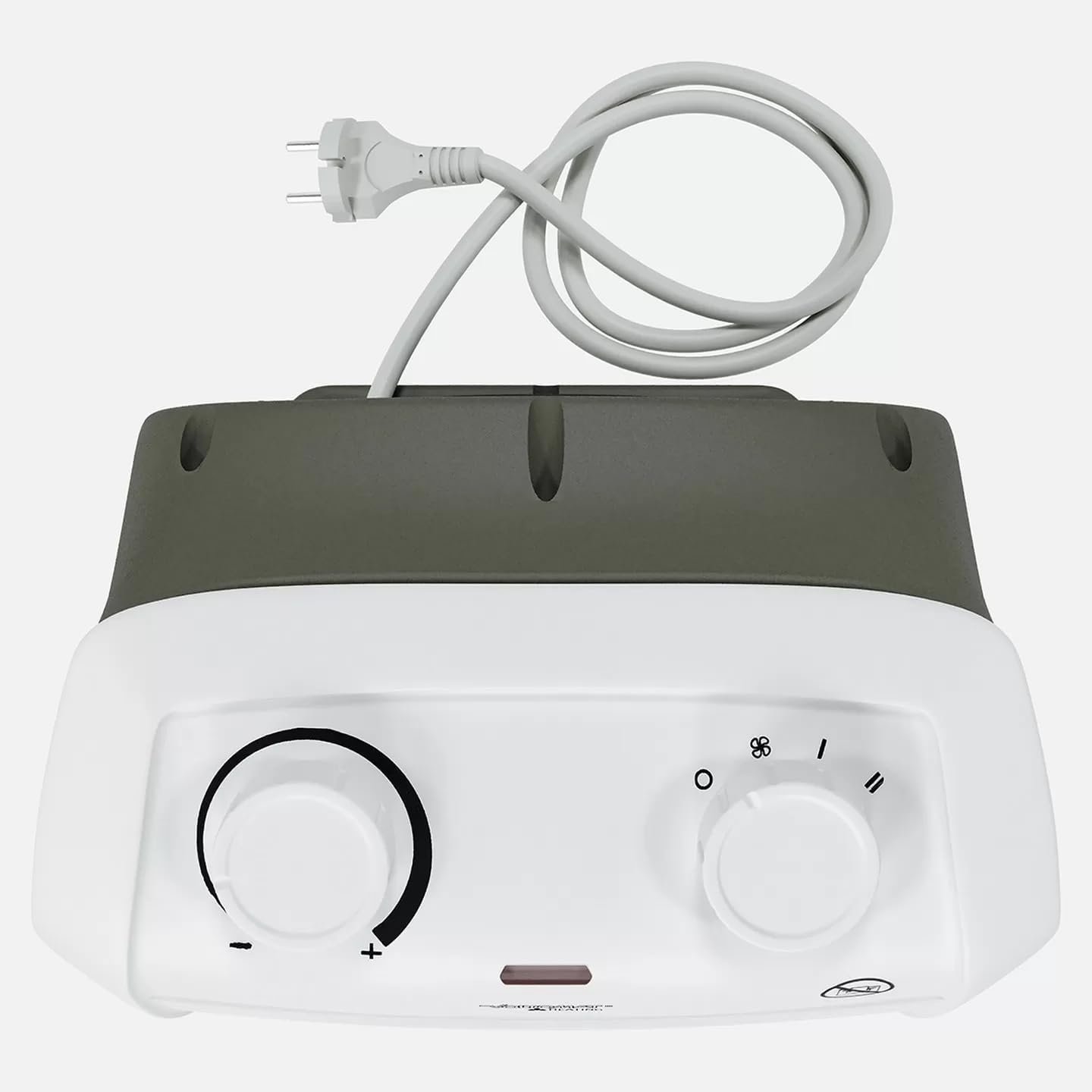
This image displays the top of the Voltomat fan heater, highlighting the two main control dials: the thermostat control on the left and the mode selector dial on the right. The power cord is visible at the rear. The operation indicator light is located between the two dials.
4. Setup
- Unpacking: Carefully remove the heater from its packaging. Retain the packaging for storage or future transport.
- Placement: Place the heater on a firm, level surface. Ensure there is at least 1 meter (3 feet) of clear space around the heater to allow for proper airflow and to prevent fire hazards. Do not place it directly under a power outlet.
- Power Connection: Ensure the heater is switched off (Mode Selector Dial set to 'O'). Plug the power cord into a standard 220-240V, 50Hz electrical outlet. Do not use extension cords or power strips with this appliance.

This image shows the Voltomat fan heater positioned on a wooden desk in an office environment, demonstrating suitable placement away from immediate obstructions.
5. Operating Instructions
- Power On: With the heater plugged in, turn the Mode Selector Dial to your desired setting:
- 'O' (Off): Heater is off.
- Fan Only: Activates the fan for cool air circulation.
- 'I' (1000W Heat): Provides low heat output.
- 'II' (2000W Heat): Provides high heat output.
- Set Thermostat: Turn the Thermostat Control Dial clockwise to the maximum setting. Once the room reaches your desired temperature, slowly turn the Thermostat Control Dial counter-clockwise until the heater switches off. The heater will now maintain this temperature by cycling on and off automatically.
- Power Off: To turn off the heater, turn the Mode Selector Dial to the 'O' (Off) position. Unplug the heater from the wall outlet when not in use for extended periods.

This image provides a side view of the Voltomat fan heater, illustrating its compact and portable design, suitable for various indoor spaces.
6. Maintenance
Regular maintenance ensures the longevity and efficient operation of your heater.
- Cleaning: Always unplug the heater and allow it to cool completely before cleaning. Use a soft, damp cloth to wipe the exterior surfaces. Do not use abrasive cleaners or solvents. Do not immerse the heater in water.
- Storage: When not in use, store the heater in a cool, dry place. It is recommended to store it in its original packaging to protect it from dust and damage.
7. Troubleshooting
If you encounter issues with your heater, refer to the following common problems and solutions:
- Heater does not turn on:
- Ensure the power cord is securely plugged into a working electrical outlet.
- Check if the Mode Selector Dial is set to a heating or fan position (not 'O').
- Verify that the thermostat is set to a higher temperature than the current room temperature.
- Check if the tip-over safety switch has been activated (ensure the heater is on a flat surface).
- If the overheat protection was activated, unplug the unit, wait 30 minutes, and then plug it back in.
- Heater produces cold air only (when set to heat):
- Ensure the Mode Selector Dial is set to 'I' (1000W) or 'II' (2000W), not just the fan symbol.
- Increase the thermostat setting.
- Heater turns off unexpectedly:
- The overheat protection may have been activated. Unplug, wait, and check for obstructions.
- The tip-over safety switch may have been triggered. Ensure the heater is stable.
- The thermostat may have reached the set temperature. This is normal operation.
If problems persist after checking these points, contact customer support.
8. Specifications
| Brand | VOLTOMAT |
| Model Number | 21769320 |
| Color | White / Anthracite |
| Maximum Power | 2000 W |
| Heating Levels | 2 Stages (1000 W / 2000 W) |
| Coverage Area | Up to 20 m² |
| Cold Air Function | 1 Level (Fan Only) |
| Fan Feature | Turbo fan for hot or cold air |
| Thermostat | Adjustable |
| Input Voltage | 220–240 V |
| Frequency | 50 Hz |
| Noise Level | 65 dB (A) |
| Product Dimensions (D x W x H) | 23 x 19.5 x 14.9 cm |
| Power Source | Corded Electric |
| Indoor/Outdoor Use | Indoor |
9. Warranty and Support
For warranty information or technical support, please refer to the warranty card included with your product or contact the retailer/manufacturer directly. Keep your purchase receipt as proof of purchase.