
1. Introduction
The DSD TECH SH-UR04A is a 4-channel USB powered relay module designed for control applications on both PC and Mac systems. It provides a reliable serial interface for switching AC and DC loads, making it suitable for industrial and home automation projects. This manual provides detailed instructions for setup, operation, and maintenance of the device.
2. Key Features
- USB Powered & Plug-and-Play: Operates directly from any USB port without an external power supply.
- Reliable Serial Interface: Utilizes the Silicon Labs CP2102 chipset for stable, high-speed communication via a virtual COM port.
- Simple AT Command & Python Integration: Control each relay using ASCII-formatted AT commands. Sample Python scripts are available for automation.
- Wide Voltage Range & High Load Capacity: Capable of switching AC 110–250 V or DC up to 30 V, supporting up to 600 W per channel.
- 4 Independent Channels: Provides four separate relay channels for versatile control.
3. Package Contents
Verify that all items are present in your package:
- 1 x DSD TECH SH-UR04A USB Relay Controller
- 1 x USB-A to USB-C cable
- 1 x User Manual (this document)

Figure 3.1: Package Contents. Includes the SH-UR04A module, a USB-A to USB-C cable, and documentation.
4. Product Overview
The SH-UR04A module features four independent relays, each with Normally Open (NO), Normally Closed (NC), and Common (COM) terminals. It also includes manual control buttons, LED indicators, and input terminals.
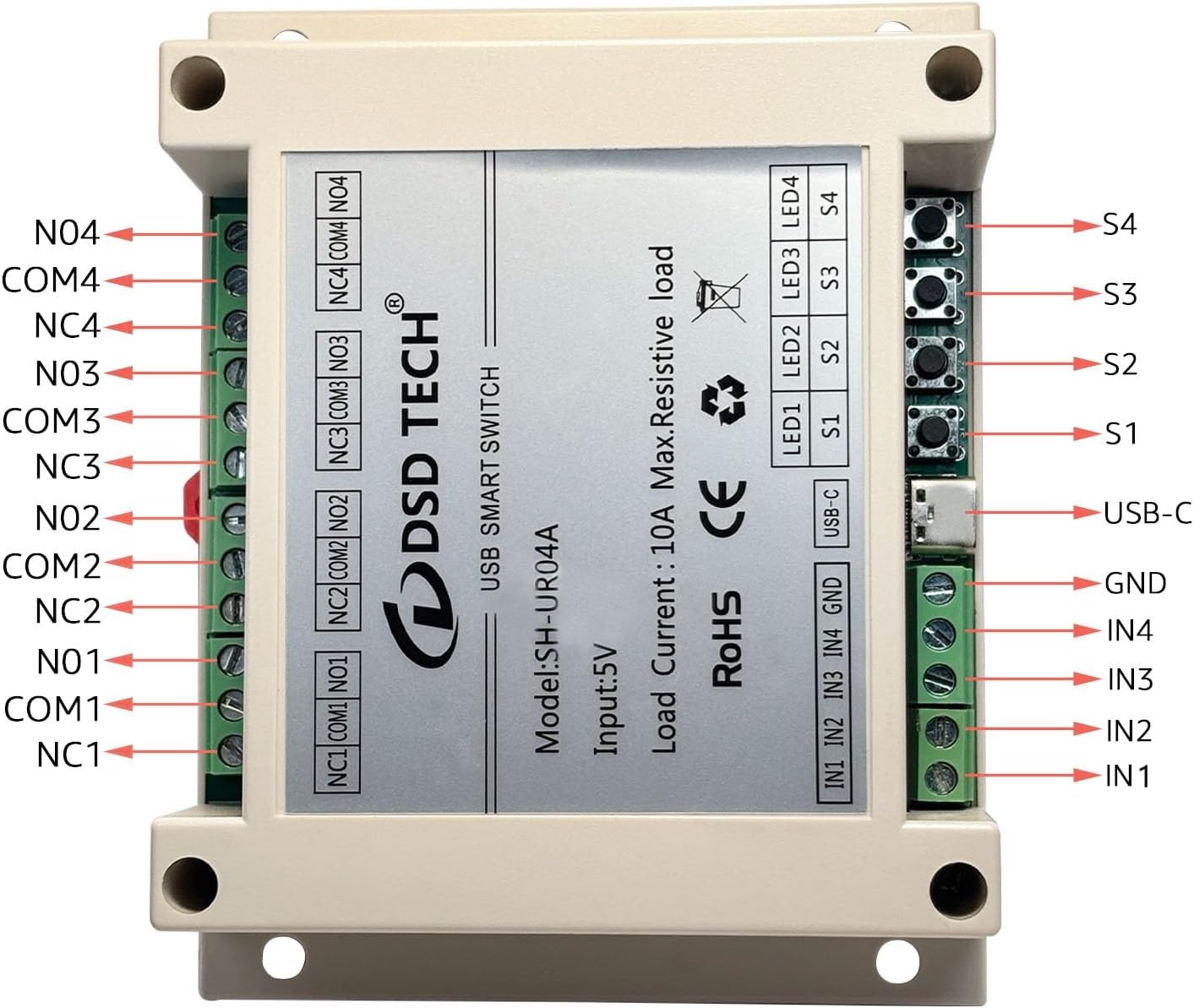
Figure 4.1: SH-UR04A Component Layout. This image highlights the various connection points and indicators on the relay module.
4.1 Dimensions

Figure 4.2: Module Dimensions. The module measures approximately 11.5 cm x 9 cm x 4 cm.
5. Setup Instructions
5.1 Driver Installation
The SH-UR04A uses a Silicon Labs CP2102 chipset. Before connecting the module, ensure the appropriate driver is installed on your operating system (Windows, macOS, Linux). Drivers can typically be found on the Silicon Labs official website or DSD TECH's support page. Once installed, the module will appear as a virtual COM port.

Figure 5.1: Serial Interface Diagram. The CP2102 chip facilitates communication between the module and your computer via a virtual COM port.
5.2 Connecting the Module
- Connect the provided USB-A to USB-C cable to the USB-C port on the SH-UR04A module.
- Plug the USB-A end of the cable into an available USB port on your computer.
- The module will power on, and the power indicator LED (if present) will illuminate.

Figure 5.2: USB-C Connection. Connect the module to your computer using the provided USB cable.
5.3 Wiring Loads to Relays
Each relay channel (1-4) has three terminals: Normally Open (NO), Normally Closed (NC), and Common (COM). Refer to Figure 4.1 for terminal identification.
- Normally Open (NO): The circuit is open (disconnected) when the relay is de-energized and closes (connects) when the relay is energized.
- Normally Closed (NC): The circuit is closed (connected) when the relay is de-energized and opens (disconnects) when the relay is energized.
- Common (COM): This is the common terminal for the switch.
Warning: When switching AC line power, ensure proper insulation and safety precautions are taken. Exposed relay screw terminals require insulation or an external enclosure to prevent electrical hazards.
6. Operating Instructions
6.1 Manual Control
Each relay channel has a corresponding manual button (S1-S4) and LED indicator (LED1-LED4). Pressing a button will toggle the state of the respective relay. The LED will illuminate when the relay is energized (closed on NO, open on NC).
6.2 AT Command Control
The SH-UR04A can be controlled using ASCII-formatted AT commands sent via the virtual COM port. The default UART settings are: Baud rate 9600, Stop Bits 1, Parity None, Data Bits 8. All commands must end with a line break.

Figure 6.1: AT Command List. Essential commands for controlling the relay module.
Example Commands:
AT: Test command. Returns "OK".AT+CH1=1: Turns on relay channel 1.AT+CH4=0: Turns off relay channel 4.AT+BAUD=115200: Changes the baud rate to 115200.AT+CH1=?: Queries the status of relay channel 1.
6.3 Python Integration
The module can be easily integrated into Python projects using the pyserial library. A sample Python script is provided below to demonstrate basic control.

Figure 6.2: Python Demo Code. An example script for controlling the relay via Python.
Python Script Example (Conceptual):
import serial
import time

# Replace 'COMX' with your actual COM port (e.g., 'COM3' on Windows, '/dev/ttyUSB0' on Linux/Mac)
# You can use serial.tools.list_ports.comports() to find available ports
ser = serial.Serial('COMX', 9600, timeout=0.5)

if ser.is_open:
    print("Serial port opened successfully.")
    # Turn relay 1 ON
    ser.write(b'AT+CH1=1\r\n') # \r\n for line break
    print("Relay 1 ON")
    time.sleep(2)

    # Turn relay 1 OFF
    ser.write(b'AT+CH1=0\r\n')
    print("Relay 1 OFF")
    time.sleep(2)

    ser.close()
    print("Serial port closed.")
else:
    print("Failed to open serial port.")
Ensure you have the pyserial library installed (pip install pyserial). Modify the COM port and baud rate as needed.
7. Specifications
| Feature | Specification |
|---|---|
| Model Number | SH-UR04A |
| Channels | 4 |
| Input Voltage | 5V (USB Powered) |
| Max. Switching Voltage (AC) | 110-250V AC |
| Max. Switching Voltage (DC) | 30V DC |
| Max. Switching Current | 10A per channel |
| Max. Resistive Load | 600W per channel |
| Connector Type | USB Type-C, 3 PIN Terminal Block |
| Contact Material | Silver Tin Oxide |
| Contact Type | Normally Closed; Normally Opened |
| Chipset | Silicon Labs CP2102 |
| Product Dimensions | 11.51 x 8.99 x 3.99 cm |
| Item Weight | 155 g |
| Compliance | RoHS |

Figure 7.1: SH-UR04A Module. A general view of the device.
7.1 Model Comparison (SH-UR01A vs SH-UR04A)

Figure 7.2: USB Relay Series Comparison. Key differences between the 1-channel and 4-channel models.
8. Troubleshooting
- Module not recognized by computer:
- Ensure the CP2102 driver is correctly installed.
- Try a different USB port or cable.
- Verify the module is properly connected.
- Relays not responding to commands:
- Check if the correct COM port is selected in your software.
- Verify the baud rate and other serial settings match the module's default (9600, 8N1).
- Ensure AT commands are terminated with a line break (
\r\n). - Test manual control using the onboard buttons to confirm relay functionality.
- Relay clicks but load does not switch:
- Inspect wiring to the NO/NC/COM terminals for secure connections.
- Ensure the load's voltage and current requirements do not exceed the relay's specifications.
- Check the load itself for proper operation.
9. Maintenance
The DSD TECH SH-UR04A module requires minimal maintenance. Keep the device clean and free from dust and moisture. Avoid exposing it to extreme temperatures or harsh chemicals. Periodically check terminal connections for tightness, especially in applications with vibration.
10. Warranty and Support
DSD TECH provides a 1-year product replacement service and lifetime technical support for the SH-UR04A module. For technical assistance or warranty claims, please contact DSD TECH customer support through their official website or the platform where the product was purchased.
Manufacturer Contact Information: DongGuan DESHIDE Technology CO.,LTD ADD:Room 801, Building 3, Donghui Zhichuangyuan, No.98 Dongkeng Avenue North, Dongkeng, Dongguan