
1. Introduction
This manual provides essential information for the safe and effective operation of your ARCCAPTAIN 60Amp Non-HF Plasma Cutter, Model CUT60 Non-HF. Please read this manual thoroughly before operating the machine to ensure proper usage, prevent injury, and maintain product longevity.
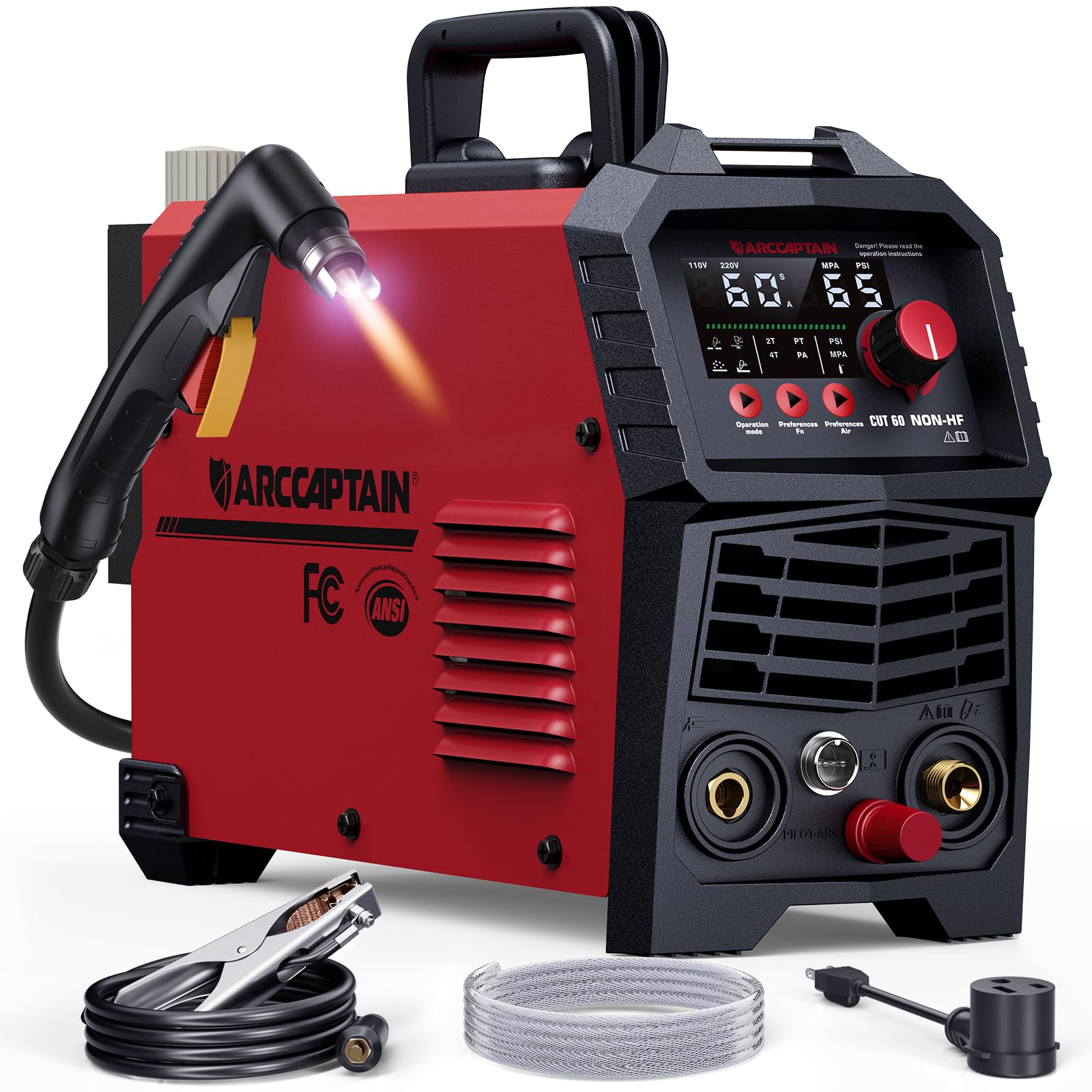
Image 1.1: The ARCCAPTAIN 60Amp Non-HF Plasma Cutter CUT60.
2. Safety Information
Operating a plasma cutter involves significant risks. Always prioritize safety to prevent personal injury or damage to equipment.
- Eye Protection: Always wear appropriate welding helmets or safety glasses with suitable shade levels to protect against intense light and sparks.
- Body Protection: Wear flame-resistant clothing, gloves, and protective footwear.
- Ventilation: Ensure adequate ventilation in the work area to disperse fumes and gases.
- Electrical Safety: Connect the machine to a properly grounded power supply. Do not operate in wet conditions.
- Fire Hazards: Keep flammable materials away from the cutting area. Sparks and molten metal can cause fires.
- Air Pressure: Ensure the air compressor is correctly connected and regulated to the recommended pressure. Incorrect pressure can lead to poor cuts or torch damage.
- Electromagnetic Interference: This non-HF unit minimizes electromagnetic interference, making it safer for use near sensitive electronics.
- Built-in Protections: The unit features overload, overheat, and overcurrent protection. If an error code (e.g., E10, E31, E34, E60, E80, E81) appears on the LED display, consult the troubleshooting section.

Image 2.1: The plasma cutter features built-in safety protections including overcurrent, overheating, overload, and IP21S water rating.
3. Package Contents
Verify that all items listed below are present in your package. If any items are missing or damaged, contact customer support.
- 1 x ARCCAPTAIN CUT60 Non-HF Plasma Cutter Machine
- 1 x 13.12FT IPT60 Cutting Torch
- 1 x 10FT Earth Clamp
- 1 x 10FT Air Hose
- 4 x Nozzles (2x 0.9mm, 2x 1.1mm)
- 2 x Electrodes
- 1 x 220V to 110V Power Adapter
- 1 x Hose Clamp
- 1 x Shoulder Strap
- User Manual (this document)

Image 3.1: Included accessories with the ARCCAPTAIN CUT60 Non-HF Plasma Cutter.
4. Product Features
The ARCCAPTAIN CUT60 Non-HF Plasma Cutter offers advanced features for efficient and versatile metal cutting.
- 4-in-1 Cutting Modes: This machine supports plate cutting, expanded-metal cutting, rust/paint removal, and plasma gouging.
- Expanded-Metal Mode: Maintains a stable arc on mesh materials for clean, uninterrupted cuts.
- Rust-Clean Mode: Removes corrosion and coatings without grinding.
- Gouging Mode: Used for removing old welds, fixing defects, and preparing bevels. Note: Replace the nozzle when using gouging mode.
- Non-HF Blowback Pilot Arc: Utilizes a non-high-frequency blowback start, reducing electromagnetic interference and protecting sensitive electronics. This provides up to 60A on 220V for smooth cuts on various metals up to 1-1/16" (28mm).
- Upgraded IPT60 Cutting Torch: Delivers strong arc starting and cutting performance on rough, painted, rusty, or dirty surfaces. The non-contact pilot arc extends consumable life and provides precise cuts.
- Smart Air Pressure Monitoring: A digital air pressure system continuously monitors incoming air, displaying real-time readings on the LED panel. Error codes E80/E81 indicate low/high pressure, preventing poor cuts and torch damage.
- Quick 1/4" NPT Connector: Features a pre-installed, metal-cased air filter with a quick-connect 1/4" NPT fitting for easy setup.
- PA/PT & 2T/4T Function:
- PA (Pilot Arc): Adjustable arc time (2-10 seconds) as needed, especially for expanded metal.
- PT (Postflow): Adjustable time (5-15 seconds, recommended ~8 seconds) to cool the torch after the arc extinguishes.
- 2T Mode: Press and hold the torch trigger to maintain the arc. Release to stop. Ideal for short, precise cuts.
- 4T Mode: Press the trigger once to start the arc, then release. Press again to stop the arc. Suitable for long, continuous cuts to reduce hand fatigue.

Image 4.1: Visual representation of the four cutting modes: Plate Cutting, Expanded Metal Cutting, Rust Removal, and Plasma Gouging.

Image 4.2: Diagram showing the front and rear panel components, including LED Display, Mode Button, Function Button, Current Control Knob, Air Conversion Button, Torch Switch, Earth Clamp, Cutting Torch, Pilot Arc, Power Switch, Power Cable, Cooling Fan, and Air Regulator.
5. Setup
Follow these steps to set up your plasma cutter for operation.
- Unpacking: Carefully remove all components from the packaging and inspect for any damage. Refer to the "Package Contents" section to ensure all parts are present.
- Power Connection:
- For 220V operation, connect the power cable directly to a suitable 220V outlet.
- For 110V operation, use the provided 220V to 110V power adapter and connect to a 110V outlet. Ensure the outlet can handle the required amperage.
- Air Compressor Connection:
- Connect an external air compressor (sold separately) to the 1/4" NPT quick-connect fitting on the plasma cutter.
- Ensure the air hose is securely attached using the provided hose clamp.
- Set the air compressor output pressure to the recommended range:
- 110V: 55 PSI
- 220V: 50–75 PSI

Image 5.1: The 1/4" NPT quick-connect fitting for air hose connection, featuring a pre-installed filter.
- Torch and Earth Clamp Connection:
- Connect the IPT60 cutting torch to the designated port on the front panel.
- Connect the earth clamp to the workpiece. Ensure a clean, secure connection for optimal performance and safety.
- Consumables: Ensure the correct nozzle and electrode are installed in the torch for your cutting application. The unit includes 0.9mm and 1.1mm nozzles.
6. Operating Instructions
This section details the steps for operating your plasma cutter. Always wear personal protective equipment.
- Power On: Turn on the main power switch located on the rear panel of the machine. The LED display will illuminate.
- Select Mode: Use the "Mode Button" on the front panel to select the desired cutting mode (Plate Cutting, Expanded Metal, Rust Removal, Plasma Gouging).
- Adjust Current: Use the "Current Control Knob" to set the cutting amperage according to the material thickness and type. Refer to the cutting chart in the Specifications section for guidance.
- Set Air Pressure: Monitor the air pressure reading on the LED display. Adjust the air regulator on your external compressor to achieve the recommended PSI for your voltage (55 PSI for 110V, 50-75 PSI for 220V).
- PA/PT Settings:
- PA (Pilot Arc) Time: Adjust the pilot arc duration (2-10 seconds) as needed, especially for expanded metal.
- PT (Postflow) Time: Set the postflow time (5-15 seconds, recommended ~8 seconds) to cool the torch after the arc extinguishes.

Image 6.1: Illustration of adjustable Pilot Arc (PA) and Postflow (PT) settings for the plasma torch.
- 2T/4T Function: Use the "Function Button" to toggle between 2T and 4T modes.
- 2T Mode: Press and hold the torch trigger to maintain the arc. Release to stop. Ideal for short, precise cuts.
- 4T Mode: Press the trigger once to start the arc, then release. Press again to stop the arc. Suitable for long, continuous cuts to reduce hand fatigue.

Image 6.2: Comparison of 2T and 4T operating modes for the plasma torch.
- Initiate Cut: Position the torch nozzle close to the workpiece. Press the torch trigger to start the pilot arc and then the cutting arc. Maintain a consistent travel speed and standoff distance for optimal cut quality.
- Monitor Display: The large LED display provides real-time feedback on current, air pressure, and error codes.
7. Maintenance
Regular maintenance ensures the longevity and optimal performance of your plasma cutter.
- Consumable Replacement: Regularly inspect the torch nozzle and electrode for wear. Replace them when signs of degradation appear to maintain cut quality and prevent torch damage. Always replace the nozzle when switching to gouging mode.
- Air Filter: Check and clean or replace the air filter element in the 1/4" NPT connector periodically to ensure clean, dry air supply to the torch.
- Cleaning: Keep the machine and torch clean from dust, metal particles, and debris. Use compressed air to blow out internal components if necessary, ensuring the machine is unplugged.
- Cable Inspection: Inspect all cables (power, torch, earth clamp) for cuts, fraying, or damage before each use. Replace damaged cables immediately.
- Storage: Store the plasma cutter in a dry, clean environment when not in use.

Image 7.1: The IPT60 torch design, highlighting its features for better performance and efficiency compared to PT31 and AG60 torches.
8. Troubleshooting
Refer to this section for common issues and their solutions. If the problem persists, contact ARCCAPTAIN customer support.
| Problem/Error Code | Possible Cause | Solution |
|---|---|---|
| No Arc / Weak Arc |
|
|
| Error Code E80 | Air pressure less than 0.2MPa (30 PSI) | Increase air compressor output pressure to the recommended range. |
| Error Code E81 | Air pressure more than 0.55MPa (80 PSI) | Decrease air compressor output pressure to the recommended range. |
| Error Code E10 | Overcurrent Protection | Reduce cutting current or allow machine to cool. Check for short circuits. |
| Error Code E31 | Low Voltage Protection | Verify input voltage is within specified limits (110V/220V). |
| Error Code E34 | IGBT Voltage Too Low | Contact customer support. |
| Error Code E60 | Overheat Protection | Allow the machine to cool down. Ensure proper ventilation and clear any obstructions from cooling vents. |

Image 8.1: Display of various error codes related to safety protections like overcurrent, low voltage, IGBT voltage, overheat, and air pressure.
9. Specifications
Detailed technical specifications for the ARCCAPTAIN CUT60 Non-HF Plasma Cutter.
| Specification | Value |
|---|---|
| Brand | ARCCAPTAIN |
| Model | CUT60 Non-HF |
| Input Voltage | 110V/220V Dual Voltage |
| Output Current (110V) | 20–35A |
| Output Current (220V) | 20–60A |
| Clean Cut Thickness (110V) | 1/2 inch (12mm) |
| Maximum Cut Thickness (110V) | 5/8 inch (16mm) |
| Clean Cut Thickness (220V) | 3/4 inch (20mm) |
| Maximum Cut Thickness (220V) | 1-1/16 inch (28mm) |
| Recommended Air Pressure (110V) | 55 PSI |
| Recommended Air Pressure (220V) | 50–75 PSI |
| Torch Type | IPT60 Blowback Pilot Arc |
| Protection Class | IP21S |
| Parcel Dimensions | 46 x 38 x 19 cm |
| Weight | 8.98 kg |

Image 9.1: Detailed cutting chart showing optimal thickness, work distance, and cut speed for various materials at 110V and 220V.

Image 9.2: Product label displaying electrical and performance specifications.
10. Warranty and Support
ARCCAPTAIN products are designed for reliability and performance. For warranty information, technical support, or service inquiries, please contact ARCCAPTAIN customer service through their official website or the retailer where the product was purchased. Keep your purchase receipt as proof of purchase.
