
1. Introduction
Thank you for choosing the Astrum Ease Drift ANC Wireless Over-Ear Headphones. This manual provides essential information for setting up, operating, and maintaining your headphones to ensure optimal performance and longevity. Please read this guide thoroughly before use.
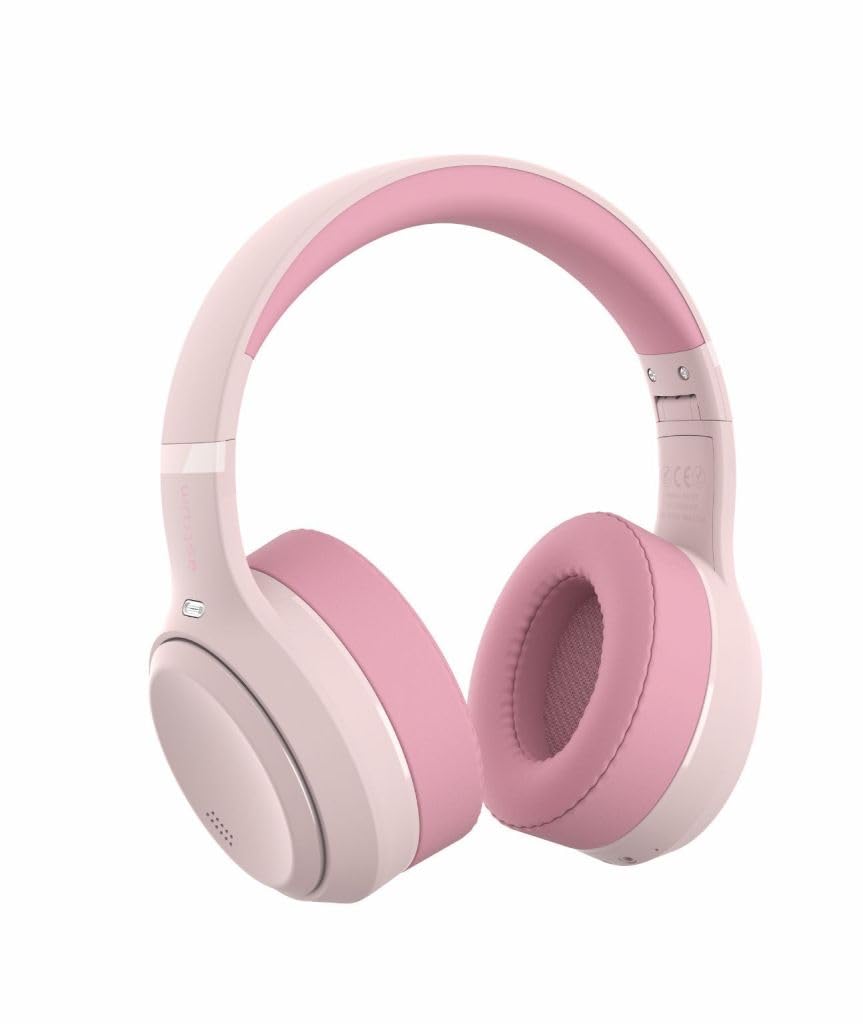
Image: Astrum Ease Drift ANC Wireless Over-Ear Headphones, showcasing the pink color variant.
2. Package Contents
Ensure all items are present in your package:
- 1 x Astrum Ease Drift Wireless Noise Cancelling Headphones
- 1 x USB-C Charging Cable
- 1 x AUX Cable (3.5mm)
- 1 x User Guide (this document)
3. Product Overview
Familiarize yourself with the headphone components and controls.

Image: Close-up view of the right earcup, showing the control buttons for power, volume, track control, and ANC activation.
Controls and Ports:
- Power Button: Used to power on/off the headphones and initiate Bluetooth pairing.
- Volume Up/Next Track Button: Press briefly to increase volume, press and hold to skip to the next track.
- Volume Down/Previous Track Button: Press briefly to decrease volume, press and hold to go to the previous track.
- Multi-function Button (Play/Pause/Call): Controls music playback and manages phone calls.
- ANC Button: Activates or deactivates Active Noise Cancellation.
- USB-C Charging Port: For charging the headphones.
- 3.5mm AUX Port: For wired audio connection.
- Microphone: For calls and voice assistant.
4. Setup
4.1 Charging the Headphones
Before first use, fully charge your headphones.
- Connect the supplied USB-C charging cable to the USB-C port on the headphones.
- Connect the other end of the cable to a USB power adapter (5V 1A recommended) or a computer's USB port.
- The LED indicator will show charging status (e.g., red for charging, blue for fully charged).
- A full charge takes approximately 2 hours.
The headphones offer up to 100 hours of playtime without ANC, and 60 hours with ANC activated.

Image: Astrum Ease Drift headphones highlighting the extended battery life of up to 100 hours.
4.2 Bluetooth Pairing
Pair your headphones with a Bluetooth-enabled device.
- Ensure the headphones are charged and powered off.
- Press and hold the Power Button for approximately 5 seconds until the LED indicator flashes blue and red alternately, indicating pairing mode.
- On your device (smartphone, tablet, laptop), enable Bluetooth and search for available devices.
- Select "Astrum Ease Drift" from the list of found devices.
- Once connected, the LED indicator will flash blue slowly.
The headphones utilize Bluetooth 6.0 for a stable connection and fast pairing.

Image: A display of multiple Astrum Ease Drift headphones in various colors, emphasizing the "Ultra Stable BT 6.0" feature for reliable wireless connectivity.
4.3 Wired Connection (AUX Mode)
Use the included 3.5mm AUX cable for a wired audio connection, which works even if the headphone battery is depleted.
- Connect one end of the 3.5mm AUX cable to the AUX port on the headphones.
- Connect the other end to the 3.5mm audio jack of your device.
- The headphones will automatically switch to wired mode.
5. Operating Instructions
5.1 Power On/Off
- Power On: Press and hold the Power Button for 2-3 seconds until the LED indicator flashes blue.
- Power Off: Press and hold the Power Button for 3-4 seconds until the LED indicator flashes red and then turns off.
5.2 Music Playback
- Play/Pause: Press the Multi-function Button once.
- Volume Up: Press the Volume Up button once.
- Volume Down: Press the Volume Down button once.
- Next Track: Press and hold the Volume Up button.
- Previous Track: Press and hold the Volume Down button.
5.3 Call Management
- Answer/End Call: Press the Multi-function Button once.
- Reject Call: Press and hold the Multi-function Button for 2 seconds.
5.4 Active Noise Cancellation (ANC)
The hybrid ANC system reduces ambient noise for an immersive listening experience.
- Activate ANC: Press the ANC Button once. The ANC indicator light will turn on.
- Deactivate ANC: Press the ANC Button once again. The ANC indicator light will turn off.

Image: Astrum Ease Drift headphones illustrating the Active Noise Cancellation feature, capable of canceling up to 95% of background noise.
5.5 Voice Assistant
- Activate Voice Assistant: Triple-press the Multi-function Button to activate your device's voice assistant (e.g., Google Assistant, Siri).
5.6 Low-Latency Game Mode
For competitive gaming, activate the low-latency mode for improved audio-visual synchronization.
- Activate Game Mode: Consult the quick start guide or product packaging for the specific button sequence to activate low-latency game mode.

Image: Astrum Ease Drift headphones illustrating the Low Latency mode, beneficial for gaming and video synchronization.
6. Maintenance
Proper care ensures the longevity and performance of your headphones.
- Cleaning: Wipe the headphones with a soft, dry cloth. Do not use abrasive cleaners or solvents.
- Storage: When not in use, store the headphones in a cool, dry place, away from direct sunlight and extreme temperatures. The foldable design allows for compact storage.
- Ear Cushions: The memory foam ear cushions are designed for comfort. Avoid excessive pressure or sharp objects that could damage them.

Image: Ivory Astrum Ease Drift headphones, emphasizing the plush memory foam ear cushions and lightweight frame for comfort.
7. Troubleshooting
If you encounter issues, refer to the following common solutions:
| Problem | Solution |
|---|---|
| Headphones do not power on. | Ensure the headphones are fully charged. Connect to a power source using the USB-C cable. |
| Cannot pair via Bluetooth. |
|
| No sound. |
|
| ANC is not working. | Ensure the ANC button is pressed and the ANC indicator light is on. |
8. Specifications
| Feature | Detail |
|---|---|
| Bluetooth Version | V6.0 |
| Play Time (ANC off) | Up to 100 hours |
| Play Time (ANC on) | Up to 60 hours |
| Charging Time | Approx. 2 hours (USB-C, 5V 1A) |
| Standby Time | Up to 12 months |
| Connectivity | Bluetooth 6.0 + AUX (3.5mm) |
| Noise Cancellation | 6-mic Hybrid ANC system |
| Frequency Response | 20Hz – 20kHz |
| Sensitivity | 118.2 ±3dB |
| Impedance | 32Ω ±10% |
| Wireless Range | Up to 10m |
| Battery | 800mAh Li-ion (3.7V) |
| Charging Port | USB-C (5V 1A) |
| Weight | 270 Grams |
| Material | Plastic |
9. Warranty and Support
The Astrum Ease Drift ANC Wireless Over-Ear Headphones come with a 12-month manufacturer's warranty. This warranty covers defects in materials and workmanship under normal use.
For warranty claims or technical support, please contact your retailer or visit the official Astrum website for customer service information. Please retain your proof of purchase for warranty validation.