WantJoin WZQPJK86001BKUSWH

WantJoin 5-in-1 Electric Vegetable Chopper User Manual

Model: WZQPJK86001BKUSWH

1. Important Safety Instructions

Please read all instructions carefully before using the appliance. Failure to follow these instructions may result in electric shock, fire, or serious injury.

2. Product Overview

The WantJoin 5-in-1 Electric Vegetable Chopper is a versatile kitchen appliance designed for efficient food preparation. It features multiple functions including slicing, dicing, and shredding, powered by a robust motor and durable stainless steel blades.

2.1 Components

WantJoin 5-in-1 Electric Vegetable Chopper with accessories

Image 2.1: The WantJoin 5-in-1 Electric Vegetable Chopper showing its main unit, various blade types, and cleaning tools.

2.2 Key Features

WantJoin Chopper demonstrating 5-in-1 functions: dicing, slicing, and shredding

Image 2.2: Visual representation of the 5-in-1 functions, including different dicing sizes, slicing, and shredding.

Internal view of the WantJoin Chopper motor and blades

Image 2.3: An internal diagram highlighting the 100W 4000RPM motor and thickened 420 stainless steel blades.
3. Setup

  1. Unpack: Carefully remove all components from the packaging. Retain packaging for future storage or transport.
  2. Clean: Before first use, wash all removable parts (feed chute, lid, blade assemblies) with warm soapy water. Rinse thoroughly and dry completely. The motor base should be wiped with a damp cloth.
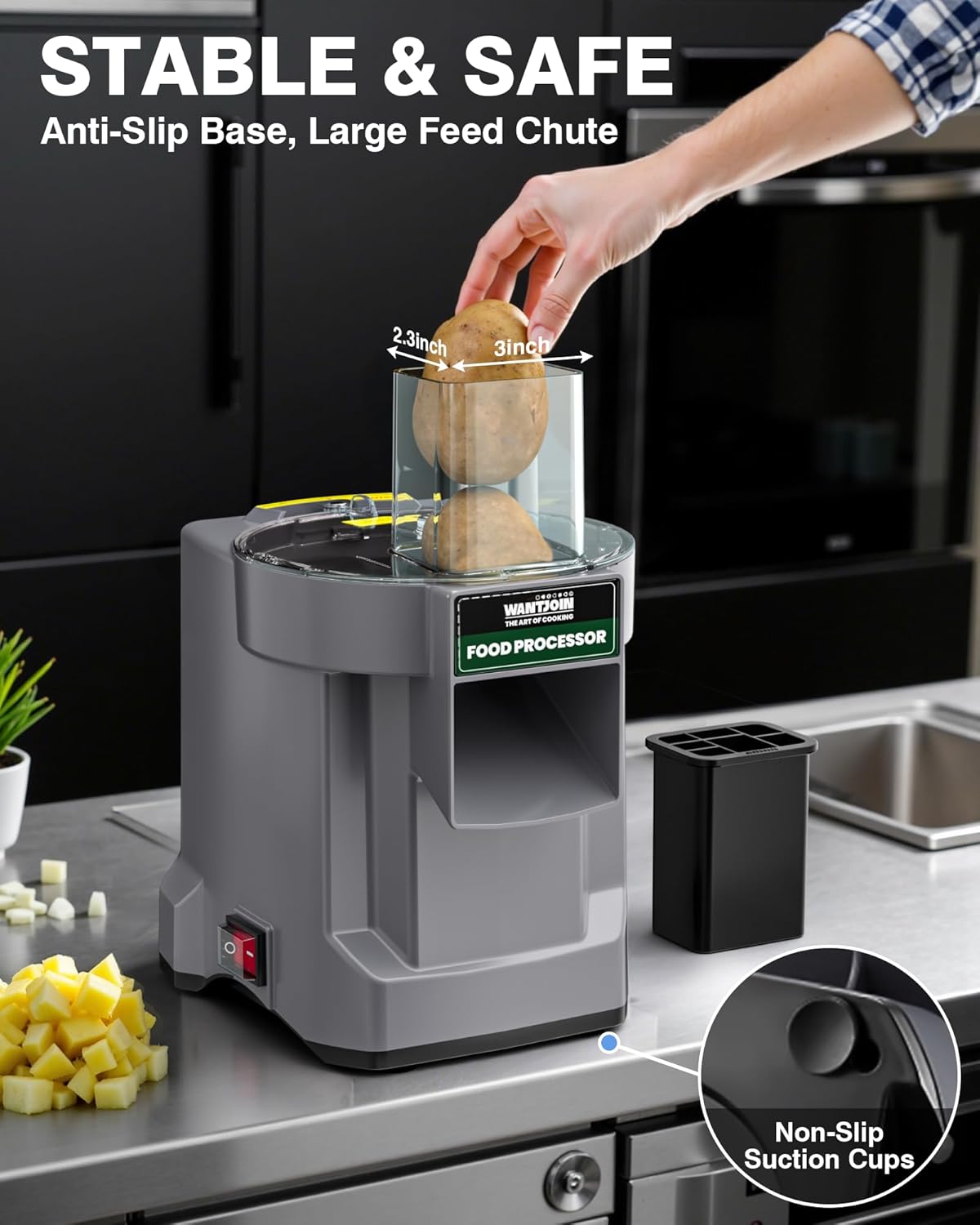
  3. Position: Place the motor base on a stable, flat, and dry surface. Ensure the silicone anti-skid suction cups are firmly attached to the countertop for stability.
  4. Install Blade: Select the desired blade assembly (slicing, dicing, or shredding). Carefully place it into the designated slot on the motor base. Ensure it is securely seated.
  5. Attach Lid: Place the lid onto the motor base, aligning it correctly. Rotate or press down until the safety lock engages. The appliance will not operate if the lid is not properly secured.
WantJoin Chopper with large feed chute and non-slip suction cups

Image 3.1: The appliance positioned on a countertop, highlighting the large feed chute and non-slip suction cups for stable operation.

4. Operation

This appliance is designed for processing hard vegetables and fruits. Avoid using soft ingredients like tomatoes, as they may not process effectively and could clog the machine.

  1. Prepare Ingredients: Wash and peel vegetables or fruits as needed. For optimal results, ensure ingredients are firm. Cut larger items to fit comfortably into the feed chute if necessary, though the large chute is designed to minimize pre-cutting.
  2. Select Blade: Install the appropriate blade assembly for your desired cut (slicing, dicing, or shredding) as described in the Setup section.
  3. Secure Lid: Ensure the lid is securely in place and the safety switch is engaged.
  4. Place Container: Position a suitable container under the output chute to collect the processed food.
  5. Power On: Plug the appliance into a standard 110-120V electrical outlet. Press the one-touch power switch to turn on the machine.
  6. Feed Ingredients: Carefully place the prepared ingredients into the feed chute. Use the food pusher to guide them down towards the rotating blades. Never use your hands to push food into the chute.
  7. Process: The machine will quickly process the ingredients. Continue feeding until all desired items are processed.
  8. Power Off: Once finished, press the power switch to turn off the appliance and unplug it from the outlet.

4.1 Video Demonstration: 5-in-1 Electric Vegetable Chopper in Action

Video 4.1: This video demonstrates the various functions of the WantJoin 5-in-1 Electric Vegetable Chopper, including shredding, dicing, and slicing different vegetables like carrots, cucumbers, and potatoes. It also shows the ease of use and the quality of the cuts.

5. Maintenance and Cleaning

Regular cleaning and maintenance will ensure the longevity and optimal performance of your appliance.

  1. Unplug: Always unplug the appliance from the power outlet before cleaning.
  2. Disassemble: Carefully remove the lid, feed chute, and blade assembly.
  3. Wash Removable Parts: Wash the lid, feed chute, and blade assemblies with warm, soapy water. Use the provided cleaning brushes and tools to remove any food residue, especially from the intricate parts of the dicing blades. Exercise extreme caution when handling blades as they are very sharp.
  4. Clean Motor Base: Wipe the motor base with a damp cloth. Never immerse the motor base in water or any other liquid.
  5. Dry: Ensure all parts are thoroughly dried before reassembling or storing.
  6. Storage: Store the appliance and its accessories in a clean, dry place.
WantJoin Chopper being cleaned in a sink with cleaning tools

Image 5.1: The removable parts of the chopper being cleaned under running water in a sink, demonstrating the use of cleaning tools for thorough maintenance.

6. Troubleshooting

ProblemPossible CauseSolution
Appliance does not turn on.Not plugged in; Lid not properly secured; Power switch off.Ensure the power cord is securely plugged into a working outlet. Check that the lid is correctly aligned and locked into place. Press the power switch to the 'ON' position.
Food is not processing efficiently or blades are stuck.Too much food in the chute; Ingredients are too soft; Blades are dull or clogged.Reduce the amount of food fed at one time. Ensure ingredients are firm. Unplug the appliance, disassemble, and clean the blades thoroughly. If blades are dull, contact support for replacement options.
Appliance vibrates excessively or moves during operation.Not placed on a stable surface; Suction cups not engaged.Place the appliance on a flat, stable, and dry countertop. Press down firmly on the appliance to ensure the silicone anti-skid suction cups are securely attached to the surface.
Unusual noise during operation.Foreign object in the machine; Blade assembly not correctly installed.Immediately turn off and unplug the appliance. Inspect for any foreign objects. Ensure the blade assembly is correctly and securely installed. If the noise persists, discontinue use and contact customer support.

7. Specifications

FeatureDetail
BrandWantJoin
Model NumberWZQPJK86001BKUSWH
FunctionsSlicing (2.5mm), Dicing (6mm, 8mm, 12mm), Shredding (2.5mm)
Power100W
Motor Speed4000 RPM
Voltage110-120V
MaterialStainless Steel (Blades), Durable Plastic (Body)
ColorBlack / Gray
Product Dimensions9.45 x 8.07 x 13.98 inches
Item Weight8.8 Pounds (3.99 kg)
UPC745166514489
WantJoin Chopper product dimensions and included accessories

Image 7.1: Detailed product dimensions and a visual overview of the included blade types and cleaning tools.

8. Warranty and Support

WantJoin provides a one-year coverage for this product. In case of any issues or for technical assistance, please contact our customer support team.

For further assistance, you may visit the WantJoin Store on Amazon.

Related Documents - WZQPJK86001BKUSWH

Preview WantJoin Pressure Cooker User Manual - Safety, Usage, and Troubleshooting Guide
Comprehensive user manual for the WantJoin Pressure Cooker. Includes detailed instructions for safe operation, cleaning, maintenance, troubleshooting common issues, and a cooking time reference table.
Preview WantJoin Hot Dog Warmer User Manual
User manual for the WantJoin Hot Dog Warmer, providing instructions for safe operation, installation, cleaning, maintenance, and troubleshooting.
Preview WantJoin Insulated Beverage Dispenser - Usage Guide and Tips
Comprehensive guide for the WantJoin Insulated Beverage Dispenser, covering optimal usage, temperature retention trends for hot and cold beverages, important warnings, and battery replacement instructions.
Preview WantJoin 95B Cup Sealing Machine: Question & Answer Guide
A comprehensive guide to the WantJoin 95B Cup Sealing Machine, covering installation, operation, maintenance, troubleshooting, and button features. This document provides essential information for users to effectively operate and maintain their cup sealing machine.
Preview WantJoin Blender User Manual
User manual for the WantJoin Blender, providing instructions on how to use, clean, maintain, and troubleshoot the appliance. Includes safety warnings and functional features.
Preview Wantjoin Blender User Manual
User manual for the Wantjoin Blender, covering how to use, function features, cleaning and maintenance, troubleshooting, and important safety warnings.