
Introduction
The Uniclife 32-Key Combination Lock Key Box is designed to provide secure and organized storage for a large collection of keys. This wall-mountable key cabinet features a robust steel construction and a customizable 3-digit combination lock, making it suitable for various environments such as offices, hotels, car dealerships, and service teams. This manual outlines the product's features, installation steps, operating instructions, and specifications to ensure proper use and maintenance.
Product Features
- High-Capacity Key Storage: Spacious design (9.8" L x 2.3" W x 15.7" H) engineered to organize up to 32 key sets, keeping large collections tidy.
- Enhanced Security: Features a secure 3-digit combination lock offering 1,000 possible combinations. The tough 1 mm steel body resists tampering and forced entry, preventing unauthorized access.
- Optimized for Larger Keys: Wider hook spacing comfortably holds up to 8 bulky car keys in a row without crowding, overlapping, or tangling. A built-in magnet keeps the door securely shut after unlocking.
- Quick Key Identification: Equipped with 4 fixed plastic racks, each with pre-installed number stickers and 32 hooks to keep keys clearly arranged in numerical order.
- 32 Key Tags in 4 Colors: Includes 8 key tags in each of 4 vibrant colors (blue, green, orange, red). Each tag has a writable insert for effortless labeling and clear windows for easy readability.

Image: Uniclife 32-Key Lock Box showing its dimensions (15.7 inches height, 9.8 inches width, 2.3 inches depth).

Image: The open key box displaying 32 colored key tags with writable inserts for easy sorting and identification.
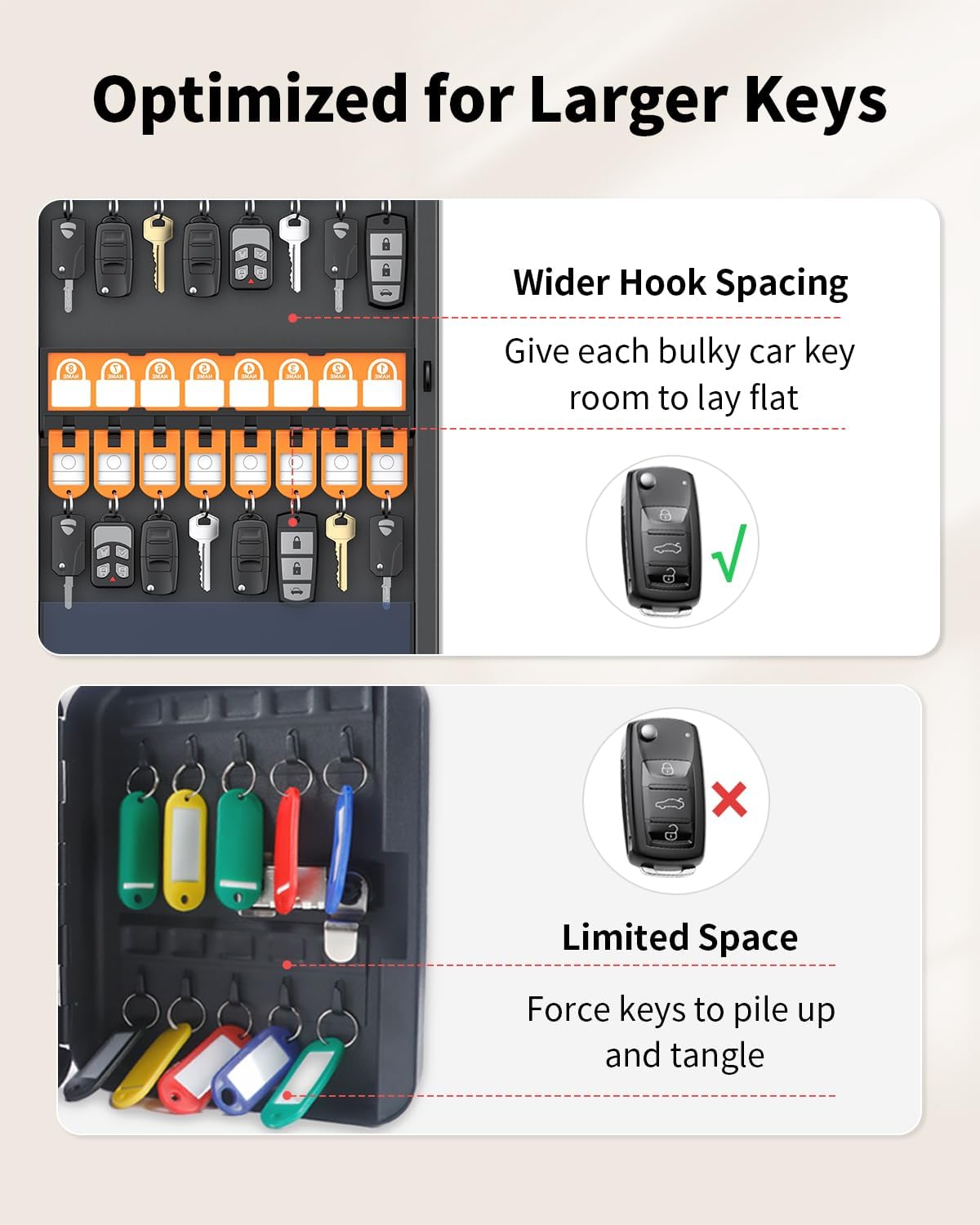
Image: Illustration demonstrating the benefit of wider hook spacing for accommodating bulky car keys without tangling, compared to limited space.
Package Contents
Please check the package to ensure all items are present:
- 1 x Uniclife 32-Key Combination Lock Key Box
- 32 x Writable Key Tags (8 each of blue, green, orange, red)
- 4 x Mounting Screws
- 4 x Wall Anchors
- 1 x Code Reset Tool
Setup and Installation
Wall Mounting
The Uniclife Key Box is designed for easy wall mounting. Ensure you select a sturdy location for installation.
- Choose a suitable wall location for the key box.
- Hold the key box against the wall at the desired height and mark the positions for the pre-drilled mounting holes.
- Drill pilot holes at the marked positions. If mounting into drywall, insert the provided wall anchors.
- Align the key box with the drilled holes and secure it to the wall using the provided screws.

Image: Components for wall mounting, including pre-drilled holes on the back of the key box, screws, and wall anchors.
Operating Instructions
Setting or Resetting the Combination Code
The default code for the lock box is 000. Follow these steps to set your personal 3-digit combination code:
- Open the key box using the current combination (default is 000).
- Inside the door, locate the small lever near the combination lock mechanism. Remove the protective paper covering it and take out the white reset tool.
- Use the reset tool to move the lever from position 'A' to position 'B'.
- With the lever in position 'B', rotate the dials on the front of the lock to set your desired 3-digit code. Choose a memorable code.
- Once your new code is set, use the tool to move the lever back from position 'B' to position 'A' to lock in the new code.
- Return the reset tool to its storage slot and slide the protective paper back.
- Test your new code by scrambling the dials and then entering your new code to open the box.

Image: A four-panel visual guide demonstrating the steps to set or reset the 3-digit combination code for the key box.
Video: Official Uniclife video demonstrating how to set or reset the combination lock and organize keys within the key box.
Organizing Keys with Key Tags
The included key tags and numbered racks help maintain an organized system for your keys.
- Attach each key or set of keys to a colored key tag.
- Open the writable insert on each tag and label it with the key's purpose, location, or owner.
- Hang the key tags on the corresponding numbered hooks within the key box. The pre-installed number stickers on the racks assist with systematic organization.
- Utilize the wider hook spacing for larger or bulkier car keys to prevent overcrowding.
Maintenance
To ensure the longevity and proper functioning of your Uniclife Key Box:
- Regularly wipe the exterior with a soft, dry cloth to remove dust and dirt.
- Avoid using abrasive cleaners or solvents, as these can damage the finish.
- Periodically check the combination lock mechanism to ensure it operates smoothly.
- Ensure the key box is securely mounted to the wall.
Specifications
| Feature | Detail |
|---|---|
| Brand | Uniclife |
| Model | 32-Key Combo Lock |
| Color | Black |
| Material | Metal (Steel) |
| Product Dimensions (D x W x H) | 2.3" x 9.8" x 15.7" (5.8 cm x 24.9 cm x 39.9 cm) |
| Lock Type | 3-Digit Combination Lock |
| Key Capacity | 32 Keys |
| Number of Compartments | 4 |
| Mounting Type | Wall Mount |
| Manufacturer Part Number | BG5164-BK-UK |
Warranty and Support
For warranty information, technical support, or any inquiries regarding your Uniclife 32-Key Combination Lock Key Box, please refer to the contact information provided with your purchase or visit the official Uniclife website. Keep your purchase receipt for warranty claims.