
Introduction
The Aerogogo GIGA Pump 4 Mini Air Pump is a compact, multi-functional device designed for inflating and deflating various items, as well as providing illumination. This manual provides detailed instructions for its safe and efficient use.
Package Contents
- Aerogogo GIGA Pump 4 Mini Air Pump
- 5 Different Air Nozzles
- USB-C Charging Cable
- Storage Pouch
- User Manual (this document)

Image: Aerogogo GIGA Pump 4 Mini Air Pump and its various accessories.
Product Features
- Ultra-light and Compact: Weighs approximately 3.5 ounces (100g), making it highly portable.
- High Pressure & Airflow: Delivers 4.2kPa pressure and 220 L/min airflow for efficient inflation and deflation.
- 3-in-1 Functionality: Serves as an air pump (inflation/deflation), vacuum pump, and camping lantern.
- Integrated Camping Lantern: Features 8 LEDs with 3 adjustable brightness levels (40lm, 160lm, 400lm).
- Versatile Nozzles: Includes 5 different nozzles to fit various inflatable products.
- Rechargeable Battery: Equipped with a Type-C charging port and a low battery indicator.
- Durable Design: IPX4 waterproof rating, concealed hook, and magnetic design for convenient use.

Image: Key features of the GIGA Pump 4, including its compact size, pressure, and airflow capabilities.
Setup
- Charge the Device: Before first use, fully charge the GIGA Pump 4 using the provided USB-C cable. The indicator light will show charging status.
- Select Appropriate Nozzle: Identify the correct nozzle from the 5 included options that matches the valve of the item you intend to inflate or deflate.
- Attach Nozzle: Securely attach the selected nozzle to either the inflation port (for blowing air out) or the deflation port (for sucking air in) of the pump.
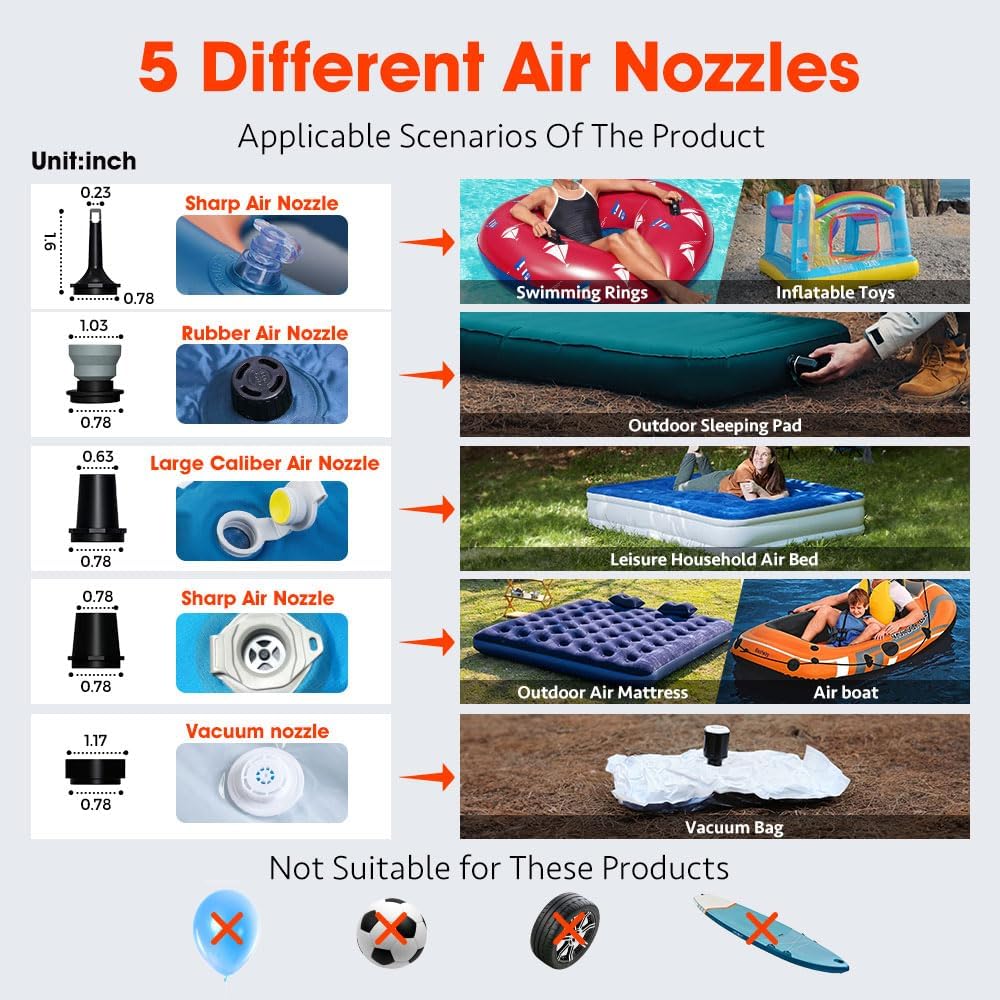
Image: Various nozzles included with the GIGA Pump 4 for different inflation/deflation needs.
Operating Instructions
1. Inflation
- Attach the appropriate nozzle to the inflation port (top of the pump).
- Insert the nozzle firmly into the valve of the item to be inflated.
- Double-click the power button to start inflation. The pump has two gear pressure modes.
- Monitor the inflation process and double-click the power button again to stop once the desired firmness is reached.

Image: The GIGA Pump 4 in use, inflating an air mattress.
2. Deflation (Vacuum Storage)
- Attach the appropriate nozzle to the deflation port (bottom of the pump).
- Insert the nozzle firmly into the valve of the item to be deflated (e.g., a vacuum storage bag).
- Double-click the power button to start deflation.
- Allow the pump to extract air until the item is fully deflated. Double-click the power button to stop.
Image: The GIGA Pump 4 in use, deflating a vacuum storage bag.
3. Camping Lantern
- Press and hold the light button to turn on the lantern.
- Press the light button repeatedly to cycle through the 3 brightness levels (40lm, 160lm, 400lm).
- To turn off the lantern, press and hold the light button again.
- Utilize the concealed hook or magnetic design to position the lantern as needed.

Image: The GIGA Pump 4's integrated lantern with adjustable brightness levels.
Maintenance
- Charging: After receiving the product, charge it initially. For optimal battery life, recharge the air pump every three months to prevent low battery voltage and ensure it remains operational.
- Storage: Store the pump and all accessories in the provided storage pouch in a cool, dry place when not in use.
- Cleaning: Wipe the exterior of the pump with a soft, damp cloth. Do not immerse the pump in water.
Troubleshooting
- Pump Not Turning On: Ensure the device is charged. The low battery indicator will flash red if power is low.
- Insufficient Airflow/Pressure: Check that the correct nozzle is securely attached and fully inserted into the item's valve. Ensure the pump is fully charged.
- Lantern Not Working: Verify the device is charged. Press and hold the light button to activate.
Specifications
| Brand | Aerogogo |
| Model Name | GP4FBAB |
| Item Weight | 3.5 Ounces (approx. 100g) |
| Product Dimensions | 1.9"L x 1.7"W x 2.3"H (approx. 4.8cm x 4.3cm x 5.8cm) |
| Air Flow Capacity | 220 Liters Per Minute |
| Maximum Pressure | 4.2 Kilopascal |
| Lantern Brightness | 40lm / 160lm / 400lm (3 levels) |
| Charging Port | USB-C |
| Waterproof Rating | IPX4 |
Warranty and Support
From the moment you purchase your Aerogogo GIGA Pump 4, you are entitled to a 5-year after-sales service (for the pump only) for non-human-induced quality issues. We are committed to providing top-notch service and support to every customer.
For further assistance or inquiries, please visit the Aerogogo Store on Amazon.