
1. Introduction
This manual provides detailed instructions for the installation, operation, and maintenance of your SIXWIN Android 15 Car Stereo. This unit is designed specifically for Mercedes Benz Smart Fortwo models manufactured between 2005 and 2010. It features a 9-inch touchscreen, 6GB RAM, 128GB internal storage, wireless Carplay and Android Auto, Digital Sound Processing (DSP), WiFi, GPS navigation, Bluetooth 5.0, FM/RDS radio, 32-band equalizer, and supports original steering wheel controls. Please read this manual thoroughly before installation and use to ensure proper functionality and safety.
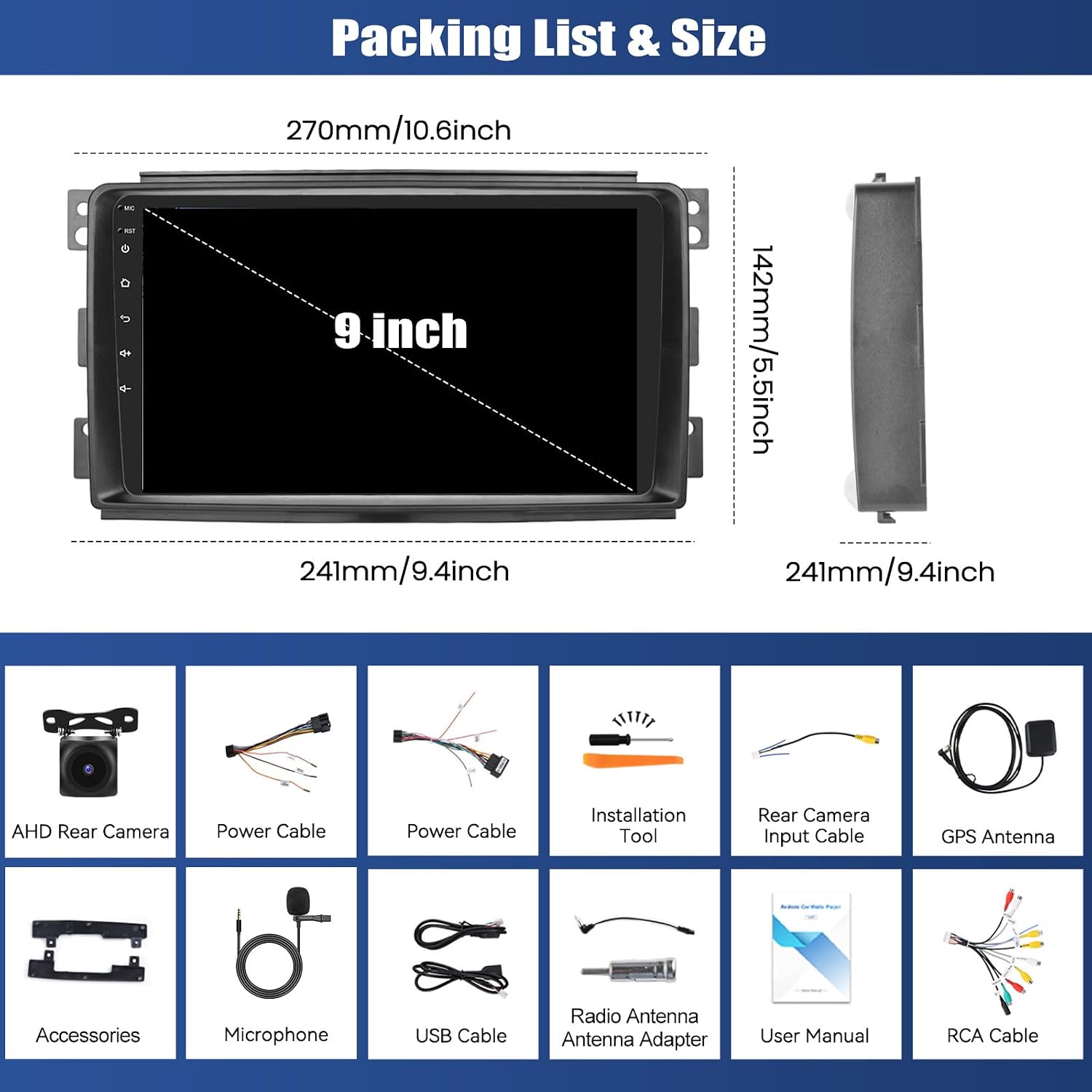
2. Package Contents
Verify that all items listed below are included in your package:
- SIXWIN Android Car Stereo Unit
- AHD Rear Camera
- Power Cable (Type A)
- Power Cable (Type B)
- Installation Tool
- Rear Camera Input Cable
- GPS Antenna
- Accessories (Mounting Brackets, Screws)
- Microphone
- USB Cable
- Radio Antenna Adapter
- RCA Cable
- User Manual (this document)
3. Setup and Installation
3.1 Wiring Diagram
Carefully follow the wiring instructions to ensure correct power and signal connections. Two power cable options (A and B) are provided. Use Cable A as the primary option. If the unit does not power on, switch to Cable B.

3.2 Physical Installation
Remove your vehicle's original radio unit. Connect the appropriate power cables, GPS antenna, and other accessories to the new SIXWIN car stereo. Secure the unit in the dashboard using the provided mounting brackets and screws. Ensure all connections are firm before reassembling the dashboard trim.

4. Operating Instructions
4.1 System Overview
Your SIXWIN car stereo runs on the Android 15 operating system, providing a fast and responsive user experience. It is equipped with an 8-core processor, 6GB of RAM, and 128GB of internal storage, allowing for seamless multitasking and ample space for applications and media.

4.2 Wireless Carplay & Android Auto
Connect your iPhone or Android smartphone wirelessly to access Carplay or Android Auto. This feature allows you to use mobile applications for navigation, music, messaging, and calls directly from the car stereo's screen, controlled via voice commands or touch.

4.3 GPS Navigation & WiFi Connectivity
The integrated GPS module supports both online and offline maps, providing accurate navigation with real-time traffic information and voice guidance. Connect to the internet via a WiFi hotspot to browse web pages, stream online content, and download applications.

4.4 Audio Features (DSP, FM/RDS, Bluetooth)
Enhance your audio experience with the built-in Digital Sound Processor (DSP) and 32-band equalizer, which reduce noise and distortion for clear sound. The Bluetooth 5.0 module allows for wireless music streaming, hands-free calls, and file transfers. Enjoy clear radio reception with the FM/RDS tuner, providing access to various radio stations and traffic information.
4.5 Display and User Interface
The 9-inch IPS touchscreen offers a high resolution of 1280x720 pixels for vivid visuals. Customize your home screen with multiple UI options and arrange app icons as desired. The split-screen function allows you to run two applications simultaneously, such as navigation and music playback.

4.6 Steering Wheel Control (SWC) & Backup Camera
The unit supports learning functions for your original steering wheel buttons, allowing you to control essential functions conveniently. The included AHD backup camera provides a clear, wide-angle view with night vision and waterproofing, enhancing safety during reverse maneuvers.

5. Maintenance
To ensure the longevity and optimal performance of your SIXWIN car stereo, follow these maintenance guidelines:
- Cleaning: Use a soft, dry cloth to clean the touchscreen and exterior. Avoid abrasive cleaners or solvents.
- Software Updates: Periodically check for available software updates to ensure you have the latest features and performance enhancements.
- Environmental Conditions: Avoid exposing the unit to extreme temperatures, direct sunlight for prolonged periods, or excessive moisture.
- Cable Connections: Ensure all cables remain securely connected to prevent signal loss or intermittent issues.
6. Troubleshooting
If you encounter any issues with your SIXWIN car stereo, refer to the following common troubleshooting steps:
- No Power: Check all power cable connections. Ensure the correct power cable (A or B) is used as per the wiring diagram. Verify the vehicle's fuse for the radio.
- No Sound: Check speaker connections. Ensure the volume is not muted or set too low. Verify audio settings in the system.
- GPS Signal Loss: Ensure the GPS antenna is properly installed and has a clear view of the sky.
- Bluetooth Connectivity Issues: Ensure Bluetooth is enabled on both the car stereo and your mobile device. Try unpairing and re-pairing the devices.
- Touchscreen Unresponsive: Restart the unit. If the issue persists, a factory reset might be necessary (refer to system settings).
- Steering Wheel Controls Not Working: Ensure the KEY1/KEY2 wires are correctly connected. Perform the steering wheel control learning function in the system settings.
For persistent issues or problems not covered here, please contact customer support.
7. Specifications
| Brand | SIXWIN |
| Model Number | 1 |
| Operating System | Android 15 |
| RAM | 6 GB |
| Internal Storage | 128 GB |
| Screen Size | 9 inches |
| Screen Resolution | 1280x720 (IPS Touchscreen) |
| Connectivity Technology | Auxiliary, USB, Wi-Fi, Bluetooth |
| Bluetooth Version | 5.0 |
| Special Features | 32EQ DSP, Wireless Carplay, Wireless Android Auto, Mirror Link, GPS Navigation |
| Compatible Devices | Smartphone |
| Audio Output Mode | Stereo |
| Surround Sound Channel Configuration | 2.0 |
| Number of Channels (EQ) | 32 |
| Connector Type | RCA |
8. Support
For further assistance, technical support, or inquiries regarding your SIXWIN Android Car Stereo, please contact our customer service team.

Email: SIXWINVIP@126.com

