
1. Product Overview
The DICTAC Full Size Loft Bed (Model LB-12) is designed to maximize space efficiency, offering a comfortable sleeping area, an integrated U-shaped desk, seven storage drawers, two open shelves, a charging station, and LED lighting. This manual provides essential information for assembly, operation, maintenance, and safety.
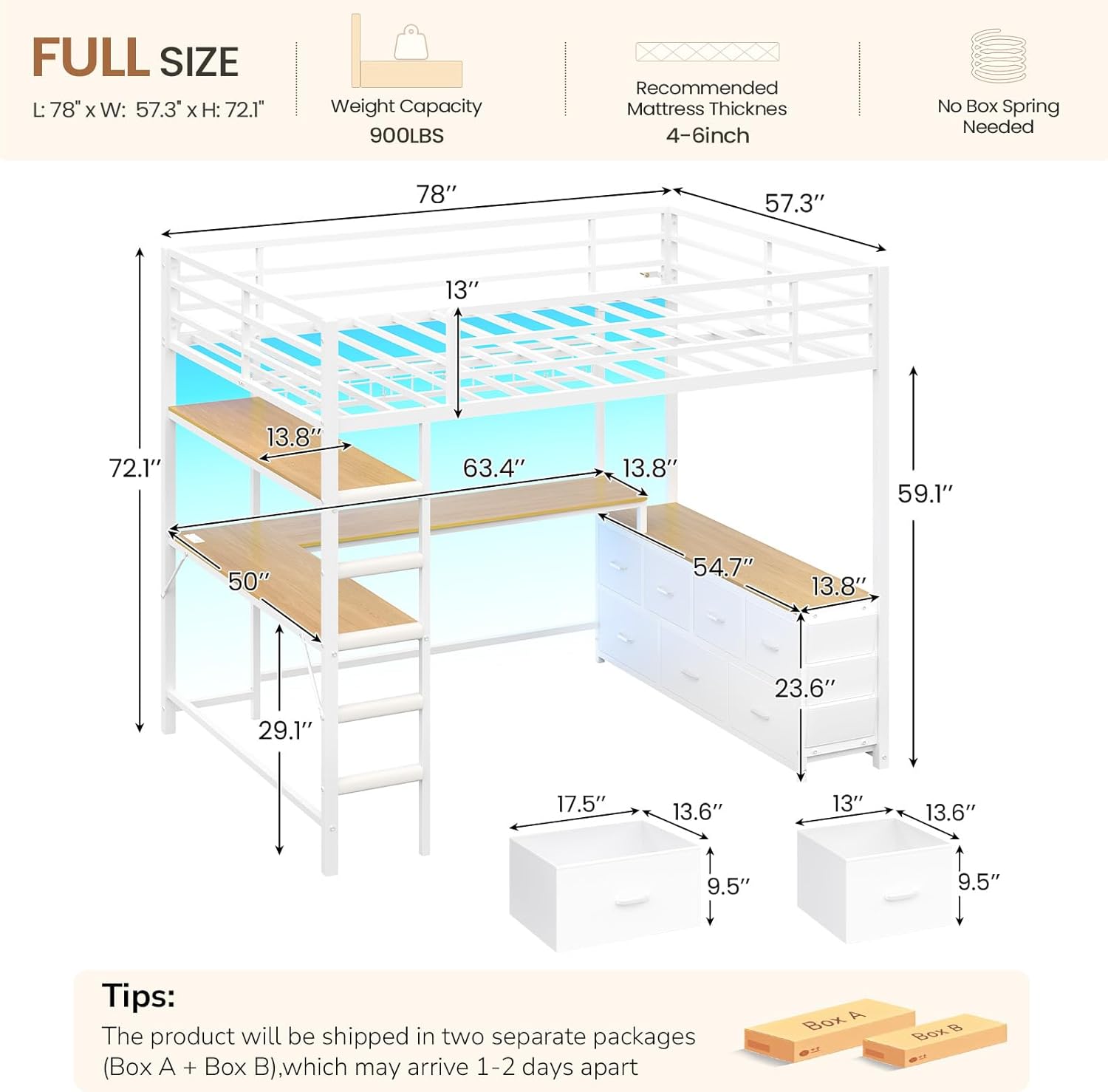
Image 1.1: DICTAC Full Size Loft Bed with U-Shaped Desk and Storage.
2. Safety Information
Please read and understand all safety warnings and instructions before assembling and using this product. Failure to follow these instructions can result in serious injury.
- Anchoring: This bed must be anchored to a wall to prevent tipping. Do not use the bed if it is not properly anchored.
- Ladder Safety: Exercise caution when using the ladder. Soft ladder pads are included to reduce foot discomfort during climbing.
- Guardrails: The upper bunk is equipped with 13-inch full-length guardrails. Ensure they are securely installed to prevent falls.
- Mattress Thickness: Recommended mattress thickness is 4-6 inches. Using a thicker mattress may reduce the effectiveness of the guardrails.
- Weight Capacity: Do not exceed the maximum weight recommendation of 900 pounds for the bed.
- Assembly: Ensure all bolts and fasteners are tightened securely during assembly. Periodically check and retighten as needed.
- Children: Supervise children using the loft bed.

Image 2.1: Safety features including 13-inch guardrails and anti-tipping device.
3. Setup and Assembly
This section provides general guidelines for assembling your DICTAC Loft Bed. Refer to the included installation manual for detailed, step-by-step instructions and diagrams.
3.1. Before You Begin
- Check Package Contents: The product ships in two separate packages (Box A + Box B), which may arrive 1-2 days apart. Verify all parts are present against the parts list in your manual.
- Tools: Ensure you have the necessary tools as specified in the installation manual. Easy assembly tools are included.
- Clear Area: Choose a clear, spacious area for assembly to avoid damage to the product or your surroundings.
- Assistance: Assembly may require two adults.
3.2. Assembly Steps (General)
- Unpack all components and lay them out.
- Follow the numbered steps in the provided installation manual carefully. Pay close attention to part orientation.
- Assemble the main bed frame structure.
- Install the U-shaped desk and storage shelves.
- Attach the ladder and ensure it is secure.
- Install the charging station and LED lights according to their specific instructions.
- Securely anchor the loft bed to the wall using the provided anti-tipping device.
- Place a mattress of recommended thickness (4-6 inches) on the upper bunk.

Image 3.1: Product dimensions for planning your space.

Image 3.2: Built-in charging station with AC outlets and USB ports.
4. Operating Instructions
4.1. U-Shaped Desk and Storage
The integrated U-shaped desk provides a spacious work surface. Utilize the 7 fabric drawers and 2 open shelves for organizing books, supplies, and personal items. The DIY metal mesh with 6 S-hooks can be used for hanging accessories.
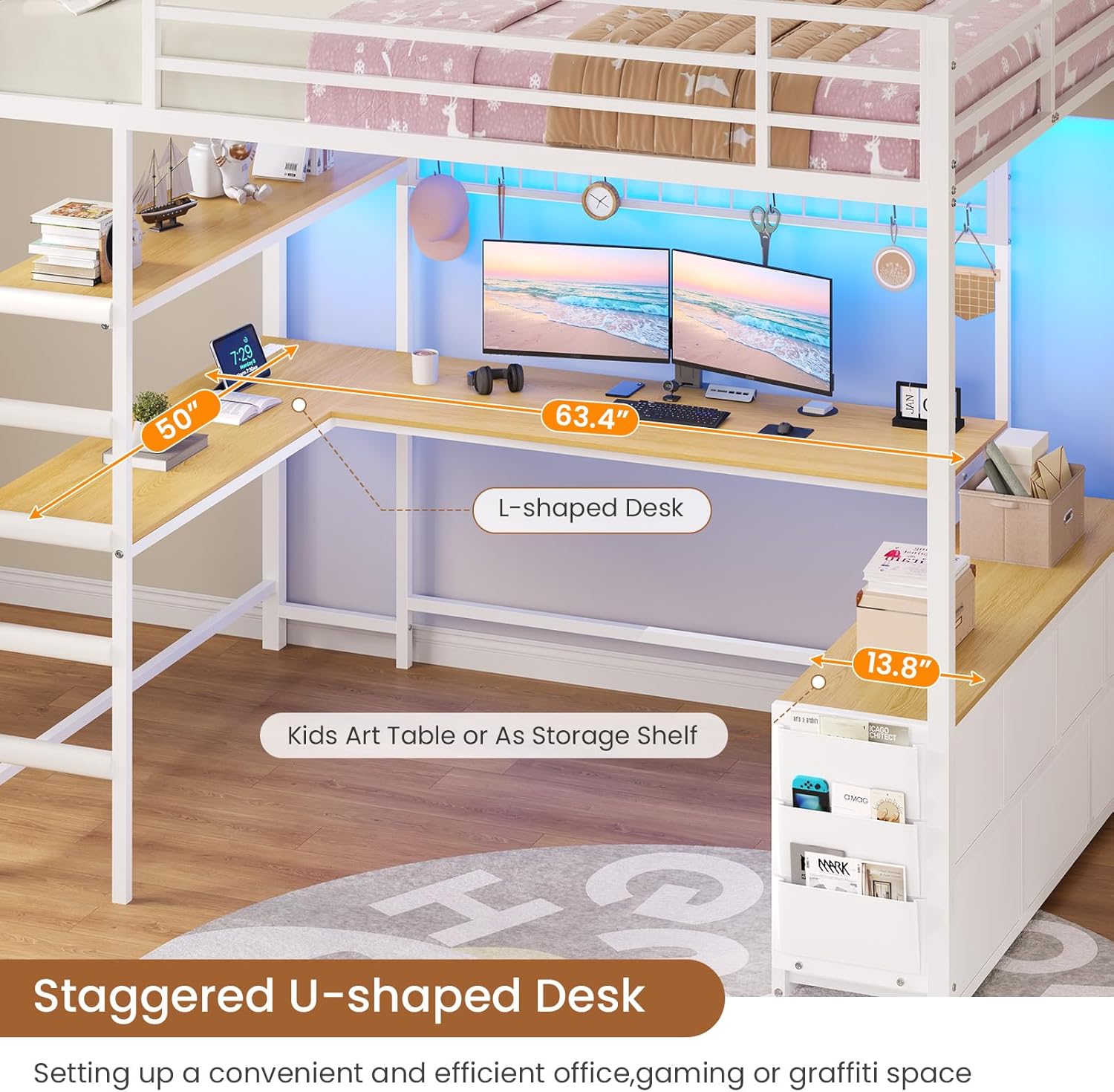
Image 4.1: U-shaped desk with ample space for monitors and accessories.

Image 4.2: Seven fabric drawers for organized storage.

Image 4.3: Two-tier open storage shelves and metal mesh for hanging items.
4.2. Charging Station
The built-in charging station includes 2 AC outlets (125V/12A) and 2 USB ports (5V/2.1A) with a 5.2-foot power cord. Use this to power and charge your electronic devices directly from your desk.
4.3. RGB LED Lights
The integrated RGB LED lights can be controlled via an app or a key controller.
- App Control: Download the specified app to access over 60,000 colors, adjust brightness, set dynamic modes, music-sync modes, or timer functions.
- Key Controller: Use the physical key controller to switch between 7 preset colors.

Image 4.4: RGB LED lights creating a vibrant atmosphere.
Video 4.1: Official product video demonstrating the White Full Size Loft Bed with U-shaped Desk and Dresser features.
5. Maintenance
Regular maintenance will help prolong the life and appearance of your loft bed.
- Cleaning: Wipe metal surfaces with a soft, damp cloth. For wooden surfaces (desk and shelves), use a mild wood cleaner if necessary, and dry immediately. Avoid harsh chemicals or abrasive cleaners.
- Fasteners: Periodically check all bolts, screws, and connections to ensure they are tight. Retighten if any looseness is detected.
- LED Lights: Ensure the LED light strips are securely attached. If they begin to peel, re-secure them with appropriate adhesive.
- Drawers: The fabric drawers can be spot cleaned with a mild detergent and air-dried.
6. Troubleshooting
If you encounter issues with your DICTAC Loft Bed, refer to the following common troubleshooting tips.
6.1. Stability Issues / Wobbling
- Check Wall Anchoring: Ensure the anti-tipping device is properly installed and securely anchored to a sturdy wall. This is crucial for stability.
- Tighten All Fasteners: Go through all assembly points and ensure every bolt and screw is fully tightened. Loose connections are a common cause of wobbling.
- Level Surface: Ensure the bed is placed on a flat, level surface. Uneven flooring can contribute to instability.
6.2. LED Lights Not Working
- Power Connection: Verify the LED light strip is correctly plugged into the power source and that the power outlet is functional.
- Controller/App: Ensure the remote control or app is properly paired and has working batteries (if applicable).
- Connections: Check all connections between the LED strip, controller, and power adapter for secure fit.
6.3. Charging Station Not Functioning
- Power Cord: Ensure the charging station's power cord is fully plugged into a functional wall outlet.
- Device Compatibility: Confirm that the device you are trying to charge is compatible with the charging station's output specifications (125V/12A AC, 5V/2.1A USB).
- Overload: Avoid overloading the charging station with too many high-power devices simultaneously.
6.4. Missing or Damaged Parts
- If you receive damaged parts or are missing components, contact DICTAC customer support immediately for assistance.
7. Specifications
| Feature | Detail |
|---|---|
| Model Number | LB-12 |
| Brand | DICTAC |
| Size | Full |
| Color | White |
| Frame Material | Metal |
| Material Type | Engineered Wood, Metal, Non-woven Fabrics |
| Item Dimensions (L x W x H) | 78"L x 57.3"W x 72.09"H |
| Item Weight | 136 pounds |
| Weight Capacity | 900 pounds |
| Recommended Mattress Thickness | 4-6 inches |
| Number of Drawers | 7 |
| Charging Station | 2 AC outlets (125V/12A), 2 USB ports (5V/2.1A), 5.2-foot power cord |
| LED Lights | RGB, App/Key Controller, 60,000+ colors, brightness, dynamic, music-sync, timer modes |
| Guardrail Height | 13 inches |
| Included Components | Charging Station & RGB LED Light kit, Drawers, Easy Assemble Tools, Installation Manual |
8. Warranty and Support
DICTAC provides customer support for its products.
- Return Policy: This product is eligible for a 30-day return/replacement policy. Please refer to your purchase platform for specific return instructions.
- Customer Support: For any issues or questions during assembly or use, please contact DICTAC customer support. You can often find contact information on the DICTAC Store page or through your purchase order details.
- Protection Plans: Extended protection plans may be available for purchase. Check your retailer for options.
