
1. Introduction
Thank you for choosing the ORICO TPP20 Series Power Strip Tower. This device is designed to provide a versatile and space-saving power solution for your home, office, or dorm. It features multiple AC outlets and USB charging ports to power and charge up to 16 devices simultaneously. Please read this manual carefully before use to ensure safe and optimal operation.
2. Safety Information
- Do not exceed the maximum load of 1625W (13A, 125V).
- This product is for indoor use only. Do not expose to moisture or use in wet environments.
- Do not disassemble or modify the device. Refer all servicing to qualified personnel.
- Keep out of reach of children.
- Ensure the power plug is fully inserted into a grounded wall outlet.
- Avoid placing the power strip near heat sources or in direct sunlight.
- If the power strip shows signs of damage, discontinue use immediately.
3. Package Contents
Verify that all items are present in the package:
- 1 x ORICO Power Strip Tower (TPP-12A2U2C)
- 1 x User Manual
- 1 x Screw (for optional mounting)
- 1 x Positioning Sticker (for optional mounting)
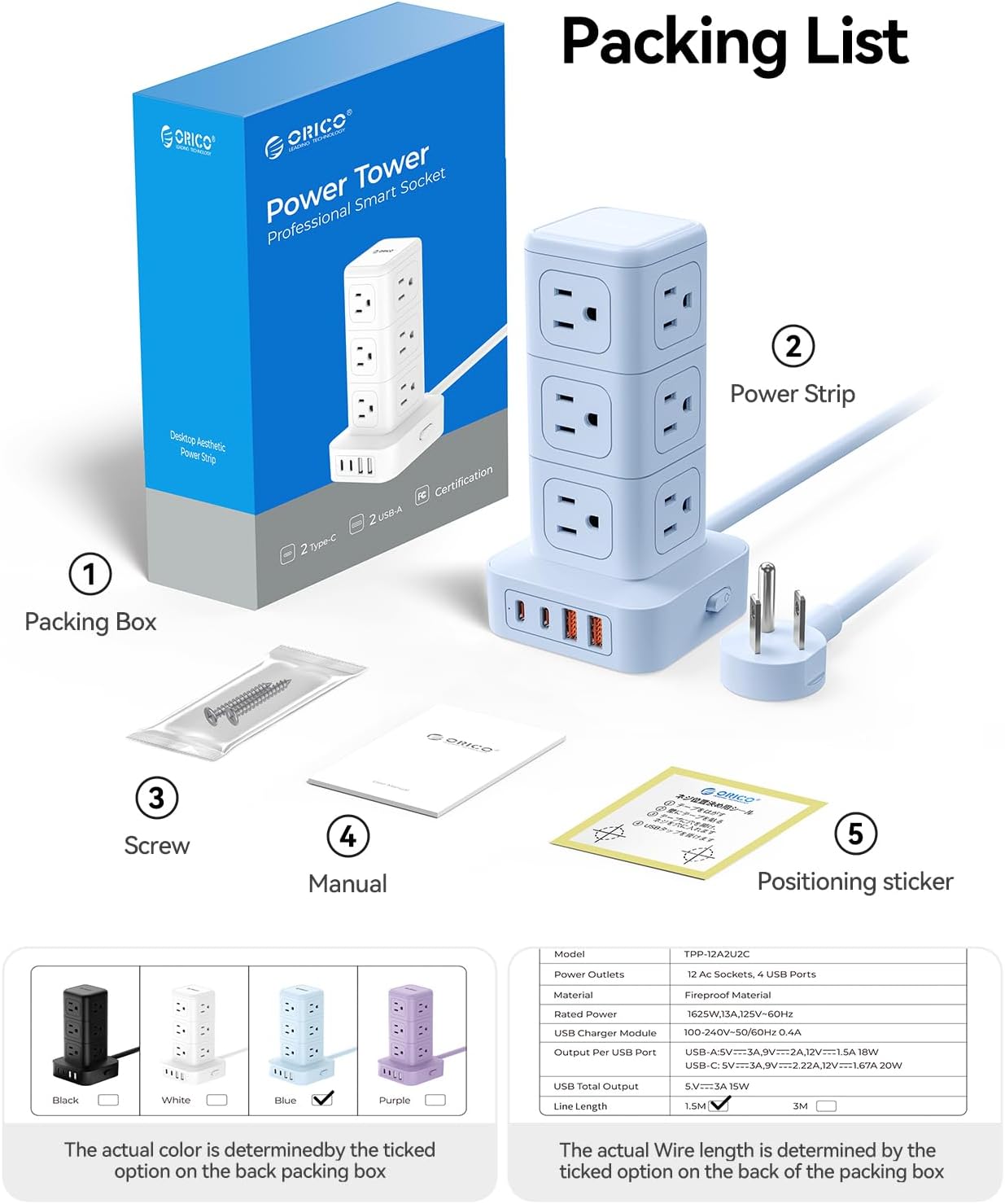
Image: Contents of the ORICO Power Strip Tower package, including the power strip, manual, screw, and positioning sticker.
4. Product Overview
The ORICO TPP20 Series Power Strip Tower is designed for efficiency and safety, offering a comprehensive charging solution.
Key Features:
- 12 AC Outlets: Provides ample power connections for various devices.
- 4 USB Ports: Includes 2 USB-A ports (up to 18W) and 2 USB-C ports (PD 20W each, total USB output 15W) for fast charging compatible devices.
- Space-Saving Vertical Design: Compact tower form factor (3.39 x 3.39 x 6.46 inches) minimizes desk clutter.
- Multiple Safety Protections: Built-in overload, short circuit, over-current, over-heat, and over-voltage protection with a 1080J surge protection rating.
- Master Power Switch: Convenient side-mounted switch for easy power control.
- Flat Plug Design: The 5-foot power cord features a 45-degree angled flat plug, allowing furniture to be placed closer to the wall.
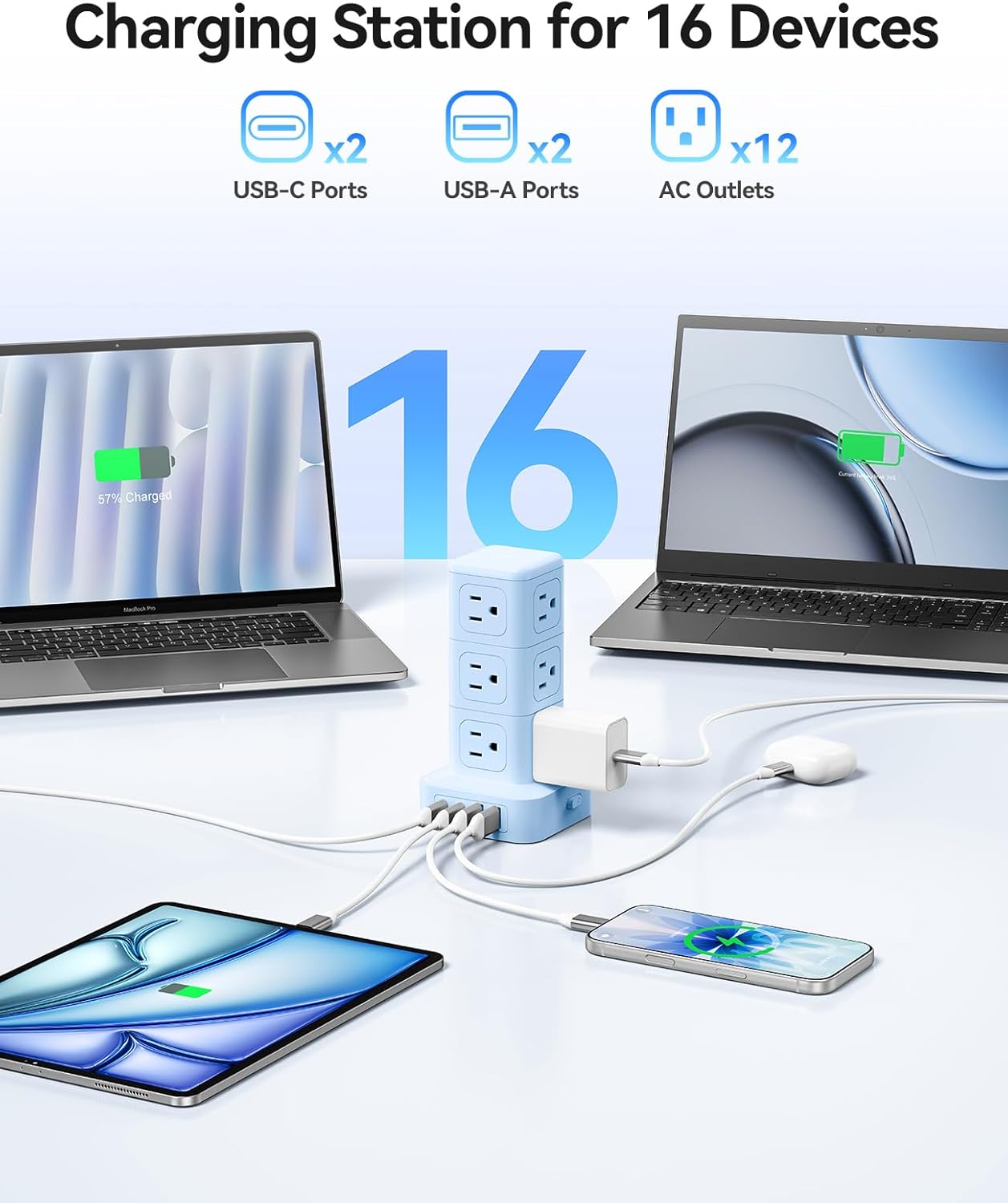
Image: The ORICO Power Strip Tower providing power to 16 devices simultaneously, including laptops, tablets, and smartphones, via its 12 AC outlets, 2 USB-C ports, and 2 USB-A ports.

Image: Illustration of the fast charging capabilities of the ORICO Power Strip Tower, showing 20W USB-C and 18W USB-A outputs, capable of charging an iPhone 15 in 2 hours compared to 3.5 hours with a standard 5W charger.
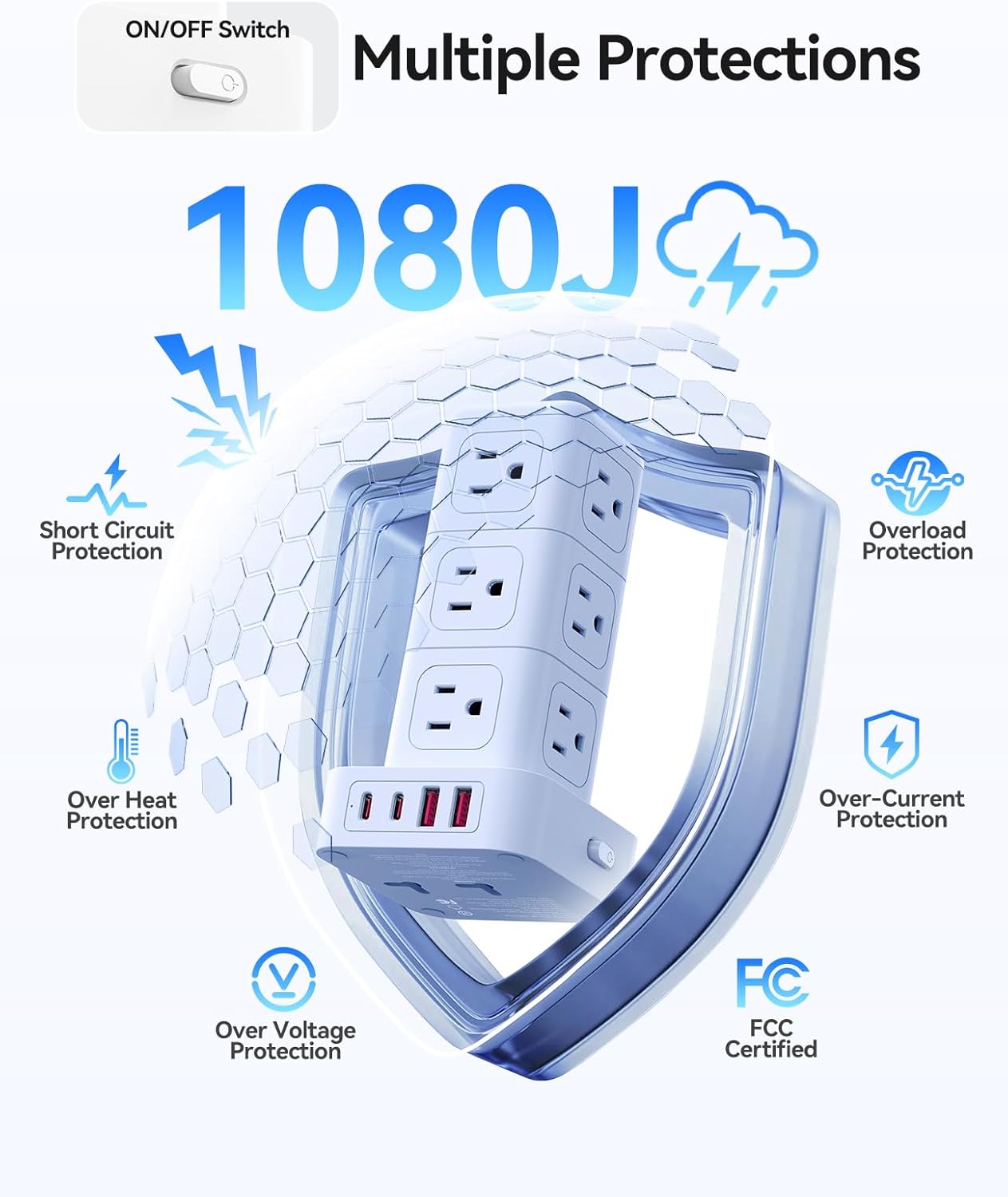
Image: Diagram highlighting the multiple safety protections of the ORICO Power Strip Tower, including 1080J surge protection, short circuit protection, overload protection, over-heat protection, over-current protection, and over-voltage protection, with FCC certification.
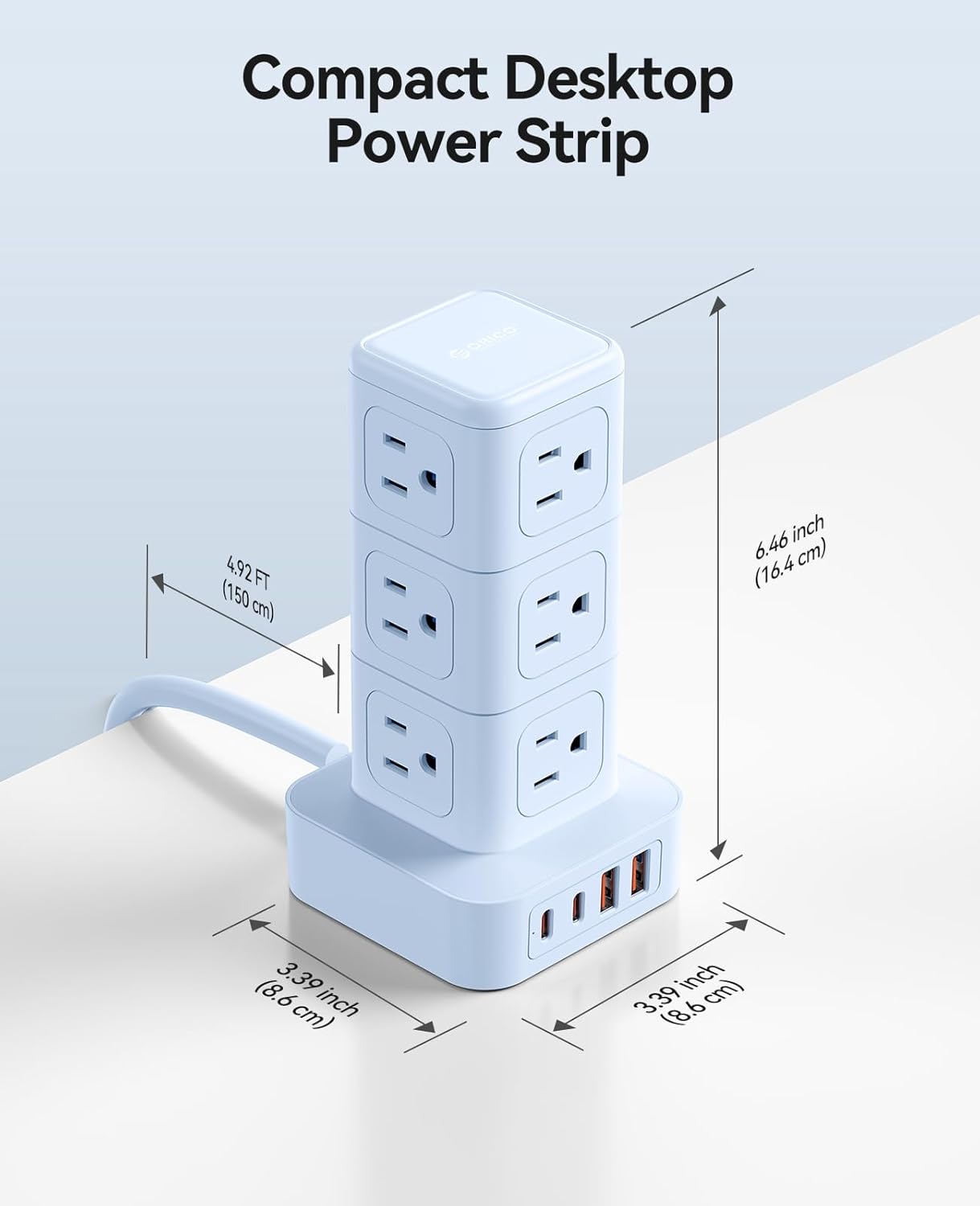
Image: A detailed view of the ORICO Power Strip Tower, illustrating its compact dimensions: 3.39 inches (8.6 cm) in length and width, and 6.46 inches (16.4 cm) in height, with a 4.92 ft (150 cm) cord.

Image: Comparison showing the ORICO Power Strip Tower's 0.5-inch flat plug design, which allows furniture to sit closer to the wall, versus a standard 3-inch plug that creates a gap.
5. Setup
- Placement: Place the power strip tower on a stable, flat surface, away from direct sunlight, heat sources, and moisture.
- Connect to Power: Plug the power strip's flat plug into a standard 3-pin (North American Type B) grounded wall outlet.
- Power On: Press the master power switch located on the side of the base to turn on the power strip. The indicator light will illuminate.
6. Operating Instructions
- Using AC Outlets: Insert your device's power plugs into any of the 12 AC outlets. Ensure the plugs are fully seated.
- Using USB-A Ports: Connect your USB-A compatible devices (e.g., older smartphones, smartwatches, power banks) to the two USB-A ports for charging. These ports provide up to 18W output.
- Using USB-C Ports: Connect your USB-C compatible devices (e.g., modern smartphones, tablets, laptops, cameras) to the two USB-C ports for fast charging. Each USB-C port provides up to 20W PD (Power Delivery) output. The total USB output is 15W.
- Power Control: Use the master power switch to turn the entire unit on or off, conserving energy when not in use.
Video: An official ORICO video demonstrating the features and usage of the TPP20 Series Power Strip Tower, showcasing its multiple outlets and USB ports in various settings.
7. Maintenance
- Cleaning: Disconnect the power strip from the wall outlet before cleaning. Use a dry, soft cloth to wipe the surface. Do not use liquid cleaners or aerosols.
- Storage: When not in use for extended periods, unplug the power strip and store it in a cool, dry place.
8. Troubleshooting
- No Power:
- Ensure the power strip is securely plugged into a working wall outlet.
- Check if the master power switch is in the 'ON' position.
- Verify that the wall outlet itself is functioning by plugging in another device.
- Devices Not Charging:
- Confirm that the power strip is powered on.
- Check if the device's charging cable is properly connected to both the power strip and the device.
- Ensure the total power consumption of connected devices does not exceed the maximum load (1625W). The overload protection may have tripped, requiring you to reset the power strip by turning it off and on.
- For USB charging, ensure your device is compatible with the USB-A or USB-C port specifications.
- Overload Protection Tripped: If the power strip automatically shuts off, it indicates an overload. Unplug some devices, then turn the power strip off and on again using the master switch to reset it.
9. Specifications
| Feature | Specification |
|---|---|
| Brand | ORICO |
| Model Number | TPP-12A2U2C |
| Total Power Outlets | 16 (12 AC, 4 USB) |
| AC Outlets | 12 |
| USB Ports | 4 (2 USB-A, 2 USB-C) |
| USB-A Output | Up to 18W |
| USB-C Output | PD 20W (single port max), Total USB output 15W |
| Voltage | 125 Volts |
| Maximum Current | 13 Amps |
| Surge Protection Rating | 1625 Watts |
| Power Plug Type | Type B - 3 pin (North American) |
| Cord Length | 5FT (1.5m) |
| Dimensions (L x W x H) | 3.39"L x 3.39"W x 6.46"H |
| Enclosure Material | Acrylonitrile Butadiene Styrene, Polyvinyl Chloride |
| Compatible Devices | Fan, Laptop, Smartphone, Tablet |
10. Warranty Information
This ORICO product comes with an 18-month warranty from the date of purchase. The warranty covers manufacturing defects and malfunctions under normal use. It does not cover damage caused by misuse, accidents, unauthorized modifications, or natural disasters. Please retain your proof of purchase for warranty claims.
11. Support
For technical support, warranty claims, or further assistance, please contact ORICO customer service through the official ORICO website or your retailer's support channels. Please have your model number (TPP-12A2U2C) and proof of purchase ready when contacting support.
