
1. Introduction
Thank you for choosing the IKIFLY Metal Twin/Twin XL Headboard. This headboard is designed to enhance your bedroom with practical storage, customizable LED lighting, and convenient charging capabilities. Please read this manual thoroughly before assembly and use to ensure proper installation and operation.
2. Safety Information
- Keep all small parts and packaging materials away from children and pets to prevent choking hazards.
- Ensure all connections are secure before use. Loose connections can lead to instability or electrical issues.
- Do not overload the storage shelf. Refer to specifications for weight limits.
- Avoid exposing the LED lights or charging station to water or excessive moisture.
- Only use the provided power adapter for the LED lights and charging station.
- If any parts are missing or damaged, do not attempt to assemble the headboard. Contact customer support immediately.
3. Package Contents
Verify that all components are present before beginning assembly:
- LED Storage Headboard components
- Bed Frame Brackets Adapter (2 pieces)
- Hardware pack (bolts, nuts, washers, Allen wrench)
- Instruction Manual (this document)
4. Setup and Assembly Instructions
Follow these steps to assemble your IKIFLY headboard. All necessary tools are included.
4.1 Headboard Assembly
Assemble the headboard frame according to the detailed diagrams in the included instruction manual. Ensure all bolts are tightened securely.

Image: A hand tightening a bolt during headboard assembly. This illustrates the ease of assembly with provided tools.
4.2 Attaching to Bed Frame
The headboard is designed for universal compatibility with most standard bed frames. Use the provided bed frame brackets adapter to securely attach the headboard to your existing bed frame's leg holes.
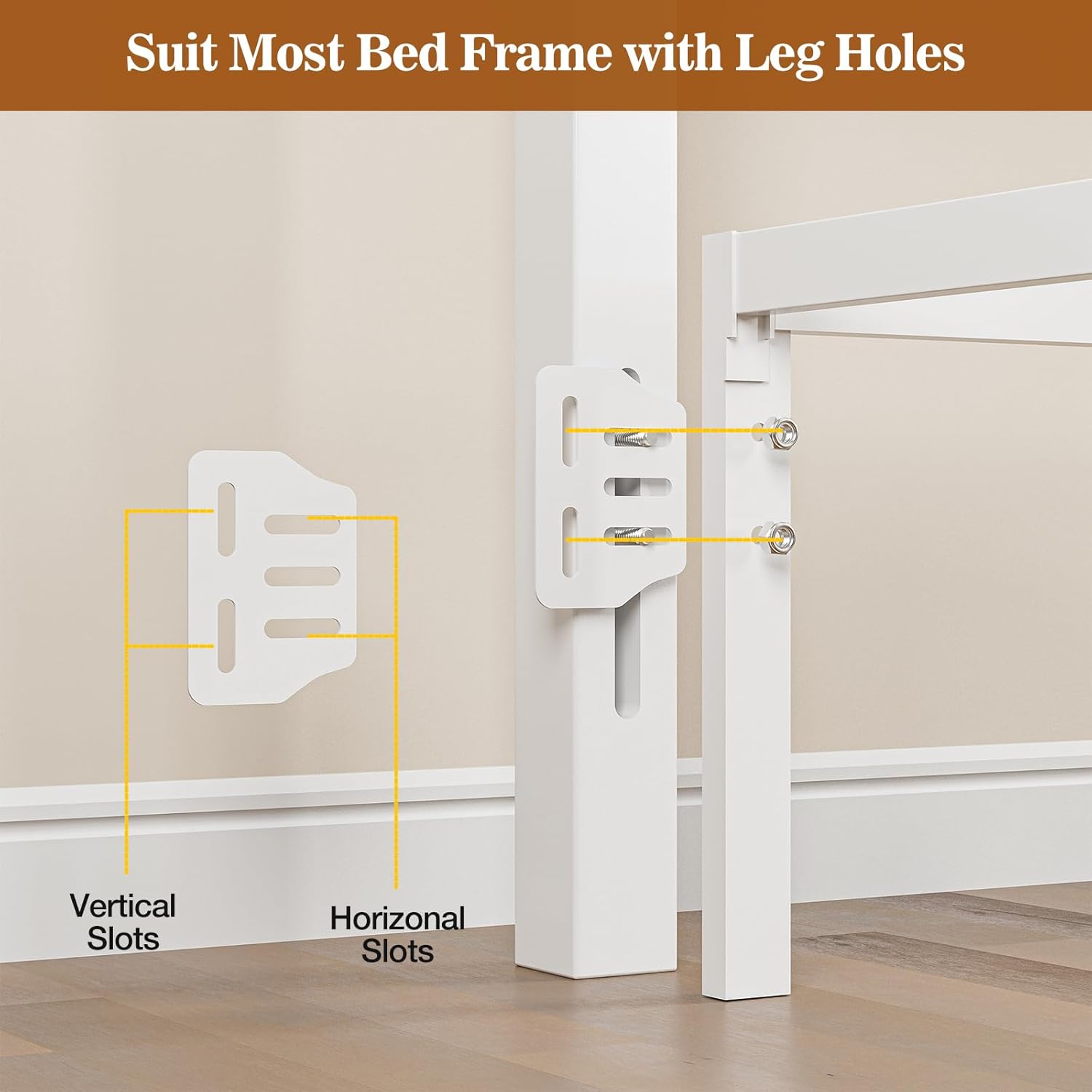
Image: Diagram illustrating the bed frame bracket adapter with vertical and horizontal slots for attachment.

Image: Close-up view of the bed frame adapter bracket, showing its connection points.
Ensure the headboard is stable and securely fastened to prevent movement.
5. Operating Instructions
5.1 LED Lights Operation
The integrated LED lights offer over 60,000 DIY color options. Control the lights using the provided remote control or a compatible smartphone application. Features include:
- Color Selection: Choose from a wide spectrum of colors to match your mood or decor.
- Music Sync Mode: Lights can synchronize with music or voice recordings for a dynamic visual experience.
- Timing Mode: Set schedules for the lights to turn on or off automatically.

Image: The headboard's LED lights in various colors, demonstrating control options via remote and app.

Image: The headboard with pink LED lights, illustrating its use with devices on the storage shelf.
5.2 Charging Station Usage
The headboard includes a built-in charging station with 2 AC outlets (125V/12A), 1 USB port (5V/2A), and 1 Type-C port (5V/3A). This allows convenient charging for your phone, headphones, power bank, gaming gear, and other devices directly from your headboard.
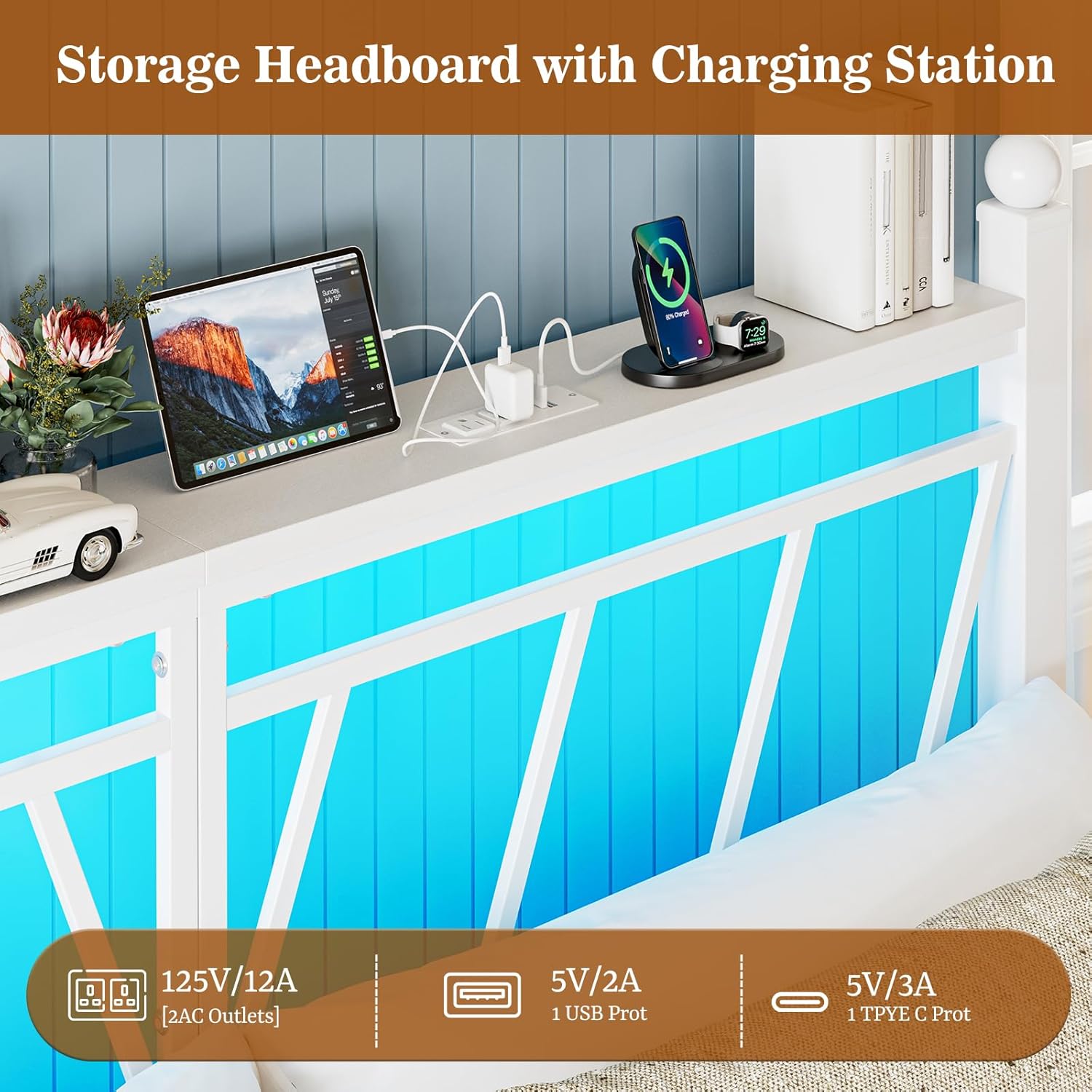
Image: Close-up of the charging station on the headboard, showing various ports in use.
Video: An overview of the IKIFLY Metal Storage Headboard with LED Lights, demonstrating its features and functionality in a bedroom setting.
6. Maintenance
6.1 Cleaning
- Wipe the metal and MDF surfaces with a soft, damp cloth.
- Avoid using harsh chemicals or abrasive cleaners, as they may damage the finish.
- Ensure the charging ports are free from dust and debris. Use a dry, soft brush if necessary.
6.2 General Care
- Periodically check all bolts and connections to ensure they remain tight.
- Do not drag the headboard when moving; lift it to prevent damage to the frame or floor.
7. Troubleshooting
7.1 LED Lights Not Working
- Check if the power adapter is securely plugged into both the headboard and a working wall outlet.
- Ensure the remote control has fresh batteries and is pointed directly at the receiver.
- If using the app, ensure your device is properly paired and within range.
7.2 Charging Ports Not Functioning
- Verify that the headboard's main power is connected and turned on.
- Test with different devices and cables to rule out device-specific issues.
- Ensure the charging ports are clean and free of obstructions.
7.3 Headboard Instability
- Re-check all assembly bolts and tighten any that are loose.
- Ensure the bed frame brackets adapter is correctly installed and secured to your bed frame.
8. Specifications
| Feature | Detail |
|---|---|
| Size | Twin/Twin XL |
| Brand | IKIFLY |
| Style | Modern |
| Special Features | Convenient Charging Station, Easy To Assemble, Flexible Compatibility, Modern LED Lights Design, Spacious Storage Headboard |
| Mounting Type | Bed Frame Mount |
| Product Dimensions | 37.6"W x 43.3"H |
| Material | Metal + MDF + LED Lights + Charging Station |
| Item Weight | 15.2 pounds |
| Color | White |

Image: Product dimensions for the Twin size headboard.

Image: Headboard with a summary of product specifications.
9. Warranty and Support
For warranty information, technical support, or to report missing/damaged parts, please contact IKIFLY customer service through the retailer where the product was purchased or visit the official IKIFLY website. Please have your purchase receipt and product model information available.