
AOPUTTRIVER AP-9000F
AOPUTTRIVER AP-9000F Hot Wire Anemometer User Manual
Model: AP-9000F
1. Introduction and Overview
The AOPUTTRIVER AP-9000F is a professional handheld hot wire anemometer designed for precise measurement of air velocity, airflow volume (CFM/CMM), and air temperature. This device is equipped with a retractable sensor probe, making it suitable for various applications, including HVAC system diagnostics, environmental monitoring, and industrial air flow analysis. This manual provides essential information for the safe and effective operation of your AP-9000F anemometer.
2. What's in the Box
Upon unpacking, please verify that all items listed below are present and in good condition:
- AP-9000F Hot Wire Anemometer Unit
- User Manual
- Type-C Data Cable

3. Product Features
The AP-9000F anemometer offers a range of features designed for precision and convenience:
- 3-in-1 Measurement: Accurately measures wind speed (m/s, km/h, ft/min, knots, mph), airflow (CFM/CMM), and wind temperature (°C/°F).
- Retractable Sensor Probe: Features a flexible, extendable probe tip for convenient measurements in confined or hard-to-reach spaces, such as air conditioning vents. Probe dimensions: 298.5 × 40.84 × 23.7 mm.
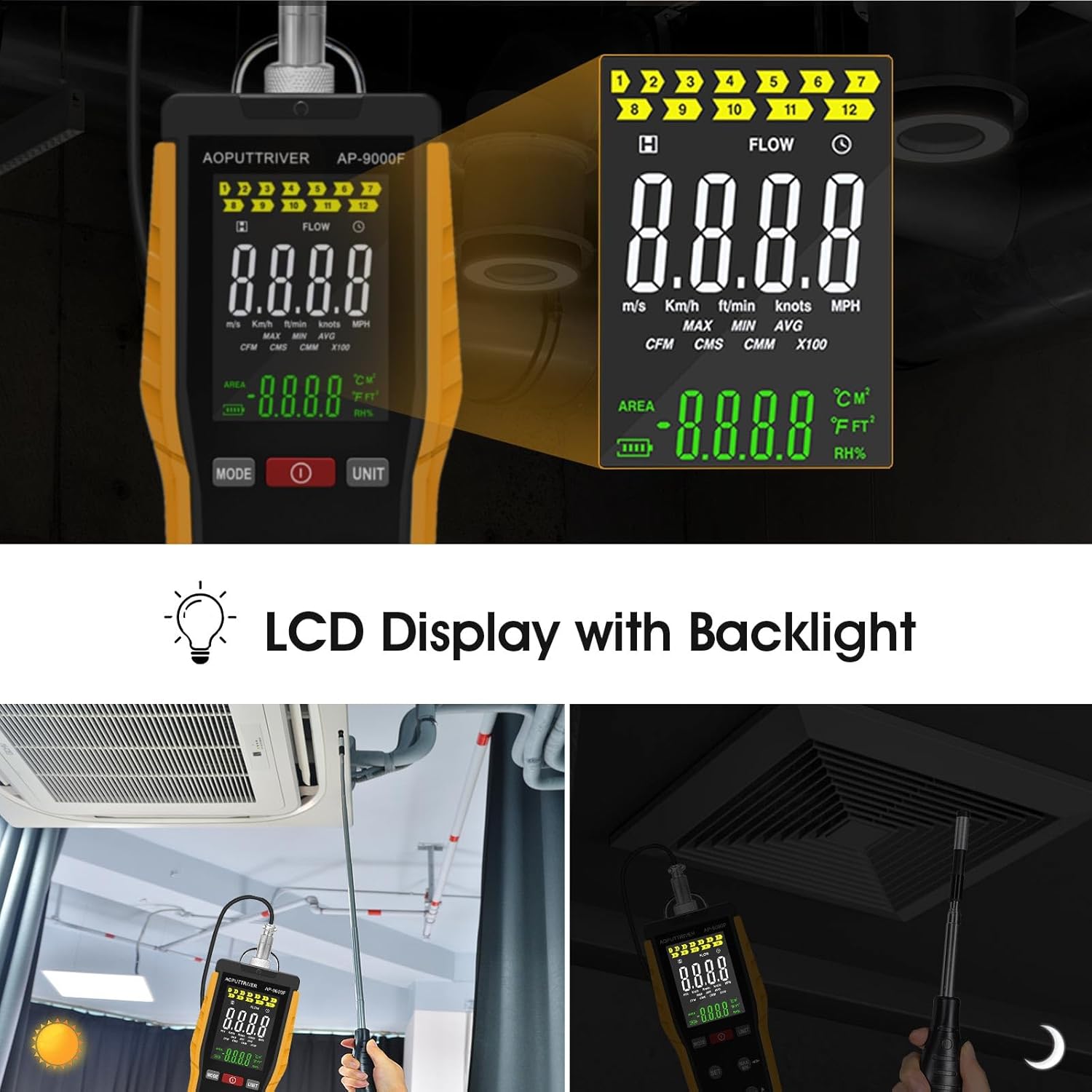
- LCD Display: A clear, backlit LCD presents wind speed (Max, Min, Real-time), airflow, temperature, and humidity data. Includes anti-interference buttons and a low battery indicator.
- Type-C Interface: Equipped with a Type-C charging port and powered by a 1000mAh lithium-ion battery. Supports an optional auto-shutdown function.
- Wide Application: Suitable for environmental measurements, air transportation, and air conditioning monitoring systems.


4. Setup
4.1 Charging the Battery
The AP-9000F is powered by a built-in 1000mAh lithium-ion battery. Before first use, or when the low battery indicator appears on the LCD, charge the device using the provided Type-C data cable.
- Connect the Type-C cable to the charging port on the anemometer and the other end to a standard USB power adapter (not included).
- A full charge typically takes 2 to 3 hours.
- Note: The device cannot be turned on or operated while it is charging.
4.2 Extending the Sensor Probe
The hot wire sensor is located at the tip of the retractable probe. Carefully extend the probe to the desired length for measurement. The probe can be rotated 360 degrees for optimal positioning.
- Gently pull the probe from the main unit to extend it.
- Adjust the angle of the probe tip as needed.
- After use, retract the probe back into the unit for protection.
5. Operating Instructions
5.1 Device Layout and Buttons

- Power Button (Red Circle): Press to turn the device ON or OFF.
- MODE Button: Switches between different measurement modes (e.g., wind speed, airflow).
- UNIT Button: Changes the unit of measurement for wind speed (m/s, km/h, ft/min, knots, mph) or airflow (CFM, CMM).
- SET Button: Used to set the air volume area for accurate CFM/CMM calculations.
- MAX/MIN Button: Toggles between maximum, minimum, and real-time values on the display.
- HOLD Button: Freezes the current reading on the display. Press again to release.
- °C/°F Button: Switches the temperature unit between Celsius and Fahrenheit.
5.2 Basic Measurement Procedure
- Power On: Press the Power Button to turn on the anemometer. The LCD will illuminate.
- Extend Probe: Carefully extend the sensor probe and position it in the airflow you wish to measure. Ensure the sensor tip is fully exposed to the air stream.
- Select Mode: Press the MODE Button to select between wind speed, airflow, or temperature measurement.
- Select Unit: Press the UNIT Button to choose your preferred unit (e.g., m/s, CFM, °C).
- Set Area (for Airflow): If measuring airflow (CFM/CMM), press the SET Button to input the cross-sectional area of the duct or vent. Refer to the specifications for area input range.
- Read Measurement: The current readings will be displayed on the LCD.
- Data Hold: Press the HOLD Button to freeze the current reading. Press again to resume live measurement.
- Max/Min/Avg: Use the MAX/MIN Button to view the maximum, minimum, or average readings recorded during the measurement session.


6. Maintenance
6.1 Cleaning the Device
- Wipe the main unit with a soft, dry cloth. Do not use abrasive cleaners or solvents.
- For the sensor probe, gently clean any dust or debris. Avoid touching the delicate hot wire sensor directly.
6.2 Battery Care and Storage
- Recharge the battery regularly, even if the device is not in frequent use, to maintain battery health.
- Store the anemometer in a cool, dry place, away from direct sunlight and extreme temperatures.
- Ensure the sensor probe is fully retracted and protected during storage.
7. Troubleshooting
If you encounter issues with your AP-9000F, please refer to the following common problems and solutions:
| Problem | Possible Cause | Solution |
|---|---|---|
| Device does not power on | Low battery; Device is charging | Charge the battery fully; Disconnect from charger before powering on. |
| Inaccurate readings | Sensor obstructed or dirty; Incorrect unit/mode selected; Probe not properly positioned | Clean the sensor gently; Verify selected mode and unit; Ensure sensor is fully in the airflow. |
| Display is blank or frozen | Battery low; HOLD function active; Device malfunction | Recharge battery; Press HOLD button to release; If problem persists, contact support. |
| Cannot change units/modes | Buttons unresponsive; Device in a locked state | Ensure buttons are pressed firmly; Power cycle the device (turn off and on). |
8. Specifications
Detailed technical specifications for the AOPUTTRIVER AP-9000F Hot Wire Anemometer:
| Parameter | Value |
|---|---|
| Wind Speed Measurement Range | 0.1 – 30 m/s |
| Air Temperature Measurement Range | 0 – 45°C (32 – 113°F) |
| Airflow Measurement Range (CFM) | 0 – 999,900 ft³/min |
| Airflow Measurement Range (CMM) | 0 – 999,900 m³/min |
| Probe Dimensions | 298.5 × 40.84 × 23.7 mm |
| Battery Type | 1000mAh Lithium-ion |
| Charging Port | Type-C |
| Display | LCD with Backlight |
| Weight | 0.12 Pounds (approx. 54g) |

9. Warranty and Support
9.1 Warranty Information
AOPUTTRIVER products are manufactured to high-quality standards. This product is covered by a limited warranty against defects in materials and workmanship. Please refer to the warranty card included with your product for specific terms and conditions, or visit the official AOPUTTRIVER website for more details.
9.2 Customer Support
For technical assistance, troubleshooting, or inquiries regarding your AP-9000F Hot Wire Anemometer, please contact AOPUTTRIVER customer support. Contact information can typically be found on the product packaging, the official AOPUTTRIVER website, or through your purchase platform.
When contacting support, please have your product model (AP-9000F) and a detailed description of the issue ready.
Ask a question about this manual
Ask about setup, troubleshooting, compatibility, parts, safety, or missing instructions. Manuals+ will review the question and use this page’s manual context to help answer it.