1. Introduction
This manual provides detailed instructions for the safe and effective operation of your MESTEK IR02C Infrared Thermometer and MESTEK CGD02A Combustible Gas Leak Detector. Please read this manual thoroughly before using the devices and retain it for future reference.

Figure 1: MESTEK IR02C Infrared Thermometer (right) and CGD02A Combustible Gas Leak Detector (left).
2. Safety Information
Always observe the following safety precautions to prevent injury or damage to the devices.
2.1 General Safety
- Do not attempt to disassemble or modify the devices.
- Keep the devices away from water, dust, and extreme temperatures.
- Use only the specified battery type (AAA batteries for the gas detector).
- If the device is damaged, do not operate it. Contact customer support.
2.2 MESTEK CGD02A Combustible Gas Leak Detector Safety
- This device detects combustible gases. It is not designed to detect toxic gases like carbon monoxide (CO) unless specifically listed as a combustible gas.
- Do not rely solely on this device for personal safety in hazardous gas environments. Always follow local safety regulations and use appropriate personal protective equipment.
- Ensure proper ventilation when investigating gas leaks.
2.3 MESTEK IR02C Infrared Thermometer Safety
- Laser Safety: Do not stare directly into the laser beam or point it at people or animals. The laser is used for targeting only and does not measure temperature.
- Avoid using the thermometer near strong electromagnetic fields.
3. Product Overview and Components
3.1 MESTEK CGD02A Combustible Gas Leak Detector
The CGD02A is a portable device designed to detect various combustible gases, providing audible and visual alarms for potential leaks. It features a flexible probe for reaching confined spaces and a 2.6-inch VA reverse color LCD display.
Key Features:
- Detection of multiple combustible gases (e.g., methane, natural gas, propane, ethanol, benzene, hydrogen).
- Flexible 11-inch gooseneck probe for extended reach.
- High sensitivity (±500PPM) and quick response time (2 seconds).
- Audible and visual alarms with PPM and %LEL display.
- 2.6-inch HD VA reverse color screen with backlight.
- Automatic calibration upon startup.
- Automatic power-off function.
Components:
- CGD02A Gas Leak Detector unit
- Flexible probe (integrated)
- AAA Batteries (3pcs)
- User Manual

Figure 2: MESTEK CGD02A Gas Leak Detector with its 2.6-inch HD VA reverse color screen displaying gas concentration and temperature.

Figure 3: The 280mm (approximately 11-inch) flexible gooseneck probe of the CGD02A Gas Leak Detector, designed for reaching difficult areas.
3.2 MESTEK IR02C Infrared Thermometer
The IR02C is a versatile infrared thermometer capable of non-contact temperature measurement and contact measurement using a K-type thermocouple probe. It features a color LCD display and adjustable emissivity.
Key Features:
- Non-contact infrared temperature measurement range: -58°F to 1472°F (-50°C to 800°C).
- K-type thermocouple contact measurement range: 14°F to 932°F (-10°C to 500°C).
- Adjustable emissivity (0.10 to 1.00).
- 13 laser pointers for precise targeting.
- Color LCD display with backlight.
- High/Low temperature set alarm function.
- Humidity and ambient temperature display.
- °C/°F conversion.
Components:
- IR02C Infrared Thermometer unit
- K-Type Thermocouple Probe
- Carrying Pouch
- AAA Batteries (2pcs, typically)
- User Manual

Figure 4: MESTEK IR02C Infrared Thermometer shown with its K-type thermocouple probe and protective carrying pouch.
4. Setup
4.1 Battery Installation
Both devices require AAA batteries for operation. Locate the battery compartment on the back of each device. Open the compartment cover, insert the batteries according to the polarity indicators (+/-), and close the cover securely.
- CGD02A Gas Leak Detector: Requires 3 x AAA batteries.
- IR02C Infrared Thermometer: Typically requires 2 x AAA batteries.
5. Operating Instructions
5.1 MESTEK CGD02A Combustible Gas Leak Detector
5.1.1 Power On/Off and Calibration
- Press and hold the Power button to turn the device on.
- The device will perform an automatic calibration for approximately 30 seconds. Ensure the probe is in a clean air environment during this process.
- Once calibration is complete, the device is ready for use.
- To turn off, press and hold the Power button again.
5.1.2 Gas Detection Procedure
- With the device powered on and calibrated, slowly move the flexible probe towards the suspected area of a gas leak.
- Observe the LCD display for gas concentration readings (PPM or %LEL).
- If a gas leak is detected, the device will emit an audible alarm and the screen will display visual warnings (e.g., 'HIGH' for concentrations above 10000 PPM or 20% LEL).
- The flexible probe allows detection in hard-to-reach areas such as pipes, joints, and appliances.

Figure 5: The CGD02A Gas Leak Detector in use, illustrating its capability to detect a wide variety of combustible gases in real-time.

Figure 6: Examples of applications for the CGD02A Gas Leak Detector, including industrial, domestic, household, and pipeline maintenance scenarios.
5.1.3 Unit Switching and Automatic Power Off (APO)
- Press the °C/°F button to switch between Celsius and Fahrenheit for ambient temperature display.
- Press the PPM/%LEL button to toggle between Parts Per Million (PPM) and Percentage of Lower Explosive Limit (%LEL) for gas concentration readings.
- The device features a 10-minute automatic shutdown function to conserve battery life. This can typically be disabled by pressing the APO button, though specific instructions may vary.
5.2 MESTEK IR02C Infrared Thermometer
5.2.1 Power On/Off and Non-Contact Measurement
- Press the Trigger to turn on the device.
- Point the thermometer at the target object. The 13 laser pointers will indicate the measurement area.
- Press and hold the Trigger to take a continuous reading. Release to hold the reading on the display.
- The device will automatically power off after a period of inactivity to save battery.
5.2.2 K-Type Thermocouple Measurement
- Insert the K-type thermocouple probe into the designated port on the side of the thermometer.
- Place the tip of the K-type probe in direct contact with the object whose temperature you wish to measure.
- The display will show the contact temperature reading.
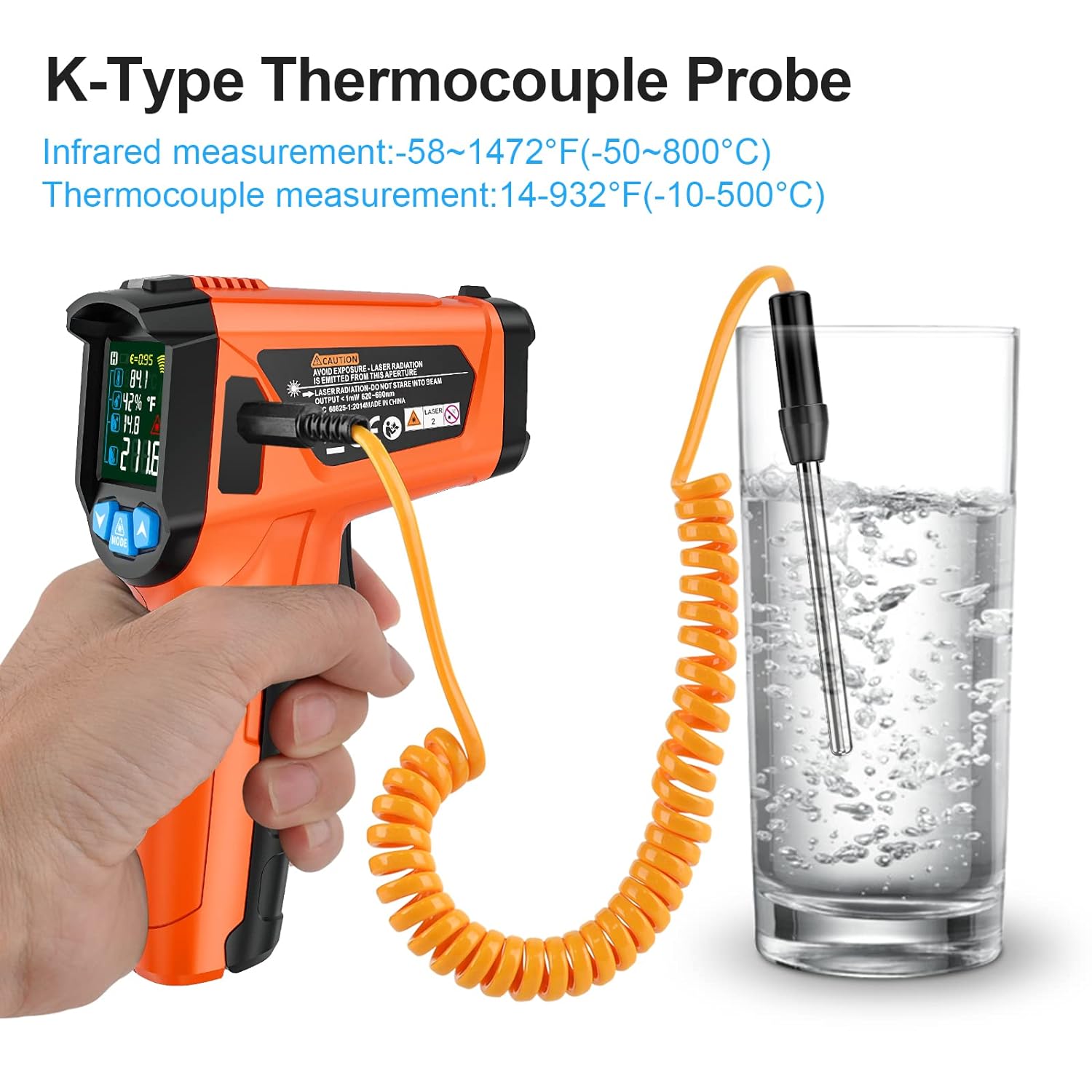
Figure 7: The MESTEK IR02C Infrared Thermometer using its K-type thermocouple probe for contact temperature measurement in a liquid.
5.2.3 Mode Selection and Settings
Use the MODE button to cycle through various settings and functions:
- Emissivity Adjustment: Adjust the emissivity (ε) value (0.10 to 1.00) to match the surface being measured for more accurate non-contact readings. Use the Up/Down arrows to change the value.
- High/Low Temperature Alarms: Set upper and lower temperature thresholds. If the measured temperature exceeds or falls below these limits, an alarm will sound.
- °C/°F Conversion: Switch between Celsius and Fahrenheit temperature units.
- Humidity Display: The device displays ambient humidity.
- Ambient Temperature: The device displays the surrounding air temperature.

Figure 8: The MESTEK IR02C Infrared Thermometer demonstrating its wide temperature measurement range, from lower limits suitable for freezers to upper limits for cooking applications.
6. Maintenance
6.1 Cleaning
- Wipe the device casing with a soft, damp cloth. Do not use abrasive cleaners or solvents.
- For the IR02C, gently clean the lens with a soft cloth or cotton swab.
- For the CGD02A, ensure the sensor head on the flexible probe is free from obstructions.
6.2 Storage
- Store the devices in a cool, dry place, away from direct sunlight and extreme temperatures.
- If storing for an extended period, remove the batteries to prevent leakage.
- Use the provided carrying pouch for the IR02C to protect it during storage.
6.3 Battery Replacement
When the low battery indicator appears on the display, replace the batteries promptly. Refer to Section 4.1 for battery installation instructions.
7. Troubleshooting
| Problem | Possible Cause | Solution |
|---|---|---|
| Device does not power on | Dead or incorrectly installed batteries | Replace batteries or check polarity. |
| CGD02A: Inaccurate gas readings | Sensor not calibrated in clean air; sensor obstructed | Ensure calibration is done in fresh air. Clean sensor head. |
| IR02C: Inaccurate temperature readings (non-contact) | Incorrect emissivity setting; dirty lens | Adjust emissivity for the target surface. Clean the lens. |
| IR02C: Laser not working | Laser function disabled or fault | Check device settings. If problem persists, contact support. |
| Audible alarm not sounding | Alarm volume low/off; device fault | Check device settings for alarm volume. Contact support if necessary. |
8. Specifications
8.1 MESTEK CGD02A Combustible Gas Leak Detector
| Parameter | Value |
|---|---|
| Detection Range | 1-50000 PPM or 1%-100% LEL |
| Sensitivity | ±500 PPM |
| Response Speed | 2 seconds |
| Calibration | Automatic within 30 seconds of booting |
| Probe Length | Approximately 11 inches (280mm) flexible gooseneck |
| Display | 2.6-inch HD VA Reverse Color LCD |
| Power Source | 3 x AAA batteries |
| Automatic Shutdown | 10 minutes (configurable) |
8.2 MESTEK IR02C Infrared Thermometer
| Parameter | Value |
|---|---|
| Infrared Temperature Range | -58°F to 1472°F (-50°C to 800°C) |
| K-Type Temperature Range | 14°F to 932°F (-10°C to 500°C) |
| Response Time | < 0.5 seconds |
| Distance Spot Ratio (D:S) | 12:1 |
| Emissivity | Adjustable 0.10 to 1.00 |
| Laser Pointers | 13 points |
| Display | Color LCD with backlight |
| Power Source | Typically 2 x AAA batteries |
9. Warranty and Support
MESTEK provides a 3-year after-sale service and technical support for this product. For any inquiries, technical assistance, or warranty claims, please contact MESTEK customer service. Our customer service team is available 24/7 to assist you.
Please refer to the product packaging or MESTEK official website for the most current contact information.


