
1. Product Overview
The Huuger Nightstand with Charging Station is designed to provide convenient bedside storage and power access. It features a fluted drawer, open storage, and integrated charging ports.

Image: The Huuger Nightstand positioned next to a bed, showcasing its design and functionality in a typical bedroom environment.
Key Features:
- Integrated Charging Station: 2 AC outlets, 1 USB port, 1 Type-C port.
- Storage: One pull-out drawer and an open shelf.
- Design: Fluted drawer front, solid wood legs, walnut finish.
- Dimensions: 11.8"D x 15.7"W x 23.6"H.
2. Package Contents
Before assembly, please ensure all components are present and undamaged. Refer to the included assembly guide for a detailed list of parts.
- Nightstand Panels (various sizes)
- Solid Wood Legs
- Drawer Components
- Charging Station Unit
- Hardware Pack (screws, dowels, cam locks, etc.)
- Assembly Tool (e.g., Allen wrench)
- Assembly Guide
3. Setup and Assembly
Assembly of the Huuger Nightstand is designed to be straightforward. Follow the step-by-step instructions provided in the included assembly guide. It is recommended to assemble the nightstand on a soft, clean surface to prevent scratches.
Assembly Steps:
- Unpack all components and verify against the parts list in the assembly guide.
- Attach the solid wood legs to the base of the nightstand using the provided hardware.
- Assemble the main frame of the nightstand, securing panels as indicated in the guide.
- Install the drawer slides and assemble the drawer box.
- Insert the assembled drawer into the nightstand frame.
- Integrate the charging station unit into the designated slot on the top surface.
- Ensure all connections are secure and the nightstand is stable.

Image: A detailed diagram illustrating the dimensions of the Huuger Nightstand, including width, depth, and height, along with the drawer and open shelf measurements. This helps in planning placement and understanding the size of the unit.
4. Operating Instructions
The Huuger Nightstand is designed for ease of use, providing both storage and convenient charging capabilities.
Using the Charging Station:
- Plug the nightstand's power cord into a standard 125V/12A wall outlet.
- Utilize the 2 AC outlets for devices such as lamps or alarm clocks.
- Connect your mobile devices to the 1 USB port (5V/2A) or 1 Type-C port (5V/2A) for charging.
- Ensure devices are compatible with the provided voltage and amperage.

Image: A close-up view of the integrated charging station on the nightstand's top surface, showing two AC outlets, one USB port, and one Type-C port in use with a tablet and smartphone charging. This highlights the convenience of the power features.
Video: An official product video from Huuger Store demonstrating the features of the nightstand, including the charging station and storage options. This video provides a visual guide to the product's functionality.
Utilizing Storage:
- The top surface with a raised edge helps prevent items from falling off.
- Use the open shelf for easy access to books, glasses, or decorative items.
- The pull-out drawer provides concealed storage for personal items.
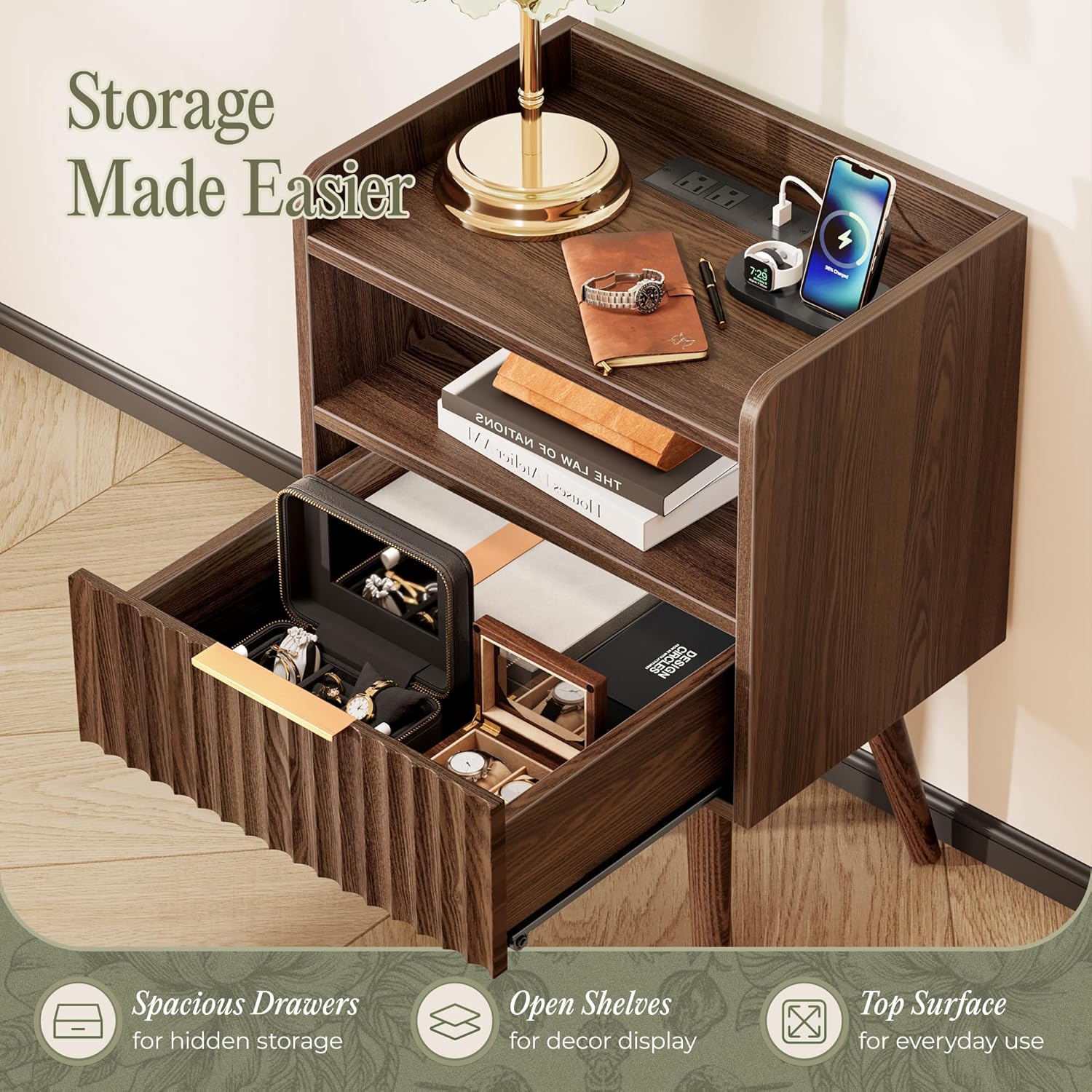
Image: The nightstand with its drawer partially open, revealing organized storage for various items like jewelry and books. The open shelf above also holds items, demonstrating the versatile storage capabilities.
5. Maintenance and Care
Proper care will ensure the longevity and appearance of your Huuger Nightstand.
General Care:
- Wipe surfaces with a soft, damp cloth. Avoid harsh chemicals or abrasive cleaners.
- Immediately blot spills to prevent moisture damage.
- Avoid placing hot items directly on the surface; use coasters or protective pads.
- Keep the nightstand away from direct sunlight and heat sources to prevent warping or fading.
Charging Station Care:
- Ensure the charging station is unplugged before cleaning.
- Do not allow liquids to enter the charging ports or outlets.
- Regularly check the power cord for any signs of damage.
6. Troubleshooting
If you encounter any issues with your nightstand, refer to the following common solutions.
Assembly Issues:
- Parts Missing or Damaged: Review the parts list in the assembly guide. Contact customer support if components are missing or damaged.
- Unstable Nightstand: Ensure all screws and fasteners are tightened according to the assembly guide. Check that legs are evenly installed.
Charging Station Issues:
- No Power to Outlets/Ports: Verify the nightstand's power cord is securely plugged into a functional wall outlet. Check if the wall outlet itself is receiving power.
- Device Not Charging: Ensure your device's charging cable is properly connected to both the device and the nightstand's port. Confirm your device is compatible with the charging station's output (5V/2A for USB/Type-C).
- Overheating: Discontinue use immediately if the charging station or connected devices become excessively hot. Unplug the nightstand and contact customer support.
7. Specifications
| Feature | Specification |
|---|---|
| Brand | Huuger |
| Model Number | B0FWBVN164 |
| Product Dimensions | 11.8"D x 15.7"W x 23.6"H |
| Frame Material | Engineered Wood |
| Leg Material | Solid Wood |
| Color | Walnut |
| Number of Drawers | 1 |
| Charging Ports | 2 AC Outlets (125V/12A), 1 USB Port (5V/2A), 1 Type-C Port (5V/2A) |
| Assembly Required | Yes |
| Indoor/Outdoor Usage | Indoor |
8. Warranty and Support
For warranty information or technical support, please refer to the contact details provided in your product packaging or visit the official Huuger website. Keep your purchase receipt for warranty claims.
If you have any questions or require assistance with assembly or operation, please do not hesitate to contact our customer service team.
- Customer Service: Refer to your product packaging or the Huuger official website for contact information.
- Online Resources: Visit the Huuger Store on Amazon